Fortinet white logo
Fortinet white logo
7.4.5

Deploying EMS with Docker Compose

Deploying EMS with Docker Compose

You can deploy EMS on Docker using Docker Compose by defining which containers to start and how to orchestrate them using a yaml file.

After deployment, you can migrate existing EMS 7.2.10 or 7.2.12 configurations to EMS 7.4.5 on Docker.
To deploy EMS with Docker Compose:
  1. Download the EMS Docker image files from the Fortinet support site:

    • forticlientems_7.4.5.2111.M_docker.tar.gz
    • forticlientems_7.4.5.2111.M_docker_compose.zip
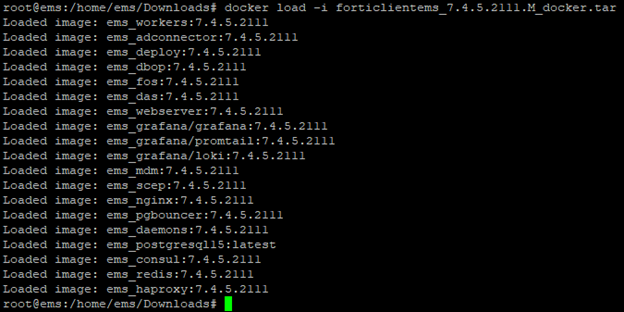
  2. Load the Docker image:

    docker load –i forticlientems_7.4.5.2111.M_docker.tar.gz
    

  3. Unzip forticlientems_7.4.5.2111.M_docker_compose.zip, which includes two yaml files and one readme file.

  4. Rename docker-compose-remote-db.yaml or docker-compose-with-db.yaml as docker-compose.yaml, depending on whether you use a remote or local EMS database for your EMS installation.

  5. Create an environment file named .env with the following variables and put it in the same location as the Docker Compose file:

    Variable

    Description

    Required

    EMS_VERSION

    Version of EMS containers to deploy. For example, 7.4.5.2111.M.

    POSTGRESQL_HOST

    IP address or host name of the PostgreSQL server that EMS must connect to. Leave this field blank if you use a local EMS DB.

    When using a postgreSQL cluster with multiple nodes, this variable can support multiple nodes, comma separated with the current primary node at the beginning.

    For example, POSTGRESQL_HOST=node1,node2,node3,node4. Alternatively, specify a DC name for each of the hosts in the list. For example, POSTGRESQL_HOST=node1@dc1,node2@dc1,node3@dc2,node4@dc3. EMS can use the DC information in conjunction with EMS_PREFERRED_DC to make failover decisions when in HA.

    POSTGRESQL_PORT

    Port of the PostgreSQL server that EMS must connect to. Leave this field blank if you use a local EMS DB.

    When using a PostgreSQL cluster with multiple nodes, this variable support multiple nodes (comma separated) which must match the number and sequence of nodes provided in POSTGRESQL_HOST.

    For example, if POSTGRESQL_HOST is pg1, pg2 and pg3 with pg1 and pg3 listening on 5432 while pg2 listening on 6432, POSTGRESQL_PORT must be 5432,6432,5432. If only a single port is provided, that single port will be used for all nodes. Default port is 5432.

    POSTGRESQL_USER

    The user that EMS will use to connect to the database. Leave this field blank if you use a local EMS DB.

    Default user is postgres.

    POSTGRESQL_PASSWORD

    • For a remote EMS DB, specify the password of the user that EMS will use to connect to the remote DB.
    • For local EMS DB, this will be the password for the PostgreSQL database. The default password is adubejbdIBEEIHVHEDVWJBNSVqivsw.

    EMS_DB_PREFIX

    Prefix to add to the database name.

    The default is empty, in which case EMS will create the `fcm` and `fcm_default` databases. If a prefix value is provided, such as "uat_", EMS will append it to the database names: `uat_fcm` and `uat_fcm_default`.

    This is useful to segregate the data for each EMS instance when multiple EMS instances connect to the same DB server.

    Optional

    EMS_AIRGAP

    Specifies whether it is an air-gapped environment. Acceptable values are true or false (default).

    When set to true, you will be able to upload your license files during initial setup for air-gapped environments without access to the Internet.

    ENABLE_EVENT_FEATURE

    Specifies whether to enable the Consolidated Events feature on EMS, which sends events to an elastic search database. Acceptable values are true or false (default).

    When set to true, configure the following options for elastic search:

    ES_HOSTS

    List of elastic search hosts for EMS to connect to.

    ES_USER

    User account to use for the elastic search connection.

    This variable is ignored if an API key is configured in ES_API_KEY.

    ES_PASSWORD

    Password for the account to use for the elastic search connection.

    This variable is ignored if an API key is configured in ES_API_KEY.

    ES_API_KEY

    API key to use for the elastic search connection.

    EMS can use either API key or user/password to connect to elastic search. If both are set, API key will be used and user/password will be ignored.

    CA_CERT_FOR_ES

    Full qualified path of the CA certificate for the ES cluster located on the host computer.

    INSTANCE_NAME

    If you want to run multiple EMS Docker on the same host, specify the instance name so that components created as part of the Docker compose, such as volumes, networks, do not conflict with one another.

    EXTERNAL_IP

    If you want to run multiple EMS Docker on the same host, you must specify the external IP of each network interface. Otherwise, 0.0.0.0 will be used for all interfaces.

    For example, for a VM with two network interfaces with IP 192.168.122.217 and 192.168.122.12, you can run ems1 with EXTERNAL_IP=192.168.122.217 and ems2 with EXTERNAL_IP=192.168.122.12 so you can access each on those specific IPs.

    REGISTRY_PATH

    Define the registry path to pull EMS Docker images from.

    For example, if your registry runs on mycomp.docker.reg.io and images are pushed to group `fortinet/ems`, set REGISTRY_PATH to `mycomp.docker.reg.io/fortinet/ems/` (Note that it must end with a slash)

    If no registry path is specified, the local docker cache is used.

    EMS_FIPS_ENABLED

    Specifies whether to initialize and operate in OpenSSL FIPS mode across all EMS containers.

    Acceptable values are true or false (default).

    SCEP_PUBLIC_HOSTNAME

    Public hostname or FQDN accessible by mobile endpoints when using MDM integration.

    Define this value so that those endpoints can pull their ZTNA certificates from the SCEP service on EMS.

    EMS_NODE_ALIAS

    Alias used to identify the EMS in the list of EMS nodes in HA. If undefined, the host name will be used.

    EMS_PREFERRED_DCS

    Preferred data centers for the EMS node to follow in HA. Separate multiple values with a comma.

    When failover happens, EMS verifes the DC of the current DB primary node and gives promotion preference to EMS nodes that use a preferred DC.

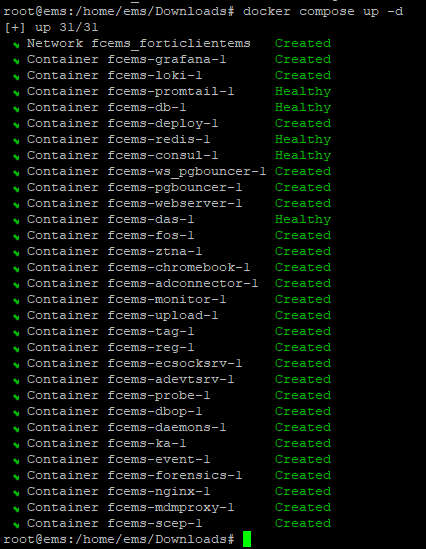
  6. Deploy EMS with the defined configuration using Docker Compose:

    docker compose up –d

  7. Check the health of the EMS services by running docker compose ps.

    • To view logs for a specific service: docker compose logs <service>

    • To view logs for multiple services: docker compose logs --tail 100 -f <service1> <service2>

    • To view logs for all services: docker compose logs

  8. After verifying that all EMS services are running, access EMS using ip/fqdn in the browser.

Deploying EMS with Docker Compose

Deploying EMS with Docker Compose

You can deploy EMS on Docker using Docker Compose by defining which containers to start and how to orchestrate them using a yaml file.

After deployment, you can migrate existing EMS 7.2.10 or 7.2.12 configurations to EMS 7.4.5 on Docker.
To deploy EMS with Docker Compose:
  1. Download the EMS Docker image files from the Fortinet support site:

    • forticlientems_7.4.5.2111.M_docker.tar.gz
    • forticlientems_7.4.5.2111.M_docker_compose.zip
  2. Load the Docker image:

    docker load –i forticlientems_7.4.5.2111.M_docker.tar.gz
    

  3. Unzip forticlientems_7.4.5.2111.M_docker_compose.zip, which includes two yaml files and one readme file.

  4. Rename docker-compose-remote-db.yaml or docker-compose-with-db.yaml as docker-compose.yaml, depending on whether you use a remote or local EMS database for your EMS installation.

  5. Create an environment file named .env with the following variables and put it in the same location as the Docker Compose file:

    Variable

    Description

    Required

    EMS_VERSION

    Version of EMS containers to deploy. For example, 7.4.5.2111.M.

    POSTGRESQL_HOST

    IP address or host name of the PostgreSQL server that EMS must connect to. Leave this field blank if you use a local EMS DB.

    When using a postgreSQL cluster with multiple nodes, this variable can support multiple nodes, comma separated with the current primary node at the beginning.

    For example, POSTGRESQL_HOST=node1,node2,node3,node4. Alternatively, specify a DC name for each of the hosts in the list. For example, POSTGRESQL_HOST=node1@dc1,node2@dc1,node3@dc2,node4@dc3. EMS can use the DC information in conjunction with EMS_PREFERRED_DC to make failover decisions when in HA.

    POSTGRESQL_PORT

    Port of the PostgreSQL server that EMS must connect to. Leave this field blank if you use a local EMS DB.

    When using a PostgreSQL cluster with multiple nodes, this variable support multiple nodes (comma separated) which must match the number and sequence of nodes provided in POSTGRESQL_HOST.

    For example, if POSTGRESQL_HOST is pg1, pg2 and pg3 with pg1 and pg3 listening on 5432 while pg2 listening on 6432, POSTGRESQL_PORT must be 5432,6432,5432. If only a single port is provided, that single port will be used for all nodes. Default port is 5432.

    POSTGRESQL_USER

    The user that EMS will use to connect to the database. Leave this field blank if you use a local EMS DB.

    Default user is postgres.

    POSTGRESQL_PASSWORD

    • For a remote EMS DB, specify the password of the user that EMS will use to connect to the remote DB.
    • For local EMS DB, this will be the password for the PostgreSQL database. The default password is adubejbdIBEEIHVHEDVWJBNSVqivsw.

    EMS_DB_PREFIX

    Prefix to add to the database name.

    The default is empty, in which case EMS will create the `fcm` and `fcm_default` databases. If a prefix value is provided, such as "uat_", EMS will append it to the database names: `uat_fcm` and `uat_fcm_default`.

    This is useful to segregate the data for each EMS instance when multiple EMS instances connect to the same DB server.

    Optional

    EMS_AIRGAP

    Specifies whether it is an air-gapped environment. Acceptable values are true or false (default).

    When set to true, you will be able to upload your license files during initial setup for air-gapped environments without access to the Internet.

    ENABLE_EVENT_FEATURE

    Specifies whether to enable the Consolidated Events feature on EMS, which sends events to an elastic search database. Acceptable values are true or false (default).

    When set to true, configure the following options for elastic search:

    ES_HOSTS

    List of elastic search hosts for EMS to connect to.

    ES_USER

    User account to use for the elastic search connection.

    This variable is ignored if an API key is configured in ES_API_KEY.

    ES_PASSWORD

    Password for the account to use for the elastic search connection.

    This variable is ignored if an API key is configured in ES_API_KEY.

    ES_API_KEY

    API key to use for the elastic search connection.

    EMS can use either API key or user/password to connect to elastic search. If both are set, API key will be used and user/password will be ignored.

    CA_CERT_FOR_ES

    Full qualified path of the CA certificate for the ES cluster located on the host computer.

    INSTANCE_NAME

    If you want to run multiple EMS Docker on the same host, specify the instance name so that components created as part of the Docker compose, such as volumes, networks, do not conflict with one another.

    EXTERNAL_IP

    If you want to run multiple EMS Docker on the same host, you must specify the external IP of each network interface. Otherwise, 0.0.0.0 will be used for all interfaces.

    For example, for a VM with two network interfaces with IP 192.168.122.217 and 192.168.122.12, you can run ems1 with EXTERNAL_IP=192.168.122.217 and ems2 with EXTERNAL_IP=192.168.122.12 so you can access each on those specific IPs.

    REGISTRY_PATH

    Define the registry path to pull EMS Docker images from.

    For example, if your registry runs on mycomp.docker.reg.io and images are pushed to group `fortinet/ems`, set REGISTRY_PATH to `mycomp.docker.reg.io/fortinet/ems/` (Note that it must end with a slash)

    If no registry path is specified, the local docker cache is used.

    EMS_FIPS_ENABLED

    Specifies whether to initialize and operate in OpenSSL FIPS mode across all EMS containers.

    Acceptable values are true or false (default).

    SCEP_PUBLIC_HOSTNAME

    Public hostname or FQDN accessible by mobile endpoints when using MDM integration.

    Define this value so that those endpoints can pull their ZTNA certificates from the SCEP service on EMS.

    EMS_NODE_ALIAS

    Alias used to identify the EMS in the list of EMS nodes in HA. If undefined, the host name will be used.

    EMS_PREFERRED_DCS

    Preferred data centers for the EMS node to follow in HA. Separate multiple values with a comma.

    When failover happens, EMS verifes the DC of the current DB primary node and gives promotion preference to EMS nodes that use a preferred DC.

  6. Deploy EMS with the defined configuration using Docker Compose:

    docker compose up –d

  7. Check the health of the EMS services by running docker compose ps.

    • To view logs for a specific service: docker compose logs <service>

    • To view logs for multiple services: docker compose logs --tail 100 -f <service1> <service2>

    • To view logs for all services: docker compose logs

  8. After verifying that all EMS services are running, access EMS using ip/fqdn in the browser.