

Let's chat
Small security teams at one building can work together with one monitor wall. But what if you have a bigger team that works in plenty of places, at different doors, or on a few floors?
You can chat together with other people that use FortiCentral, unrestricted by your location. Your usernames appear in each other's Contacts list if you:
- connect to the same FortiRecorder devices, and
- join the FortiCentral domain
Data sovereignty is built-in. Unlike other chat software and social media apps that require the Internet, your FortiCentral chats can remain on your organization's private network. Sensitive details such as security coordination, VIP visitors, and suspected crime can be kept private.
For example, large buildings have many entrances. If you don't coordinate, a prohibited person that you escort out of the building at one door can simply return at another door. With FortiCentral chat, you can contact your team and give them the exact timestamp of a video recording of the prohibited person. Teammates at the SOC can add the prohibited person's face to the face recognition database while others work together to prevent that person from returning at all entrances—and even at multiple buildings.
To start a chat
- On an empty view pane, click the Settings button.
-
Go to Open Chat.
The Contacts list on the left side of the view pane shows usernames that are currently logged into the same FortiCentral domain.
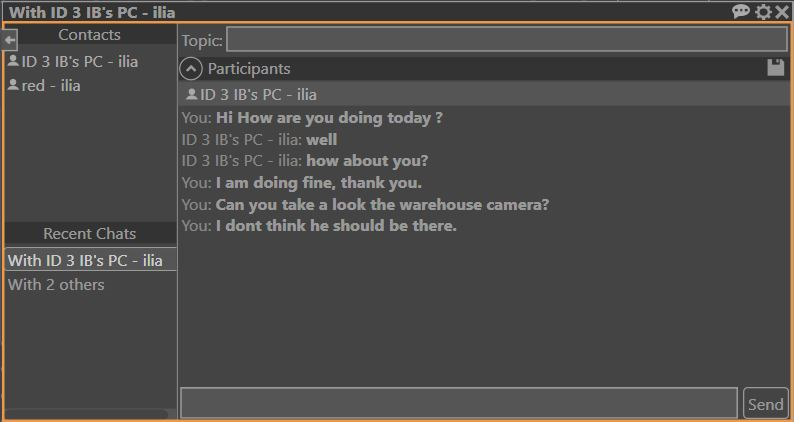
- Double-click a username or drag them into the Participants area on the right side of the view pane to start a chat, or to add usernames to an existing chat.
-
To save the list of participants in a current conversation as a new chat group, click the disk button on the right side.
The group appears in the Contacts list.