
Fortinet white logo
Fortinet white logo

User Guide

GraphQL Protection

GraphQL Protection

Safeguard your GraphQL APIs from malicious queries, signature attacks, and excessive resource consumption, ensuring their secure and efficient operation.
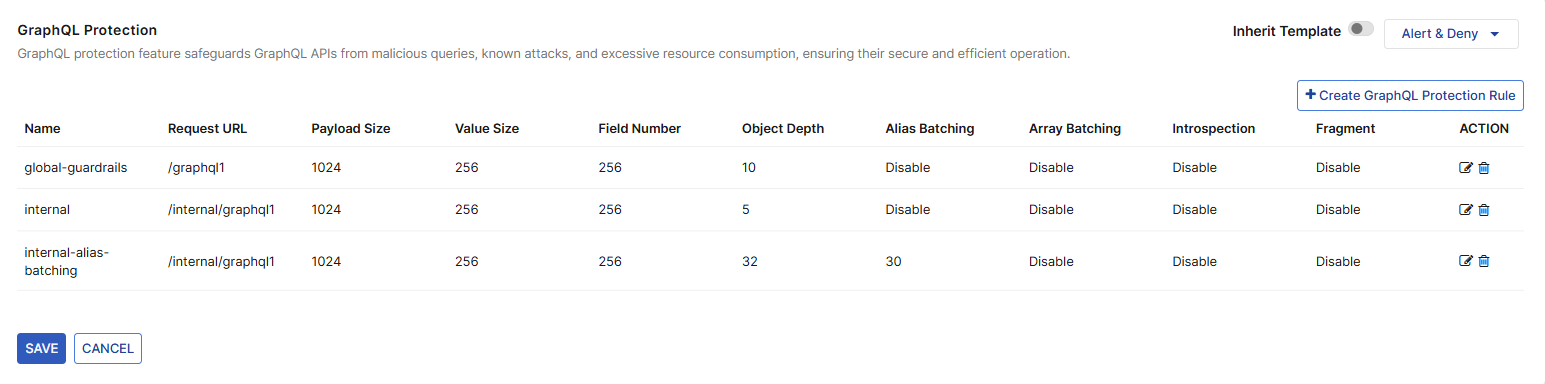
To configure GraphQL Protection, you must have already enabled this module in Add Modules. See Add and Remove Modules.

Create GraphQL Protection Rule

When a request violates any of the configured protection rules, FortiAppSec Cloud performs the configured action.

To configure a GraphQL Protection Rule:

  1. Navigate to WAF > WAF Modules > API Protection > GraphQL Protection.

  2. Select the action FortiAppSec Cloud takes when a request violates the configured rules.

    1. Click the dropdown menu displaying the currently selected action to expand the list of available options.

      This is located in the top right corner of the module, not to be mistaken for the action column in the table listing the configured rules.

      Action

      Description

      Alert

      Record the invalid request in the attack log.

      Alert and deny

      Block the invalid request and send a "block page" back to the browser, as well as record the request in the attack log.

      Deny (no log)

      Block the invalid request and send a "block page" back to the browser, without recording the request in the attack log.

  3. Click Create GraphQL Protection Rule.

  4. Enter the following:

    Setting

    Description

    Name

    Enter a name that can be referenced by other parts of the configuration. You will use the name to select the rule in a GraphQL protection policy. The maximum length is 40 characters.

    Request URL

    Enter a literal URL, such as /folder1/index.htm that the POST API request must contain in order to match the rule, or use wildcards to match multiple URLs, such as /folder1/* or /folder1/*/index.htm. The URL must begin with a slash ( / ).

    Do not include the domain name, such as www.example.com

    Payload Size

    Enter the payload size limit.

    • In the POST method, the payload would be the HTTP request body.

    • In the GET method, the payload would be the URL parameters.

    Requests exceeding this size will trigger the configured action.

    The default value for this limit is 1024.

    Value Size

    Enter the maximum length on any user input value within a GraphQL query.

    • If the value is an array, each item in the array is evaluated against the specified value size.

    • If the value is an object, only the values contained within the object are compared to the value size, not the keys themselves.

    Requests exceeding this size will trigger the configured action.

    The default value for this limit is 256.

    Field Number

    Enter the maximum number of terminal fields within a query, thereby limiting the number of fields within objects.

    Requests exceeding this number will trigger the configured action.

    The default value for this limit is 256.

    Object Depth

    Enter the maximum depth of a GraphQL query, limiting how deeply nested the query can be before triggering the configured action.

    The default value is 32.

    Alias Batching

    Enable this option to allow alias batching and display the Alias Batching Number option.

    When this setting is disabled, all requests that use Alias Batching trigger the configured action.

    Alias Batching Number

    Enter the maximum number of queries that can be found within an array batch, before triggering the configured action.

    The default value is 0.

    Only available when Array Batching is enabled.

    Array Batching

    Enable this option to allow array batching and display the Array Batching Number option.

    When this setting is disabled, all requests that use Array Batching trigger the configured action.

    Array Batching Number

    Enter the maximum number of queries that can be found within an array batch, before triggering the configured action.

    The default value is 0.

    Only available when Array Batching is enabled.

    Introspection Queries

    Enable to allow introspection queries.

    When this setting is disabled, all introspection queries trigger the configured action.

    Enable Fragment

    Enable to allow requests that contain fragments.

    When this setting is disabled, all requests that contain fragments trigger the configured action.

  5. Click OK to apply changes.

Edit GraphQL Protection Rule

To make changes to a GraphQL Protection Rule:

  1. Navigate to WAF > WAF Modules > API Protection > GraphQL Protection.

  2. Under the ACTION column, click the edit icon for the rule you would like to edit.

  3. Enter or click to enable/disable the desired setting.

  4. Click OK to apply changes.

GraphQL Protection

GraphQL Protection

Safeguard your GraphQL APIs from malicious queries, signature attacks, and excessive resource consumption, ensuring their secure and efficient operation.

To configure GraphQL Protection, you must have already enabled this module in Add Modules. See Add and Remove Modules.

Create GraphQL Protection Rule

When a request violates any of the configured protection rules, FortiAppSec Cloud performs the configured action.

To configure a GraphQL Protection Rule:

  1. Navigate to WAF > WAF Modules > API Protection > GraphQL Protection.

  2. Select the action FortiAppSec Cloud takes when a request violates the configured rules.

    1. Click the dropdown menu displaying the currently selected action to expand the list of available options.

      This is located in the top right corner of the module, not to be mistaken for the action column in the table listing the configured rules.

      Action

      Description

      Alert

      Record the invalid request in the attack log.

      Alert and deny

      Block the invalid request and send a "block page" back to the browser, as well as record the request in the attack log.

      Deny (no log)

      Block the invalid request and send a "block page" back to the browser, without recording the request in the attack log.

  3. Click Create GraphQL Protection Rule.

  4. Enter the following:

    Setting

    Description

    Name

    Enter a name that can be referenced by other parts of the configuration. You will use the name to select the rule in a GraphQL protection policy. The maximum length is 40 characters.

    Request URL

    Enter a literal URL, such as /folder1/index.htm that the POST API request must contain in order to match the rule, or use wildcards to match multiple URLs, such as /folder1/* or /folder1/*/index.htm. The URL must begin with a slash ( / ).

    Do not include the domain name, such as www.example.com

    Payload Size

    Enter the payload size limit.

    • In the POST method, the payload would be the HTTP request body.

    • In the GET method, the payload would be the URL parameters.

    Requests exceeding this size will trigger the configured action.

    The default value for this limit is 1024.

    Value Size

    Enter the maximum length on any user input value within a GraphQL query.

    • If the value is an array, each item in the array is evaluated against the specified value size.

    • If the value is an object, only the values contained within the object are compared to the value size, not the keys themselves.

    Requests exceeding this size will trigger the configured action.

    The default value for this limit is 256.

    Field Number

    Enter the maximum number of terminal fields within a query, thereby limiting the number of fields within objects.

    Requests exceeding this number will trigger the configured action.

    The default value for this limit is 256.

    Object Depth

    Enter the maximum depth of a GraphQL query, limiting how deeply nested the query can be before triggering the configured action.

    The default value is 32.

    Alias Batching

    Enable this option to allow alias batching and display the Alias Batching Number option.

    When this setting is disabled, all requests that use Alias Batching trigger the configured action.

    Alias Batching Number

    Enter the maximum number of queries that can be found within an array batch, before triggering the configured action.

    The default value is 0.

    Only available when Array Batching is enabled.

    Array Batching

    Enable this option to allow array batching and display the Array Batching Number option.

    When this setting is disabled, all requests that use Array Batching trigger the configured action.

    Array Batching Number

    Enter the maximum number of queries that can be found within an array batch, before triggering the configured action.

    The default value is 0.

    Only available when Array Batching is enabled.

    Introspection Queries

    Enable to allow introspection queries.

    When this setting is disabled, all introspection queries trigger the configured action.

    Enable Fragment

    Enable to allow requests that contain fragments.

    When this setting is disabled, all requests that contain fragments trigger the configured action.

  5. Click OK to apply changes.

Edit GraphQL Protection Rule

To make changes to a GraphQL Protection Rule:

  1. Navigate to WAF > WAF Modules > API Protection > GraphQL Protection.

  2. Under the ACTION column, click the edit icon for the rule you would like to edit.

  3. Enter or click to enable/disable the desired setting.

  4. Click OK to apply changes.