Fortinet white logo
Fortinet white logo

User Guide

FortiAI Assistant

FortiAI Assistant

The FortiAI Assistant is a natural language processing interface integrated with FortiAppSec Cloud, designed to provide conversational assistance for security operations , management, network support, knowledge base. As a generative AI-powered tool, all its model updates pass rigorous security efficacy benchmarks before deployment.

This feature is currently in beta and available to all users at no cost. For information on usage limits, please see Token usage.

Activate FortiAI Assistant

  1. To use this feature, navigate to General > Settings and enable FortiAI Assistant.
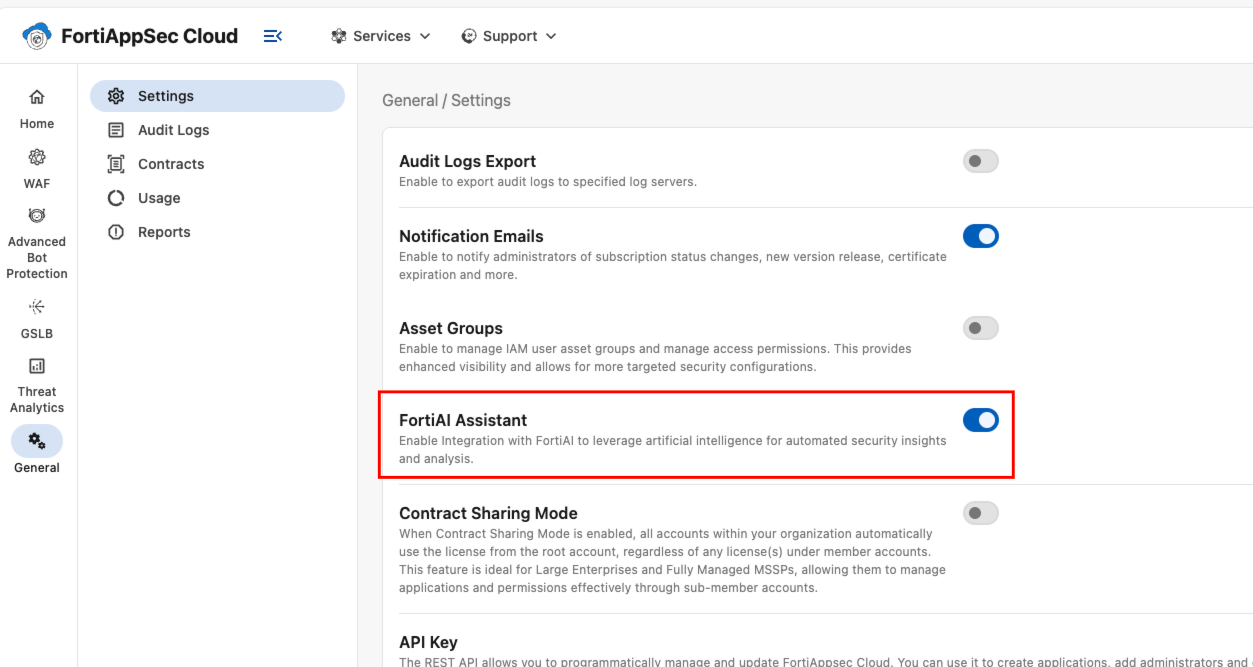
How to use FortiAI Assistant

The following capabilities are currently supported:

  • Knowledge Base: Get instant answers on configurations, features, and best practices.

  • Log Analysis: It summarizes Cloud WAF attack logs and analyzes traffic trends to help you spot anomalies and understand usage.

  • Dashboard Insights: Provides performance summaries and detects anomalies.

  • Smart Communication: It asks for clarification when a query is unclear and gracefully rejects non-security questions.

Launch the chat interface

Chat with the FortiAI Assistant by clicking the icon in the top-right corner of your screen.
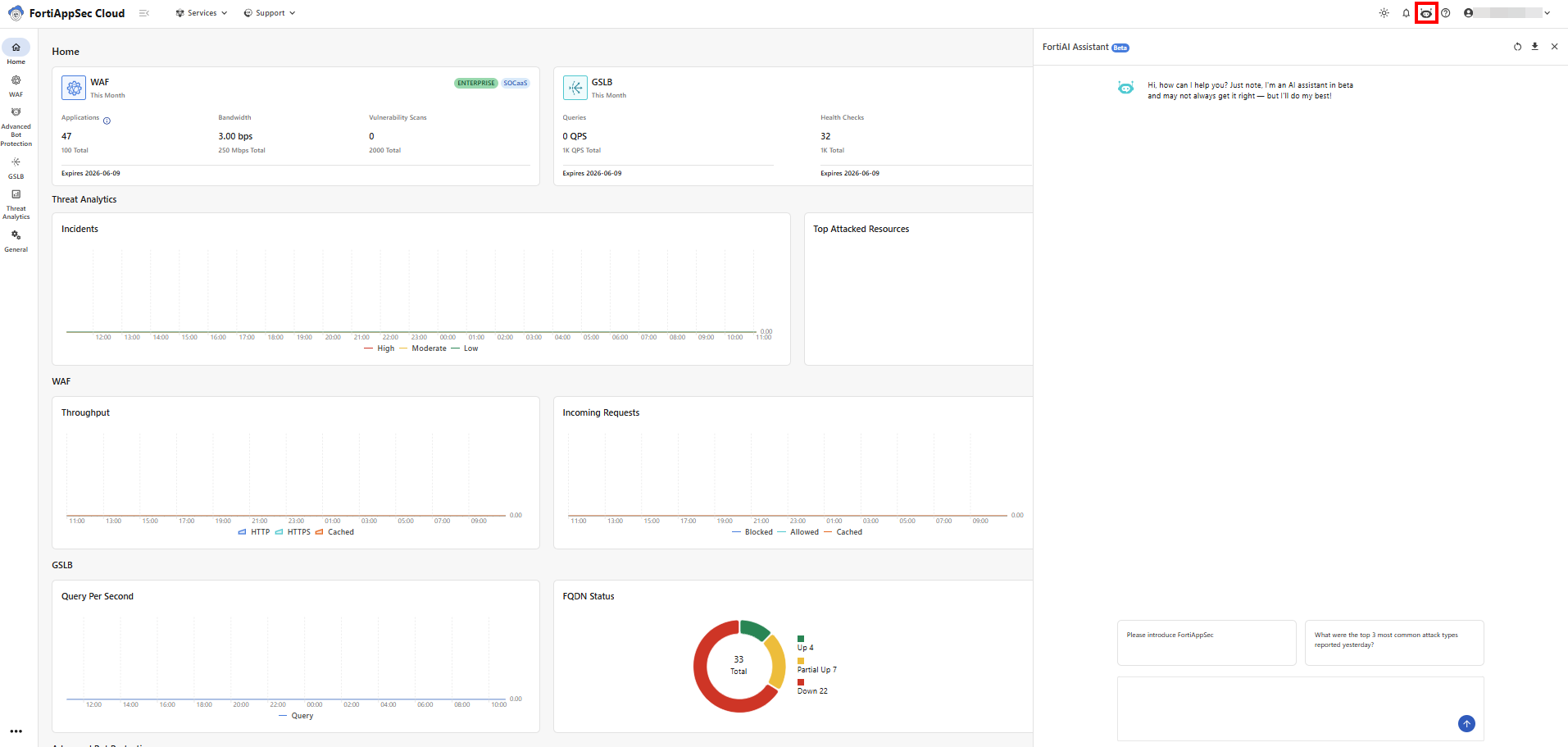
The suggestions below offer some examples of how to get started with common security tasks.

  • Product Q&A: Get quick answers about FortiAppSec Cloud features, deployment, and settings.

    Example prompts:

    • "How do I configure a custom WAF rule in FortiAppSec Cloud?"

    • "How do I set up geo-blocking for my API endpoints?"

    • "Explain the difference between brute force protection and rate limiting."

    Best practices:

    • Mention specific features or settings.

    • Try to use terms from our product UI or documentation. This helps FortiAI Assistant understand your request more accurately, leading to better results.

    • When submitting feedback or asking detailed questions about a specific feature, please specify the relevant service or product area (for example, "WAF known bots module" or "Threat analytics Attack logs". This helps the chatbot route your suggestions to the appropriate team.

  • Log Analysis: Identify false positives in attack logs with contextual analysis.

    Example prompts:

    • "Why was this request blocked? log ID: abc123"

    • "Explain this SQL injection attempt in log ID XYZ456."

    • "Which rule triggered for this XSS alert?"

    Best practices:

    • Include Log IDs or request snippets for precise analysis.

    • Ask for recommended actions (e.g., "Should I allowlist this request?").

  • Dashboard Log Insights: Extract trends and analytics from your traffic logs.

    Example prompts:

    • "Show request volume trends for /checkout in the last 7 days."

    • "Compare attack patterns between last month and this month."

    • "Which endpoints had the most 5xx errors yesterday?"

    Best practices:

    • Specify time ranges (e.g., "last 24 hours").

    • Reference specific endpoints or APIs for targeted insights.

  • Audit Logs Insights: Ask questions about log trends, filter by attributes, or request specific data.

    Example prompts:

    • "Show GSLB connector audit logs over the past 24 hours."

    • "Find auto-certificate audit logs for ROMANIA in the past week."

    • "Find login audit logs from 123.456.789.012 in the past 2 days."

    Best practices:

    • Specify the exact type of audit logs you are querying, such as GSLB connector logs, auto-certificate logs, or authentication logs.

    • Specify time ranges (e.g., "last hour").

Analyze Attack Logs

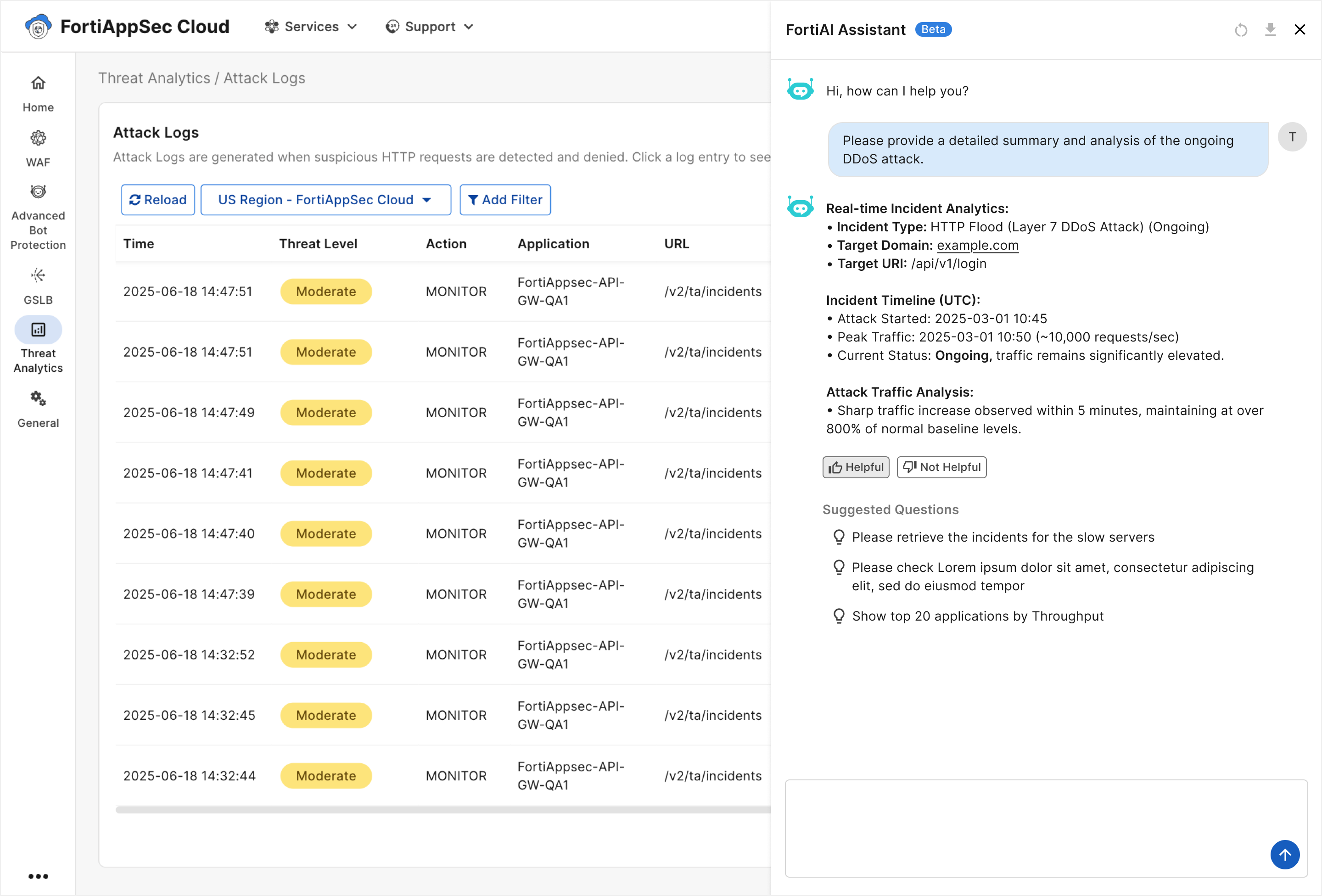
While reviewing activity on the Threat Analytics > Attack Logs page, you can use FortiAI to provide insights on specific events.

Please note, this feature only applies to Cloud WAF logs. FortiAI does not yet support ABP nor GSLB log analysis.

  1. Navigate to Threat Analytics > Attack Logs.

  2. In the row of the desired event, click the three dots icon to expand the actions menu, and select Analyze with AI.
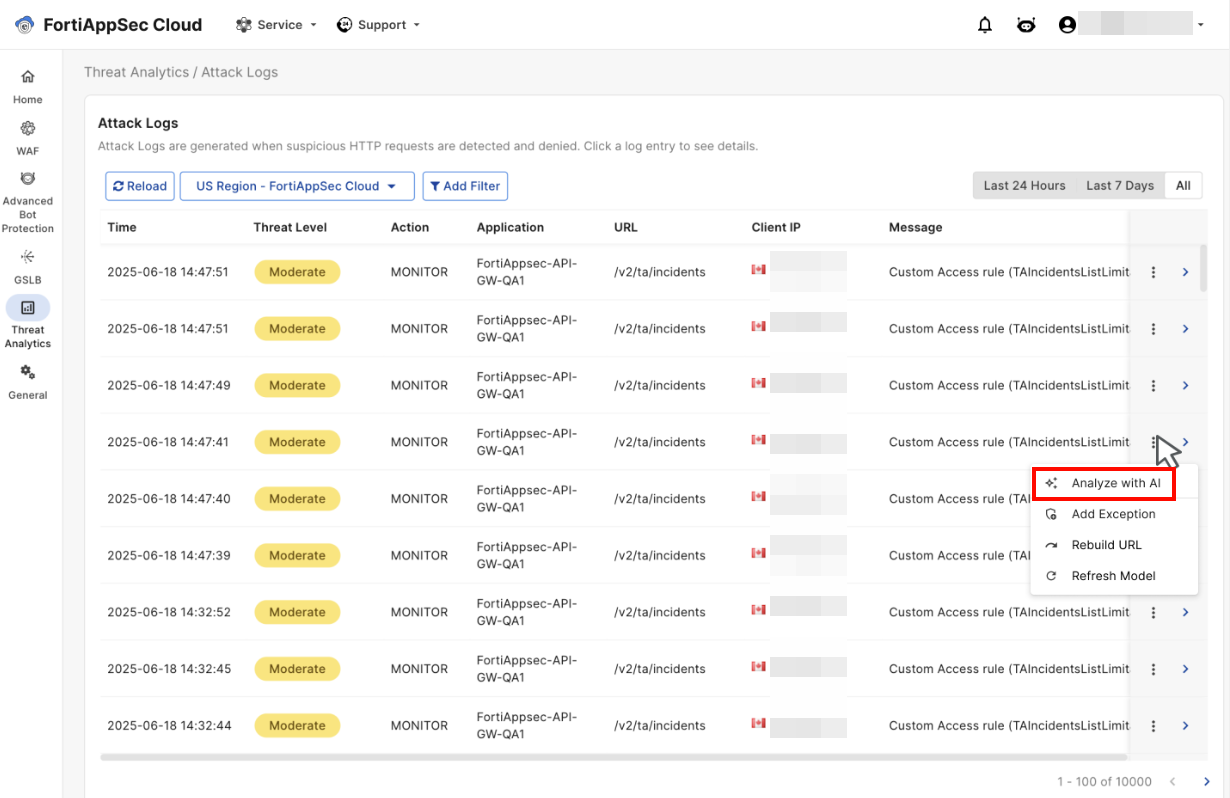
  3. This launches the FortiAI Assistant, which generates a detailed analysis of the selected attack log event.
Analyze Diagnostics Report

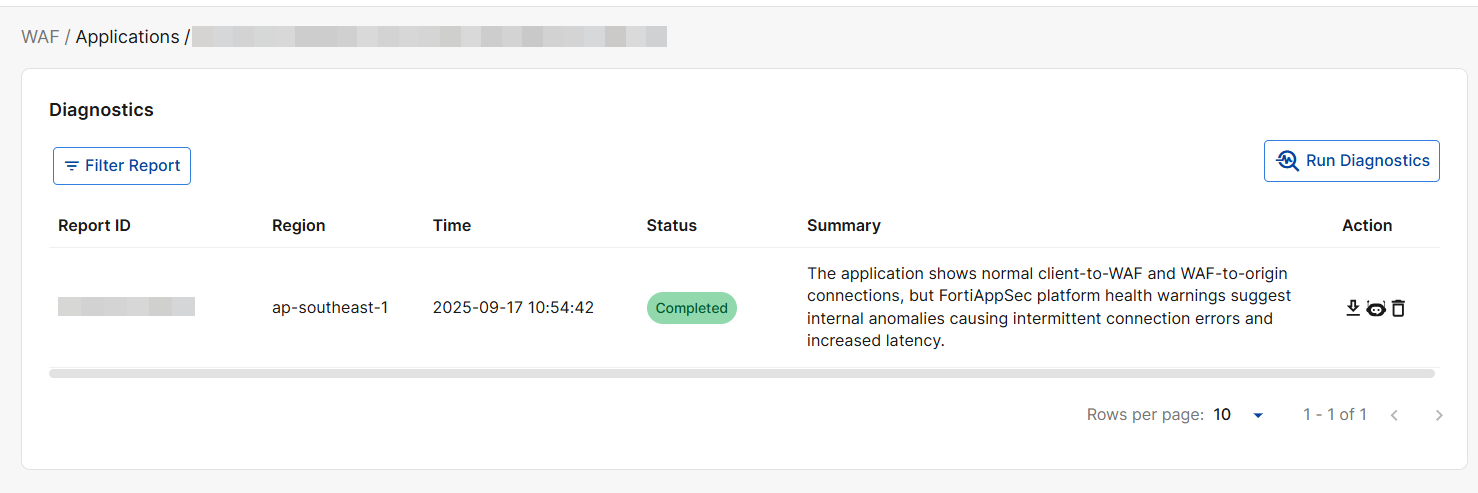
The Diagnostics Agent helps identify abnormal connection statuses within their applications and provides insights for resolving connectivity issues.

To activate the agent, click the FortiAI icon under Actions.

For more information on the Diagnostics report, see Diagnostics.

Analyze Threat Analytics Incidents

Click Analyze with AI to see AI-generated summaries and insights for Threat Analytics (TA) incidents, streamlining incident review and decision-making. It combines automated contextual narratives with natural language query capabilities to help analysts quickly understand incident details and trends.
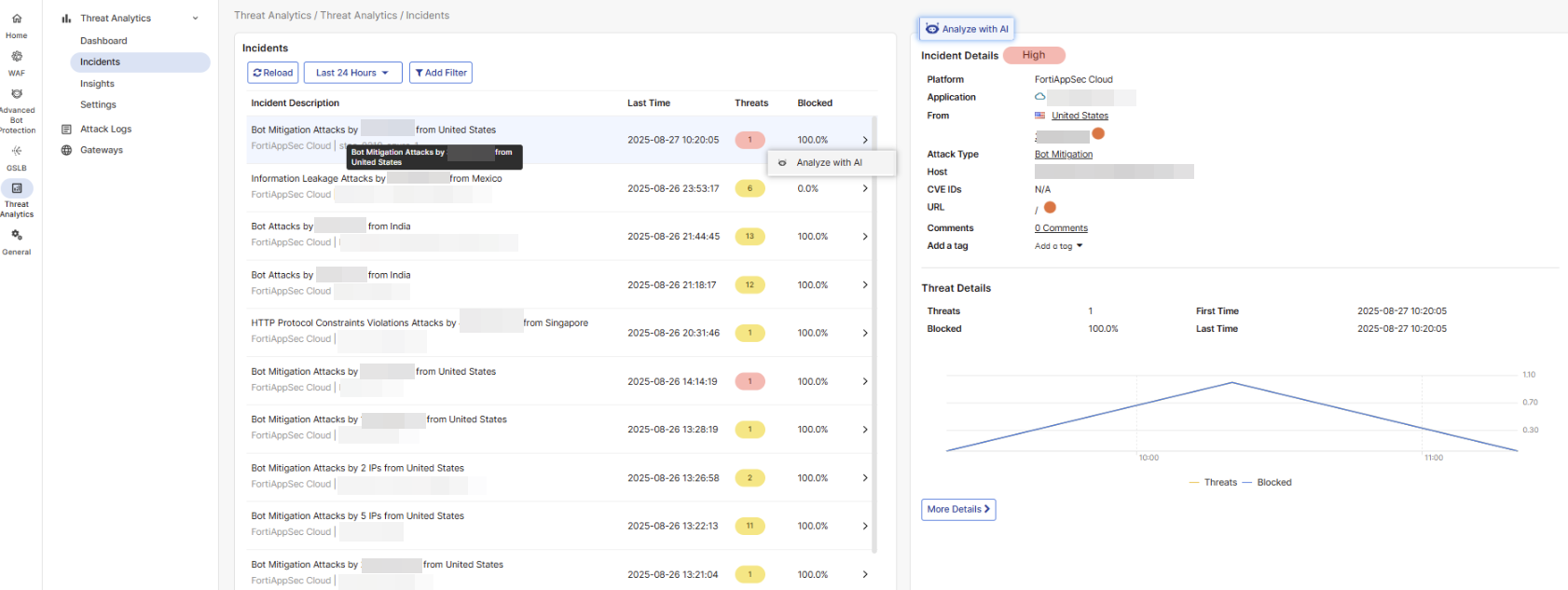
For more information on Threat Analytics Incidents, please refer to Incidents.

Help us improve

Your feedback is vital for training and refining the AI.

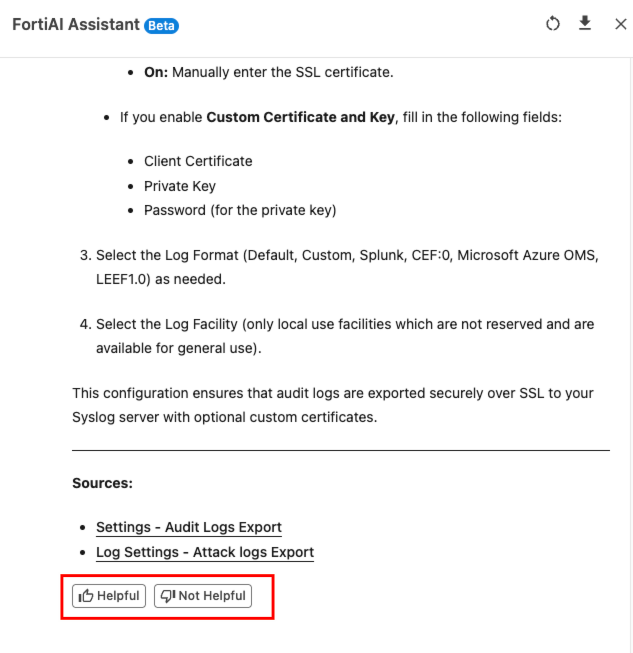
Please let us know how FortiAI Assistant is doing by clicking the thumbs up or thumbs down icons below each AI response.
Chatbot Limitations

FortiAI Assistant is a powerful tool, but it's important to understand its current limitations:

  • Product-Specific Knowledge: FortiAI Assistant can only answer questions related to FortiAppSec Cloud. If you ask about other topics, including other Fortinet products, it will let you know the question is out of scope.

  • Advisory Only: This is an analytical and advisory tool. It cannot directly make configuration changes or create rules for you.

  • Log Analysis Scope: FortiAI Assistant currently only supports analysis of Cloud WAF logs. It cannot yet analyze logs from ABP or GSLB.

  • Data Access: FortiAI Assistant analyzes indexed log data only, and it does not have access to real-time logs. The data retention period is 2-3 months.

  • Usage: There are no visible usage quotas or token tracking for your queries.

Token usage

FortiAI usage is measured in tokens, which are a unit of measurement for the size of both your questions and the AI's responses. Simply put, longer questions and longer answers consume more tokens.

Please note, these tokens are different from those used in FortiFlex license usage.

During the Beta Period
  • Free for all users: FortiAI is currently free to use.

  • Daily limit: Each user has a daily allowance of 500,000 tokens.

  • Token tracking: While you can't view your usage in real time, the chatbot will notify you once you've reached your daily limit.

After the Beta Period
  • Paid service: FortiAI Assistant will transition to a paid, token-based usage model. Detailed pricing will be announced before the official release.

  • Legacy contracts: Legacy contract users will lose access to FortiAI Assistant and must upgrade to a FortiAppSec Cloud Contract to continue using the feature.

FortiAI Assistant

FortiAI Assistant

The FortiAI Assistant is a natural language processing interface integrated with FortiAppSec Cloud, designed to provide conversational assistance for security operations , management, network support, knowledge base. As a generative AI-powered tool, all its model updates pass rigorous security efficacy benchmarks before deployment.

This feature is currently in beta and available to all users at no cost. For information on usage limits, please see Token usage.

Activate FortiAI Assistant

  1. To use this feature, navigate to General > Settings and enable FortiAI Assistant.

How to use FortiAI Assistant

The following capabilities are currently supported:

  • Knowledge Base: Get instant answers on configurations, features, and best practices.

  • Log Analysis: It summarizes Cloud WAF attack logs and analyzes traffic trends to help you spot anomalies and understand usage.

  • Dashboard Insights: Provides performance summaries and detects anomalies.

  • Smart Communication: It asks for clarification when a query is unclear and gracefully rejects non-security questions.

Launch the chat interface

Chat with the FortiAI Assistant by clicking the icon in the top-right corner of your screen.

The suggestions below offer some examples of how to get started with common security tasks.

  • Product Q&A: Get quick answers about FortiAppSec Cloud features, deployment, and settings.

    Example prompts:

    • "How do I configure a custom WAF rule in FortiAppSec Cloud?"

    • "How do I set up geo-blocking for my API endpoints?"

    • "Explain the difference between brute force protection and rate limiting."

    Best practices:

    • Mention specific features or settings.

    • Try to use terms from our product UI or documentation. This helps FortiAI Assistant understand your request more accurately, leading to better results.

    • When submitting feedback or asking detailed questions about a specific feature, please specify the relevant service or product area (for example, "WAF known bots module" or "Threat analytics Attack logs". This helps the chatbot route your suggestions to the appropriate team.

  • Log Analysis: Identify false positives in attack logs with contextual analysis.

    Example prompts:

    • "Why was this request blocked? log ID: abc123"

    • "Explain this SQL injection attempt in log ID XYZ456."

    • "Which rule triggered for this XSS alert?"

    Best practices:

    • Include Log IDs or request snippets for precise analysis.

    • Ask for recommended actions (e.g., "Should I allowlist this request?").

  • Dashboard Log Insights: Extract trends and analytics from your traffic logs.

    Example prompts:

    • "Show request volume trends for /checkout in the last 7 days."

    • "Compare attack patterns between last month and this month."

    • "Which endpoints had the most 5xx errors yesterday?"

    Best practices:

    • Specify time ranges (e.g., "last 24 hours").

    • Reference specific endpoints or APIs for targeted insights.

  • Audit Logs Insights: Ask questions about log trends, filter by attributes, or request specific data.

    Example prompts:

    • "Show GSLB connector audit logs over the past 24 hours."

    • "Find auto-certificate audit logs for ROMANIA in the past week."

    • "Find login audit logs from 123.456.789.012 in the past 2 days."

    Best practices:

    • Specify the exact type of audit logs you are querying, such as GSLB connector logs, auto-certificate logs, or authentication logs.

    • Specify time ranges (e.g., "last hour").

Analyze Attack Logs

While reviewing activity on the Threat Analytics > Attack Logs page, you can use FortiAI to provide insights on specific events.

Please note, this feature only applies to Cloud WAF logs. FortiAI does not yet support ABP nor GSLB log analysis.

  1. Navigate to Threat Analytics > Attack Logs.

  2. In the row of the desired event, click the three dots icon to expand the actions menu, and select Analyze with AI.

  3. This launches the FortiAI Assistant, which generates a detailed analysis of the selected attack log event.

Analyze Diagnostics Report

The Diagnostics Agent helps identify abnormal connection statuses within their applications and provides insights for resolving connectivity issues.

To activate the agent, click the FortiAI icon under Actions.

For more information on the Diagnostics report, see Diagnostics.

Analyze Threat Analytics Incidents

Click Analyze with AI to see AI-generated summaries and insights for Threat Analytics (TA) incidents, streamlining incident review and decision-making. It combines automated contextual narratives with natural language query capabilities to help analysts quickly understand incident details and trends.

For more information on Threat Analytics Incidents, please refer to Incidents.

Help us improve

Your feedback is vital for training and refining the AI.

Please let us know how FortiAI Assistant is doing by clicking the thumbs up or thumbs down icons below each AI response.

Chatbot Limitations

FortiAI Assistant is a powerful tool, but it's important to understand its current limitations:

  • Product-Specific Knowledge: FortiAI Assistant can only answer questions related to FortiAppSec Cloud. If you ask about other topics, including other Fortinet products, it will let you know the question is out of scope.

  • Advisory Only: This is an analytical and advisory tool. It cannot directly make configuration changes or create rules for you.

  • Log Analysis Scope: FortiAI Assistant currently only supports analysis of Cloud WAF logs. It cannot yet analyze logs from ABP or GSLB.

  • Data Access: FortiAI Assistant analyzes indexed log data only, and it does not have access to real-time logs. The data retention period is 2-3 months.

  • Usage: There are no visible usage quotas or token tracking for your queries.

Token usage

FortiAI usage is measured in tokens, which are a unit of measurement for the size of both your questions and the AI's responses. Simply put, longer questions and longer answers consume more tokens.

Please note, these tokens are different from those used in FortiFlex license usage.

During the Beta Period
  • Free for all users: FortiAI is currently free to use.

  • Daily limit: Each user has a daily allowance of 500,000 tokens.

  • Token tracking: While you can't view your usage in real time, the chatbot will notify you once you've reached your daily limit.

After the Beta Period
  • Paid service: FortiAI Assistant will transition to a paid, token-based usage model. Detailed pricing will be announced before the official release.

  • Legacy contracts: Legacy contract users will lose access to FortiAI Assistant and must upgrade to a FortiAppSec Cloud Contract to continue using the feature.