

Configurations
The Configurations page contains the analyzed resources required to protect your application, which includes the protected URL entries and the locations where JavaScript is inserted through your connector devices to collect client information for bot detection.
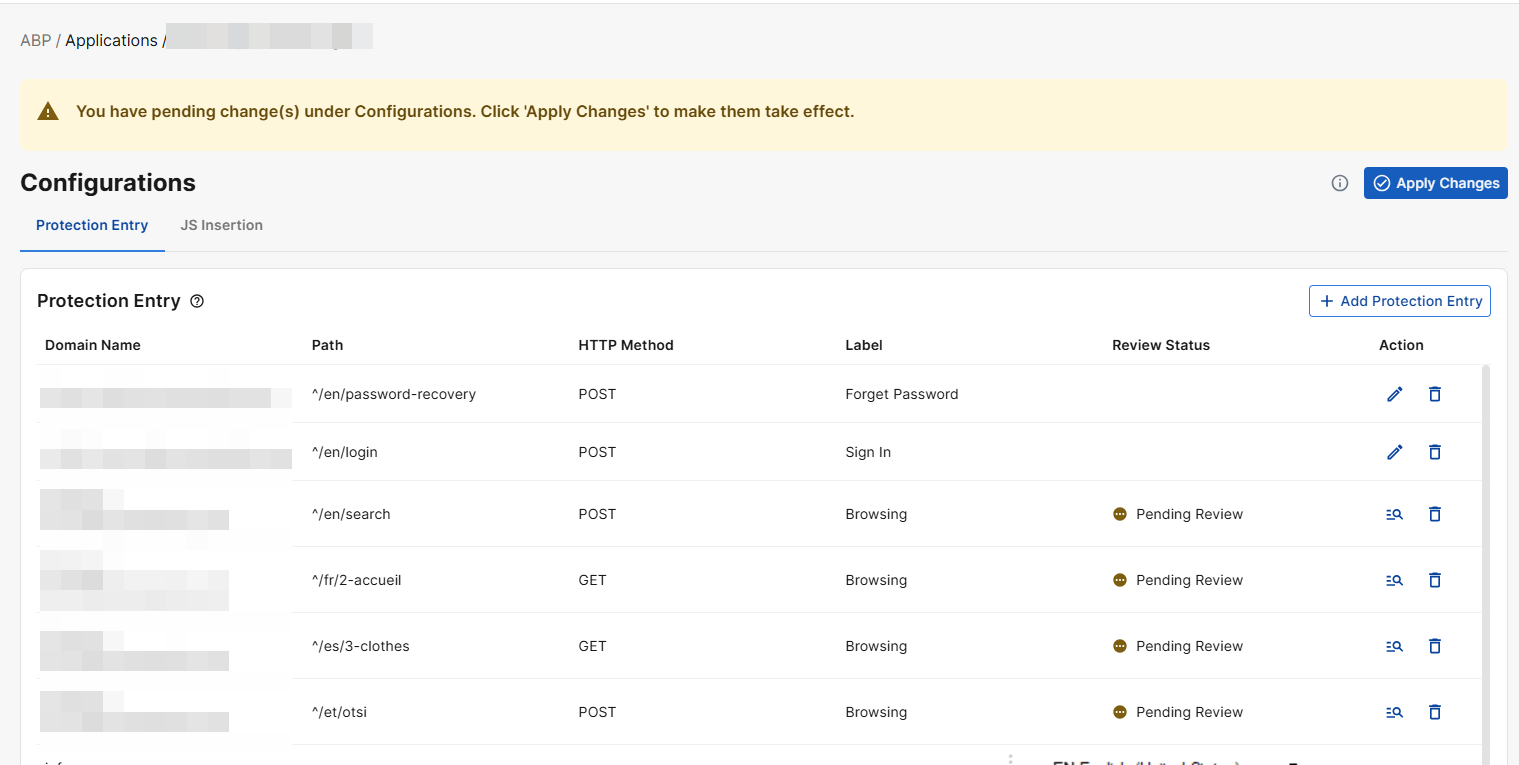
Protection Entry
The Protection Entry table lists all the URL paths under your Application domain that ABP has identified should be protected.
|
Parameter |
Description |
|---|---|
| Domain | Domain of the ABP Application to be protected. |
| Path | The URL path identified from the Application domain. Supports PCRE regex format. |
| HTTP Method | HTTP requests using any of the listed methods in the protected URL will initiate the attack query to the Advanced Bot Protection Cloud Service. |
|
Label |
The primary function of the page.
|
|
Review Status |
Indicates whether the protection entry must be reviewed before it can be applied. Manually added entries do not require review; only entries suggested by Auto Discovery trigger a review notification. |
|
Action |
The available actions to be taken on the protection entry. May include Edit, Review, and Delete. |
Add Protection Entry
-
Click Add Protection Entry.
-
For detailed information on the configuration settings and their descriptions, refer to the Add ABP Application - Review Protected Entries section.
JS Insertion
The Insert JS Entries table lists all the locations ABP has identified in your Application domain that should be inserted with the JavaScript to collect client information.
By default, a custom JavaScript is automatically inserted into all pages that return HTTP 200 responses and have a text/html content type within the application's domains. This is essential for Advanced Bot Protection (ABP) to collect client information and secure your website.
JS Insertion Exclude
Temporarily exclude pages from JavaScript injection. Excluded pages will not be protected by Advanced Bot Protection.
|
Parameter |
Description |
|---|---|
| Domain | The domain name of the ABP application to be protected. |
| URL | The path portion of the application’s domain identified for this protection entry. Supports PCRE regex format. |
| Action |
The available actions to be taken on the protection entry. Includes Edit and Delete. |
Add JS Inertion Exclude
-
Click Add JS Insertion Exclude.
-
Enter the Domain and URL as per the descriptions above.
JS Insertion Special
Define custom injection rules for non-HTML content or non-200 responses to override the default behavior.
|
Parameter |
Description |
|---|---|
| Domain |
The domain name of the ABP application to be excluded from protection. If the port number is not 80 for HTTP or 443 for HTTPS, please include the custom port number in the Domain. Example input where the port number is 1111: |
| URL | The path portion of the application’s domain to be excluded from protection. Supports PCRE regex format. |
| (Status) Code |
The HTTP response status codes that this rule applies to. When a response matches one of these status codes, this custom injection rule overrides the default behavior. You can select one or more status codes from the drop-down list, or enter new ones to create them. |
|
Content Type |
Specify the HTTP Select one or more content types from the drop-down list, or enter new ones to create them. |
|
Action |
The available actions to be taken on the protection entry. Includes Edit and Delete. |
Add JS Insertion Special
-
Click Add JS Insertion Special.
-
Enter the Domain, URL, Status Code, and Content Type as per the descriptions above.