

Traffic flow of NAT46 mode
The following diagram illustrates the traffic flow between the Client, FortiADC, and back-end servers in NAT46 mode. Please note that in real-world deployments, additional network devices—such as routers, switches, or firewalls—may exist both in front of and behind FortiADC. However, these components are omitted in the diagram, as they are not directly relevant to the specific packet flow and behavior we aim to explain through FortiADC.
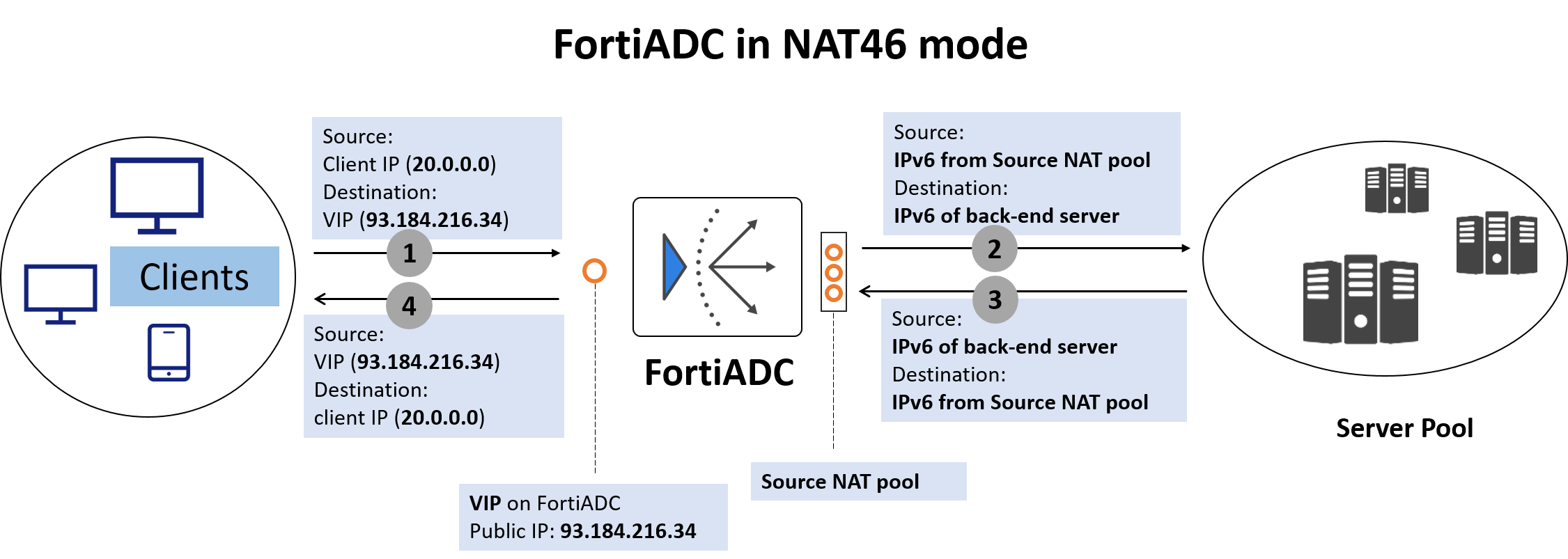
Here's how the packet flow works:
-
Client Sends IPv4 Request
The client sends a packet to a Virtual IP (VIP) on FortiADC, which is an IPv4 address, publicly reachable, representing the services provided by the application server.
Example:
-
src = Client IP (e.g., 20.0.0.0)
-
dst = VIP on FortiADC (e.g., 192.168.1.20)
-
-
FortiADC performs NAT46 translation
-
Source IP is translated: FortiADC replaces the IPv4 client IP with an IPv6 address selected from a NAT46 Source Pool. It also creates a mapping table linking the original IPv4 client IP to the selected IPv6 address for return traffic.
-
Destination IP is translated: FortiADC replaces the VIP (IPv4) with the IPv6 address of the real server (from the server pool).
FortiADC also adjusts the IP header and protocol fields to conform to IPv6 standards before forwarding the request.
Resulting packet sent to real server:
-
src = 2001:db8:100::1 (from NAT46 pool)
-
dst = 2001:db8:200::20 (IPv6 real server)
-
-
Back-end server sends IPv6 response
The real server responds to the IPv6 address.
-
FortiADC performs reverse NAT46
When FortiADC receives the response packet from the back-end server, FortiADC looks up its NAT46 mapping table to determine the original IPv4 client IP that corresponds to the IPv6 destination address.
In the response it sends to the client:
-
It sets the original IPv4 client IP as the destination IP.
-
It restores the VIP as the source IP.
Final response packet from FortiADC to the client:
-
src = VIP on FortiADC (e.g., 192.168.1.20)
-
dst = Client IP (e.g., 20.0.0.0)
-