

DSPM cloud account setup
When you have used Terraform to integrate DSPM scanning into an AWS or Azure cloud account, the account is listed on the FortiCNAPPconsole Settings > DSPM page. Information on the list for each account includes the Integration Name, Integration Status, Regions, the date and time the integration was last updated and the administrator account that last updated the integration.You can also enable or disable DSPM for each account and from the Actions column, edit or delete each integration.
Newly added integrations include a yellow Setup Required label in the Integration Status column. DSPM scanning of these integrations will start when the Integration Status has a green Success label.
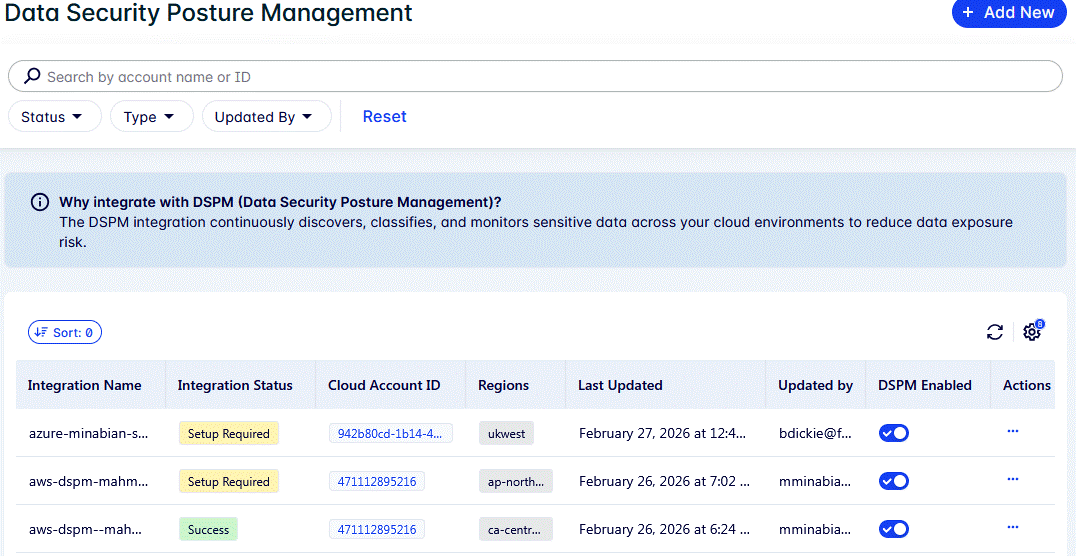
To complete DSPM integration of a cloud account:
-
Click the Integration Status Setup Required button and click Edit.
-
Set the Scan Frequency (every 1 day, 3 days, 7 days, or 30 days).
-
Set the Max File Size (range 1 to 50MB, default 5MB).
You can reduce scan time and scan costs by reducing the max file size. Scanning larger files can be less efficient. Reducing the max file size also reduces the number of files scanned.
-
Use the Bucket Filter to control the AWS buckets or Azure blobs to scan.
You can scan all buckets, include buckets to scan, or exclude buckets that you don’t want to scan. When configuring buckets to include or exclude you can select from a list of buckets found by FortiCNAPP. It may take a while for FortiCNAPPto index all of the buckets.
-
Click Save to save your changes.
Integration status should change to a green Success label.
The first DSPM scan runs within an hour of completing the DSPM setup. Scan frequency timing is based on the initial setup completion time. For example, a daily scan will run each day at the time the setup was completed.
-
The first scan checks all files the same size as or smaller than the max file size. Subsequent scans just scan new or changed files.
Editing the DSPM cloud account setup
At any time you can go to Settings > DSPM and edit an integration to change the Scan Frequency, Max File Size or Bucket Filter. Any changes you make apply to the next scan.