
Fortinet white logo
Fortinet white logo

CLI Reference

system certificate ocsp-stapling

system certificate ocsp-stapling

Use this command to configure OCSP Stapling.

In SSL/TLS connections between the clients (like browsers or apps) and FortiWeb, clients by default check the server certificate presented by FortiWeb, verifying it against a trusted CA store, and contacting the OCSP responder to check whether it is revoked or expired.

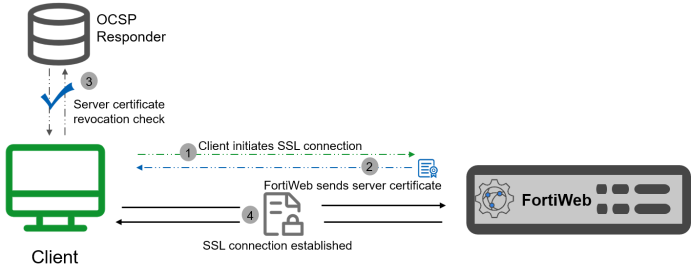
While verifying the server certificate’s status through the OCSP responder provides clients with the most up-to-date information, it also introduces an extra network request on the client side. This additional request can increase connection times and lead to noticeable delays in establishing SSL/TLS connections. The diagram below illustrates the SSL connection process between the client and FortiWeb, where the client reaches out to the OCSP responder for the server certificate status.
To improve the efficiency of SSL connections, FortiWeb supports OCSP stapling. In the OCSP stapling process, FortiWeb can be configured to periodically query the OCSP server and cache a time-stamped OCSP response for a specified period. This cached response is then "stapled" to the SSL/TLS handshake, allowing the client to validate the certificate’s status directly through the "stamp" without needing to contact the OCSP responder. The following diagram illustrates the process of OCSP stapling in the SSL connection flow.
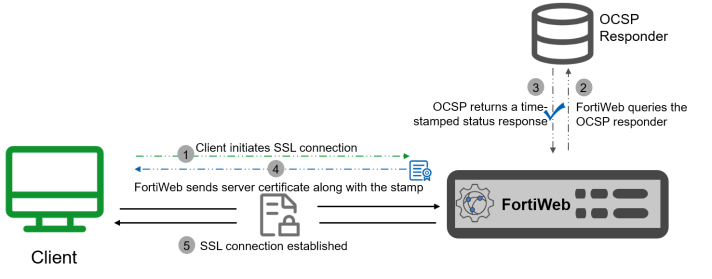
This method of verifying the revocation status of certificates shifts the resource cost in providing OCSP responses from the client to the presenter of a certificate. In addition, because fewer overall queries to the OCSP responder will be made when OCSP stapling is configured, the total resource cost in verifying the revocation status of certificates is also reduced.

tooltip icon OCSP stapling is available in Reverse Proxy, True Transparent Proxy, and WCCP mode.

Syntax

config system certificate ocsp-stapling

edit <name>

set certificate <datasource>

set local-cert <datasource>

set ocsp_url <string>

set comment <string>

next

end

Variable Description Default
<name>

Enter a name for the OCSP Stapling. The maximum length is 63 characters.

No default
certificate <datasource>

Select the CA certificate of the server certificate to be queried.

For the server to staple a valid OCSP response to its SSL/TLS handshake, it must obtain an OCSP response that the client will recognize and trust. This trust typically relies on the CA that issued both the server certificate and the OCSP signing certificate. The CA you upload here should be the one that issued the server certificate and is responsible for the OCSP response. By ensuring the client can validate the CA’s signature on the OCSP response, the client is able to trust the stapled OCSP response provided by the server.

No default
local-cert <datasource>

Select the server certificate that FortiWeb presents to clients for SSL connection.

No default
ocsp_url <string>

Specify the URL of the OCSP responder server.

No default
comment <string>

Optionally, enter a description of the server OCSP stapling. The maximum length is 199 characters.

No default
Related topics:

system certificate ocsp-stapling

system certificate ocsp-stapling

Use this command to configure OCSP Stapling.

In SSL/TLS connections between the clients (like browsers or apps) and FortiWeb, clients by default check the server certificate presented by FortiWeb, verifying it against a trusted CA store, and contacting the OCSP responder to check whether it is revoked or expired.

While verifying the server certificate’s status through the OCSP responder provides clients with the most up-to-date information, it also introduces an extra network request on the client side. This additional request can increase connection times and lead to noticeable delays in establishing SSL/TLS connections. The diagram below illustrates the SSL connection process between the client and FortiWeb, where the client reaches out to the OCSP responder for the server certificate status.

To improve the efficiency of SSL connections, FortiWeb supports OCSP stapling. In the OCSP stapling process, FortiWeb can be configured to periodically query the OCSP server and cache a time-stamped OCSP response for a specified period. This cached response is then "stapled" to the SSL/TLS handshake, allowing the client to validate the certificate’s status directly through the "stamp" without needing to contact the OCSP responder. The following diagram illustrates the process of OCSP stapling in the SSL connection flow.

This method of verifying the revocation status of certificates shifts the resource cost in providing OCSP responses from the client to the presenter of a certificate. In addition, because fewer overall queries to the OCSP responder will be made when OCSP stapling is configured, the total resource cost in verifying the revocation status of certificates is also reduced.

tooltip icon OCSP stapling is available in Reverse Proxy, True Transparent Proxy, and WCCP mode.

Syntax

config system certificate ocsp-stapling

edit <name>

set certificate <datasource>

set local-cert <datasource>

set ocsp_url <string>

set comment <string>

next

end

Variable Description Default
<name>

Enter a name for the OCSP Stapling. The maximum length is 63 characters.

No default
certificate <datasource>

Select the CA certificate of the server certificate to be queried.

For the server to staple a valid OCSP response to its SSL/TLS handshake, it must obtain an OCSP response that the client will recognize and trust. This trust typically relies on the CA that issued both the server certificate and the OCSP signing certificate. The CA you upload here should be the one that issued the server certificate and is responsible for the OCSP response. By ensuring the client can validate the CA’s signature on the OCSP response, the client is able to trust the stapled OCSP response provided by the server.

No default
local-cert <datasource>

Select the server certificate that FortiWeb presents to clients for SSL connection.

No default
ocsp_url <string>

Specify the URL of the OCSP responder server.

No default
comment <string>

Optionally, enter a description of the server OCSP stapling. The maximum length is 199 characters.

No default
Related topics: