
Fortinet white logo
Fortinet white logo

Administration Guide

AI-Powered Site Health and Posture Monitoring with FortiAI (8.0.5)

AI-Powered Site Health and Posture Monitoring with FortiAI (8.0.5)

You can now use FortiAI to perform holistic infrastructure health assessments and deep-dive troubleshooting through natural language querying.

FortiAI Phase 2 expands the AI Assistant’s scope from simple log retrieval to comprehensive site posture analysis and system observability. By interacting with the AI chat interface, you can obtain a real-time overview of system resource health including CPU usage, memory consumption, and throughput. You can also monitor security metrics such as policy up/down status and risk trends. This enhancement shifts the burden of data collection from the user to the AI, enabling faster identification of complex system issues.

Holistic Site and Security Posture

The FortiAI Assistant now correlates data across configuration, network, and business layers to determine the operational state of your protected sites. You can request a summary of online and offline policies or ask for a detailed analysis of a specific site. FortiAI evaluates factors such as Virtual IP status, server pool health, and content routing logic to explain why a service is offline.

Scenario 1: System Performance and Resource Monitoring

To get an immediate overview of appliance health, you can query the system status directly.

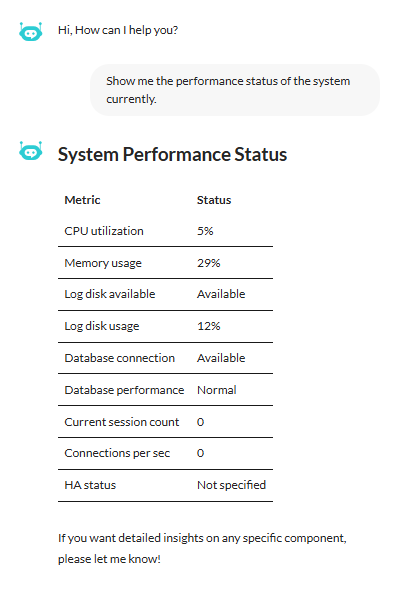
Prompt: Show me the performance status of the system currently.

Result: FortiAI generates a structured summary that includes CPU usage, memory consumption, and log disk status.
Scenario 2: Granular Site Status and Troubleshooting

You can perform a deep-dive analysis of a specific server policy to understand its availability and health.

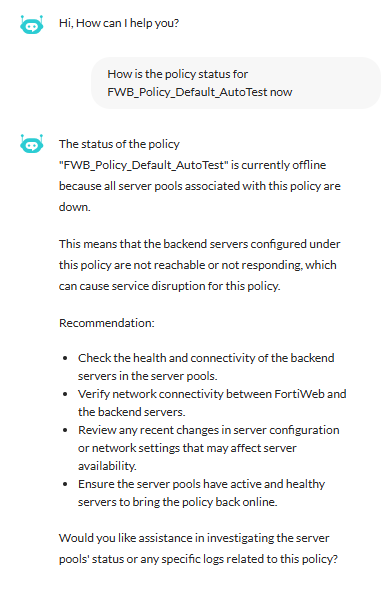
Prompt: How is the policy status for FWB_Policy_Default_AutoTest now?

Result: FortiAI identifies the offline status, identifies the failing health check as the root cause, and provides specific remediation steps.
Scenario 3: Intelligent CPU Diagnostics and Root Cause Analysis

When the system experiences performance issues, FortiAI can pinpoint the specific process causing the bottleneck.

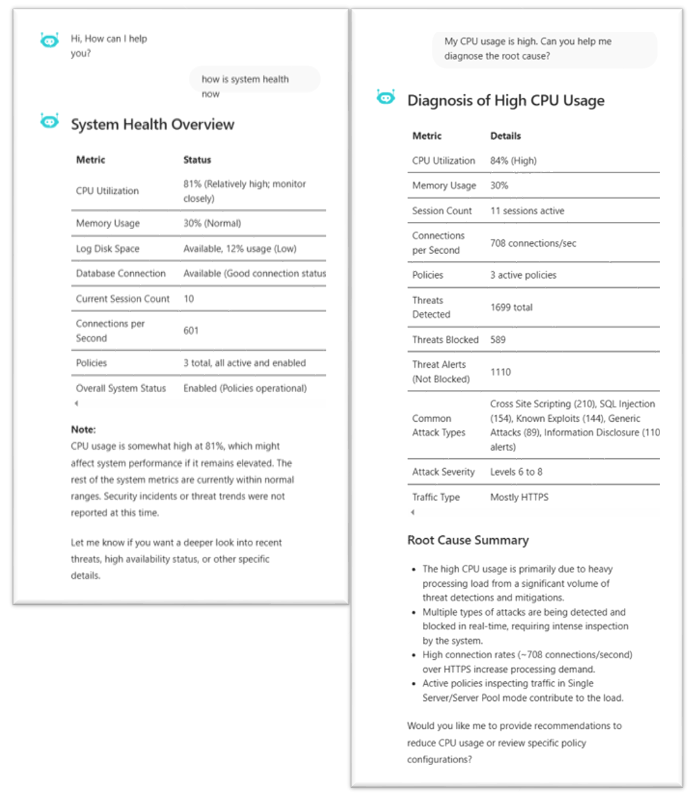
Prompt: My CPU usage is high. Can you help me diagnose the root cause?

Result: The AI Assistant delivers a metrics report covering utilization, traffic load, and threat data, followed by a concise root cause summary.
AI-Powered Site Health and Posture Monitoring with FortiAI (8.0.5)

AI-Powered Site Health and Posture Monitoring with FortiAI (8.0.5)

You can now use FortiAI to perform holistic infrastructure health assessments and deep-dive troubleshooting through natural language querying.

FortiAI Phase 2 expands the AI Assistant’s scope from simple log retrieval to comprehensive site posture analysis and system observability. By interacting with the AI chat interface, you can obtain a real-time overview of system resource health including CPU usage, memory consumption, and throughput. You can also monitor security metrics such as policy up/down status and risk trends. This enhancement shifts the burden of data collection from the user to the AI, enabling faster identification of complex system issues.

Holistic Site and Security Posture

The FortiAI Assistant now correlates data across configuration, network, and business layers to determine the operational state of your protected sites. You can request a summary of online and offline policies or ask for a detailed analysis of a specific site. FortiAI evaluates factors such as Virtual IP status, server pool health, and content routing logic to explain why a service is offline.

Scenario 1: System Performance and Resource Monitoring

To get an immediate overview of appliance health, you can query the system status directly.

Prompt: Show me the performance status of the system currently.

Result: FortiAI generates a structured summary that includes CPU usage, memory consumption, and log disk status.

Scenario 2: Granular Site Status and Troubleshooting

You can perform a deep-dive analysis of a specific server policy to understand its availability and health.

Prompt: How is the policy status for FWB_Policy_Default_AutoTest now?

Result: FortiAI identifies the offline status, identifies the failing health check as the root cause, and provides specific remediation steps.

Scenario 3: Intelligent CPU Diagnostics and Root Cause Analysis

When the system experiences performance issues, FortiAI can pinpoint the specific process causing the bottleneck.

Prompt: My CPU usage is high. Can you help me diagnose the root cause?

Result: The AI Assistant delivers a metrics report covering utilization, traffic load, and threat data, followed by a concise root cause summary.