
Fortinet white logo
Fortinet white logo

Administration Guide

MCP Security for Streamable HTTP and SSE (8.0.3)

MCP Security for Streamable HTTP and SSE (8.0.3)

FortiWeb 8.0.3 introduces Model Context Protocol (MCP) Security, a new inspection framework designed for applications that return data in continuous, incremental streams. Model Context Protocol is a JSON-based format used by AI and LLM applications to exchange tool definitions, parameters, argument values, and prompt content in a structured way. Many modern services use Streamable HTTP or Server-Sent Events (SSE) to deliver these JSON fragments, partial responses, or tokenized output in real time. MCP Security adds native parsing for these streaming formats and evaluates each message block as it is generated, allowing FortiWeb to protect the structured interactions that drive MCP-based workflows.

Key Capabilities

MCP Security introduces several capabilities that strengthen FortiWeb’s inspection of applications that exchange structured JSON over streaming connections:

  • Streaming-aware inspection: FortiWeb identifies and parses data returned through Streamable HTTP and SSE so that incremental responses, such as tokenized LLM output or event-driven updates, can be evaluated as they are generated.

  • Structured analysis of MCP content: The system examines fields used in MCP workflows, including tool parameters, tool descriptions, method calls, and prompt content. This supports applications that rely on MCP to coordinate external lookups, execute tools, or guide LLM behavior.

  • Policy-based enforcement: Administrators can define message size limits, target specific AI or API endpoints, and configure exceptions for trusted tool or prompt functions that operate within controlled workflows.

Together, these capabilities allow FortiWeb to apply precise, context-aware protection to applications that use MCP to deliver incremental output or orchestrate tool interactions over long-lived connections.

How It Works

When an application uses MCP over Streamable HTTP or SSE, FortiWeb parses each streamed JSON message and evaluates its content as it is produced. The inspection process applies the following functions:

Function Description
Signature Detection Evaluates MCP fields such as method, tool name, parameter keys, and argument values for indicators of unsafe behavior. This includes command injection attempts, misuse of tool parameters, unexpected shell or file-path references, and known exploit signatures. Inspection is applied to each message block as it arrives, allowing FortiWeb to detect malicious or unintended instructions embedded within incremental MCP tool output.
Poisoning Attack Protection Analyzes tool descriptions, tool parameters, and prompt content for adversarial patterns intended to manipulate LLM behavior. This includes prompts designed to override safeguards, extract sensitive data, or direct the LLM to invoke tools in an unauthorized manner. The inspection considers both structure and context, making it effective for workflows where LLMs generate multi-step tool calls or combine user prompts with external data.
JSON Schema Validation Validates each streamed MCP message against MCP schema files retrieved from FortiGuard. This ensures that message structure, required fields, and data types meet the MCP specification. Validation is performed incrementally, which is important for applications that produce partial JSON fragments, nested objects, or machine-generated outputs during streaming.

These inspection functions run continuously throughout the stream. FortiWeb applies the appropriate security action based on the configured MCP Security Rules, enabling real-time enforcement for AI inference output, MCP tool execution, and SSE-based event updates.

Configuration Overview

The new MCP module is available under Web Protection > Protocol. This module contains all settings required to enable MCP Security and is organized into three configuration pages that work together to define how FortiWeb inspects MCP traffic: MCP Security Policy, MCP Security Rule, and MCP Security Policy Exception.
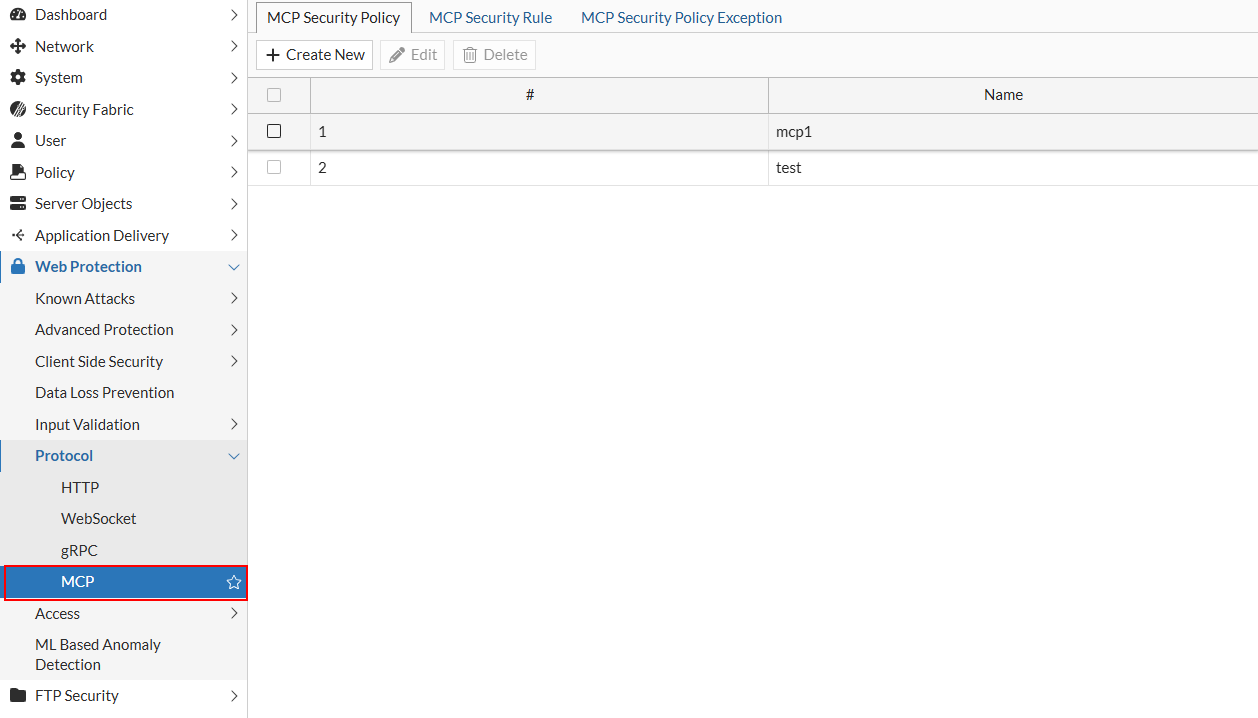
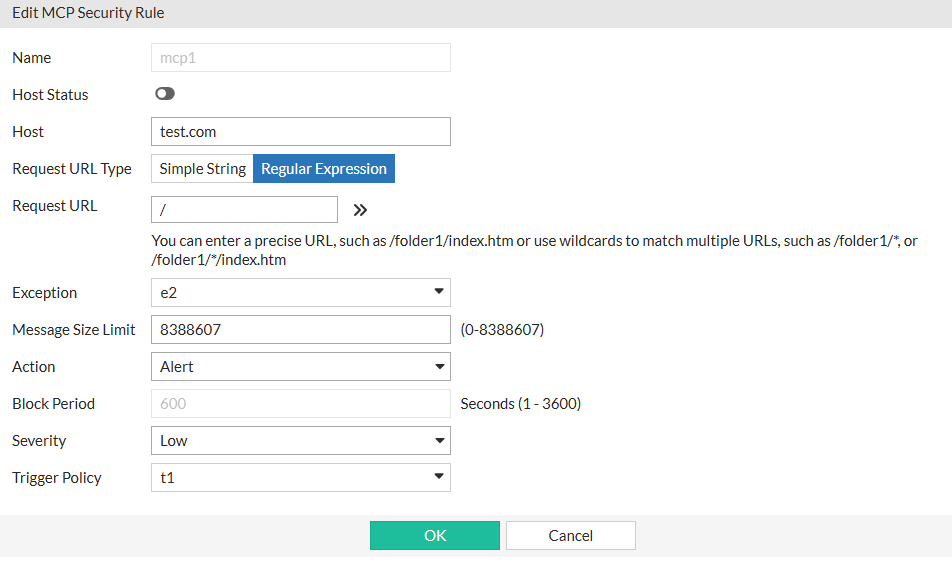
Create MCP Security Rules

Rules specify the traffic that FortiWeb inspects, including hostnames, URL patterns, message size limits, and the action taken when a violation occurs.
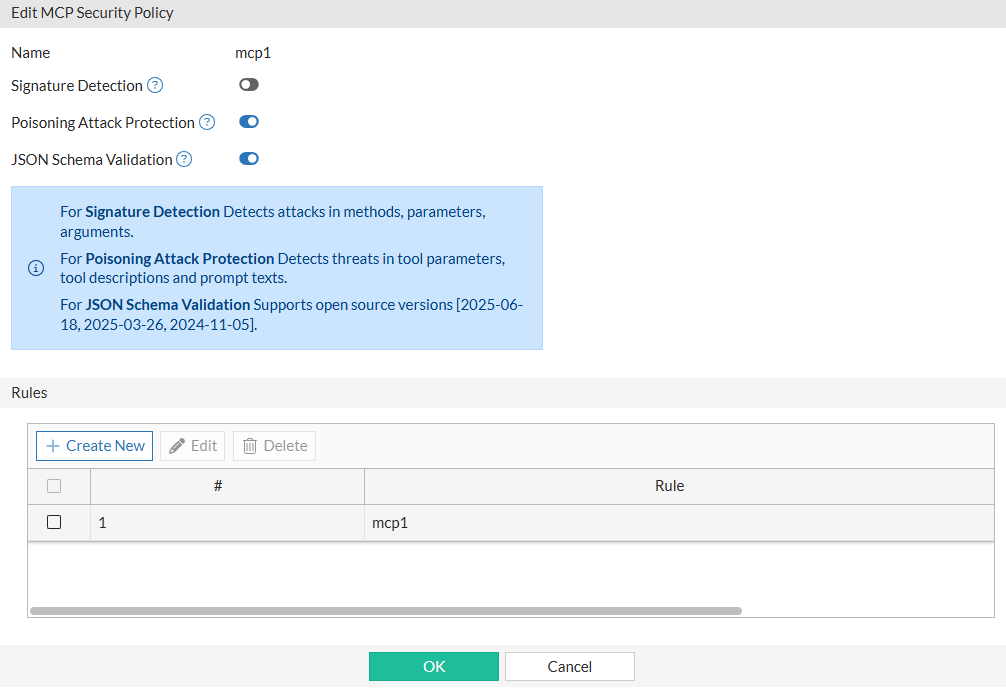
Create the MCP Security Policy and attach the rules

The policy determines which inspection features are enabled and applies the selected rules to the protected traffic.
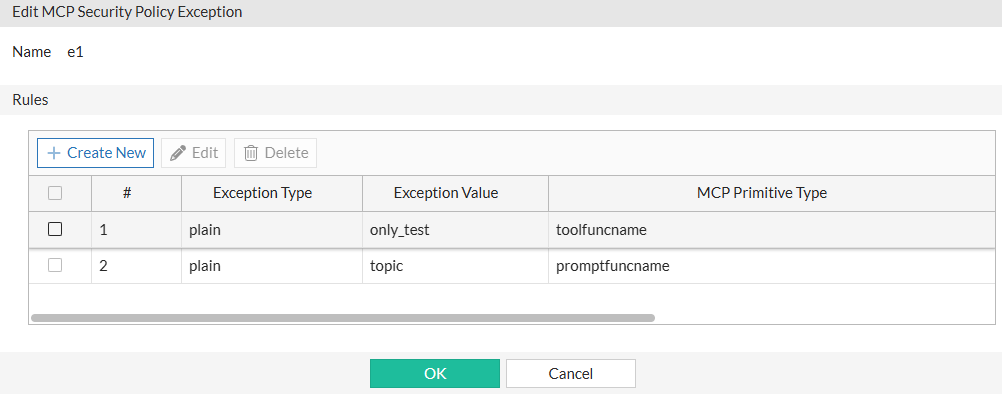
Configure MCP Security Policy Exceptions

Optionally, you can configure Exceptions to allow specific tool names or prompt functions to bypass poisoning attack analysis and can be referenced by rules when required.
After creating the necessary MCP Security Rules, defining the MCP Security Policy, and configuring any optional exceptions, the final step is to apply the MCP Security Policy to the appropriate Web Protection Profile. Once the profile is assigned to a server policy, FortiWeb enforces MCP Security on any Streamable HTTP or SSE traffic that matches the configured rules.
Related Videos

sidebar video

FortiWeb 8.0.3: MCP Protection

  • 0 views
  • 3 months ago

MCP Security for Streamable HTTP and SSE (8.0.3)

MCP Security for Streamable HTTP and SSE (8.0.3)

FortiWeb 8.0.3 introduces Model Context Protocol (MCP) Security, a new inspection framework designed for applications that return data in continuous, incremental streams. Model Context Protocol is a JSON-based format used by AI and LLM applications to exchange tool definitions, parameters, argument values, and prompt content in a structured way. Many modern services use Streamable HTTP or Server-Sent Events (SSE) to deliver these JSON fragments, partial responses, or tokenized output in real time. MCP Security adds native parsing for these streaming formats and evaluates each message block as it is generated, allowing FortiWeb to protect the structured interactions that drive MCP-based workflows.

Key Capabilities

MCP Security introduces several capabilities that strengthen FortiWeb’s inspection of applications that exchange structured JSON over streaming connections:

  • Streaming-aware inspection: FortiWeb identifies and parses data returned through Streamable HTTP and SSE so that incremental responses, such as tokenized LLM output or event-driven updates, can be evaluated as they are generated.

  • Structured analysis of MCP content: The system examines fields used in MCP workflows, including tool parameters, tool descriptions, method calls, and prompt content. This supports applications that rely on MCP to coordinate external lookups, execute tools, or guide LLM behavior.

  • Policy-based enforcement: Administrators can define message size limits, target specific AI or API endpoints, and configure exceptions for trusted tool or prompt functions that operate within controlled workflows.

Together, these capabilities allow FortiWeb to apply precise, context-aware protection to applications that use MCP to deliver incremental output or orchestrate tool interactions over long-lived connections.

How It Works

When an application uses MCP over Streamable HTTP or SSE, FortiWeb parses each streamed JSON message and evaluates its content as it is produced. The inspection process applies the following functions:

Function Description
Signature Detection Evaluates MCP fields such as method, tool name, parameter keys, and argument values for indicators of unsafe behavior. This includes command injection attempts, misuse of tool parameters, unexpected shell or file-path references, and known exploit signatures. Inspection is applied to each message block as it arrives, allowing FortiWeb to detect malicious or unintended instructions embedded within incremental MCP tool output.
Poisoning Attack Protection Analyzes tool descriptions, tool parameters, and prompt content for adversarial patterns intended to manipulate LLM behavior. This includes prompts designed to override safeguards, extract sensitive data, or direct the LLM to invoke tools in an unauthorized manner. The inspection considers both structure and context, making it effective for workflows where LLMs generate multi-step tool calls or combine user prompts with external data.
JSON Schema Validation Validates each streamed MCP message against MCP schema files retrieved from FortiGuard. This ensures that message structure, required fields, and data types meet the MCP specification. Validation is performed incrementally, which is important for applications that produce partial JSON fragments, nested objects, or machine-generated outputs during streaming.

These inspection functions run continuously throughout the stream. FortiWeb applies the appropriate security action based on the configured MCP Security Rules, enabling real-time enforcement for AI inference output, MCP tool execution, and SSE-based event updates.

Configuration Overview

The new MCP module is available under Web Protection > Protocol. This module contains all settings required to enable MCP Security and is organized into three configuration pages that work together to define how FortiWeb inspects MCP traffic: MCP Security Policy, MCP Security Rule, and MCP Security Policy Exception.

Create MCP Security Rules

Rules specify the traffic that FortiWeb inspects, including hostnames, URL patterns, message size limits, and the action taken when a violation occurs.

Create the MCP Security Policy and attach the rules

The policy determines which inspection features are enabled and applies the selected rules to the protected traffic.

Configure MCP Security Policy Exceptions

Optionally, you can configure Exceptions to allow specific tool names or prompt functions to bypass poisoning attack analysis and can be referenced by rules when required.

After creating the necessary MCP Security Rules, defining the MCP Security Policy, and configuring any optional exceptions, the final step is to apply the MCP Security Policy to the appropriate Web Protection Profile. Once the profile is assigned to a server policy, FortiWeb enforces MCP Security on any Streamable HTTP or SSE traffic that matches the configured rules.