Fortinet white logo
Fortinet white logo

CLI Reference

user saml-user

user saml-user

Use this command to configure queries that can be used for remote authentication of either FortiWeb administrators or end users via a Security Assertion Markup Language (SAML) server.

To use a SAML server for client authentication, you need to first add this SAML server to a SAML server pool (for details, see waf site-publish-helper saml-spool), then select the server pool in a site publish rule (for details, see waf site-publish-helper rule.

To use this command, your administrator account’s access control profile must have either w or rw permission to the authusergrp area. For details, see Permissions.

Syntax

config user saml-user

edit "<saml_server_name>"

set entityID "<server_URL>"

set select-custom-certificate {enable | disable}

set custom-certificate <datasource>

set service-path "<server_URL_path>"

set enforce-signing {enable | disable}

set slo-bind {post | redirect}

set slo-path "<slo_URL_path>"

set sso-bind <post>

set sso-path "<sso_URL_path>"

set custom-username-src {enable | disable}

set username-src {nameid | attribute}

set username-src-attriname <string>

config mapping-domains

edit <index>

set domain <domain_name>

next

end

next

end

Variable Description Default

"<saml_server_name>"

Enter a name that can be referenced by other parts of the configuration. The maximum length is 63 characters.

No default.

entityID "<server_URL>"

Enter the URL for the SAML server. The communications protocol must be HTTPS.

No default.

select-custom-certificate {enable | disable}

Enable this option to use a customized, imported certificate and private key to sign the Service Provider (SP) metadata instead of the automatically generated self-signed certificate. When disabled (default), FortiWeb uses a locally generated certificate/key pair.

disable

custom-certificate <datasource>

The custom-certificate option is available if select-custom-certificate is enabled.

Select the imported certificate from the drop-down menu that you want to use for signing SAML SP metadata. This list is populated from certificates previously imported into the System > Admin > Certificates > Admin Cert Local list.

No default.

service-path "<server_URL_path>"

Enter a path for the SAML server at the URL you specified in entityID "<server_URL>".

No default.

enforce-signing {enable | disable}

Enable to enforce signing verification to digitally sign the SAML message, and then the Identity Provider will verify the signature to confirm its integrity.

disable

slo-bind {post | redirect}

Select the binding that the server will use when the service provider initiates a single logout request:

  • POST—SAML protocol messages are transported via the user's browser in an XHTML document using base64-encoding.
  • REDIRECT—SAML protocol messages will be carried in the URL of an HTTP GET request. Because the length of URLs is limited, this option is best for shorter messages. If the SAML message contains information that the IDP is not yet aware of, you can sign the message for security purposes.

POST

slo-path "<slo_URL_path>"

Enter a partial URL that the IDP will use to confirm with the service provider that a user has been logged out.

No default.

sso-bind <post>

Select the binding that the server will use to transport the SAML authentication request to the IDP.

POST

sso-path "<sso_URL_path>"

Enter a partial URL that the IDP will use to confirm with the service provider that a user has been authenticated.

No default.

custom-username-src {enable | disable}

Enable this setting to manually define how FortiWeb retrieves the username from the SAML assertion. When disabled (default), FortiWeb continues to use the EPPN attribute (urn:oid:1.3.6.1.4.1.5923.1.1.1.6) as the fixed source for user identification

disable

username-src {nameid | attribute}

The Source option is available if Custom Username Source is enabled.

Select the method FortiWeb uses to extract the username from the SAML response:

  • nameid — FortiWeb retrieves the username directly from the Subject's NameID field in the SAML assertion.

  • attribute — FortiWeb extracts the username from a specific SAML attribute. In this mode, the attribute used is determined by the IdP's configuration and FortiWeb's parsing of the assertion.

nameid

username-src-attriname <string>

The username-src-attriname option is available if username-src is attribute.

Enter the exact name of the attribute (e.g., uid, email, or memberOf) that contains the username in the SAML response.

No default.

<index>

Enter the index number for the domain name.

No default.

domain <domain_name>

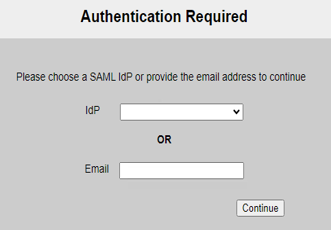
Add domain names for this server. When users log in with an email address suffixed with the specified domain name, the authentication request will be forwarded to this SAML server.
For instance, if a user enters "xxx@example.com" in the Email field, FortiWeb will forward the request to the SAML server which is configured with the domain name "example.com".

You can add multiple domain names for one SAML server. Similarly, it's allowed to associate multiple SAML server with the same domain name.

No default.

Example

This example configures a SAML server at https://sp.example.com/samlsp. We specify the Service Path, Assertion Consumer Service (ACS), and Single Logout Service (SLS). We use a POST binding for ACS and a REDIRECT binding for SLS.

config user saml-user

edit "saml_example"

set entityID "https://sp.example.com/samlsp"

set select-custom-certificate enable

set custom-certificate defaulthttpscert

set service-path "/saml.sso"

set slo-bind redirect

set slo-path "/SLO/REDIRECT"

set sso-bind post

set sso-path "/SAML2/POST"

next

end

Related topic

user saml-user

user saml-user

Use this command to configure queries that can be used for remote authentication of either FortiWeb administrators or end users via a Security Assertion Markup Language (SAML) server.

To use a SAML server for client authentication, you need to first add this SAML server to a SAML server pool (for details, see waf site-publish-helper saml-spool), then select the server pool in a site publish rule (for details, see waf site-publish-helper rule.

To use this command, your administrator account’s access control profile must have either w or rw permission to the authusergrp area. For details, see Permissions.

Syntax

config user saml-user

edit "<saml_server_name>"

set entityID "<server_URL>"

set select-custom-certificate {enable | disable}

set custom-certificate <datasource>

set service-path "<server_URL_path>"

set enforce-signing {enable | disable}

set slo-bind {post | redirect}

set slo-path "<slo_URL_path>"

set sso-bind <post>

set sso-path "<sso_URL_path>"

set custom-username-src {enable | disable}

set username-src {nameid | attribute}

set username-src-attriname <string>

config mapping-domains

edit <index>

set domain <domain_name>

next

end

next

end

Variable Description Default

"<saml_server_name>"

Enter a name that can be referenced by other parts of the configuration. The maximum length is 63 characters.

No default.

entityID "<server_URL>"

Enter the URL for the SAML server. The communications protocol must be HTTPS.

No default.

select-custom-certificate {enable | disable}

Enable this option to use a customized, imported certificate and private key to sign the Service Provider (SP) metadata instead of the automatically generated self-signed certificate. When disabled (default), FortiWeb uses a locally generated certificate/key pair.

disable

custom-certificate <datasource>

The custom-certificate option is available if select-custom-certificate is enabled.

Select the imported certificate from the drop-down menu that you want to use for signing SAML SP metadata. This list is populated from certificates previously imported into the System > Admin > Certificates > Admin Cert Local list.

No default.

service-path "<server_URL_path>"

Enter a path for the SAML server at the URL you specified in entityID "<server_URL>".

No default.

enforce-signing {enable | disable}

Enable to enforce signing verification to digitally sign the SAML message, and then the Identity Provider will verify the signature to confirm its integrity.

disable

slo-bind {post | redirect}

Select the binding that the server will use when the service provider initiates a single logout request:

  • POST—SAML protocol messages are transported via the user's browser in an XHTML document using base64-encoding.
  • REDIRECT—SAML protocol messages will be carried in the URL of an HTTP GET request. Because the length of URLs is limited, this option is best for shorter messages. If the SAML message contains information that the IDP is not yet aware of, you can sign the message for security purposes.

POST

slo-path "<slo_URL_path>"

Enter a partial URL that the IDP will use to confirm with the service provider that a user has been logged out.

No default.

sso-bind <post>

Select the binding that the server will use to transport the SAML authentication request to the IDP.

POST

sso-path "<sso_URL_path>"

Enter a partial URL that the IDP will use to confirm with the service provider that a user has been authenticated.

No default.

custom-username-src {enable | disable}

Enable this setting to manually define how FortiWeb retrieves the username from the SAML assertion. When disabled (default), FortiWeb continues to use the EPPN attribute (urn:oid:1.3.6.1.4.1.5923.1.1.1.6) as the fixed source for user identification

disable

username-src {nameid | attribute}

The Source option is available if Custom Username Source is enabled.

Select the method FortiWeb uses to extract the username from the SAML response:

  • nameid — FortiWeb retrieves the username directly from the Subject's NameID field in the SAML assertion.

  • attribute — FortiWeb extracts the username from a specific SAML attribute. In this mode, the attribute used is determined by the IdP's configuration and FortiWeb's parsing of the assertion.

nameid

username-src-attriname <string>

The username-src-attriname option is available if username-src is attribute.

Enter the exact name of the attribute (e.g., uid, email, or memberOf) that contains the username in the SAML response.

No default.

<index>

Enter the index number for the domain name.

No default.

domain <domain_name>

Add domain names for this server. When users log in with an email address suffixed with the specified domain name, the authentication request will be forwarded to this SAML server.
For instance, if a user enters "xxx@example.com" in the Email field, FortiWeb will forward the request to the SAML server which is configured with the domain name "example.com".

You can add multiple domain names for one SAML server. Similarly, it's allowed to associate multiple SAML server with the same domain name.

No default.

Example

This example configures a SAML server at https://sp.example.com/samlsp. We specify the Service Path, Assertion Consumer Service (ACS), and Single Logout Service (SLS). We use a POST binding for ACS and a REDIRECT binding for SLS.

config user saml-user

edit "saml_example"

set entityID "https://sp.example.com/samlsp"

set select-custom-certificate enable

set custom-certificate defaulthttpscert

set service-path "/saml.sso"

set slo-bind redirect

set slo-path "/SLO/REDIRECT"

set sso-bind post

set sso-path "/SAML2/POST"

next

end

Related topic