

Enabling Payloads
Payload inspection enhances threat detection by enabling FortiNDR Cloud sensors to extract and analyze packet payloads and files observed in network traffic. This capability provides deeper inspection beyond flow data and metadata, improving detection accuracy for advanced and evasive threats.
FortiNDR Cloud supports two types of payload inspection:
- Suricata: A Suricata event is created when Suricata (an intrusion detection tool) alerts or metadata are integrated into Zeek logs, highlighting threat detection signatures and behaviors.
- DPI: A DPI (Deep Packet Inspection) event is created by the Fortinet IPS (Intrusion Prevention System) engine running on the sensor which logs informative and pattern matching based events. The IPS engine logs AppID (Applications seen by the engine for software and protocols), IDS (signatures for vulnerabilities), OT Protocols/Threats (Operational Technology based protocol parsing and signatures), Botnet (Botnet based traffic patterns), and Info (informational events about protocols).
Payload data is available in detections and investigations, providing additional context to help determine whether traffic is malicious or benign. This feature is supported on sensors running version 2.5 or later.
Enabling payload inspection can increase sensor resource utilization, particularly during periods of high traffic. Before enabling payloads, ensure that the sensor has sufficient CPU, memory, and storage resources.
To enable DPI and Suricata payloads:
- Go to Settings > Sensors. The Sensor page opens.
- Click the Sensor ID. The sensor Status page opens.
- Click the Settings tab.
- Click Edit Features Settings.
- Under Packet Inspection Engine, enable:
- Suricata
- Payloads
- Fortinet DPI
- Payloads
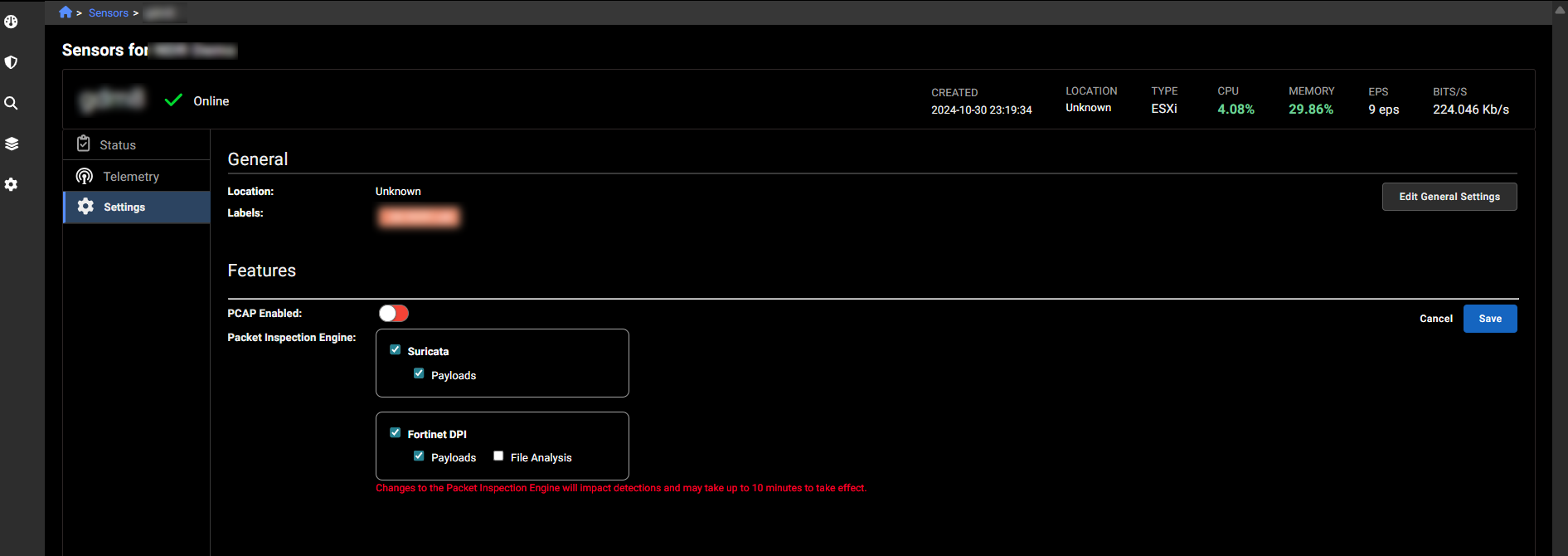
- Suricata
- Click Save.