
Fortinet white logo
Fortinet white logo

User Guide

Threat Intelligence Capabilities

Threat Intelligence Capabilities

FortiSOAR enhances your organization’s cybersecurity posture through integrated threat intelligence features. Powered by FortiGuard Labs, these capabilities support proactive threat detection, faster incident response, and enhanced situational awareness.

To enable threat intelligence and outbreak management features, install and configure the Threat Intel Management and Outbreak Response Management Solution Packs. For installation instructions, see the Solution Packs chapter.

Note

To access unrestricted FortiGuard or other threat feeds and advanced Threat Intelligence Management features, a Threat Intel Management Service Subscription is required. For more information, see the Licensing FortiSOAR chapter in the "Deployment Guide".

Key Features

  • Outbreak Management: Detect, monitor, and respond to widespread cyberattacks with significant business impact. Outbreak Management provides tools to assess and mitigate high-severity threats in real time.
  • Threat Intelligence Management: Aggregate, normalize, and analyze threat data — including Threat Feeds, Reports, and Actor profiles — from internal and external sources to accelerate threat detection and response. Key capabilities include:
    • Threat Intel Search: Query FortiGuard’s extensive threat intelligence database to investigate Indicators of Compromise (IOCs), including associated malware, threat actors, CVEs, and threat correlations. This feature provides contextual insights to support faster threat validation and informed decision-making.
    • CVE Correlation with Threat Reports and Threat Actors:Correlate Common Vulnerabilities and Exposures (CVE) data with active threat reports and actors to identify vulnerabilities currently being exploited in the wild. This helps prioritize remediation efforts based on real-world threat activity.

Outbreak Management

The Outbreak Response Management Solution Pack provides essential information about ongoing cybersecurity attacks with widespread impact across companies, organizations, and industries.

Outbreak Alerts from FortiGuard Labs are real-time notifications that inform users about emerging security outbreaks or active threats identified by FortiGuard’s threat intelligence systems. These alerts typically contain details such as the nature of the threat (e.g., malware, ransomware, phishing), the affected systems or applications, and recommended mitigation strategies. Additionally, the alerts may include specifics on the threat's propagation methods, exploited vulnerabilities, and Indicators of Compromise (IOCs). These insights help users quickly identify and respond to threats within their networks.

To enable Outbreak Management features in FortiSOAR:

  1. Install the Outbreak Response Management Solution Pack
  2. Install and configure essential connectors such as Fortinet FortiGuard Outbreak, and NIST National Vulnerability Database, etc.
  3. Run the Outbreak Response Framework configuration wizard to prepare your FortiSOARenvironment for handling outbreak alerts.

After installation, the Solution Pack adds an Outbreak Management section to FortiSOAR's left navigation, which includes:

  • Outbreak Alerts Overview Dashboard:
    Transforms critical data into clear, easy-to-understand visuals to support quick, informed decision-making. Also, provides a high-level summary of current response activities and trends.
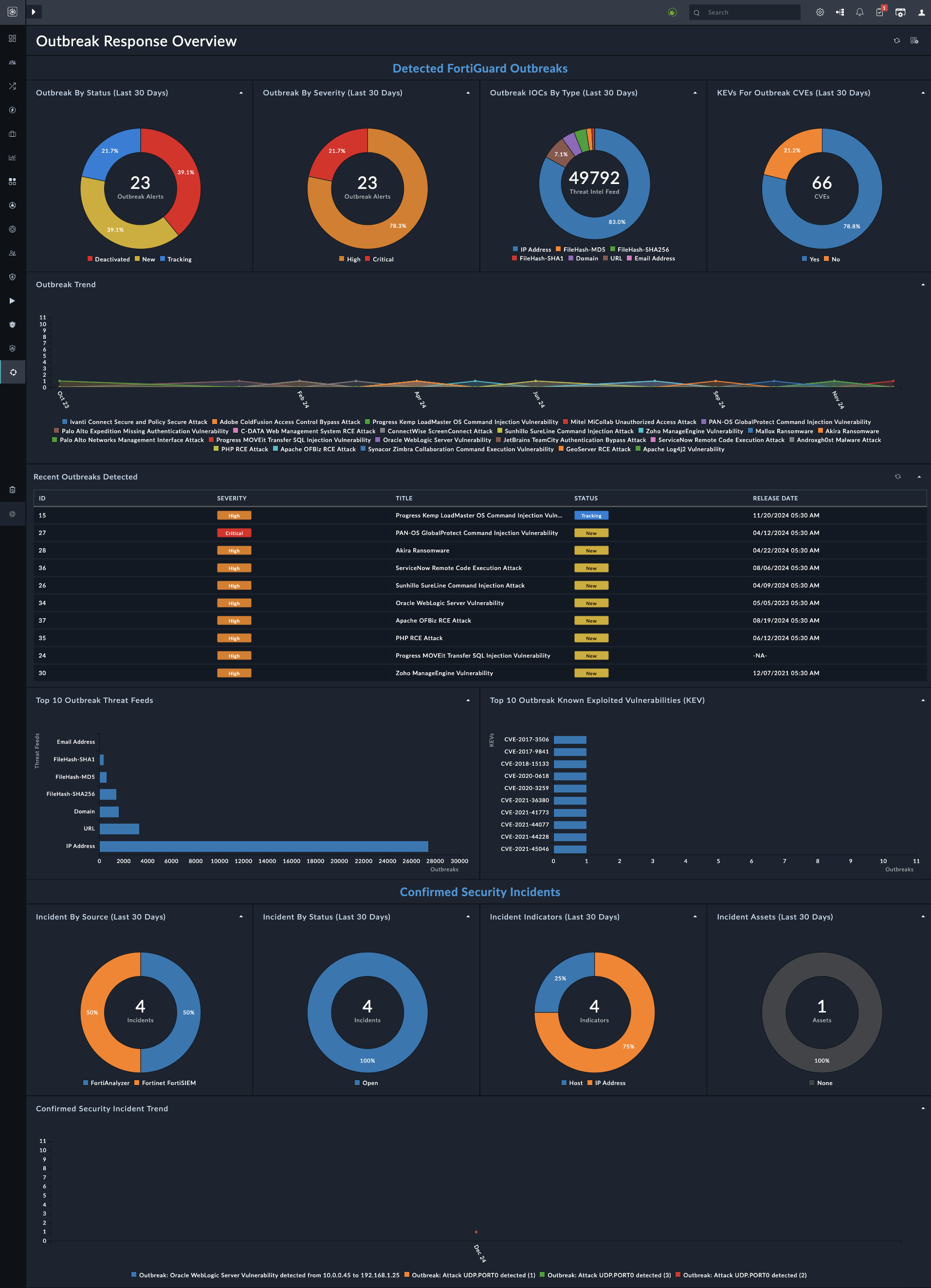
    Outbreak Response Overview Dashboard
  • Outbreak Alerts Module:
    Lists all outbreak alerts. Open the alert detail page view to its the description and background, CVE IDs and correlation data.
    To begin investigation, click the Execute button and select Investigate Outbreak:
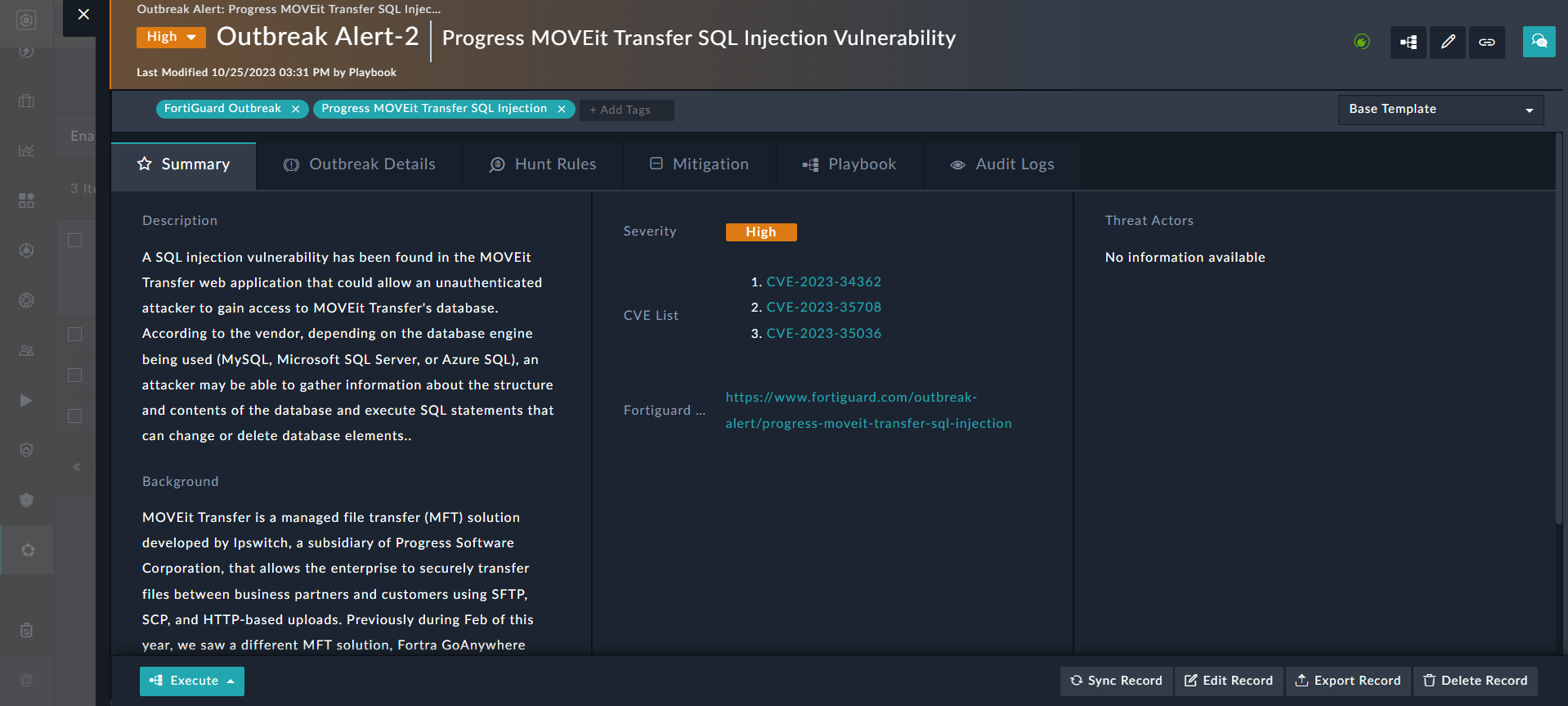
    Outbreak Alert Detail View

Threat Intelligence Management

The Threat Intel Management Solution Pack enables users to consume and correlate threat data — including Threat Feeds, Reports, and Actor profiles — from both external and internal sources, giving threat intelligence analysts deeper insights into known or suspected threats. Feeds can be either structured (e.g., STIX, CSV) or unstructured (e.g., PDF threat reports).

To enable Threat Intel Management (TIM) features in FortiSOAR:

  1. Install the TIM Solution Pack.
  2. Install and configure essential connectors such as FortiRecon ACI, Exchange, NIST National Vulnerability Database, and other supported integrations as required.
    Note: Connector configuration is required even for default feeds connectors such as, Fortinet FortiGuard.
  3. Run the TIM configuration wizard to configure threat intelligence feeds, integrations, and processing rules

After installation, the Solution Pack adds a Threat Intel Management section to FortiSOAR's left navigation, which includes:

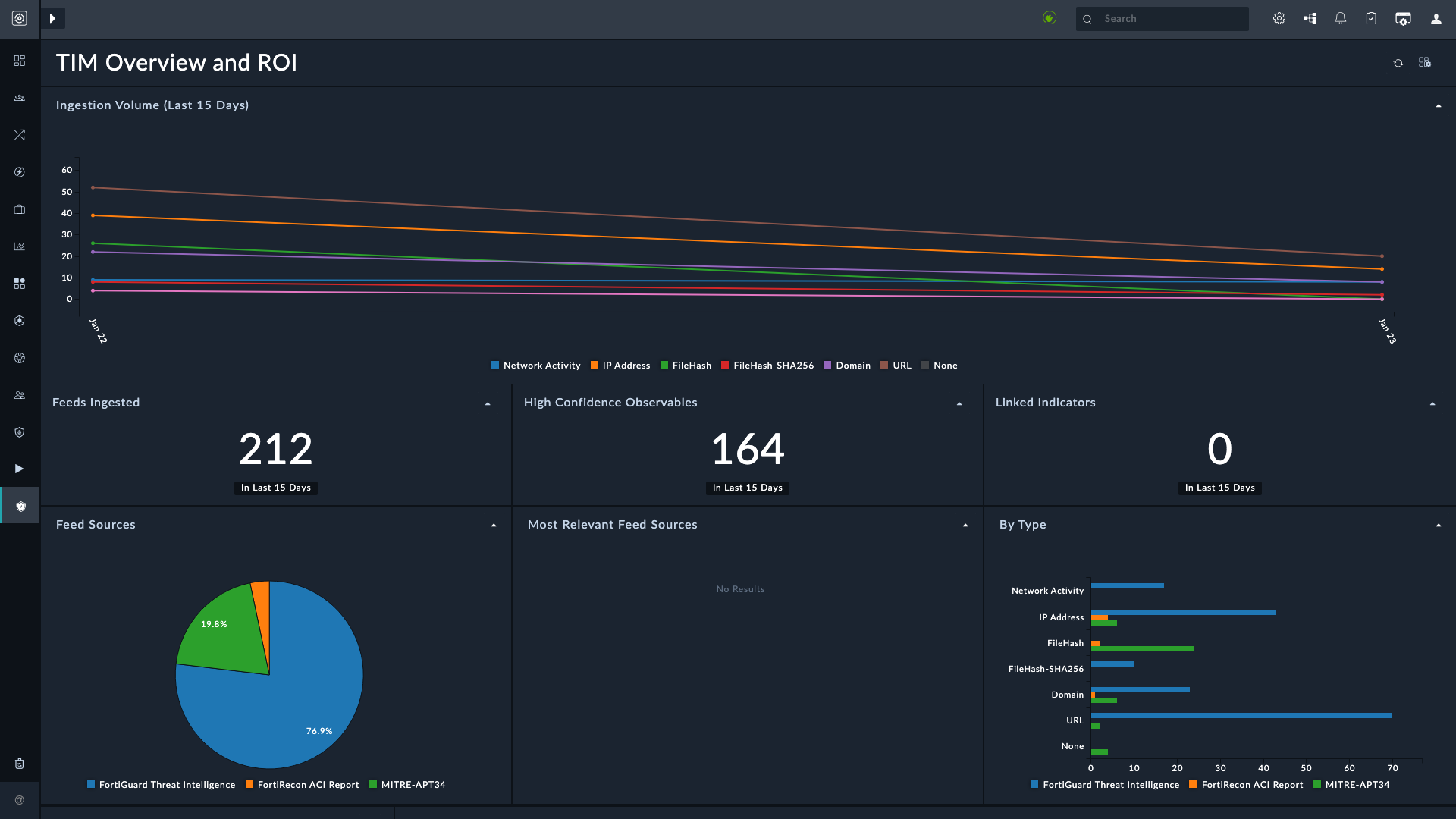
  • Dashboard:
    The TIM Overview and ROI dashboard provides visibility to feed ingestion effectiveness, observables linked to indicators, and feed relevance:
  • Threat Intel Search:
    Enables SOC analysts to search FortiGuard Labs' global threat intelligence for suspicious indicators such as domains, IP addresses, and other IOCs.
    To search for IOCs, on the Threat Intel Search page, enter up to 10 indicators (separated by line breaks) and click the Search button.
    The results page lists all matched IOCs:
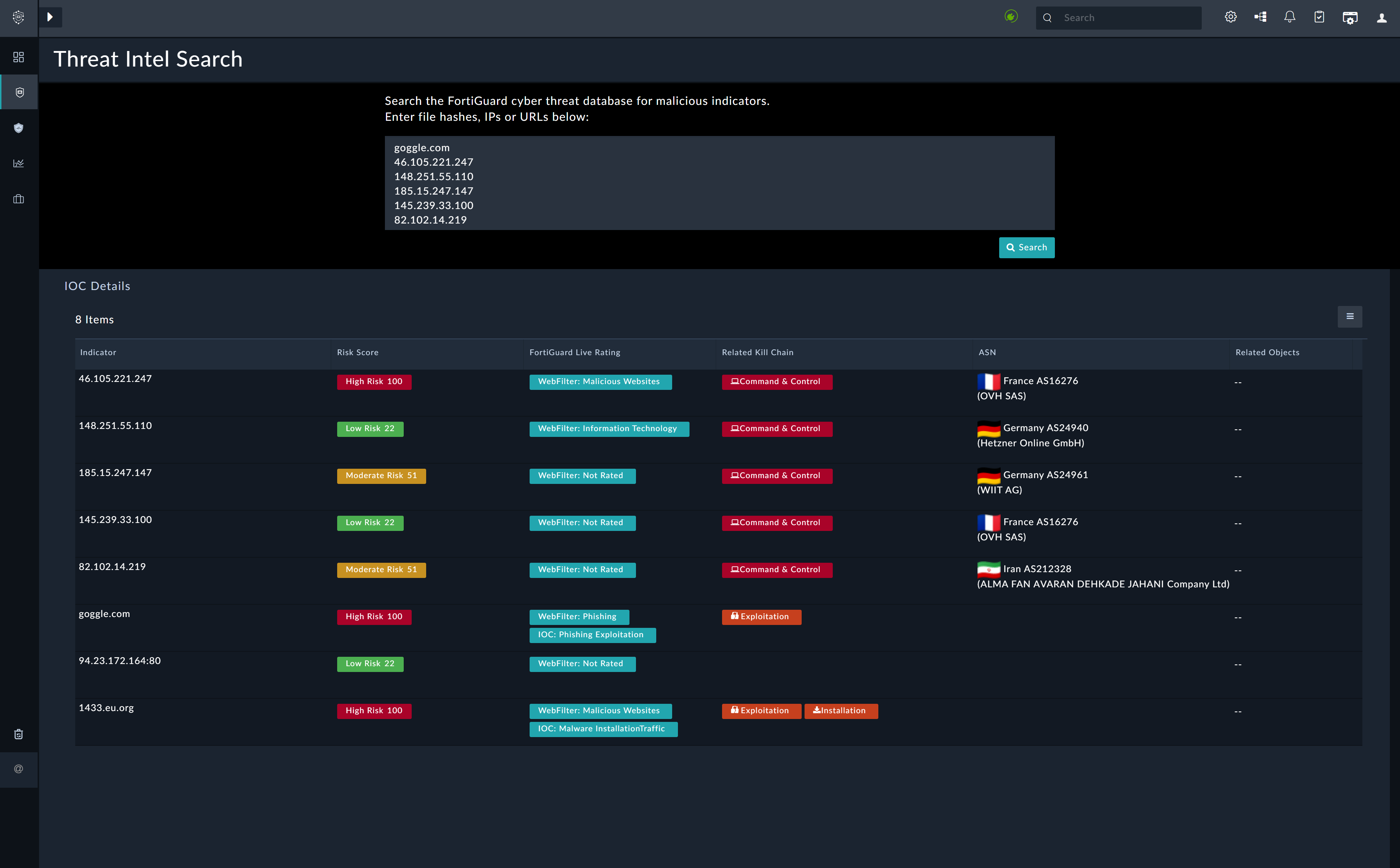
    Threat Intel Search Results Page
    Click any IOC record to view detailed threat information:
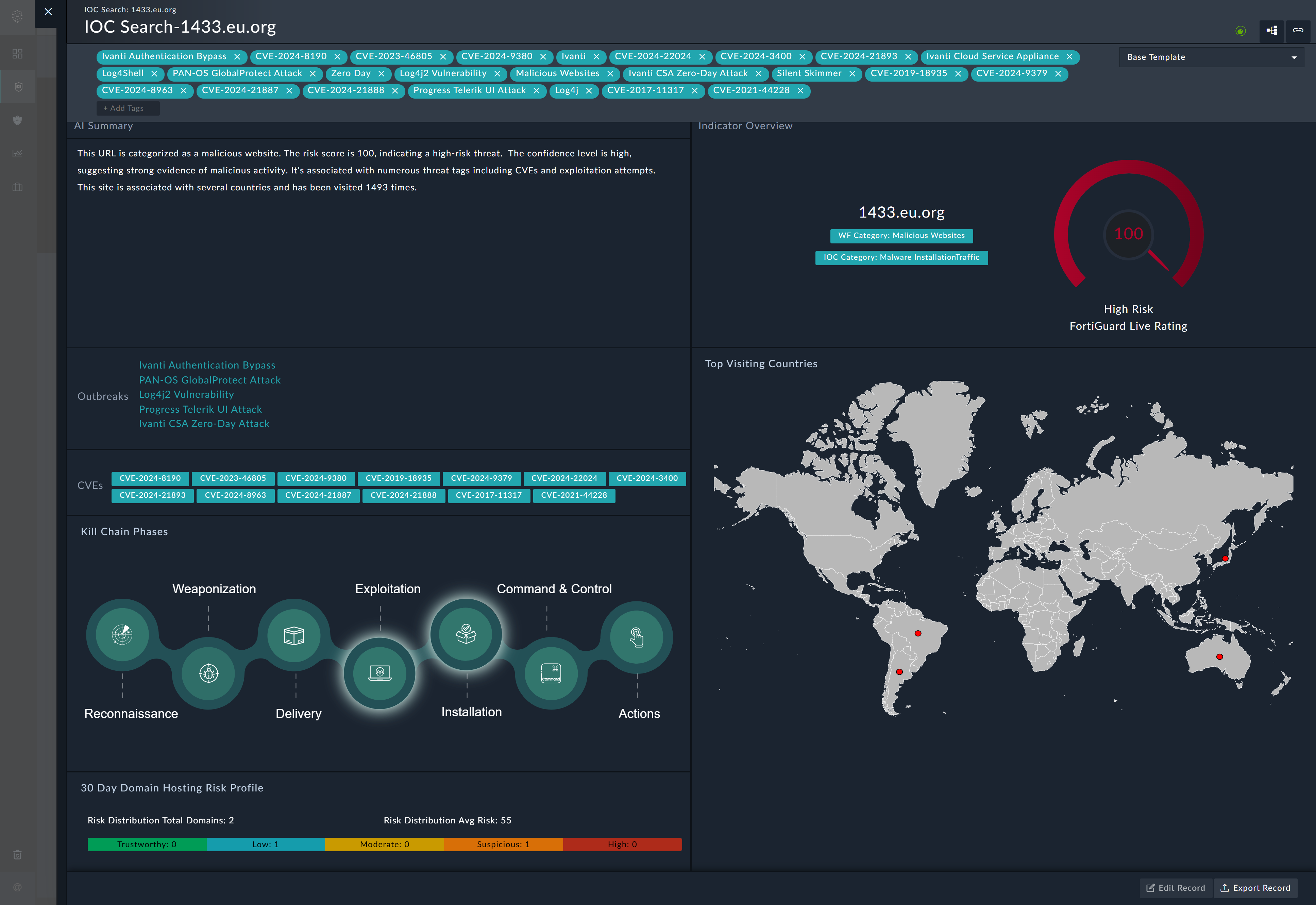
    IOC record detail view
  • Intelligence:
    Provides a centralized location to manage threat feeds, actors, and reports:
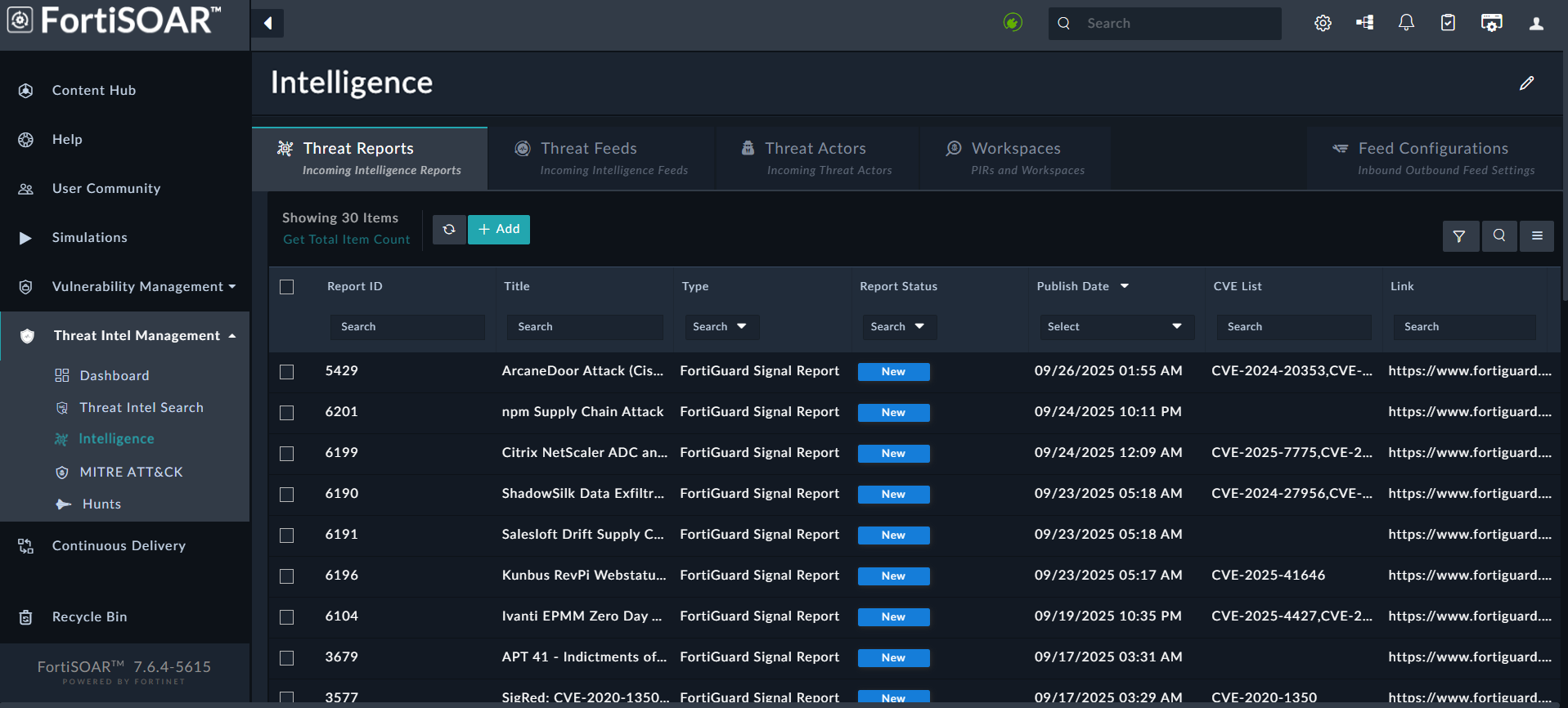
    The Intelligence page includes the following tabs:
    • Threat Reports:
      Displays threat intelligence reports ingested from FortiGuard, FortiRecon ACI, and other threat report providers. A threat intelligence report provides critical insights into emerging or ongoing cyber threats, helping organizations understand the risks they face and how to implement effective defenses.
      The following is an example of a threat report ingested from FortiRecon ACI:
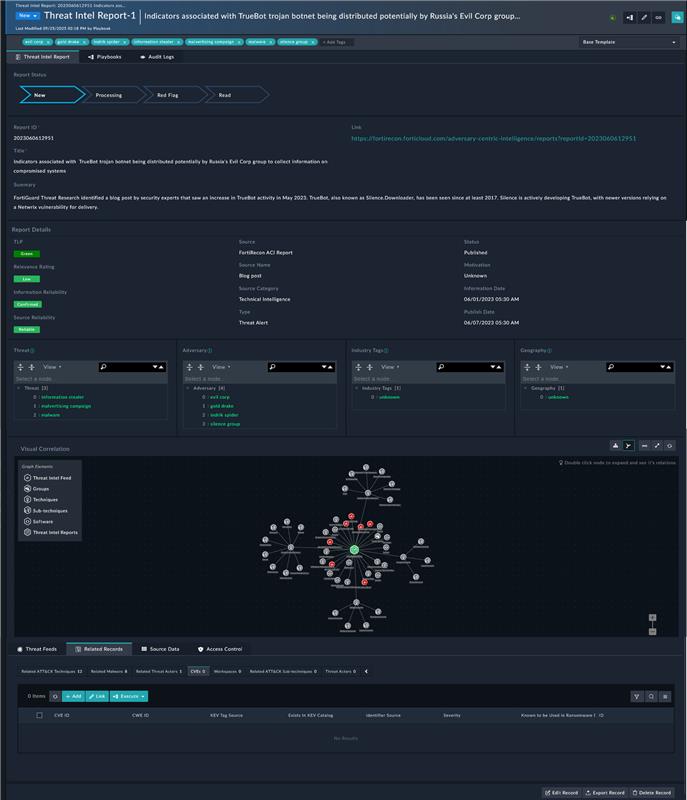
    • Threat Feeds:
      After installing the TIM Solution Pack, configure feed connectors such as FortiGuard, Anomali Limo, Cisco Talos, etc.
      Note: By default, Fortinet FortiGuard Threat Intelligence is added as a threat source. However, to enable feed ingestion, you must configure its ingestion parameters, scheduling, and feed processing rules.
      The Threat Feeds page is used for configuring, ingesting, filtering, and managing threat feeds:
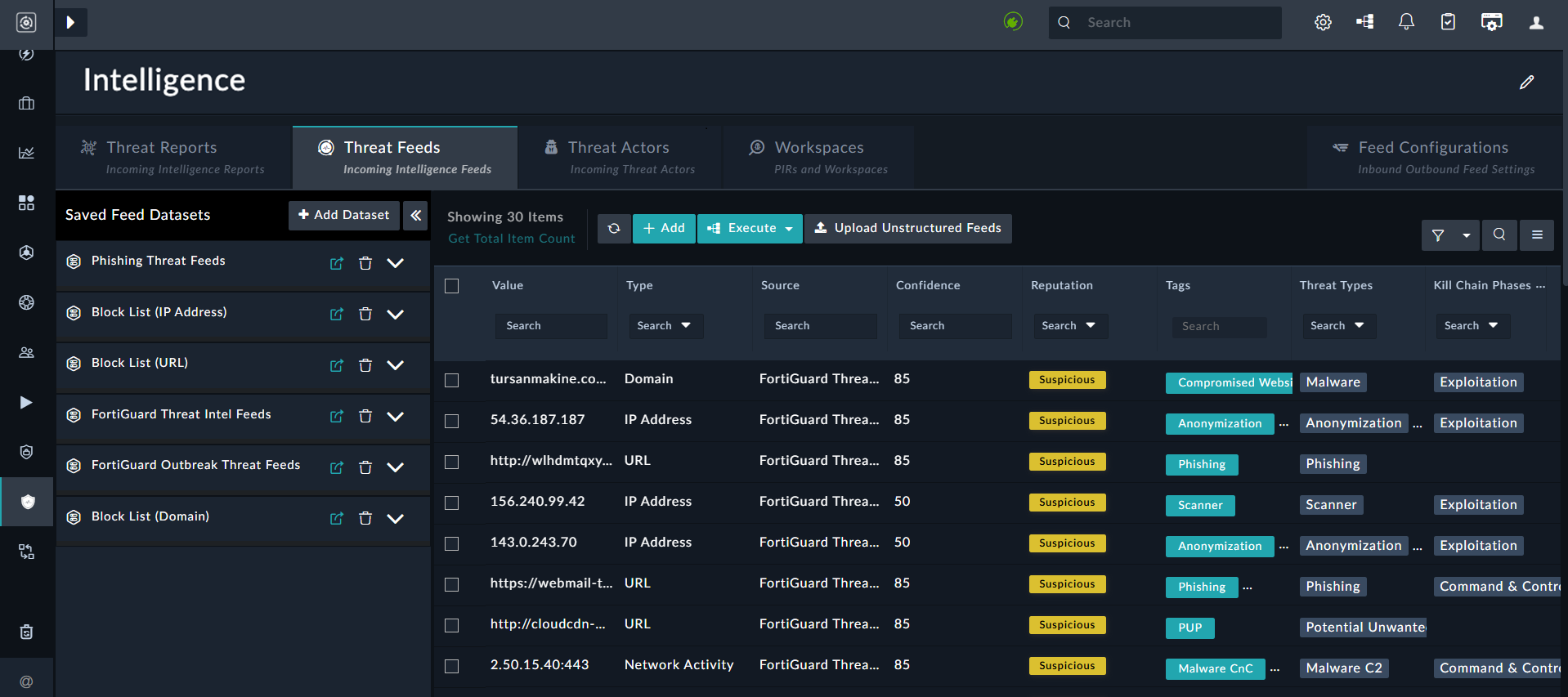
      Threat Feeds page
    • Threat Actors:
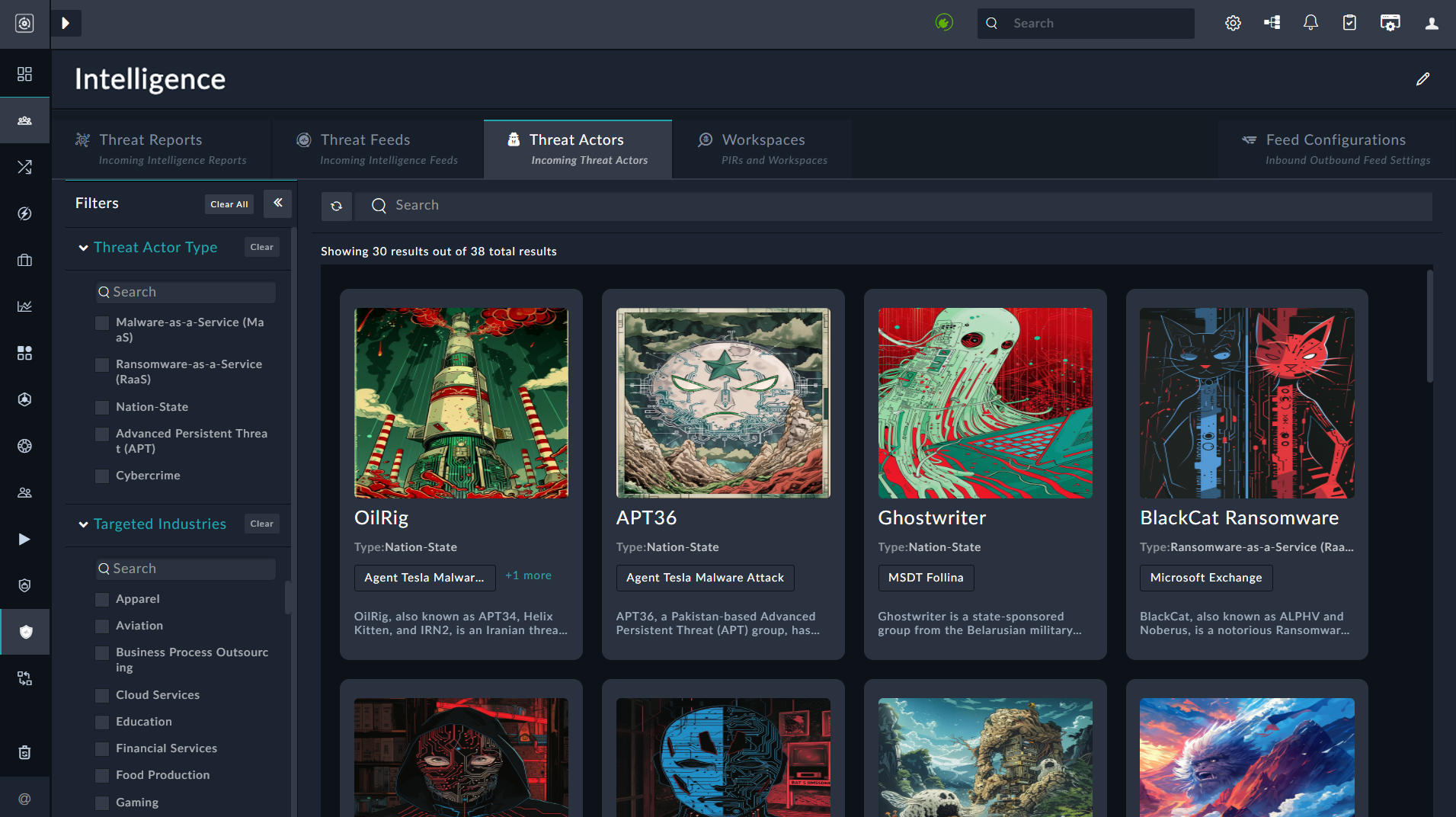
      The Threat Actors (TA) page pulls threat actor data from FortiGuard, and provides analysts with detailed insights into adversaries, their motivations, and their tactics, techniques, and procedures (TTPs). TAs can be filtered based on Category, Industries, Tags and Dates. Clicking on a TA card allows users to view its comprehensive information:
    • WorkSpaces:
      The WorkSpaces page enables contextual workflows by allowing creation of workspaces based on Priority Intelligence Requests (PIRs):
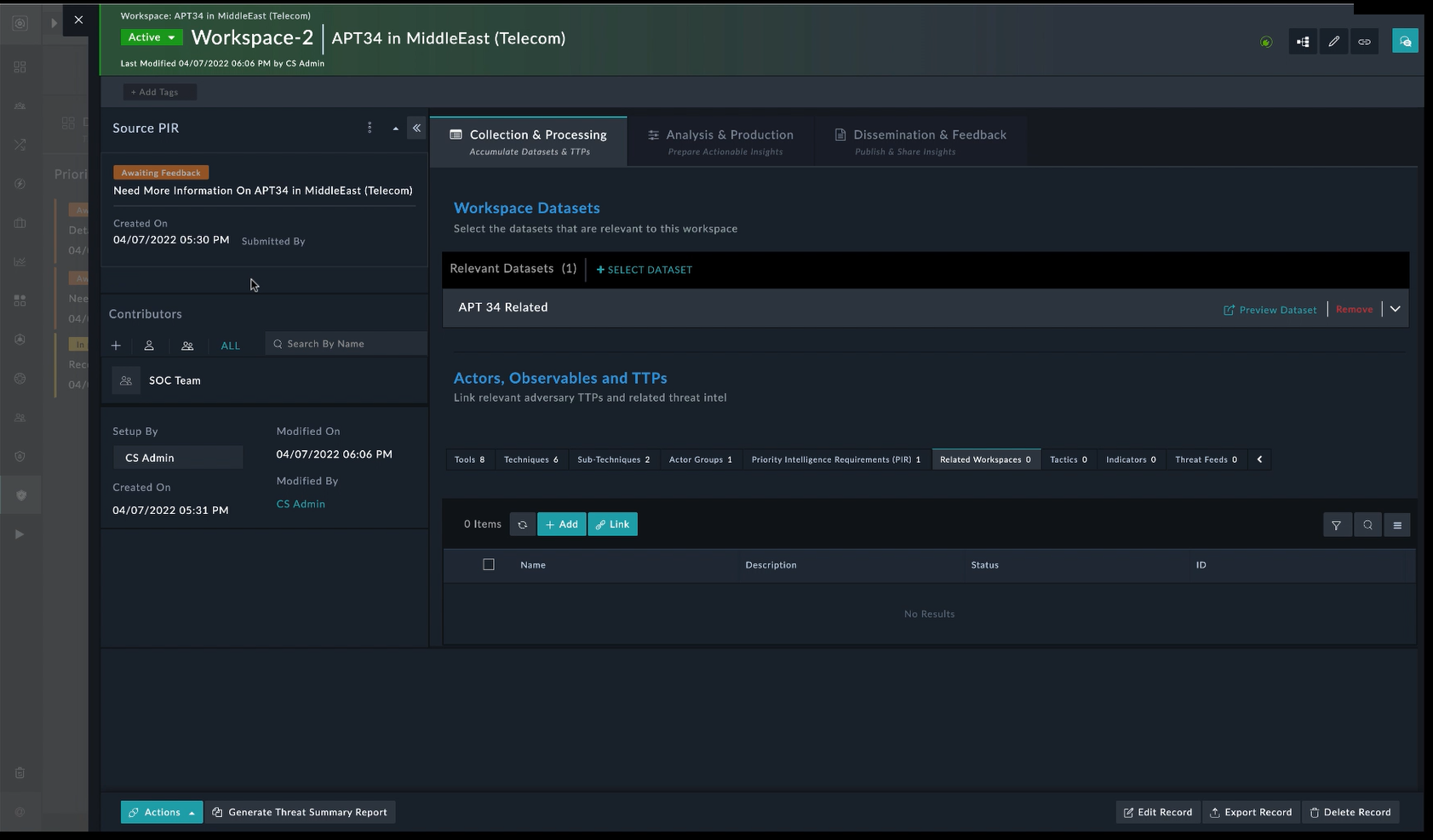
      WorkSpaces page
    • Feed Configurations:
      The Feed Configurations page manages inbound and outbound feed settings, including allowing you to configure a TAXII Server to generate outgoing feeds based on the threat intelligence you wish to share externally, and specifying rules to automate feed ingestion:
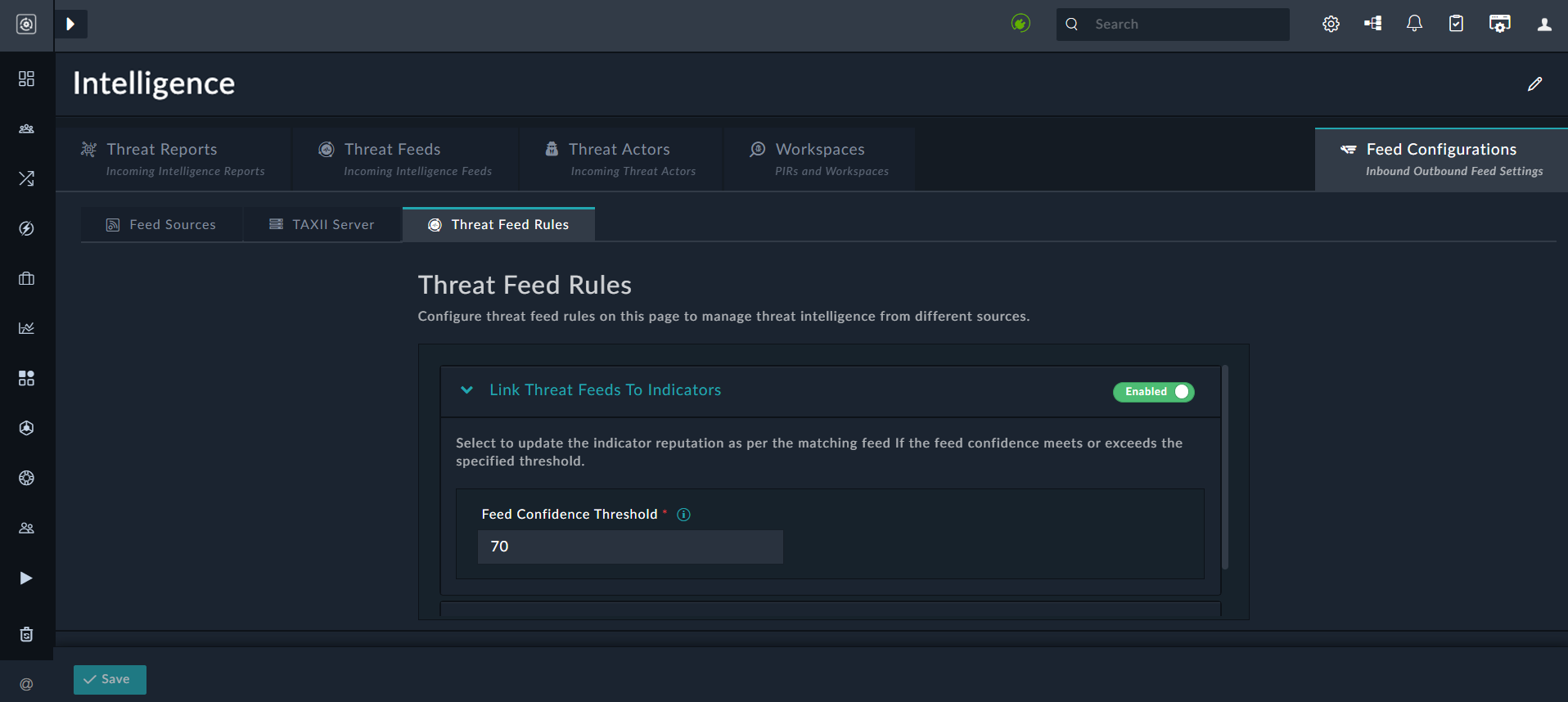
      Threat Indicators -Feed Configuation page
  • MITRE ATT&CK:
    The installation of the TIM Solution Pack configures the MITRE ATT&CK connector and schedules its data ingestion by default, enabling use of the globally accessible MITRE ATT&CK® Framework. The connector retrieves the latest data on groups, mitigations, software, and techniques, and maps it to the appropriate modules:
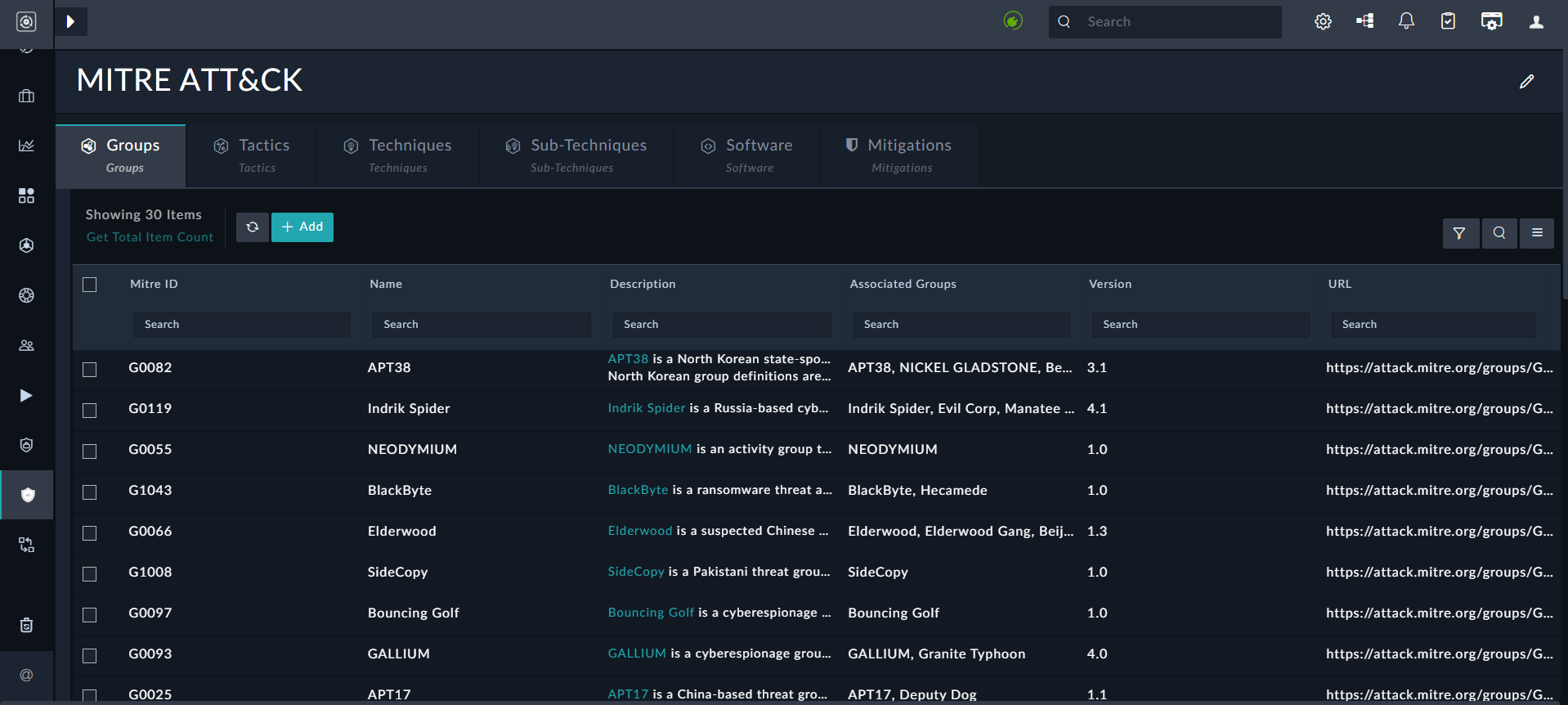
    Threat Intel - Mitre Attack page
    For details, see the MITRE ATT&CK Enrichment Framework Solution Pack documentation.
  • Hunts:
    A centralized module to store and manage threat hunting activities. Each Hunt acts as a repository, linking related Alerts, Assets, Users, and other modules’ records associated with the hunting activity.
    For details, see the MITRE ATT&CK Enrichment Framework Solution Pack documentation.

Vulnerability Management

The Vulnerability Management Solution Pack, which is included with the TIM Solution Pack enables correlation of CVE (Common Vulnerabilities and Exposures) data with active threat intelligence feeds. This feature helps organizations identify vulnerabilities actively targeted by adversaries, prioritize patching based on real-world risk, and enable proactive defense strategies.

Threat Intelligence Capabilities

Threat Intelligence Capabilities

FortiSOAR enhances your organization’s cybersecurity posture through integrated threat intelligence features. Powered by FortiGuard Labs, these capabilities support proactive threat detection, faster incident response, and enhanced situational awareness.

To enable threat intelligence and outbreak management features, install and configure the Threat Intel Management and Outbreak Response Management Solution Packs. For installation instructions, see the Solution Packs chapter.

Note

To access unrestricted FortiGuard or other threat feeds and advanced Threat Intelligence Management features, a Threat Intel Management Service Subscription is required. For more information, see the Licensing FortiSOAR chapter in the "Deployment Guide".

Key Features

  • Outbreak Management: Detect, monitor, and respond to widespread cyberattacks with significant business impact. Outbreak Management provides tools to assess and mitigate high-severity threats in real time.
  • Threat Intelligence Management: Aggregate, normalize, and analyze threat data — including Threat Feeds, Reports, and Actor profiles — from internal and external sources to accelerate threat detection and response. Key capabilities include:
    • Threat Intel Search: Query FortiGuard’s extensive threat intelligence database to investigate Indicators of Compromise (IOCs), including associated malware, threat actors, CVEs, and threat correlations. This feature provides contextual insights to support faster threat validation and informed decision-making.
    • CVE Correlation with Threat Reports and Threat Actors:Correlate Common Vulnerabilities and Exposures (CVE) data with active threat reports and actors to identify vulnerabilities currently being exploited in the wild. This helps prioritize remediation efforts based on real-world threat activity.

Outbreak Management

The Outbreak Response Management Solution Pack provides essential information about ongoing cybersecurity attacks with widespread impact across companies, organizations, and industries.

Outbreak Alerts from FortiGuard Labs are real-time notifications that inform users about emerging security outbreaks or active threats identified by FortiGuard’s threat intelligence systems. These alerts typically contain details such as the nature of the threat (e.g., malware, ransomware, phishing), the affected systems or applications, and recommended mitigation strategies. Additionally, the alerts may include specifics on the threat's propagation methods, exploited vulnerabilities, and Indicators of Compromise (IOCs). These insights help users quickly identify and respond to threats within their networks.

To enable Outbreak Management features in FortiSOAR:

  1. Install the Outbreak Response Management Solution Pack
  2. Install and configure essential connectors such as Fortinet FortiGuard Outbreak, and NIST National Vulnerability Database, etc.
  3. Run the Outbreak Response Framework configuration wizard to prepare your FortiSOARenvironment for handling outbreak alerts.

After installation, the Solution Pack adds an Outbreak Management section to FortiSOAR's left navigation, which includes:

  • Outbreak Alerts Overview Dashboard:
    Transforms critical data into clear, easy-to-understand visuals to support quick, informed decision-making. Also, provides a high-level summary of current response activities and trends.
    Outbreak Response Overview Dashboard
  • Outbreak Alerts Module:
    Lists all outbreak alerts. Open the alert detail page view to its the description and background, CVE IDs and correlation data.
    To begin investigation, click the Execute button and select Investigate Outbreak:
    Outbreak Alert Detail View

Threat Intelligence Management

The Threat Intel Management Solution Pack enables users to consume and correlate threat data — including Threat Feeds, Reports, and Actor profiles — from both external and internal sources, giving threat intelligence analysts deeper insights into known or suspected threats. Feeds can be either structured (e.g., STIX, CSV) or unstructured (e.g., PDF threat reports).

To enable Threat Intel Management (TIM) features in FortiSOAR:

  1. Install the TIM Solution Pack.
  2. Install and configure essential connectors such as FortiRecon ACI, Exchange, NIST National Vulnerability Database, and other supported integrations as required.
    Note: Connector configuration is required even for default feeds connectors such as, Fortinet FortiGuard.
  3. Run the TIM configuration wizard to configure threat intelligence feeds, integrations, and processing rules

After installation, the Solution Pack adds a Threat Intel Management section to FortiSOAR's left navigation, which includes:

  • Dashboard:
    The TIM Overview and ROI dashboard provides visibility to feed ingestion effectiveness, observables linked to indicators, and feed relevance:
  • Threat Intel Search:
    Enables SOC analysts to search FortiGuard Labs' global threat intelligence for suspicious indicators such as domains, IP addresses, and other IOCs.
    To search for IOCs, on the Threat Intel Search page, enter up to 10 indicators (separated by line breaks) and click the Search button.
    The results page lists all matched IOCs:
    Threat Intel Search Results Page
    Click any IOC record to view detailed threat information:
    IOC record detail view
  • Intelligence:
    Provides a centralized location to manage threat feeds, actors, and reports:

    The Intelligence page includes the following tabs:
    • Threat Reports:
      Displays threat intelligence reports ingested from FortiGuard, FortiRecon ACI, and other threat report providers. A threat intelligence report provides critical insights into emerging or ongoing cyber threats, helping organizations understand the risks they face and how to implement effective defenses.
      The following is an example of a threat report ingested from FortiRecon ACI:

    • Threat Feeds:
      After installing the TIM Solution Pack, configure feed connectors such as FortiGuard, Anomali Limo, Cisco Talos, etc.
      Note: By default, Fortinet FortiGuard Threat Intelligence is added as a threat source. However, to enable feed ingestion, you must configure its ingestion parameters, scheduling, and feed processing rules.
      The Threat Feeds page is used for configuring, ingesting, filtering, and managing threat feeds:
      Threat Feeds page
    • Threat Actors:
      The Threat Actors (TA) page pulls threat actor data from FortiGuard, and provides analysts with detailed insights into adversaries, their motivations, and their tactics, techniques, and procedures (TTPs). TAs can be filtered based on Category, Industries, Tags and Dates. Clicking on a TA card allows users to view its comprehensive information:
    • WorkSpaces:
      The WorkSpaces page enables contextual workflows by allowing creation of workspaces based on Priority Intelligence Requests (PIRs):
      WorkSpaces page
    • Feed Configurations:
      The Feed Configurations page manages inbound and outbound feed settings, including allowing you to configure a TAXII Server to generate outgoing feeds based on the threat intelligence you wish to share externally, and specifying rules to automate feed ingestion:
      Threat Indicators -Feed Configuation page
  • MITRE ATT&CK:
    The installation of the TIM Solution Pack configures the MITRE ATT&CK connector and schedules its data ingestion by default, enabling use of the globally accessible MITRE ATT&CK® Framework. The connector retrieves the latest data on groups, mitigations, software, and techniques, and maps it to the appropriate modules:
    Threat Intel - Mitre Attack page
    For details, see the MITRE ATT&CK Enrichment Framework Solution Pack documentation.
  • Hunts:
    A centralized module to store and manage threat hunting activities. Each Hunt acts as a repository, linking related Alerts, Assets, Users, and other modules’ records associated with the hunting activity.
    For details, see the MITRE ATT&CK Enrichment Framework Solution Pack documentation.

Vulnerability Management

The Vulnerability Management Solution Pack, which is included with the TIM Solution Pack enables correlation of CVE (Common Vulnerabilities and Exposures) data with active threat intelligence feeds. This feature helps organizations identify vulnerabilities actively targeted by adversaries, prioritize patching based on real-world risk, and enable proactive defense strategies.