
 DOCUMENT LIBRARY
1.0.0
DOCUMENT LIBRARY
1.0.0
DOCUMENT LIBRARY
1.0.0
DOCUMENT LIBRARY
1.0.0
Google Threat Intelligence is a cloud-based threat intelligence service provided by Google (via Google Cloud) that helps organizations gain visibility into threat actors, attacks, and indicators of compromise (IOCs). This connector facilitates the automated operations related to analyze retro hunts, search intelligence, livehunt notifications, livehunt rulesets, and download files from Google Threat Intelligence.
This document provides information about the Google Threat Intelligence connector, which facilitates automated interactions, with a Google Threat Intelligence server using FortiSOAR™ playbooks. Add the Google Threat Intelligence connector as a step in FortiSOAR™ playbooks and perform automated operations with Google Threat Intelligence.
Connector Version: 1.0.0
FortiSOAR™ Version Tested on: 7.6.4-5623
Google Threat Intelligence Version Tested on: Cloud instance
Authored By: Fortinet
Certified: Yes
Use the Content Hub to install the connector. For the detailed procedure to install a connector, click here.
You can also use the yum command to install the connector:
sudo yum install cyops-connector-google-threat-intelligenceYou must have the credentials of Google Threat Intelligence server to which you will connect and perform automated operations.
The FortiSOAR™ server should have outbound connectivity to port 443 on the Google Threat Intelligence server.
Not applicable
For the procedure to configure a connector, click here.
In FortiSOAR™, on the Connectors page, click the Google Threat Intelligence connector row (if you are in the Grid view on the Connectors page) and in the Configurations tab enter the required configuration details:
| Parameter | Description |
|---|---|
| Server URL | Specify the server URL of the Google Threat Intelligence server to which you will connect and perform the automated operations. |
| API Key | Specify the API key that is configured for your account to access the Google Threat Intelligence server. |
| Verify SSL | Specifies whether the SSL certificate for the server is to be verified. By default, this option is selected, i.e., set to true. |
You can use the following automated operations in playbooks and also use the annotations to access operations:
| Function | Description | Annotation and Category |
|---|---|---|
| Get Entities List | Retrieves a list of threats, reports, or vulnerabilities from Google Threat Intelligence based on the collection type, creation/modification date, and filter criteria that you have specified. | get_entities_list Investigation |
| Get Entities Details | Retrieves a specific info of threats, reports, or vulnerabilities from Google Threat Intelligence based on the Object ID that you have specified. | get_entities_details Investigation |
| Get Mitre Tactics and Techniques | Retrieves a list of MITRE tactics with their correspondent techniques that are associated with the threats, reports, or vulnerabilities from Google Threat Intelligence based on the Object ID that you have specified. | get_mitre_tactics_and_techniques Investigation |
| Get Widget Rendering URL | Retrieves a URL from Google Threat Intelligence that renders a widget within an iframe and is valid for three days. | get_widget_rendering_url Investigation |
| Submit File | Scans and analyzes files submitted to Google Threat Intelligence from FortiSOAR™ to determine if it is suspicious based on the Attachment ID or File IRI you have specified. | submit_file Investigation |
| Submit URL for Scanning | Scans and analyzes the URL submitted to Google Threat Intelligence to determine if it is suspicious based on the URL you have specified. | scan_url Investigation |
| Get IP Reputation | Retrieves an IP reputation report from Google Threat Intelligence to determine if it is suspicious based on the IP address you have specified. | get_ip_reputation Investigation |
| Get Domain Reputation | Retrieves a domain reputation report from Google Threat Intelligence to determine if it is suspicious based on the domain name you have specified. | get_domain_reputation Investigation |
| Get URL Reputation | Retrieves a URL reputation report from Google Threat Intelligence to determine if it is suspicious based on the URL you have specified. | get_url_reputation Investigation |
| Get File Reputation | Retrieves a file reputation report from Google Threat Intelligence to determine if it is suspicious based on the file hash value you have specified. | get_file_reputation Investigation |
| Get File Or URL Analysis Report | Retrieves details of a File or a URL analysis from Google Threat Intelligence based on the File or URL that you have specified for scanning and analysis. | analysis_file Investigation |
| Download File | Downloads a file from Google Threat Intelligence, to FortiSOAR™'s Attachments module, based on the hash value of the file you have specified. | download_file Investigation |
| Create ZIP File | Creates a password-protected ZIP file based on the hash values of the Google files and the password you have specified. | create_zip_file Investigation |
| Get ZIP File Status | Retrieves information about a ZIP file from Google Threat Intelligence based on the zip file ID you have specified. | get_zip_file_status Investigation |
| Get ZIP File URL | Retrieves a signed download URL from Google Threat Intelligence based on the zip file ID you have specified. Note: The retrieved URL expires after 1 hour. |
get_zip_file_url Investigation |
| Download ZIP File | Downloads a zip file from Google Threat Intelligence, to FortiSOAR™'s Attachments module, based on the zip file ID you have specified. | download_zip_file Investigation |
| Get PCAP File Behaviour | Retrieves a PCAP file from Google Threat Intelligence based on the report ID you have specified. A PCAP file is generated while analyzing a file's behavior in Google Threat Intelligence. | get_pcap_file_behaviour Investigation |
| Search Intelligence | Searches for files in Google Threat Intelligence based on a query and other filter criteria you have specified. | search_intelligence Investigation |
| Create Livehunt Ruleset | Creates a livehunt ruleset in Google Threat Intelligence based on the ruleset name, rules, and other input parameters that you have specified. | create_livehunt_ruleset Investigation |
| Get Livehunt Rulesets List | Retrieves a list of livehunt rulesets from Google Threat Intelligence based on a query and other filter criteria you have specified. | get_livehunt_rulesets_list Investigation |
| Get Livehunt Ruleset Details | Retrieves details for a specific livehunt ruleset from Google Threat Intelligence based on the ruleset ID you have specified. | get_livehunt_ruleset_details Investigation |
| Update Livehunt Ruleset | Updates a specific hunting livehunt ruleset in Google Threat Intelligence based on the ruleset ID, ruleset name, rules, and other input parameters that you have specified. | update_livehunt_ruleset Investigation |
| Delete Livehunt Ruleset | Deletes a specific livehunt ruleset from Google Threat Intelligence based on the ruleset ID you have specified. | delete_livehunt_ruleset Investigation |
| Create Retrohunt Job | Creates a retro-hunt job in Google Threat Intelligence based on the rules, and other input parameters that you have specified. | create_retrohunt_job Investigation |
| Abort Retrohunt Job | Aborts a specific retro-hunt job in Google Threat Intelligence based on the job ID you have specified. | abort_retrohunt_job Investigation |
| Get Retrohunt Jobs List | Retrieves a list of all retro-hunt jobs from Google Threat Intelligence based on a query and other filter criteria you have specified. | get_retrohunt_jobs_list Investigation |
| Get Retrohunt Job Details | Retrieves details for a specific retro-hunt job from Google Threat Intelligence based on the job ID you have specified. | get_retrohunt_job_details Investigation |
| Get Retrohunt Job Matching Files | Retrieves a list of all retro-hunt job matching files from Google Threat Intelligence based on the job ID and other filter criteria you have specified.. | get_retrohunt_job_matching_files Investigation |
| Delete Retrohunt Job | Deletes a specific retro-hunt job from Google Threat Intelligence based on the retro-hunt job ID you have specified. | delete_retrohunt_job Investigation |
| Execute an API Request | Sends an API request to an API endpoint based on specified HTTP method, endpoint, and other input parameters that you have specified, enabling flexible API interactions tailored to user needs. | execute_an_api_call Investigation |
| Parameter | Description |
|---|---|
| Collection Type | (Optional) Select the type of the collection based on which you want to retrieve entities from Google Threat Intelligence. You can choose from the following options: Collection, Threat Actor, Malware Family, Software Toolkit, Campaign, Report, or Vulnerability. |
| Created/Last Modified After | (Optional) Select a date and time to retrieve entities that include only those items that were created/last modified after the specified timestamp. |
| Origin Type | (Optional) Select the type of the origin based on which you want to retrieve entities from Google Threat Intelligence. You can choose from the following options: Partner, Crowdsourced, or Google Threat Intelligence. |
| Limit | (Optional) Specify the maximum number of results this operation should return, per page, in the response. By default, this is set to 10 and maximum limit is 40. |
| Cursor | (Optional) Specify the next page cursor to fetch the next set of records. The next page cursor value can be retrieved from the previous API response. |
The output contains the following populated JSON schema:
{
  "data": [
      {
          "id": "",
          "type": "",
          "links": {
              "self": ""
          },
          "attributes": {
              "cwe": {
                  "id": "",
                  "title": ""
              },
              "cpes": [
                  {
                      "end_cpe": {
                          "uri": "",
                          "vendor": "",
                          "product": "",
                          "version": ""
                      },
                      "end_rel": "",
                      "start_cpe": {
                          "uri": "",
                          "vendor": "",
                          "product": "",
                          "version": ""
                      },
                      "start_rel": ""
                  }
              ],
              "cvss": {
                  "cvssv3_x": {
                      "vector": "",
                      "base_score": "",
                      "temporal_score": ""
                  }
              },
              "epss": {
                  "score": "",
                  "percentile": ""
              },
              "name": "",
              "tags": [],
              "cve_id": "",
              "mve_id": "",
              "origin": "",
              "status": "",
              "private": "",
              "sources": [
                  {
                      "md5": "",
                      "url": "",
                      "cvss": {
                          "cvssv2_0": "",
                          "cvssv3_x": "",
                          "cvssv4_x": "",
                          "cvssv3_x_translated": ""
                      },
                      "name": "",
                      "title": "",
                      "unique_id": "",
                      "published_date": "",
                      "source_description": ""
                  }
              ],
              "analysis": "",
              "counters": {
                  "iocs": "",
                  "urls": "",
                  "files": "",
                  "domains": "",
                  "subscribers": "",
                  "ip_addresses": "",
                  "attack_techniques": ""
              },
              "priority": "",
              "alt_names": [],
              "urls_count": "",
              "description": "",
              "files_count": "",
              "mitigations": [],
              "motivations": [],
              "risk_rating": "",
              "workarounds": [],
              "aggregations": {},
              "capabilities": [],
              "exploitation": {
                  "first_exploitation": "",
                  "exploit_release_date": "",
                  "tech_details_release_date": ""
              },
              "risk_factors": [],
              "tags_details": [],
              "technologies": [],
              "threat_scape": [],
              "top_icon_md5": [],
              "creation_date": "",
              "days_to_patch": "",
              "domains_count": "",
              "field_sources": [
                  {
                      "field": "",
                      "source": {
                          "sources": [
                              {
                                  "source_urls": [],
                                  "source_names": [
                                      ""
                                  ]
                              }
                          ],
                          "field_type": "",
                          "source_url": "",
                          "source_name": ""
                      }
                  }
              ],
              "malware_roles": [],
              "merged_actors": [],
              "collection_type": "",
              "detection_names": [],
              "version_history": [
                  {
                      "date": "",
                      "version_notes": []
                  }
              ],
              "affected_systems": [],
              "collection_links": [],
              "intended_effects": [],
              "mati_genids_dict": {
                  "cve_id": "",
                  "mve_id": "",
                  "report_id": ""
              },
              "references_count": "",
              "targeted_regions": [],
              "alt_names_details": [],
              "executive_summary": "",
              "last_seen_details": [],
              "operating_systems": [],
              "subscribers_count": "",
              "autogenerated_tags": [],
              "date_of_disclosure": "",
              "exploitation_state": "",
              "first_seen_details": [],
              "ip_addresses_count": "",
              "targeted_industries": [],
              "vulnerable_products": "",
              "available_mitigation": [],
              "exploit_availability": "",
              "exploitation_vectors": [],
              "is_content_translated": "",
              "predicted_risk_rating": "",
              "targeted_informations": [],
              "vendor_fix_references": [
                  {
                      "md5": "",
                      "url": "",
                      "cvss": "",
                      "name": "",
                      "title": "",
                      "unique_id": "",
                      "published_date": "",
                      "source_description": ""
                  }
              ],
              "last_modification_date": "",
              "recent_activity_summary": [],
              "exploitation_consequence": "",
              "source_regions_hierarchy": [],
              "targeted_industries_tree": [],
              "targeted_regions_hierarchy": []
          },
          "context_attributes": {
              "role": "",
              "snippet": "",
              "shared_with_me": ""
          }
      }
  ],
  "meta": {
      "count": "",
      "cursor": ""
  },
  "links": {
      "next": "",
      "self": ""
  }
}| Parameter | Description |
|---|---|
| Object ID | Specify the ID of the object whose details are to be retrieved from Google Threat Intelligence. Note: You can retrieve the object ID from the Get Entities List action. |
The output contains the following populated JSON schema:
{
  "data": {
      "id": "",
      "type": "",
      "links": {
          "self": ""
      },
      "attributes": {
          "cwe": {
              "id": "",
              "title": ""
          },
          "cpes": [
              {
                  "end_cpe": {
                      "uri": "",
                      "vendor": "",
                      "product": "",
                      "version": ""
                  },
                  "end_rel": "",
                  "start_cpe": {
                      "uri": "",
                      "vendor": "",
                      "product": "",
                      "version": ""
                  },
                  "start_rel": ""
              }
          ],
          "cvss": {
              "cvssv3_x": {
                  "vector": "",
                  "base_score": "",
                  "temporal_score": ""
              }
          },
          "epss": {
              "score": "",
              "percentile": ""
          },
          "name": "",
          "tags": [],
          "cve_id": "",
          "mve_id": "",
          "origin": "",
          "status": "",
          "private": "",
          "sources": [
              {
                  "md5": "",
                  "url": "",
                  "cvss": {
                      "cvssv2_0": "",
                      "cvssv3_x": "",
                      "cvssv4_x": "",
                      "cvssv3_x_translated": ""
                  },
                  "name": "",
                  "title": "",
                  "unique_id": "",
                  "published_date": "",
                  "source_description": ""
              }
          ],
          "analysis": "",
          "counters": {
              "iocs": "",
              "urls": "",
              "files": "",
              "domains": "",
              "subscribers": "",
              "ip_addresses": "",
              "attack_techniques": ""
          },
          "priority": "",
          "alt_names": [],
          "urls_count": "",
          "description": "",
          "files_count": "",
          "mitigations": [],
          "motivations": [],
          "risk_rating": "",
          "workarounds": [],
          "aggregations": {},
          "capabilities": [],
          "exploitation": {
              "first_exploitation": "",
              "exploit_release_date": "",
              "tech_details_release_date": ""
          },
          "risk_factors": [],
          "tags_details": [],
          "technologies": [],
          "threat_scape": [],
          "top_icon_md5": [],
          "creation_date": "",
          "days_to_patch": "",
          "domains_count": "",
          "field_sources": [
              {
                  "field": "",
                  "source": {
                      "sources": [
                          {
                              "source_urls": [],
                              "source_names": [
                                  ""
                              ]
                          }
                      ],
                      "field_type": "",
                      "source_url": "",
                      "source_name": ""
                  }
              }
          ],
          "malware_roles": [],
          "merged_actors": [],
          "collection_type": "",
          "detection_names": [],
          "version_history": [
              {
                  "date": "",
                  "version_notes": []
              }
          ],
          "affected_systems": [],
          "collection_links": [],
          "intended_effects": [],
          "mati_genids_dict": {
              "cve_id": "",
              "mve_id": "",
              "report_id": ""
          },
          "references_count": "",
          "targeted_regions": [],
          "alt_names_details": [],
          "executive_summary": "",
          "last_seen_details": [],
          "operating_systems": [],
          "subscribers_count": "",
          "autogenerated_tags": [],
          "date_of_disclosure": "",
          "exploitation_state": "",
          "first_seen_details": [],
          "ip_addresses_count": "",
          "targeted_industries": [],
          "vulnerable_products": "",
          "available_mitigation": [],
          "exploit_availability": "",
          "exploitation_vectors": [],
          "is_content_translated": "",
          "predicted_risk_rating": "",
          "targeted_informations": [],
          "vendor_fix_references": [
              {
                  "md5": "",
                  "url": "",
                  "cvss": "",
                  "name": "",
                  "title": "",
                  "unique_id": "",
                  "published_date": "",
                  "source_description": ""
              }
          ],
          "last_modification_date": "",
          "recent_activity_summary": [],
          "exploitation_consequence": "",
          "source_regions_hierarchy": [],
          "targeted_industries_tree": [],
          "targeted_regions_hierarchy": []
      },
      "context_attributes": {
          "role": "",
          "snippet": "",
          "shared_with_me": ""
      }
  }
}| Parameter | Description |
|---|---|
| Object ID | Specify the ID of the object whose MITRE tactics and techniques are to be retrieved from Google Threat Intelligence. Note: You can retrieve the object ID from the Get Entities List action. |
The output contains the following populated JSON schema:
{
  "data": {
      "tactics": [
          {
              "id": "",
              "link": "",
              "name": "",
              "techniques": [
                  {
                      "id": "",
                      "link": "",
                      "name": "",
                      "count": "",
                      "source": [],
                      "description": ""
                  }
              ],
              "description": ""
          }
      ]
  }
}| Parameter | Description |
|---|---|
| Indicator | Specify the file hash (md5, sha1 or sha256), URL, IP address, or a Domain. |
| Theme | (Optional) You can select either Light or Dark as the widget theme. By default, it is set to Dark. |
| Primary Foreground Color | (Optional) Specify the theme for primary foreground color in hex notation. |
| Secondary Foreground Color | (Optional) Specify the theme for secondary foreground color in hex notation. |
| Tertiary Foreground Color | (Optional) Specify the theme for tertiary foreground color in hex notation. |
| Primary Background Color | (Optional) Specify the theme for primary background color in hex notation. |
| Secondary Background Color | (Optional) Specify the theme for secondary background color in hex notation. |
| Tertiary Background Color | (Optional) Specify the theme for tertiary background color in hex notation. |
| Theme Accent Color | (Optional) Specify the theme for accent color in hex notation. |
The output contains the following populated JSON schema:
{
  "data": {
      "url": "",
      "found": "",
      "detection_ratio": {
          "detections": "",
          "total": ""
      },
      "type": "",
      "id": ""
  }
}| Parameter | Description |
|---|---|
| Type | Specify the type of file to submit to Google Threat Intelligence for analysis. Type can be an Attachment ID or a File IRI. |
| Reference ID | Specify the reference ID to access the attachment metadata from the FortiSOAR™'s Attachments module. In the playbook, this defaults to the{{vars.attachment_id}} value or the {{vars.file_iri}} value. |
The output contains the following populated JSON schema:
{
  "id": "",
  "type": ""
}| Parameter | Description |
|---|---|
| URL | Specify the URL that you want to submit to Google Threat Intelligence for scanning. |
The output contains the following populated JSON schema:
{
  "type": "",
  "id": ""
}| Parameter | Description |
|---|---|
| IP | Specify the IP address for which to retrieve a Google Threat Intelligence report. |
| Relationships to Include | (Optional) Select the relationships such as Comments, Graphs, etc. that you want to include in the output of this operation. |
{
  "id": "",
  "type": "",
  "links": {
      "self": ""
  },
  "attributes": {
      "rdap": {
          "name": "",
          "type": "",
          "links": [
              {
                  "rel": "",
                  "href": "",
                  "type": "",
                  "media": "",
                  "title": "",
                  "value": "",
                  "href_lang": []
              }
          ],
          "events": [
              {
                  "links": [],
                  "event_date": "",
                  "event_actor": "",
                  "event_action": ""
              }
          ],
          "handle": "",
          "port43": "",
          "status": [],
          "country": "",
          "notices": [
              {
                  "type": "",
                  "links": [
                      {
                          "rel": "",
                          "href": "",
                          "type": "",
                          "media": "",
                          "title": "",
                          "value": "",
                          "href_lang": []
                      }
                  ],
                  "title": "",
                  "description": []
              }
          ],
          "remarks": [],
          "entities": [
              {
                  "url": "",
                  "lang": "",
                  "links": [
                      {
                          "rel": "",
                          "href": "",
                          "type": "",
                          "media": "",
                          "title": "",
                          "value": "",
                          "href_lang": []
                      }
                  ],
                  "roles": [],
                  "events": [],
                  "handle": "",
                  "port43": "",
                  "status": [],
                  "autnums": [],
                  "remarks": [],
                  "entities": [],
                  "networks": [],
                  "public_ids": [],
                  "vcard_array": [
                      {
                          "name": "",
                          "type": "",
                          "values": [],
                          "parameters": {}
                      }
                  ],
                  "as_event_actor": [],
                  "rdap_conformance": [],
                  "object_class_name": ""
              }
          ],
          "ip_version": "",
          "cidr0_cidrs": [
              {
                  "length": "",
                  "v4prefix": "",
                  "v6prefix": ""
              }
          ],
          "end_address": "",
          "parent_handle": "",
          "start_address": "",
          "rdap_conformance": [],
          "object_class_name": "",
          "arin_originas0_originautnums": []
      },
      "asn": "",
      "jarm": "",
      "tags": [],
      "whois": {
          "raw": [],
          "data": ""
      },
      "country": "",
      "network": "",
      "as_owner": "",
      "reputation": "",
      "whois_date": "",
      "total_votes": {
          "harmless": "",
          "malicious": ""
      },
      "last_analysis_date": "",
      "last_analysis_stats": {
          "timeout": "",
          "harmless": "",
          "malicious": "",
          "suspicious": "",
          "undetected": ""
      },
      "last_analysis_results": {},
      "last_https_certificate": {
          "size": "",
          "tags": [],
          "issuer": {},
          "subject": {},
          "version": "",
          "validity": {
              "not_after": "",
              "not_before": ""
          },
          "extensions": {
              "CA": "",
              "tags": [],
              "key_usage": [],
              "extended_key_usage": [],
              "certificate_policies": [],
              "ca_information_access": {},
              "subject_key_identifier": "",
              "crl_distribution_points": [],
              "authority_key_identifier": {
                  "keyid": ""
              },
              "subject_alternative_name": []
          },
          "public_key": {},
          "thumbprint": "",
          "serial_number": "",
          "cert_signature": {
              "signature": "",
              "signature_algorithm": ""
          },
          "thumbprint_sha256": "",
          "signature_algorithm": ""
      },
      "last_modification_date": "",
      "last_https_certificate_date": ""
  }
}| Parameter | Description |
|---|---|
| Domain | Specify the domain name for which you want to retrieve a Google Threat Intelligence report. |
| Relationships to Include | (Optional) Select the relationships such as Comments, Graphs, etc. that you want to include in the output of this operation. |
{
  "id": "",
  "type": "",
  "links": {
      "self": ""
  },
  "attributes": {
      "tld": "",
      "jarm": "",
      "tags": [],
      "whois": {
          "raw": [],
          "data": ""
      },
      "favicon": {
          "dhash": "",
          "raw_md5": ""
      },
      "categories": {},
      "reputation": "",
      "whois_date": "",
      "total_votes": {
          "harmless": "",
          "malicious": ""
      },
      "last_dns_records": [],
      "popularity_ranks": {},
      "last_analysis_date": "",
      "last_analysis_stats": {
          "timeout": "",
          "harmless": "",
          "malicious": "",
          "suspicious": "",
          "undetected": ""
      },
      "last_analysis_results": {},
      "last_dns_records_date": "",
      "last_https_certificate": {
          "size": "",
          "tags": [],
          "issuer": {
          },
          "subject": {
          },
          "version": "",
          "validity": {
              "not_after": "",
              "not_before": ""
          },
          "extensions": {
              "CA": "",
              "tags": [],
              "key_usage": [],
              "extended_key_usage": [],
              "certificate_policies": [],
              "ca_information_access": {
                  "OCSP": "",
                  "CA Issuers": ""
              },
              "subject_key_identifier": "",
              "authority_key_identifier": {
                  "keyid": ""
              },
              "subject_alternative_name": []
          },
          "public_key": {
          },
          "thumbprint": "",
          "serial_number": "",
          "cert_signature": {
              "signature": "",
              "signature_algorithm": ""
          },
          "thumbprint_sha256": "",
          "signature_algorithm": ""
      },
      "last_modification_date": "",
      "last_https_certificate_date": ""
  }
}| Parameter | Description |
|---|---|
| URL | Specify the URL for which you want to retrieve a Google Threat Intelligence report. |
| Relationships to Include | (Optional) Select the relationships such as Comments, Graphs, etc. that you want to include in the output of this operation. |
{
  "id": "",
  "type": "",
  "links": {
      "self": ""
  },
  "attributes": {
      "tld": "",
      "url": "",
      "tags": [],
      "favicon": {
          "dhash": "",
          "raw_md5": ""
      },
      "categories": {},
      "reputation": "",
      "has_content": "",
      "total_votes": {
          "harmless": "",
          "malicious": ""
      },
      "threat_names": [],
      "last_final_url": "",
      "times_submitted": "",
      "redirection_chain": [],
      "last_analysis_date": "",
      "last_analysis_stats": {
          "timeout": "",
          "harmless": "",
          "malicious": "",
          "suspicious": "",
          "undetected": ""
      },
      "last_submission_date": "",
      "first_submission_date": "",
      "last_analysis_results": {},
      "last_modification_date": "",
      "last_http_response_code": "",
      "last_http_response_headers": {},
      "last_http_response_content_length": "",
      "last_http_response_content_sha256": ""
  }
}| Parameter | Description |
|---|---|
| File Hash | Specify the File Hash of the file for which you want to retrieve a Google Threat Intelligence report. |
| Relationships to Include | (Optional) Select the relationships such as Comments, Graphs, etc. that you want to include in the output of this operation. |
{
  "id": "",
  "type": "",
  "links": {
      "self": ""
  },
  "attributes": {
      "md5": "",
      "sha1": "",
      "size": "",
      "tags": [],
      "trid": [],
      "magic": "",
      "names": [],
      "vhash": "",
      "sha256": "",
      "ssdeep": "",
      "pe_info": {
          "imphash": "",
          "overlay": {
              "md5": "",
              "chi2": "",
              "size": "",
              "offset": "",
              "entropy": "",
              "filetype": ""
          },
          "sections": [],
          "timestamp": "",
          "entry_point": "",
          "import_list": [],
          "machine_type": ""
      },
      "type_tag": "",
      "type_tags": [],
      "reputation": "",
      "total_votes": {
          "harmless": "",
          "malicious": ""
      },
      "authentihash": "",
      "downloadable": "",
      "bytehero_info": "",
      "creation_date": "",
      "type_extension": "",
      "unique_sources": "",
      "times_submitted": "",
      "type_description": "",
      "capabilities_tags": [],
      "last_analysis_date": "",
      "last_analysis_stats": {
          "failure": "",
          "timeout": "",
          "harmless": "",
          "malicious": "",
          "suspicious": "",
          "undetected": "",
          "type-unsupported": "",
          "confirmed-timeout": ""
      },
      "last_submission_date": "",
      "first_submission_date": "",
      "last_analysis_results": {},
      "last_modification_date": "",
      "popular_threat_classification": {
          "popular_threat_name": [],
          "suggested_threat_label": "",
          "popular_threat_category": []
      }
  }
}| Parameter | Description |
|---|---|
| Type | (Optional) Select the type, either File or URL, whose analysis details you want to retrieve from Google Threat Intelligence. |
| Analysis ID | Specify the ID of the File or URL analysis whose details you want to retrieve from Google Threat Intelligence. Note: To retrieve the analysis ID, you can use the Submit File or Submit URL for Scanning operation. |
The output contains the following populated JSON schema:
Output schema when you choose Type as File:
{
  "meta": {
      "file_info": {
          "size": "",
          "sha1": "",
          "sha256": "",
          "md5": ""
      }
  },
  "data": {
      "attributes": {
          "date": "",
          "status": "",
          "stats": {
              "harmless": "",
              "type-unsupported": "",
              "suspicious": "",
              "confirmed-timeout": "",
              "timeout": "",
              "failure": "",
              "malicious": "",
              "undetected": ""
          },
          "results": {}
      },
      "type": "",
      "id": "",
      "links": {
          "item": "",
          "self": ""
      }
  }
}
Output schema when you choose Type as URL:
{
  "meta": {
      "url_info": {
          "url": "",
          "id": ""
      }
  },
  "data": {
      "attributes": {
          "date": "",
          "status": "",
          "stats": {
              "harmless": "",
              "malicious": "",
              "suspicious": "",
              "undetected": "",
              "timeout": ""
          },
          "results": {}
      },
      "type": "",
      "id": "",
      "links": {
          "item": "",
          "self": ""
      }
  }
}| Parameter | Description |
|---|---|
| Hash Value | Specify the SHA-256, SHA-1, or MD5 of the file for which you want to retrieve a Google Threat Intelligence report. |
The output contains the following populated JSON schema:
{
  "id": "",
  "@id": "",
  "file": {
      "id": "",
      "@id": "",
      "size": "",
      "uuid": "",
      "@type": "",
      "assignee": "",
      "filename": "",
      "metadata": [],
      "mimeType": "",
      "thumbnail": "",
      "uploadDate": ""
  },
  "name": "",
  "type": "",
  "uuid": "",
  "@type": "",
  "tasks": [],
  "alerts": [],
  "assets": [],
  "owners": [],
  "people": [],
  "@context": "",
  "assignee": "",
  "comments": [],
  "warrooms": [],
  "incidents": [],
  "createDate": "",
  "createUser": {
      "id": "",
      "@id": "",
      "name": "",
      "uuid": "",
      "@type": "",
      "avatar": "",
      "userId": "",
      "userType": "",
      "createDate": "",
      "createUser": "",
      "modifyDate": "",
      "modifyUser": ""
  },
  "indicators": [],
  "modifyDate": "",
  "modifyUser": {
      "id": "",
      "@id": "",
      "name": "",
      "uuid": "",
      "@type": "",
      "avatar": "",
      "userId": "",
      "userType": "",
      "createDate": "",
      "createUser": "",
      "modifyDate": "",
      "modifyUser": ""
  },
  "recordTags": [],
  "userOwners": [],
  "description": ""
}| Parameter | Description |
|---|---|
| Hashes | Specify a list of comma-separated hash values of files to create a zip file in Google Threat Intelligence. |
| Password | (Optional) Specify a password for protecting the ZIP file that is being created with Google files. |
The output contains the following populated JSON schema:
{
  "attributes": {
      "status": "",
      "files_error": "",
      "files_ok": "",
      "progress": ""
  },
  "type": "",
  "id": "",
  "links": {
      "self": ""
  }
}| Parameter | Description |
|---|---|
| ZIP File ID | Specify the file identifier of the ZIP file whose information is to be retrieved from Google Threat Intelligence. |
The output contains the following populated JSON schema:
{
  "attributes": {
      "status": "",
      "files_error": "",
      "files_ok": "",
      "progress": ""
  },
  "type": "",
  "id": "",
  "links": {
      "self": ""
  }
}| Parameter | Description |
|---|---|
| ZIP File ID | Specify the file identifier of the ZIP file whose signed URL is to be retrieved from Google Threat Intelligence. |
The output contains the following populated JSON schema:
{
  "url": ""
}| Parameter | Description |
|---|---|
| ZIP File ID | Specify the file identifier of the ZIP file that you want to download from Google Threat Intelligence. |
The output contains the following populated JSON schema:
{
  "id": "",
  "@id": "",
  "file": {
      "id": "",
      "@id": "",
      "size": "",
      "uuid": "",
      "@type": "",
      "assignee": "",
      "filename": "",
      "metadata": [],
      "mimeType": "",
      "thumbnail": "",
      "uploadDate": ""
  },
  "name": "",
  "type": "",
  "uuid": "",
  "@type": "",
  "tasks": [],
  "alerts": [],
  "assets": [],
  "owners": [],
  "people": [],
  "@context": "",
  "assignee": "",
  "comments": [],
  "warrooms": [],
  "incidents": [],
  "createDate": "",
  "createUser": {
      "id": "",
      "@id": "",
      "name": "",
      "uuid": "",
      "@type": "",
      "avatar": "",
      "userId": "",
      "userType": "",
      "createDate": "",
      "createUser": "",
      "modifyDate": "",
      "modifyUser": ""
  },
  "indicators": [],
  "modifyDate": "",
  "modifyUser": {
      "id": "",
      "@id": "",
      "name": "",
      "uuid": "",
      "@type": "",
      "avatar": "",
      "userId": "",
      "userType": "",
      "createDate": "",
      "createUser": "",
      "modifyDate": "",
      "modifyUser": ""
  },
  "recordTags": [],
  "userOwners": [],
  "description": ""
}| Parameter | Description |
|---|---|
| Report ID | Specify the report ID of the sandbox from which to retrieve the PCAP file. A PCAP file is generated while analyzing the file's behavior in Google Threat Intelligence. |
The output contains a non-dictionary value.
| Parameter | Description |
|---|---|
| Query | Specify a query as a key:value pair using which to search files in Google Threat Intelligence. For example, content: "hello World". |
| Order By | (Optional) Specify the order in which you want to sort the results retrieved from Google Threat Intelligence. Note: If your Query parameter contains content search, then the Order parameter does not have any effect. |
| Limit | (Optional) Specify the maximum number of results this operation should return, per page, in the response. By default, this is set to 10 and maximum limit is 300. |
| Descriptors Only | (Optional) Select this option to return the full object information. Clear this option (default) to return just the object descriptors. |
| Cursor | (Optional) Specify this parameter only if the previous operation returned a partial result. If a previous response contains a cursor element, then the value of the cursor element includes a cursor parameter that specifies a starting point to use for subsequent calls. |
The output contains the following populated JSON schema:
{
  "meta": {
      "cursor": "",
      "days_back": ""
  },
  "data": [
      {
          "attributes": {
              "type_description": "",
              "tlsh": "",
              "vhash": "",
              "exiftool": {
                  "ZipRequiredVersion": "",
                  "MIMEType": "",
                  "ZipCRC": "",
                  "FileType": "",
                  "ZipCompression": "",
                  "ZipUncompressedSize": "",
                  "ZipCompressedSize": "",
                  "FileTypeExtension": "",
                  "ZipFileName": "",
                  "ZipBitFlag": "",
                  "ZipModifyDate": ""
              },
              "trid": [
                  {
                      "file_type": "",
                      "probability": ""
                  }
              ],
              "crowdsourced_yara_results": [
                  {
                      "description": "",
                      "source": "",
                      "author": "",
                      "ruleset_name": "",
                      "rule_name": "",
                      "ruleset_id": ""
                  }
              ],
              "names": [],
              "last_modification_date": "",
              "type_tag": "",
              "times_submitted": "",
              "total_votes": {
                  "harmless": "",
                  "malicious": ""
              },
              "size": "",
              "type_extension": "",
              "last_submission_date": "",
              "last_analysis_results": {},
              "downloadable": "",
              "sha256": "",
              "tags": [],
              "last_analysis_date": "",
              "unique_sources": "",
              "first_submission_date": "",
              "sha1": "",
              "ssdeep": "",
              "bundle_info": {
                  "highest_datetime": "",
                  "lowest_datetime": "",
                  "num_children": "",
                  "extensions": {
                      "dex": "",
                      "xml": "",
                      "MF": "",
                      "png": "",
                      "zip": "",
                      "RSA": "",
                      "jpg": "",
                      "swf": "",
                      "dat": "",
                      "so": "",
                      "mp3": "",
                      "ttf": "",
                      "ogg": "",
                      "txt": "",
                      "sg": "",
                      "SF": "",
                      "pbk": "",
                      "pbj": ""
                  },
                  "file_types": {
                      "XML": "",
                      "DEX": "",
                      "ZIP": "",
                      "unknown": "",
                      "ELF": "",
                      "JPG": "",
                      "MP3": "",
                      "OGG": "",
                      "PNG": ""
                  },
                  "type": "",
                  "uncompressed_size": ""
              },
              "md5": "",
              "androguard": {
                  "VTAndroidInfo": "",
                  "Libraries": [],
                  "AndroidApplicationError": "",
                  "MinSdkVersion": "",
                  "AndroguardVersion": "",
                  "Activities": [],
                  "certificate": {
                      "Subject": {
                          "DN": "",
                          "CN": ""
                      },
                      "validto": "",
                      "serialnumber": "",
                      "thumbprint": "",
                      "validfrom": "",
                      "Issuer": {
                          "DN": "",
                          "CN": ""
                      }
                  },
                  "AndroidApplication": "",
                  "RiskIndicator": {
                      "APK": {
                          "SHARED LIBRARIES": ""
                      },
                      "PERM": {
                          "DANGEROUS": "",
                          "INTERNET": "",
                          "INSTANT": "",
                          "NORMAL": ""
                      }
                  },
                  "Services": [],
                  "AndroidVersionCode": "",
                  "main_activity": "",
                  "Package": "",
                  "intent_filters": {},
                  "AndroidVersionName": "",
                  "TargetSdkVersion": "",
                  "AndroidApplicationInfo": "",
                  "Providers": [],
                  "permission_details": {},
                  "Receivers": [],
                  "StringsInformation": []
              },
              "magic": "",
              "last_analysis_stats": {
                  "harmless": "",
                  "type-unsupported": "",
                  "suspicious": "",
                  "confirmed-timeout": "",
                  "timeout": "",
                  "failure": "",
                  "malicious": "",
                  "undetected": ""
              },
              "meaningful_name": "",
              "reputation": ""
          },
          "type": "",
          "id": "",
          "links": {
              "self": ""
          },
          "context_attributes": {
              "snippet": "",
              "confidence": "",
              "match_in_subfile": ""
          }
      }
  ],
  "links": {
      "self": "",
      "next": ""
  }
}| Parameter | Description |
|---|---|
| Ruleset Name | Specify the name of the livehunt ruleset to create in Google Threat Intelligence. |
| Rules | Specify the rules based on which to create the livehunt ruleset in Google Threat Intelligence. |
| Enabled | (Optional) Select this option (default) to enable the livehunt ruleset being created in Google Threat Intelligence. |
| Limit | (Optional) Specify the maximum number of results this operation should return, per page, in the response. By default, this is set to 100. |
| Notification Emails | (Optional) Specify a list of comma-separated notification emails to create the livehunt ruleset in Google Threat Intelligence. |
The output contains the following populated JSON schema:
{
  "attributes": {
      "name": "",
      "modification_date": "",
      "rules": "",
      "enabled": "",
      "rate_limited": "",
      "creation_date": "",
      "rule_names": [],
      "limit": "",
      "rate_limited_ratio": "",
      "notification_emails": [],
      "number_of_rules": ""
  },
  "type": "",
  "id": "",
  "links": {
      "self": ""
  }
}| Parameter | Description |
|---|---|
| Filter | (Optional) Specify a filter using values of certain attributes, for example, filter=enabled:true, based on which to filter the retrieved livehunt rulesets from Google Threat Intelligence. |
| Order By | (Optional) Specify the order in which you want to sort the results retrieved from Google Threat Intelligence. Note: If your Query parameter contains content search, then the Order parameter does not have any effect. |
| Limit | (Optional) Specify the maximum number of results this operation should return, per page, in the response. By default, this is set to 10 and maximum allowed limit is 40. |
| Cursor | (Optional) Specify this parameter only if the previous operation returned a partial result. If a previous response contains a cursor element, then the value of the cursor element includes a cursor parameter that specifies a starting point to use for subsequent calls. |
The output contains the following populated JSON schema:
{
  "meta": {
      "count": "",
      "cursor": ""
  },
  "data": [
      {
          "attributes": {
              "name": "",
              "modification_date": "",
              "rules": "",
              "enabled": "",
              "rate_limited": "",
              "creation_date": "",
              "rule_names": [],
              "limit": "",
              "rate_limited_ratio": "",
              "notification_emails": [],
              "number_of_rules": ""
          },
          "type": "",
          "id": "",
          "links": {
              "self": ""
          }
      }
  ],
  "links": {
      "self": "",
      "next": ""
  }
}| Parameter | Description |
|---|---|
| Ruleset ID | Specify the ID of the livehunt ruleset for which to retrieve details from Google Threat Intelligence. |
The output contains the following populated JSON schema:
{
  "attributes": {
      "name": "",
      "modification_date": "",
      "rules": "",
      "enabled": "",
      "rate_limited": "",
      "creation_date": "",
      "rule_names": [],
      "limit": "",
      "rate_limited_ratio": "",
      "notification_emails": [],
      "number_of_rules": ""
  },
  "type": "",
  "id": "",
  "links": {
      "self": ""
  }
}| Parameter | Description |
|---|---|
| Ruleset ID | Specify the ID of the livehunt ruleset that you want to update in Google Threat Intelligence. |
| Ruleset Name | Specify the name of the livehunt ruleset to update in Google Threat Intelligence. |
| Rules | Specify the rules to update the hunting livehunt ruleset in Google Threat Intelligence. |
| Enabled | (Optional) Select this option (default) to enable the livehunt ruleset that you want to update in Google Threat Intelligence. |
| Limit | (Optional) Specify the maximum number of results this operation should return, per page, in the response. By default, this is set to 100. |
| Notification Emails | (Optional) Specify a list of comma-separated notification emails to update the livehunt ruleset in Google Threat Intelligence. |
The output contains the following populated JSON schema:
{
  "attributes": {
      "name": "",
      "modification_date": "",
      "rules": "",
      "enabled": "",
      "rate_limited": "",
      "creation_date": "",
      "rule_names": [],
      "limit": "",
      "rate_limited_ratio": "",
      "notification_emails": [],
      "number_of_rules": ""
  },
  "type": "",
  "id": "",
  "links": {
      "self": ""
  }
}| Parameter | Description |
|---|---|
| Ruleset ID | Specify the ID of the livehunt ruleset to remove from Google Threat Intelligence. |
The output contains the following populated JSON schema:
{
  "message": ""
}| Parameter | Description |
|---|---|
| Rules | Specify the rules based on which to create the retro-hunt job in Google Threat Intelligence. |
| Notification Emails | (Optional) Specify a list of comma-separated notifications emails using which to create the retro-hunt job in Google Threat Intelligence. |
| Corpus | (Optional) Select the dataset to scan with the job being created in Google Threat Intelligence. You can choose from Main or GoodWare. |
| Start Time | (Optional) Specify the start date and time of the retro-hunt job being created in Google Threat Intelligence. |
| End Time | (Optional) Specify the end date and time of the retro-hunt job being created in Google Threat Intelligence. |
The output contains the following populated JSON schema:
{
  "attributes": {
      "status": "",
      "rules": "",
      "num_matches_outside_time_range": "",
      "scanned_bytes": "",
      "creation_date": "",
      "progress": "",
      "time_range": {
          "start": "",
          "end": ""
      },
      "num_matches": "",
      "notification_email": "",
      "corpus": ""
  },
  "type": "",
  "id": "",
  "links": {
      "self": ""
  }
}| Parameter | Description |
|---|---|
| Job ID | Specify the ID of the retro-hunt job to abort in Google Threat Intelligence. |
The output contains a non-dictionary value.
| Parameter | Description |
|---|---|
| Filter | (Optional) Specify a filter using values of certain attributes, for example, filter=tag:my_rule, based on which you want to filter the retro-hunt jobs retrieved from Google Threat Intelligence. |
| Limit | (Optional) Specify the maximum number of results this operation should return, per page, in the response. By default, this is set to 10 and maximum allowed limit is 40. |
| Cursor | (Optional) Specify this parameter only if the previous operation returned a partial result. If a previous response contains a cursor element, then the value of the cursor element includes a cursor parameter that specifies a starting point to use for subsequent calls. |
The output contains the following populated JSON schema:
{
  "meta": {
      "count": ""
  },
  "data": [
      {
          "attributes": {
              "status": "",
              "rules": "",
              "num_matches_outside_time_range": "",
              "corpus": "",
              "scanned_bytes": "",
              "eta_seconds": "",
              "num_matches": "",
              "progress": "",
              "time_range": {
                  "start": "",
                  "end": ""
              },
              "notification_email": "",
              "creation_date": "",
              "start_date": ""
          },
          "type": "",
          "id": "",
          "links": {
              "self": ""
          }
      }
  ],
  "links": {
      "self": ""
  }
}| Parameter | Description |
|---|---|
| Job ID | Specify the ID of the retro-hunt job whose details to retrieve from Google Threat Intelligence. |
The output contains the following populated JSON schema:
{
  "data": {
      "attributes": {
          "status": "",
          "finish_date": "",
          "rules": "",
          "num_matches_outside_time_range": "",
          "scanned_bytes": "",
          "creation_date": "",
          "num_matches": "",
          "progress": "",
          "notification_email": "",
          "corpus": ""
      },
      "type": "",
      "id": "",
      "links": {
          "self": ""
      }
  }
}| Parameter | Description |
|---|---|
| Job ID | Specify the ID of the retro-hunt job whose details are to be retrieved from Google Threat Intelligence. |
| Limit | (Optional) Specify the maximum number of results this operation should return, per page, in the response. By default, this is set to 10. |
| Cursor | (Optional) Specify this parameter only if the previous operation returned a partial result. If a previous response contains a cursor element, then the value of the cursor element includes a cursor parameter that specifies a starting point to use for subsequent calls. |
The output contains the following populated JSON schema:
{
  "meta": {
      "count": "",
      "cursor": ""
  },
  "data": [
      {
          "attributes": {
              "type_description": "",
              "tlsh": "",
              "vhash": "",
              "exiftool": {
                  "ZipRequiredVersion": "",
                  "MIMEType": "",
                  "ZipCRC": "",
                  "FileType": "",
                  "ZipCompression": "",
                  "ZipUncompressedSize": "",
                  "ZipCompressedSize": "",
                  "FileTypeExtension": "",
                  "ZipFileName": "",
                  "ZipBitFlag": "",
                  "ZipModifyDate": ""
              },
              "trid": [
                  {
                      "file_type": "",
                      "probability": ""
                  }
              ],
              "names": [],
              "last_modification_date": "",
              "type_tag": "",
              "times_submitted": "",
              "total_votes": {
                  "harmless": "",
                  "malicious": ""
              },
              "size": "",
              "type_extension": "",
              "last_submission_date": "",
              "last_analysis_results": {},
              "downloadable": "",
              "sha256": "",
              "tags": [],
              "last_analysis_date": "",
              "unique_sources": "",
              "first_submission_date": "",
              "sha1": "",
              "ssdeep": "",
              "bundle_info": {
                  "highest_datetime": "",
                  "lowest_datetime": "",
                  "num_children": "",
                  "extensions": {
                      "xml": "",
                      "dex": "",
                      "so": "",
                      "png": ""
                  },
                  "file_types": {
                      "XML": "",
                      "DEX": "",
                      "ELF": "",
                      "PNG": "",
                      "unknown": ""
                  },
                  "type": "",
                  "uncompressed_size": ""
              },
              "md5": "",
              "androguard": {
                  "VTAndroidInfo": "",
                  "Libraries": [],
                  "AndroidApplicationError": "",
                  "MinSdkVersion": "",
                  "AndroguardVersion": "",
                  "Activities": [],
                  "certificate": {
                      "Subject": {
                          "DN": "",
                          "C": "",
                          "CN": "",
                          "L": "",
                          "O": "",
                          "ST": "",
                          "OU": ""
                      },
                      "validto": "",
                      "serialnumber": "",
                      "thumbprint": "",
                      "validfrom": "",
                      "Issuer": {
                          "DN": "",
                          "C": "",
                          "CN": "",
                          "L": "",
                          "O": "",
                          "ST": "",
                          "OU": ""
                      }
                  },
                  "AndroidApplication": "",
                  "RiskIndicator": {
                      "APK": {
                          "DEX": "",
                          "SHARED LIBRARIES": ""
                      },
                      "PERM": {
                          "INSTANT": "",
                          "PRIVACY": "",
                          "DANGEROUS": "",
                          "NORMAL": "",
                          "INTERNET": "",
                          "GPS": ""
                      }
                  },
                  "Services": [],
                  "AndroidVersionCode": "",
                  "main_activity": "",
                  "Package": "",
                  "intent_filters": {
                      "Services": {},
                      "Activities": {},
                      "Receivers": {}
                  },
                  "AndroidVersionName": "",
                  "TargetSdkVersion": "",
                  "AndroidApplicationInfo": "",
                  "Providers": [],
                  "permission_details": {},
                  "Receivers": [],
                  "StringsInformation": []
              },
              "magic": "",
              "main_icon": {
                  "raw_md5": "",
                  "dhash": ""
              },
              "last_analysis_stats": {
                  "harmless": "",
                  "type-unsupported": "",
                  "suspicious": "",
                  "confirmed-timeout": "",
                  "timeout": "",
                  "failure": "",
                  "malicious": "",
                  "undetected": ""
              },
              "meaningful_name": "",
              "reputation": ""
          },
          "type": "",
          "id": "",
          "links": {
              "self": ""
          },
          "context_attributes": {
              "rule_name": "",
              "match_in_subfile": ""
          }
      }
  ],
  "links": {
      "self": "",
      "next": ""
  }
}| Parameter | Description |
|---|---|
| Job ID | Specify the ID of the retro-hunt job to delete from Google Threat Intelligence. |
The output contains the following populated JSON schema:
{
  "message": ""
}| Parameter | Description |
|---|---|
| HTTP Method | Select an HTTP action for the request. You can select from the following options: DELETE, GET, PATCH, POST, and PUT. |
| Endpoint | Specify the target API URL path for the request. For example, if the website is https://example.com and URL path is https://example.com/images/pic.jpg, the endpoint would be images/pic.jpg. |
| Query Parameters | (Optional) Specify any optional parameters to add to the URL and refine the request. |
| Request Payload | (Optional) Specify data, as JSON, to be sent as the request payload (typically for POST or PUT requests). |
The output contains a non-dictionary value.
The Sample - Google Threat Intelligence - 1.0.0 playbook collection comes bundled with the Google Threat Intelligence connector. These playbooks contain steps using which you can perform all supported actions. You can see bundled playbooks in the Automation > Playbooks section in FortiSOAR™ after importing the Google Threat Intelligence connector.
Abort Retrohunt Job
Create Livehunt Ruleset
Create Retrohunt Job
Create ZIP File
Delete Livehunt Ruleset
Delete Retrohunt Job
Domain > Google Threat Intelligence > Enrichment
Download File
Download ZIP File
Execute an API Request
File > Google Threat Intelligence > Enrichment
File Hash > Google Threat Intelligence > Enrichment
Get Domain Reputation
Get Entities Details
Get Entities List
Get File Or URL Analysis Report
Get File Reputation
Get IP Reputation
Get Livehunt Ruleset Details
Get Livehunt Rulesets List
Get Mitre Tactics and Techniques
Get PCAP File Behaviour
Get Retrohunt Job Details
Get Retrohunt Job Matching Files
Get Retrohunt Jobs List
Get URL Reputation
Get Widget Rendering URL
Get ZIP File Status
Get ZIP File URL
IP Address > Google Threat Intelligence > Enrichment
Search Intelligence
Submit File
Submit URL for Scanning
URL > Google Threat Intelligence > Enrichment
Update Livehunt Ruleset
Note: If you are planning to use any of the sample playbooks in your environment, ensure that you clone those playbooks and move them to a different collection since the sample playbook collection gets deleted during connector upgrade and delete.
The Sample - Google Threat Intelligence - 1.0.0 playbook collection contains pluggable enrichment playbooks that are used to provide verdicts for indicator types IP Address, File Hash, URL, and Domain. The pluggable enrichment playbooks are in the format: indicatorType > Google Threat Intelligence > Enrichment. For example, IP > Google Threat Intelligence > Enrichment.
The Configuration step in all the pluggable enrichment playbooks contains variables that have default values for calculating the Verdict for various indicator types.
NOTE: Create a global variable virus_total_premium_upload_file to manage the upload file operation performed by the File > Google Threat Intelligence > Enrichment playbook. The value true uploads the file to Google Threat Intelligence; false skips the upload.
The Google Threat Intelligence integration API response returns the verdict, cti_score, and enrichment_summary and other variables as listed in the following table:
| Variable Name | Description | Return Value |
|---|---|---|
verdict |
This connector returns a high-reliability value called verdict. Use this verdict to find the reputation of the various types of indicators. |
if the value in if the value in if the value in For any other value, return the verdict as No Reputation Available |
cti_name |
The name of the connector is called the CTI (Cyber Threat Intelligence) name | Google Threat Intelligence |
cti_score |
The verdict value is returned by the integration API. |
Returns the value contained in Returns the value in Returns |
source_data |
The source_data response is returned by the integration API. | A JSON response object containing the source data of the threat intelligence integration. |
field_mapping |
The mapping of the FortiSOAR Indicator module fields with the Google Threat Intelligence response fields. | A JSON response object containing the field mapping of the threat intelligence integration. |
enrichment_summary |
The contents are added, in the HTML format, in the Description field of the specified FortiSOAR indicator record. |
The following values are returned in the HTML format:
The following image displays a sample of the populated Description field in a FortiSOAR indicator record: 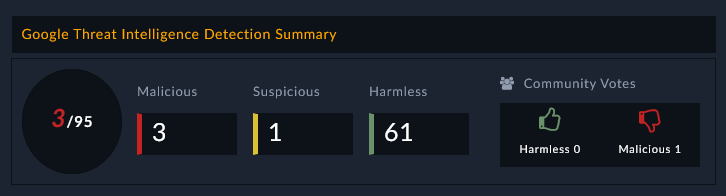 |
Google Threat Intelligence is a cloud-based threat intelligence service provided by Google (via Google Cloud) that helps organizations gain visibility into threat actors, attacks, and indicators of compromise (IOCs). This connector facilitates the automated operations related to analyze retro hunts, search intelligence, livehunt notifications, livehunt rulesets, and download files from Google Threat Intelligence.
This document provides information about the Google Threat Intelligence connector, which facilitates automated interactions, with a Google Threat Intelligence server using FortiSOAR™ playbooks. Add the Google Threat Intelligence connector as a step in FortiSOAR™ playbooks and perform automated operations with Google Threat Intelligence.
Connector Version: 1.0.0
FortiSOAR™ Version Tested on: 7.6.4-5623
Google Threat Intelligence Version Tested on: Cloud instance
Authored By: Fortinet
Certified: Yes
Use the Content Hub to install the connector. For the detailed procedure to install a connector, click here.
You can also use the yum command to install the connector:
sudo yum install cyops-connector-google-threat-intelligenceYou must have the credentials of Google Threat Intelligence server to which you will connect and perform automated operations.
The FortiSOAR™ server should have outbound connectivity to port 443 on the Google Threat Intelligence server.
Not applicable
For the procedure to configure a connector, click here.
In FortiSOAR™, on the Connectors page, click the Google Threat Intelligence connector row (if you are in the Grid view on the Connectors page) and in the Configurations tab enter the required configuration details:
| Parameter | Description |
|---|---|
| Server URL | Specify the server URL of the Google Threat Intelligence server to which you will connect and perform the automated operations. |
| API Key | Specify the API key that is configured for your account to access the Google Threat Intelligence server. |
| Verify SSL | Specifies whether the SSL certificate for the server is to be verified. By default, this option is selected, i.e., set to true. |
You can use the following automated operations in playbooks and also use the annotations to access operations:
| Function | Description | Annotation and Category |
|---|---|---|
| Get Entities List | Retrieves a list of threats, reports, or vulnerabilities from Google Threat Intelligence based on the collection type, creation/modification date, and filter criteria that you have specified. | get_entities_list Investigation |
| Get Entities Details | Retrieves a specific info of threats, reports, or vulnerabilities from Google Threat Intelligence based on the Object ID that you have specified. | get_entities_details Investigation |
| Get Mitre Tactics and Techniques | Retrieves a list of MITRE tactics with their correspondent techniques that are associated with the threats, reports, or vulnerabilities from Google Threat Intelligence based on the Object ID that you have specified. | get_mitre_tactics_and_techniques Investigation |
| Get Widget Rendering URL | Retrieves a URL from Google Threat Intelligence that renders a widget within an iframe and is valid for three days. | get_widget_rendering_url Investigation |
| Submit File | Scans and analyzes files submitted to Google Threat Intelligence from FortiSOAR™ to determine if it is suspicious based on the Attachment ID or File IRI you have specified. | submit_file Investigation |
| Submit URL for Scanning | Scans and analyzes the URL submitted to Google Threat Intelligence to determine if it is suspicious based on the URL you have specified. | scan_url Investigation |
| Get IP Reputation | Retrieves an IP reputation report from Google Threat Intelligence to determine if it is suspicious based on the IP address you have specified. | get_ip_reputation Investigation |
| Get Domain Reputation | Retrieves a domain reputation report from Google Threat Intelligence to determine if it is suspicious based on the domain name you have specified. | get_domain_reputation Investigation |
| Get URL Reputation | Retrieves a URL reputation report from Google Threat Intelligence to determine if it is suspicious based on the URL you have specified. | get_url_reputation Investigation |
| Get File Reputation | Retrieves a file reputation report from Google Threat Intelligence to determine if it is suspicious based on the file hash value you have specified. | get_file_reputation Investigation |
| Get File Or URL Analysis Report | Retrieves details of a File or a URL analysis from Google Threat Intelligence based on the File or URL that you have specified for scanning and analysis. | analysis_file Investigation |
| Download File | Downloads a file from Google Threat Intelligence, to FortiSOAR™'s Attachments module, based on the hash value of the file you have specified. | download_file Investigation |
| Create ZIP File | Creates a password-protected ZIP file based on the hash values of the Google files and the password you have specified. | create_zip_file Investigation |
| Get ZIP File Status | Retrieves information about a ZIP file from Google Threat Intelligence based on the zip file ID you have specified. | get_zip_file_status Investigation |
| Get ZIP File URL | Retrieves a signed download URL from Google Threat Intelligence based on the zip file ID you have specified. Note: The retrieved URL expires after 1 hour. |
get_zip_file_url Investigation |
| Download ZIP File | Downloads a zip file from Google Threat Intelligence, to FortiSOAR™'s Attachments module, based on the zip file ID you have specified. | download_zip_file Investigation |
| Get PCAP File Behaviour | Retrieves a PCAP file from Google Threat Intelligence based on the report ID you have specified. A PCAP file is generated while analyzing a file's behavior in Google Threat Intelligence. | get_pcap_file_behaviour Investigation |
| Search Intelligence | Searches for files in Google Threat Intelligence based on a query and other filter criteria you have specified. | search_intelligence Investigation |
| Create Livehunt Ruleset | Creates a livehunt ruleset in Google Threat Intelligence based on the ruleset name, rules, and other input parameters that you have specified. | create_livehunt_ruleset Investigation |
| Get Livehunt Rulesets List | Retrieves a list of livehunt rulesets from Google Threat Intelligence based on a query and other filter criteria you have specified. | get_livehunt_rulesets_list Investigation |
| Get Livehunt Ruleset Details | Retrieves details for a specific livehunt ruleset from Google Threat Intelligence based on the ruleset ID you have specified. | get_livehunt_ruleset_details Investigation |
| Update Livehunt Ruleset | Updates a specific hunting livehunt ruleset in Google Threat Intelligence based on the ruleset ID, ruleset name, rules, and other input parameters that you have specified. | update_livehunt_ruleset Investigation |
| Delete Livehunt Ruleset | Deletes a specific livehunt ruleset from Google Threat Intelligence based on the ruleset ID you have specified. | delete_livehunt_ruleset Investigation |
| Create Retrohunt Job | Creates a retro-hunt job in Google Threat Intelligence based on the rules, and other input parameters that you have specified. | create_retrohunt_job Investigation |
| Abort Retrohunt Job | Aborts a specific retro-hunt job in Google Threat Intelligence based on the job ID you have specified. | abort_retrohunt_job Investigation |
| Get Retrohunt Jobs List | Retrieves a list of all retro-hunt jobs from Google Threat Intelligence based on a query and other filter criteria you have specified. | get_retrohunt_jobs_list Investigation |
| Get Retrohunt Job Details | Retrieves details for a specific retro-hunt job from Google Threat Intelligence based on the job ID you have specified. | get_retrohunt_job_details Investigation |
| Get Retrohunt Job Matching Files | Retrieves a list of all retro-hunt job matching files from Google Threat Intelligence based on the job ID and other filter criteria you have specified.. | get_retrohunt_job_matching_files Investigation |
| Delete Retrohunt Job | Deletes a specific retro-hunt job from Google Threat Intelligence based on the retro-hunt job ID you have specified. | delete_retrohunt_job Investigation |
| Execute an API Request | Sends an API request to an API endpoint based on specified HTTP method, endpoint, and other input parameters that you have specified, enabling flexible API interactions tailored to user needs. | execute_an_api_call Investigation |
| Parameter | Description |
|---|---|
| Collection Type | (Optional) Select the type of the collection based on which you want to retrieve entities from Google Threat Intelligence. You can choose from the following options: Collection, Threat Actor, Malware Family, Software Toolkit, Campaign, Report, or Vulnerability. |
| Created/Last Modified After | (Optional) Select a date and time to retrieve entities that include only those items that were created/last modified after the specified timestamp. |
| Origin Type | (Optional) Select the type of the origin based on which you want to retrieve entities from Google Threat Intelligence. You can choose from the following options: Partner, Crowdsourced, or Google Threat Intelligence. |
| Limit | (Optional) Specify the maximum number of results this operation should return, per page, in the response. By default, this is set to 10 and maximum limit is 40. |
| Cursor | (Optional) Specify the next page cursor to fetch the next set of records. The next page cursor value can be retrieved from the previous API response. |
The output contains the following populated JSON schema:
{
  "data": [
      {
          "id": "",
          "type": "",
          "links": {
              "self": ""
          },
          "attributes": {
              "cwe": {
                  "id": "",
                  "title": ""
              },
              "cpes": [
                  {
                      "end_cpe": {
                          "uri": "",
                          "vendor": "",
                          "product": "",
                          "version": ""
                      },
                      "end_rel": "",
                      "start_cpe": {
                          "uri": "",
                          "vendor": "",
                          "product": "",
                          "version": ""
                      },
                      "start_rel": ""
                  }
              ],
              "cvss": {
                  "cvssv3_x": {
                      "vector": "",
                      "base_score": "",
                      "temporal_score": ""
                  }
              },
              "epss": {
                  "score": "",
                  "percentile": ""
              },
              "name": "",
              "tags": [],
              "cve_id": "",
              "mve_id": "",
              "origin": "",
              "status": "",
              "private": "",
              "sources": [
                  {
                      "md5": "",
                      "url": "",
                      "cvss": {
                          "cvssv2_0": "",
                          "cvssv3_x": "",
                          "cvssv4_x": "",
                          "cvssv3_x_translated": ""
                      },
                      "name": "",
                      "title": "",
                      "unique_id": "",
                      "published_date": "",
                      "source_description": ""
                  }
              ],
              "analysis": "",
              "counters": {
                  "iocs": "",
                  "urls": "",
                  "files": "",
                  "domains": "",
                  "subscribers": "",
                  "ip_addresses": "",
                  "attack_techniques": ""
              },
              "priority": "",
              "alt_names": [],
              "urls_count": "",
              "description": "",
              "files_count": "",
              "mitigations": [],
              "motivations": [],
              "risk_rating": "",
              "workarounds": [],
              "aggregations": {},
              "capabilities": [],
              "exploitation": {
                  "first_exploitation": "",
                  "exploit_release_date": "",
                  "tech_details_release_date": ""
              },
              "risk_factors": [],
              "tags_details": [],
              "technologies": [],
              "threat_scape": [],
              "top_icon_md5": [],
              "creation_date": "",
              "days_to_patch": "",
              "domains_count": "",
              "field_sources": [
                  {
                      "field": "",
                      "source": {
                          "sources": [
                              {
                                  "source_urls": [],
                                  "source_names": [
                                      ""
                                  ]
                              }
                          ],
                          "field_type": "",
                          "source_url": "",
                          "source_name": ""
                      }
                  }
              ],
              "malware_roles": [],
              "merged_actors": [],
              "collection_type": "",
              "detection_names": [],
              "version_history": [
                  {
                      "date": "",
                      "version_notes": []
                  }
              ],
              "affected_systems": [],
              "collection_links": [],
              "intended_effects": [],
              "mati_genids_dict": {
                  "cve_id": "",
                  "mve_id": "",
                  "report_id": ""
              },
              "references_count": "",
              "targeted_regions": [],
              "alt_names_details": [],
              "executive_summary": "",
              "last_seen_details": [],
              "operating_systems": [],
              "subscribers_count": "",
              "autogenerated_tags": [],
              "date_of_disclosure": "",
              "exploitation_state": "",
              "first_seen_details": [],
              "ip_addresses_count": "",
              "targeted_industries": [],
              "vulnerable_products": "",
              "available_mitigation": [],
              "exploit_availability": "",
              "exploitation_vectors": [],
              "is_content_translated": "",
              "predicted_risk_rating": "",
              "targeted_informations": [],
              "vendor_fix_references": [
                  {
                      "md5": "",
                      "url": "",
                      "cvss": "",
                      "name": "",
                      "title": "",
                      "unique_id": "",
                      "published_date": "",
                      "source_description": ""
                  }
              ],
              "last_modification_date": "",
              "recent_activity_summary": [],
              "exploitation_consequence": "",
              "source_regions_hierarchy": [],
              "targeted_industries_tree": [],
              "targeted_regions_hierarchy": []
          },
          "context_attributes": {
              "role": "",
              "snippet": "",
              "shared_with_me": ""
          }
      }
  ],
  "meta": {
      "count": "",
      "cursor": ""
  },
  "links": {
      "next": "",
      "self": ""
  }
}| Parameter | Description |
|---|---|
| Object ID | Specify the ID of the object whose details are to be retrieved from Google Threat Intelligence. Note: You can retrieve the object ID from the Get Entities List action. |
The output contains the following populated JSON schema:
{
  "data": {
      "id": "",
      "type": "",
      "links": {
          "self": ""
      },
      "attributes": {
          "cwe": {
              "id": "",
              "title": ""
          },
          "cpes": [
              {
                  "end_cpe": {
                      "uri": "",
                      "vendor": "",
                      "product": "",
                      "version": ""
                  },
                  "end_rel": "",
                  "start_cpe": {
                      "uri": "",
                      "vendor": "",
                      "product": "",
                      "version": ""
                  },
                  "start_rel": ""
              }
          ],
          "cvss": {
              "cvssv3_x": {
                  "vector": "",
                  "base_score": "",
                  "temporal_score": ""
              }
          },
          "epss": {
              "score": "",
              "percentile": ""
          },
          "name": "",
          "tags": [],
          "cve_id": "",
          "mve_id": "",
          "origin": "",
          "status": "",
          "private": "",
          "sources": [
              {
                  "md5": "",
                  "url": "",
                  "cvss": {
                      "cvssv2_0": "",
                      "cvssv3_x": "",
                      "cvssv4_x": "",
                      "cvssv3_x_translated": ""
                  },
                  "name": "",
                  "title": "",
                  "unique_id": "",
                  "published_date": "",
                  "source_description": ""
              }
          ],
          "analysis": "",
          "counters": {
              "iocs": "",
              "urls": "",
              "files": "",
              "domains": "",
              "subscribers": "",
              "ip_addresses": "",
              "attack_techniques": ""
          },
          "priority": "",
          "alt_names": [],
          "urls_count": "",
          "description": "",
          "files_count": "",
          "mitigations": [],
          "motivations": [],
          "risk_rating": "",
          "workarounds": [],
          "aggregations": {},
          "capabilities": [],
          "exploitation": {
              "first_exploitation": "",
              "exploit_release_date": "",
              "tech_details_release_date": ""
          },
          "risk_factors": [],
          "tags_details": [],
          "technologies": [],
          "threat_scape": [],
          "top_icon_md5": [],
          "creation_date": "",
          "days_to_patch": "",
          "domains_count": "",
          "field_sources": [
              {
                  "field": "",
                  "source": {
                      "sources": [
                          {
                              "source_urls": [],
                              "source_names": [
                                  ""
                              ]
                          }
                      ],
                      "field_type": "",
                      "source_url": "",
                      "source_name": ""
                  }
              }
          ],
          "malware_roles": [],
          "merged_actors": [],
          "collection_type": "",
          "detection_names": [],
          "version_history": [
              {
                  "date": "",
                  "version_notes": []
              }
          ],
          "affected_systems": [],
          "collection_links": [],
          "intended_effects": [],
          "mati_genids_dict": {
              "cve_id": "",
              "mve_id": "",
              "report_id": ""
          },
          "references_count": "",
          "targeted_regions": [],
          "alt_names_details": [],
          "executive_summary": "",
          "last_seen_details": [],
          "operating_systems": [],
          "subscribers_count": "",
          "autogenerated_tags": [],
          "date_of_disclosure": "",
          "exploitation_state": "",
          "first_seen_details": [],
          "ip_addresses_count": "",
          "targeted_industries": [],
          "vulnerable_products": "",
          "available_mitigation": [],
          "exploit_availability": "",
          "exploitation_vectors": [],
          "is_content_translated": "",
          "predicted_risk_rating": "",
          "targeted_informations": [],
          "vendor_fix_references": [
              {
                  "md5": "",
                  "url": "",
                  "cvss": "",
                  "name": "",
                  "title": "",
                  "unique_id": "",
                  "published_date": "",
                  "source_description": ""
              }
          ],
          "last_modification_date": "",
          "recent_activity_summary": [],
          "exploitation_consequence": "",
          "source_regions_hierarchy": [],
          "targeted_industries_tree": [],
          "targeted_regions_hierarchy": []
      },
      "context_attributes": {
          "role": "",
          "snippet": "",
          "shared_with_me": ""
      }
  }
}| Parameter | Description |
|---|---|
| Object ID | Specify the ID of the object whose MITRE tactics and techniques are to be retrieved from Google Threat Intelligence. Note: You can retrieve the object ID from the Get Entities List action. |
The output contains the following populated JSON schema:
{
  "data": {
      "tactics": [
          {
              "id": "",
              "link": "",
              "name": "",
              "techniques": [
                  {
                      "id": "",
                      "link": "",
                      "name": "",
                      "count": "",
                      "source": [],
                      "description": ""
                  }
              ],
              "description": ""
          }
      ]
  }
}| Parameter | Description |
|---|---|
| Indicator | Specify the file hash (md5, sha1 or sha256), URL, IP address, or a Domain. |
| Theme | (Optional) You can select either Light or Dark as the widget theme. By default, it is set to Dark. |
| Primary Foreground Color | (Optional) Specify the theme for primary foreground color in hex notation. |
| Secondary Foreground Color | (Optional) Specify the theme for secondary foreground color in hex notation. |
| Tertiary Foreground Color | (Optional) Specify the theme for tertiary foreground color in hex notation. |
| Primary Background Color | (Optional) Specify the theme for primary background color in hex notation. |
| Secondary Background Color | (Optional) Specify the theme for secondary background color in hex notation. |
| Tertiary Background Color | (Optional) Specify the theme for tertiary background color in hex notation. |
| Theme Accent Color | (Optional) Specify the theme for accent color in hex notation. |
The output contains the following populated JSON schema:
{
  "data": {
      "url": "",
      "found": "",
      "detection_ratio": {
          "detections": "",
          "total": ""
      },
      "type": "",
      "id": ""
  }
}| Parameter | Description |
|---|---|
| Type | Specify the type of file to submit to Google Threat Intelligence for analysis. Type can be an Attachment ID or a File IRI. |
| Reference ID | Specify the reference ID to access the attachment metadata from the FortiSOAR™'s Attachments module. In the playbook, this defaults to the{{vars.attachment_id}} value or the {{vars.file_iri}} value. |
The output contains the following populated JSON schema:
{
  "id": "",
  "type": ""
}| Parameter | Description |
|---|---|
| URL | Specify the URL that you want to submit to Google Threat Intelligence for scanning. |
The output contains the following populated JSON schema:
{
  "type": "",
  "id": ""
}| Parameter | Description |
|---|---|
| IP | Specify the IP address for which to retrieve a Google Threat Intelligence report. |
| Relationships to Include | (Optional) Select the relationships such as Comments, Graphs, etc. that you want to include in the output of this operation. |
{
  "id": "",
  "type": "",
  "links": {
      "self": ""
  },
  "attributes": {
      "rdap": {
          "name": "",
          "type": "",
          "links": [
              {
                  "rel": "",
                  "href": "",
                  "type": "",
                  "media": "",
                  "title": "",
                  "value": "",
                  "href_lang": []
              }
          ],
          "events": [
              {
                  "links": [],
                  "event_date": "",
                  "event_actor": "",
                  "event_action": ""
              }
          ],
          "handle": "",
          "port43": "",
          "status": [],
          "country": "",
          "notices": [
              {
                  "type": "",
                  "links": [
                      {
                          "rel": "",
                          "href": "",
                          "type": "",
                          "media": "",
                          "title": "",
                          "value": "",
                          "href_lang": []
                      }
                  ],
                  "title": "",
                  "description": []
              }
          ],
          "remarks": [],
          "entities": [
              {
                  "url": "",
                  "lang": "",
                  "links": [
                      {
                          "rel": "",
                          "href": "",
                          "type": "",
                          "media": "",
                          "title": "",
                          "value": "",
                          "href_lang": []
                      }
                  ],
                  "roles": [],
                  "events": [],
                  "handle": "",
                  "port43": "",
                  "status": [],
                  "autnums": [],
                  "remarks": [],
                  "entities": [],
                  "networks": [],
                  "public_ids": [],
                  "vcard_array": [
                      {
                          "name": "",
                          "type": "",
                          "values": [],
                          "parameters": {}
                      }
                  ],
                  "as_event_actor": [],
                  "rdap_conformance": [],
                  "object_class_name": ""
              }
          ],
          "ip_version": "",
          "cidr0_cidrs": [
              {
                  "length": "",
                  "v4prefix": "",
                  "v6prefix": ""
              }
          ],
          "end_address": "",
          "parent_handle": "",
          "start_address": "",
          "rdap_conformance": [],
          "object_class_name": "",
          "arin_originas0_originautnums": []
      },
      "asn": "",
      "jarm": "",
      "tags": [],
      "whois": {
          "raw": [],
          "data": ""
      },
      "country": "",
      "network": "",
      "as_owner": "",
      "reputation": "",
      "whois_date": "",
      "total_votes": {
          "harmless": "",
          "malicious": ""
      },
      "last_analysis_date": "",
      "last_analysis_stats": {
          "timeout": "",
          "harmless": "",
          "malicious": "",
          "suspicious": "",
          "undetected": ""
      },
      "last_analysis_results": {},
      "last_https_certificate": {
          "size": "",
          "tags": [],
          "issuer": {},
          "subject": {},
          "version": "",
          "validity": {
              "not_after": "",
              "not_before": ""
          },
          "extensions": {
              "CA": "",
              "tags": [],
              "key_usage": [],
              "extended_key_usage": [],
              "certificate_policies": [],
              "ca_information_access": {},
              "subject_key_identifier": "",
              "crl_distribution_points": [],
              "authority_key_identifier": {
                  "keyid": ""
              },
              "subject_alternative_name": []
          },
          "public_key": {},
          "thumbprint": "",
          "serial_number": "",
          "cert_signature": {
              "signature": "",
              "signature_algorithm": ""
          },
          "thumbprint_sha256": "",
          "signature_algorithm": ""
      },
      "last_modification_date": "",
      "last_https_certificate_date": ""
  }
}| Parameter | Description |
|---|---|
| Domain | Specify the domain name for which you want to retrieve a Google Threat Intelligence report. |
| Relationships to Include | (Optional) Select the relationships such as Comments, Graphs, etc. that you want to include in the output of this operation. |
{
  "id": "",
  "type": "",
  "links": {
      "self": ""
  },
  "attributes": {
      "tld": "",
      "jarm": "",
      "tags": [],
      "whois": {
          "raw": [],
          "data": ""
      },
      "favicon": {
          "dhash": "",
          "raw_md5": ""
      },
      "categories": {},
      "reputation": "",
      "whois_date": "",
      "total_votes": {
          "harmless": "",
          "malicious": ""
      },
      "last_dns_records": [],
      "popularity_ranks": {},
      "last_analysis_date": "",
      "last_analysis_stats": {
          "timeout": "",
          "harmless": "",
          "malicious": "",
          "suspicious": "",
          "undetected": ""
      },
      "last_analysis_results": {},
      "last_dns_records_date": "",
      "last_https_certificate": {
          "size": "",
          "tags": [],
          "issuer": {
          },
          "subject": {
          },
          "version": "",
          "validity": {
              "not_after": "",
              "not_before": ""
          },
          "extensions": {
              "CA": "",
              "tags": [],
              "key_usage": [],
              "extended_key_usage": [],
              "certificate_policies": [],
              "ca_information_access": {
                  "OCSP": "",
                  "CA Issuers": ""
              },
              "subject_key_identifier": "",
              "authority_key_identifier": {
                  "keyid": ""
              },
              "subject_alternative_name": []
          },
          "public_key": {
          },
          "thumbprint": "",
          "serial_number": "",
          "cert_signature": {
              "signature": "",
              "signature_algorithm": ""
          },
          "thumbprint_sha256": "",
          "signature_algorithm": ""
      },
      "last_modification_date": "",
      "last_https_certificate_date": ""
  }
}| Parameter | Description |
|---|---|
| URL | Specify the URL for which you want to retrieve a Google Threat Intelligence report. |
| Relationships to Include | (Optional) Select the relationships such as Comments, Graphs, etc. that you want to include in the output of this operation. |
{
  "id": "",
  "type": "",
  "links": {
      "self": ""
  },
  "attributes": {
      "tld": "",
      "url": "",
      "tags": [],
      "favicon": {
          "dhash": "",
          "raw_md5": ""
      },
      "categories": {},
      "reputation": "",
      "has_content": "",
      "total_votes": {
          "harmless": "",
          "malicious": ""
      },
      "threat_names": [],
      "last_final_url": "",
      "times_submitted": "",
      "redirection_chain": [],
      "last_analysis_date": "",
      "last_analysis_stats": {
          "timeout": "",
          "harmless": "",
          "malicious": "",
          "suspicious": "",
          "undetected": ""
      },
      "last_submission_date": "",
      "first_submission_date": "",
      "last_analysis_results": {},
      "last_modification_date": "",
      "last_http_response_code": "",
      "last_http_response_headers": {},
      "last_http_response_content_length": "",
      "last_http_response_content_sha256": ""
  }
}| Parameter | Description |
|---|---|
| File Hash | Specify the File Hash of the file for which you want to retrieve a Google Threat Intelligence report. |
| Relationships to Include | (Optional) Select the relationships such as Comments, Graphs, etc. that you want to include in the output of this operation. |
{
  "id": "",
  "type": "",
  "links": {
      "self": ""
  },
  "attributes": {
      "md5": "",
      "sha1": "",
      "size": "",
      "tags": [],
      "trid": [],
      "magic": "",
      "names": [],
      "vhash": "",
      "sha256": "",
      "ssdeep": "",
      "pe_info": {
          "imphash": "",
          "overlay": {
              "md5": "",
              "chi2": "",
              "size": "",
              "offset": "",
              "entropy": "",
              "filetype": ""
          },
          "sections": [],
          "timestamp": "",
          "entry_point": "",
          "import_list": [],
          "machine_type": ""
      },
      "type_tag": "",
      "type_tags": [],
      "reputation": "",
      "total_votes": {
          "harmless": "",
          "malicious": ""
      },
      "authentihash": "",
      "downloadable": "",
      "bytehero_info": "",
      "creation_date": "",
      "type_extension": "",
      "unique_sources": "",
      "times_submitted": "",
      "type_description": "",
      "capabilities_tags": [],
      "last_analysis_date": "",
      "last_analysis_stats": {
          "failure": "",
          "timeout": "",
          "harmless": "",
          "malicious": "",
          "suspicious": "",
          "undetected": "",
          "type-unsupported": "",
          "confirmed-timeout": ""
      },
      "last_submission_date": "",
      "first_submission_date": "",
      "last_analysis_results": {},
      "last_modification_date": "",
      "popular_threat_classification": {
          "popular_threat_name": [],
          "suggested_threat_label": "",
          "popular_threat_category": []
      }
  }
}| Parameter | Description |
|---|---|
| Type | (Optional) Select the type, either File or URL, whose analysis details you want to retrieve from Google Threat Intelligence. |
| Analysis ID | Specify the ID of the File or URL analysis whose details you want to retrieve from Google Threat Intelligence. Note: To retrieve the analysis ID, you can use the Submit File or Submit URL for Scanning operation. |
The output contains the following populated JSON schema:
Output schema when you choose Type as File:
{
  "meta": {
      "file_info": {
          "size": "",
          "sha1": "",
          "sha256": "",
          "md5": ""
      }
  },
  "data": {
      "attributes": {
          "date": "",
          "status": "",
          "stats": {
              "harmless": "",
              "type-unsupported": "",
              "suspicious": "",
              "confirmed-timeout": "",
              "timeout": "",
              "failure": "",
              "malicious": "",
              "undetected": ""
          },
          "results": {}
      },
      "type": "",
      "id": "",
      "links": {
          "item": "",
          "self": ""
      }
  }
}
Output schema when you choose Type as URL:
{
  "meta": {
      "url_info": {
          "url": "",
          "id": ""
      }
  },
  "data": {
      "attributes": {
          "date": "",
          "status": "",
          "stats": {
              "harmless": "",
              "malicious": "",
              "suspicious": "",
              "undetected": "",
              "timeout": ""
          },
          "results": {}
      },
      "type": "",
      "id": "",
      "links": {
          "item": "",
          "self": ""
      }
  }
}| Parameter | Description |
|---|---|
| Hash Value | Specify the SHA-256, SHA-1, or MD5 of the file for which you want to retrieve a Google Threat Intelligence report. |
The output contains the following populated JSON schema:
{
  "id": "",
  "@id": "",
  "file": {
      "id": "",
      "@id": "",
      "size": "",
      "uuid": "",
      "@type": "",
      "assignee": "",
      "filename": "",
      "metadata": [],
      "mimeType": "",
      "thumbnail": "",
      "uploadDate": ""
  },
  "name": "",
  "type": "",
  "uuid": "",
  "@type": "",
  "tasks": [],
  "alerts": [],
  "assets": [],
  "owners": [],
  "people": [],
  "@context": "",
  "assignee": "",
  "comments": [],
  "warrooms": [],
  "incidents": [],
  "createDate": "",
  "createUser": {
      "id": "",
      "@id": "",
      "name": "",
      "uuid": "",
      "@type": "",
      "avatar": "",
      "userId": "",
      "userType": "",
      "createDate": "",
      "createUser": "",
      "modifyDate": "",
      "modifyUser": ""
  },
  "indicators": [],
  "modifyDate": "",
  "modifyUser": {
      "id": "",
      "@id": "",
      "name": "",
      "uuid": "",
      "@type": "",
      "avatar": "",
      "userId": "",
      "userType": "",
      "createDate": "",
      "createUser": "",
      "modifyDate": "",
      "modifyUser": ""
  },
  "recordTags": [],
  "userOwners": [],
  "description": ""
}| Parameter | Description |
|---|---|
| Hashes | Specify a list of comma-separated hash values of files to create a zip file in Google Threat Intelligence. |
| Password | (Optional) Specify a password for protecting the ZIP file that is being created with Google files. |
The output contains the following populated JSON schema:
{
  "attributes": {
      "status": "",
      "files_error": "",
      "files_ok": "",
      "progress": ""
  },
  "type": "",
  "id": "",
  "links": {
      "self": ""
  }
}| Parameter | Description |
|---|---|
| ZIP File ID | Specify the file identifier of the ZIP file whose information is to be retrieved from Google Threat Intelligence. |
The output contains the following populated JSON schema:
{
  "attributes": {
      "status": "",
      "files_error": "",
      "files_ok": "",
      "progress": ""
  },
  "type": "",
  "id": "",
  "links": {
      "self": ""
  }
}| Parameter | Description |
|---|---|
| ZIP File ID | Specify the file identifier of the ZIP file whose signed URL is to be retrieved from Google Threat Intelligence. |
The output contains the following populated JSON schema:
{
  "url": ""
}| Parameter | Description |
|---|---|
| ZIP File ID | Specify the file identifier of the ZIP file that you want to download from Google Threat Intelligence. |
The output contains the following populated JSON schema:
{
  "id": "",
  "@id": "",
  "file": {
      "id": "",
      "@id": "",
      "size": "",
      "uuid": "",
      "@type": "",
      "assignee": "",
      "filename": "",
      "metadata": [],
      "mimeType": "",
      "thumbnail": "",
      "uploadDate": ""
  },
  "name": "",
  "type": "",
  "uuid": "",
  "@type": "",
  "tasks": [],
  "alerts": [],
  "assets": [],
  "owners": [],
  "people": [],
  "@context": "",
  "assignee": "",
  "comments": [],
  "warrooms": [],
  "incidents": [],
  "createDate": "",
  "createUser": {
      "id": "",
      "@id": "",
      "name": "",
      "uuid": "",
      "@type": "",
      "avatar": "",
      "userId": "",
      "userType": "",
      "createDate": "",
      "createUser": "",
      "modifyDate": "",
      "modifyUser": ""
  },
  "indicators": [],
  "modifyDate": "",
  "modifyUser": {
      "id": "",
      "@id": "",
      "name": "",
      "uuid": "",
      "@type": "",
      "avatar": "",
      "userId": "",
      "userType": "",
      "createDate": "",
      "createUser": "",
      "modifyDate": "",
      "modifyUser": ""
  },
  "recordTags": [],
  "userOwners": [],
  "description": ""
}| Parameter | Description |
|---|---|
| Report ID | Specify the report ID of the sandbox from which to retrieve the PCAP file. A PCAP file is generated while analyzing the file's behavior in Google Threat Intelligence. |
The output contains a non-dictionary value.
| Parameter | Description |
|---|---|
| Query | Specify a query as a key:value pair using which to search files in Google Threat Intelligence. For example, content: "hello World". |
| Order By | (Optional) Specify the order in which you want to sort the results retrieved from Google Threat Intelligence. Note: If your Query parameter contains content search, then the Order parameter does not have any effect. |
| Limit | (Optional) Specify the maximum number of results this operation should return, per page, in the response. By default, this is set to 10 and maximum limit is 300. |
| Descriptors Only | (Optional) Select this option to return the full object information. Clear this option (default) to return just the object descriptors. |
| Cursor | (Optional) Specify this parameter only if the previous operation returned a partial result. If a previous response contains a cursor element, then the value of the cursor element includes a cursor parameter that specifies a starting point to use for subsequent calls. |
The output contains the following populated JSON schema:
{
  "meta": {
      "cursor": "",
      "days_back": ""
  },
  "data": [
      {
          "attributes": {
              "type_description": "",
              "tlsh": "",
              "vhash": "",
              "exiftool": {
                  "ZipRequiredVersion": "",
                  "MIMEType": "",
                  "ZipCRC": "",
                  "FileType": "",
                  "ZipCompression": "",
                  "ZipUncompressedSize": "",
                  "ZipCompressedSize": "",
                  "FileTypeExtension": "",
                  "ZipFileName": "",
                  "ZipBitFlag": "",
                  "ZipModifyDate": ""
              },
              "trid": [
                  {
                      "file_type": "",
                      "probability": ""
                  }
              ],
              "crowdsourced_yara_results": [
                  {
                      "description": "",
                      "source": "",
                      "author": "",
                      "ruleset_name": "",
                      "rule_name": "",
                      "ruleset_id": ""
                  }
              ],
              "names": [],
              "last_modification_date": "",
              "type_tag": "",
              "times_submitted": "",
              "total_votes": {
                  "harmless": "",
                  "malicious": ""
              },
              "size": "",
              "type_extension": "",
              "last_submission_date": "",
              "last_analysis_results": {},
              "downloadable": "",
              "sha256": "",
              "tags": [],
              "last_analysis_date": "",
              "unique_sources": "",
              "first_submission_date": "",
              "sha1": "",
              "ssdeep": "",
              "bundle_info": {
                  "highest_datetime": "",
                  "lowest_datetime": "",
                  "num_children": "",
                  "extensions": {
                      "dex": "",
                      "xml": "",
                      "MF": "",
                      "png": "",
                      "zip": "",
                      "RSA": "",
                      "jpg": "",
                      "swf": "",
                      "dat": "",
                      "so": "",
                      "mp3": "",
                      "ttf": "",
                      "ogg": "",
                      "txt": "",
                      "sg": "",
                      "SF": "",
                      "pbk": "",
                      "pbj": ""
                  },
                  "file_types": {
                      "XML": "",
                      "DEX": "",
                      "ZIP": "",
                      "unknown": "",
                      "ELF": "",
                      "JPG": "",
                      "MP3": "",
                      "OGG": "",
                      "PNG": ""
                  },
                  "type": "",
                  "uncompressed_size": ""
              },
              "md5": "",
              "androguard": {
                  "VTAndroidInfo": "",
                  "Libraries": [],
                  "AndroidApplicationError": "",
                  "MinSdkVersion": "",
                  "AndroguardVersion": "",
                  "Activities": [],
                  "certificate": {
                      "Subject": {
                          "DN": "",
                          "CN": ""
                      },
                      "validto": "",
                      "serialnumber": "",
                      "thumbprint": "",
                      "validfrom": "",
                      "Issuer": {
                          "DN": "",
                          "CN": ""
                      }
                  },
                  "AndroidApplication": "",
                  "RiskIndicator": {
                      "APK": {
                          "SHARED LIBRARIES": ""
                      },
                      "PERM": {
                          "DANGEROUS": "",
                          "INTERNET": "",
                          "INSTANT": "",
                          "NORMAL": ""
                      }
                  },
                  "Services": [],
                  "AndroidVersionCode": "",
                  "main_activity": "",
                  "Package": "",
                  "intent_filters": {},
                  "AndroidVersionName": "",
                  "TargetSdkVersion": "",
                  "AndroidApplicationInfo": "",
                  "Providers": [],
                  "permission_details": {},
                  "Receivers": [],
                  "StringsInformation": []
              },
              "magic": "",
              "last_analysis_stats": {
                  "harmless": "",
                  "type-unsupported": "",
                  "suspicious": "",
                  "confirmed-timeout": "",
                  "timeout": "",
                  "failure": "",
                  "malicious": "",
                  "undetected": ""
              },
              "meaningful_name": "",
              "reputation": ""
          },
          "type": "",
          "id": "",
          "links": {
              "self": ""
          },
          "context_attributes": {
              "snippet": "",
              "confidence": "",
              "match_in_subfile": ""
          }
      }
  ],
  "links": {
      "self": "",
      "next": ""
  }
}| Parameter | Description |
|---|---|
| Ruleset Name | Specify the name of the livehunt ruleset to create in Google Threat Intelligence. |
| Rules | Specify the rules based on which to create the livehunt ruleset in Google Threat Intelligence. |
| Enabled | (Optional) Select this option (default) to enable the livehunt ruleset being created in Google Threat Intelligence. |
| Limit | (Optional) Specify the maximum number of results this operation should return, per page, in the response. By default, this is set to 100. |
| Notification Emails | (Optional) Specify a list of comma-separated notification emails to create the livehunt ruleset in Google Threat Intelligence. |
The output contains the following populated JSON schema:
{
  "attributes": {
      "name": "",
      "modification_date": "",
      "rules": "",
      "enabled": "",
      "rate_limited": "",
      "creation_date": "",
      "rule_names": [],
      "limit": "",
      "rate_limited_ratio": "",
      "notification_emails": [],
      "number_of_rules": ""
  },
  "type": "",
  "id": "",
  "links": {
      "self": ""
  }
}| Parameter | Description |
|---|---|
| Filter | (Optional) Specify a filter using values of certain attributes, for example, filter=enabled:true, based on which to filter the retrieved livehunt rulesets from Google Threat Intelligence. |
| Order By | (Optional) Specify the order in which you want to sort the results retrieved from Google Threat Intelligence. Note: If your Query parameter contains content search, then the Order parameter does not have any effect. |
| Limit | (Optional) Specify the maximum number of results this operation should return, per page, in the response. By default, this is set to 10 and maximum allowed limit is 40. |
| Cursor | (Optional) Specify this parameter only if the previous operation returned a partial result. If a previous response contains a cursor element, then the value of the cursor element includes a cursor parameter that specifies a starting point to use for subsequent calls. |
The output contains the following populated JSON schema:
{
  "meta": {
      "count": "",
      "cursor": ""
  },
  "data": [
      {
          "attributes": {
              "name": "",
              "modification_date": "",
              "rules": "",
              "enabled": "",
              "rate_limited": "",
              "creation_date": "",
              "rule_names": [],
              "limit": "",
              "rate_limited_ratio": "",
              "notification_emails": [],
              "number_of_rules": ""
          },
          "type": "",
          "id": "",
          "links": {
              "self": ""
          }
      }
  ],
  "links": {
      "self": "",
      "next": ""
  }
}| Parameter | Description |
|---|---|
| Ruleset ID | Specify the ID of the livehunt ruleset for which to retrieve details from Google Threat Intelligence. |
The output contains the following populated JSON schema:
{
  "attributes": {
      "name": "",
      "modification_date": "",
      "rules": "",
      "enabled": "",
      "rate_limited": "",
      "creation_date": "",
      "rule_names": [],
      "limit": "",
      "rate_limited_ratio": "",
      "notification_emails": [],
      "number_of_rules": ""
  },
  "type": "",
  "id": "",
  "links": {
      "self": ""
  }
}| Parameter | Description |
|---|---|
| Ruleset ID | Specify the ID of the livehunt ruleset that you want to update in Google Threat Intelligence. |
| Ruleset Name | Specify the name of the livehunt ruleset to update in Google Threat Intelligence. |
| Rules | Specify the rules to update the hunting livehunt ruleset in Google Threat Intelligence. |
| Enabled | (Optional) Select this option (default) to enable the livehunt ruleset that you want to update in Google Threat Intelligence. |
| Limit | (Optional) Specify the maximum number of results this operation should return, per page, in the response. By default, this is set to 100. |
| Notification Emails | (Optional) Specify a list of comma-separated notification emails to update the livehunt ruleset in Google Threat Intelligence. |
The output contains the following populated JSON schema:
{
  "attributes": {
      "name": "",
      "modification_date": "",
      "rules": "",
      "enabled": "",
      "rate_limited": "",
      "creation_date": "",
      "rule_names": [],
      "limit": "",
      "rate_limited_ratio": "",
      "notification_emails": [],
      "number_of_rules": ""
  },
  "type": "",
  "id": "",
  "links": {
      "self": ""
  }
}| Parameter | Description |
|---|---|
| Ruleset ID | Specify the ID of the livehunt ruleset to remove from Google Threat Intelligence. |
The output contains the following populated JSON schema:
{
  "message": ""
}| Parameter | Description |
|---|---|
| Rules | Specify the rules based on which to create the retro-hunt job in Google Threat Intelligence. |
| Notification Emails | (Optional) Specify a list of comma-separated notifications emails using which to create the retro-hunt job in Google Threat Intelligence. |
| Corpus | (Optional) Select the dataset to scan with the job being created in Google Threat Intelligence. You can choose from Main or GoodWare. |
| Start Time | (Optional) Specify the start date and time of the retro-hunt job being created in Google Threat Intelligence. |
| End Time | (Optional) Specify the end date and time of the retro-hunt job being created in Google Threat Intelligence. |
The output contains the following populated JSON schema:
{
  "attributes": {
      "status": "",
      "rules": "",
      "num_matches_outside_time_range": "",
      "scanned_bytes": "",
      "creation_date": "",
      "progress": "",
      "time_range": {
          "start": "",
          "end": ""
      },
      "num_matches": "",
      "notification_email": "",
      "corpus": ""
  },
  "type": "",
  "id": "",
  "links": {
      "self": ""
  }
}| Parameter | Description |
|---|---|
| Job ID | Specify the ID of the retro-hunt job to abort in Google Threat Intelligence. |
The output contains a non-dictionary value.
| Parameter | Description |
|---|---|
| Filter | (Optional) Specify a filter using values of certain attributes, for example, filter=tag:my_rule, based on which you want to filter the retro-hunt jobs retrieved from Google Threat Intelligence. |
| Limit | (Optional) Specify the maximum number of results this operation should return, per page, in the response. By default, this is set to 10 and maximum allowed limit is 40. |
| Cursor | (Optional) Specify this parameter only if the previous operation returned a partial result. If a previous response contains a cursor element, then the value of the cursor element includes a cursor parameter that specifies a starting point to use for subsequent calls. |
The output contains the following populated JSON schema:
{
  "meta": {
      "count": ""
  },
  "data": [
      {
          "attributes": {
              "status": "",
              "rules": "",
              "num_matches_outside_time_range": "",
              "corpus": "",
              "scanned_bytes": "",
              "eta_seconds": "",
              "num_matches": "",
              "progress": "",
              "time_range": {
                  "start": "",
                  "end": ""
              },
              "notification_email": "",
              "creation_date": "",
              "start_date": ""
          },
          "type": "",
          "id": "",
          "links": {
              "self": ""
          }
      }
  ],
  "links": {
      "self": ""
  }
}| Parameter | Description |
|---|---|
| Job ID | Specify the ID of the retro-hunt job whose details to retrieve from Google Threat Intelligence. |
The output contains the following populated JSON schema:
{
  "data": {
      "attributes": {
          "status": "",
          "finish_date": "",
          "rules": "",
          "num_matches_outside_time_range": "",
          "scanned_bytes": "",
          "creation_date": "",
          "num_matches": "",
          "progress": "",
          "notification_email": "",
          "corpus": ""
      },
      "type": "",
      "id": "",
      "links": {
          "self": ""
      }
  }
}| Parameter | Description |
|---|---|
| Job ID | Specify the ID of the retro-hunt job whose details are to be retrieved from Google Threat Intelligence. |
| Limit | (Optional) Specify the maximum number of results this operation should return, per page, in the response. By default, this is set to 10. |
| Cursor | (Optional) Specify this parameter only if the previous operation returned a partial result. If a previous response contains a cursor element, then the value of the cursor element includes a cursor parameter that specifies a starting point to use for subsequent calls. |
The output contains the following populated JSON schema:
{
  "meta": {
      "count": "",
      "cursor": ""
  },
  "data": [
      {
          "attributes": {
              "type_description": "",
              "tlsh": "",
              "vhash": "",
              "exiftool": {
                  "ZipRequiredVersion": "",
                  "MIMEType": "",
                  "ZipCRC": "",
                  "FileType": "",
                  "ZipCompression": "",
                  "ZipUncompressedSize": "",
                  "ZipCompressedSize": "",
                  "FileTypeExtension": "",
                  "ZipFileName": "",
                  "ZipBitFlag": "",
                  "ZipModifyDate": ""
              },
              "trid": [
                  {
                      "file_type": "",
                      "probability": ""
                  }
              ],
              "names": [],
              "last_modification_date": "",
              "type_tag": "",
              "times_submitted": "",
              "total_votes": {
                  "harmless": "",
                  "malicious": ""
              },
              "size": "",
              "type_extension": "",
              "last_submission_date": "",
              "last_analysis_results": {},
              "downloadable": "",
              "sha256": "",
              "tags": [],
              "last_analysis_date": "",
              "unique_sources": "",
              "first_submission_date": "",
              "sha1": "",
              "ssdeep": "",
              "bundle_info": {
                  "highest_datetime": "",
                  "lowest_datetime": "",
                  "num_children": "",
                  "extensions": {
                      "xml": "",
                      "dex": "",
                      "so": "",
                      "png": ""
                  },
                  "file_types": {
                      "XML": "",
                      "DEX": "",
                      "ELF": "",
                      "PNG": "",
                      "unknown": ""
                  },
                  "type": "",
                  "uncompressed_size": ""
              },
              "md5": "",
              "androguard": {
                  "VTAndroidInfo": "",
                  "Libraries": [],
                  "AndroidApplicationError": "",
                  "MinSdkVersion": "",
                  "AndroguardVersion": "",
                  "Activities": [],
                  "certificate": {
                      "Subject": {
                          "DN": "",
                          "C": "",
                          "CN": "",
                          "L": "",
                          "O": "",
                          "ST": "",
                          "OU": ""
                      },
                      "validto": "",
                      "serialnumber": "",
                      "thumbprint": "",
                      "validfrom": "",
                      "Issuer": {
                          "DN": "",
                          "C": "",
                          "CN": "",
                          "L": "",
                          "O": "",
                          "ST": "",
                          "OU": ""
                      }
                  },
                  "AndroidApplication": "",
                  "RiskIndicator": {
                      "APK": {
                          "DEX": "",
                          "SHARED LIBRARIES": ""
                      },
                      "PERM": {
                          "INSTANT": "",
                          "PRIVACY": "",
                          "DANGEROUS": "",
                          "NORMAL": "",
                          "INTERNET": "",
                          "GPS": ""
                      }
                  },
                  "Services": [],
                  "AndroidVersionCode": "",
                  "main_activity": "",
                  "Package": "",
                  "intent_filters": {
                      "Services": {},
                      "Activities": {},
                      "Receivers": {}
                  },
                  "AndroidVersionName": "",
                  "TargetSdkVersion": "",
                  "AndroidApplicationInfo": "",
                  "Providers": [],
                  "permission_details": {},
                  "Receivers": [],
                  "StringsInformation": []
              },
              "magic": "",
              "main_icon": {
                  "raw_md5": "",
                  "dhash": ""
              },
              "last_analysis_stats": {
                  "harmless": "",
                  "type-unsupported": "",
                  "suspicious": "",
                  "confirmed-timeout": "",
                  "timeout": "",
                  "failure": "",
                  "malicious": "",
                  "undetected": ""
              },
              "meaningful_name": "",
              "reputation": ""
          },
          "type": "",
          "id": "",
          "links": {
              "self": ""
          },
          "context_attributes": {
              "rule_name": "",
              "match_in_subfile": ""
          }
      }
  ],
  "links": {
      "self": "",
      "next": ""
  }
}| Parameter | Description |
|---|---|
| Job ID | Specify the ID of the retro-hunt job to delete from Google Threat Intelligence. |
The output contains the following populated JSON schema:
{
  "message": ""
}| Parameter | Description |
|---|---|
| HTTP Method | Select an HTTP action for the request. You can select from the following options: DELETE, GET, PATCH, POST, and PUT. |
| Endpoint | Specify the target API URL path for the request. For example, if the website is https://example.com and URL path is https://example.com/images/pic.jpg, the endpoint would be images/pic.jpg. |
| Query Parameters | (Optional) Specify any optional parameters to add to the URL and refine the request. |
| Request Payload | (Optional) Specify data, as JSON, to be sent as the request payload (typically for POST or PUT requests). |
The output contains a non-dictionary value.
The Sample - Google Threat Intelligence - 1.0.0 playbook collection comes bundled with the Google Threat Intelligence connector. These playbooks contain steps using which you can perform all supported actions. You can see bundled playbooks in the Automation > Playbooks section in FortiSOAR™ after importing the Google Threat Intelligence connector.
Abort Retrohunt Job
Create Livehunt Ruleset
Create Retrohunt Job
Create ZIP File
Delete Livehunt Ruleset
Delete Retrohunt Job
Domain > Google Threat Intelligence > Enrichment
Download File
Download ZIP File
Execute an API Request
File > Google Threat Intelligence > Enrichment
File Hash > Google Threat Intelligence > Enrichment
Get Domain Reputation
Get Entities Details
Get Entities List
Get File Or URL Analysis Report
Get File Reputation
Get IP Reputation
Get Livehunt Ruleset Details
Get Livehunt Rulesets List
Get Mitre Tactics and Techniques
Get PCAP File Behaviour
Get Retrohunt Job Details
Get Retrohunt Job Matching Files
Get Retrohunt Jobs List
Get URL Reputation
Get Widget Rendering URL
Get ZIP File Status
Get ZIP File URL
IP Address > Google Threat Intelligence > Enrichment
Search Intelligence
Submit File
Submit URL for Scanning
URL > Google Threat Intelligence > Enrichment
Update Livehunt Ruleset
Note: If you are planning to use any of the sample playbooks in your environment, ensure that you clone those playbooks and move them to a different collection since the sample playbook collection gets deleted during connector upgrade and delete.
The Sample - Google Threat Intelligence - 1.0.0 playbook collection contains pluggable enrichment playbooks that are used to provide verdicts for indicator types IP Address, File Hash, URL, and Domain. The pluggable enrichment playbooks are in the format: indicatorType > Google Threat Intelligence > Enrichment. For example, IP > Google Threat Intelligence > Enrichment.
The Configuration step in all the pluggable enrichment playbooks contains variables that have default values for calculating the Verdict for various indicator types.
NOTE: Create a global variable virus_total_premium_upload_file to manage the upload file operation performed by the File > Google Threat Intelligence > Enrichment playbook. The value true uploads the file to Google Threat Intelligence; false skips the upload.
The Google Threat Intelligence integration API response returns the verdict, cti_score, and enrichment_summary and other variables as listed in the following table:
| Variable Name | Description | Return Value |
|---|---|---|
verdict |
This connector returns a high-reliability value called verdict. Use this verdict to find the reputation of the various types of indicators. |
if the value in if the value in if the value in For any other value, return the verdict as No Reputation Available |
cti_name |
The name of the connector is called the CTI (Cyber Threat Intelligence) name | Google Threat Intelligence |
cti_score |
The verdict value is returned by the integration API. |
Returns the value contained in Returns the value in Returns |
source_data |
The source_data response is returned by the integration API. | A JSON response object containing the source data of the threat intelligence integration. |
field_mapping |
The mapping of the FortiSOAR Indicator module fields with the Google Threat Intelligence response fields. | A JSON response object containing the field mapping of the threat intelligence integration. |
enrichment_summary |
The contents are added, in the HTML format, in the Description field of the specified FortiSOAR indicator record. |
The following values are returned in the HTML format:
The following image displays a sample of the populated Description field in a FortiSOAR indicator record: |