
Fortinet white logo
Fortinet white logo

User Guide

Getting Started with Playbooks

Getting Started with Playbooks

FortiSIEM Automation Services allows you to design and run SOAR style playbooks, use connectors, and deploy lightweight agents inside FortiSIEM Collectors, or within the Cloud Automation Service, enabling automated enrichment and response across.

Overview and Key Components

  • FortiSIEM Automation Services: A built in integration layer that exposes a playbook engine, connector framework, and agent runtime to FortiSIEM platform.

  • Automation Service: The cloud SOAR service that hosts connectors, playbook design, and orchestration.

  • Playbooks: Reusable automation workflows (enrichment, triage, response) authored playbook designer.

  • Connectors: Prebuilt integrations (Fortinet and third party) that provide actions and data enrichment.

  • Automation Agents: Lightweight agents that execute connector actions and local tasks; these are deployed on the FortiSIEM supervisor (super) for integration, on collectors, or run from the Cloud Automation Service depending on where the action must execute (local network access, credential scope, or latency needs).

Recommended Small Scale Setup
  1. Plan Scope & Placement

    • Decide which playbooks need local access (e.g., blocking on a firewall) — those require agents on supervisor or collectors; cloud only enrichment can run from Cloud Automation Service.

  2. Install FortiSIEM Solution Pack / Playbooks

    • Deploy the FortiSIEM solution pack (playbooks/connectors) that includes some starting playbooks.

  3. Configure Connectors

    • Install and configure connectors (credentials, endpoints). For actions requiring local network access, install and register Automation Agents on the FortiSIEM Collectors and assign them to the connector.

  4. Map Alerts → Playbooks

    • In FortiSIEM, map correlation rules or incidents to Automation Services playbooks by ensuring rule tags and playbook tags map. This pre-filters the list of playbooks when executing on an incident.

      Playbooks within the default Solution Pack include Incident and Playbook tag mapping, however these can be expanded.

  5. Test & Iterate

    • Run test incidents, verify agent execution paths succeed as expected.

Relationship
  • FortiSIEM (alerts/incidents) → Automation ServicesCloud Automation Service (playbook engine & connectors) → Automation Agents (deployed on supervisor / collectors / cloud) → target systems (firewalls, endpoints).

Key Considerations, Risks, and Troubleshooting
  • Security: Protect API keys and agent credentials; use least privilege for connector accounts where possible.

  • Network: Automation Agents on supervisors/collectors are required when playbooks need LAN access or credentials that cannot be exposed to cloud.

  • Troubleshooting: Check agent registration, connector test results, and playbook logs in the FortiSIEM Automation Service. Ensure that FortiSIEM Super, Connectors running the Automation Agent and your browser has access to the FortiSOAR Cloud Platform via HTTPS outbound.

Running Playbooks

You can run playbooks from open Incidents within FortiSIEM:

  • When an Incident is selected, you can execute a playbook from the Incident slide in.
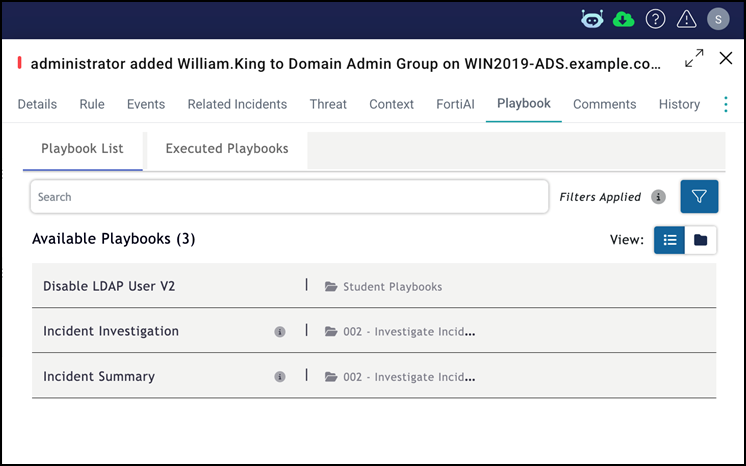

  • Playbooks can be scheduled to run and can be executed immediately from the Playbook Schedule.

  • Via a FortiSIEM Automation Policy.

Getting Started with Playbooks

Getting Started with Playbooks

FortiSIEM Automation Services allows you to design and run SOAR style playbooks, use connectors, and deploy lightweight agents inside FortiSIEM Collectors, or within the Cloud Automation Service, enabling automated enrichment and response across.

Overview and Key Components

  • FortiSIEM Automation Services: A built in integration layer that exposes a playbook engine, connector framework, and agent runtime to FortiSIEM platform.

  • Automation Service: The cloud SOAR service that hosts connectors, playbook design, and orchestration.

  • Playbooks: Reusable automation workflows (enrichment, triage, response) authored playbook designer.

  • Connectors: Prebuilt integrations (Fortinet and third party) that provide actions and data enrichment.

  • Automation Agents: Lightweight agents that execute connector actions and local tasks; these are deployed on the FortiSIEM supervisor (super) for integration, on collectors, or run from the Cloud Automation Service depending on where the action must execute (local network access, credential scope, or latency needs).

Recommended Small Scale Setup
  1. Plan Scope & Placement

    • Decide which playbooks need local access (e.g., blocking on a firewall) — those require agents on supervisor or collectors; cloud only enrichment can run from Cloud Automation Service.

  2. Install FortiSIEM Solution Pack / Playbooks

    • Deploy the FortiSIEM solution pack (playbooks/connectors) that includes some starting playbooks.

  3. Configure Connectors

    • Install and configure connectors (credentials, endpoints). For actions requiring local network access, install and register Automation Agents on the FortiSIEM Collectors and assign them to the connector.

  4. Map Alerts → Playbooks

    • In FortiSIEM, map correlation rules or incidents to Automation Services playbooks by ensuring rule tags and playbook tags map. This pre-filters the list of playbooks when executing on an incident.

      Playbooks within the default Solution Pack include Incident and Playbook tag mapping, however these can be expanded.

  5. Test & Iterate

    • Run test incidents, verify agent execution paths succeed as expected.

Relationship
  • FortiSIEM (alerts/incidents) → Automation ServicesCloud Automation Service (playbook engine & connectors) → Automation Agents (deployed on supervisor / collectors / cloud) → target systems (firewalls, endpoints).

Key Considerations, Risks, and Troubleshooting
  • Security: Protect API keys and agent credentials; use least privilege for connector accounts where possible.

  • Network: Automation Agents on supervisors/collectors are required when playbooks need LAN access or credentials that cannot be exposed to cloud.

  • Troubleshooting: Check agent registration, connector test results, and playbook logs in the FortiSIEM Automation Service. Ensure that FortiSIEM Super, Connectors running the Automation Agent and your browser has access to the FortiSOAR Cloud Platform via HTTPS outbound.

Running Playbooks

You can run playbooks from open Incidents within FortiSIEM:

  • When an Incident is selected, you can execute a playbook from the Incident slide in.


  • Playbooks can be scheduled to run and can be executed immediately from the Playbook Schedule.

  • Via a FortiSIEM Automation Policy.