
Fortinet white logo
Fortinet white logo
26.2.0

Operational Workflow

Operational Workflow

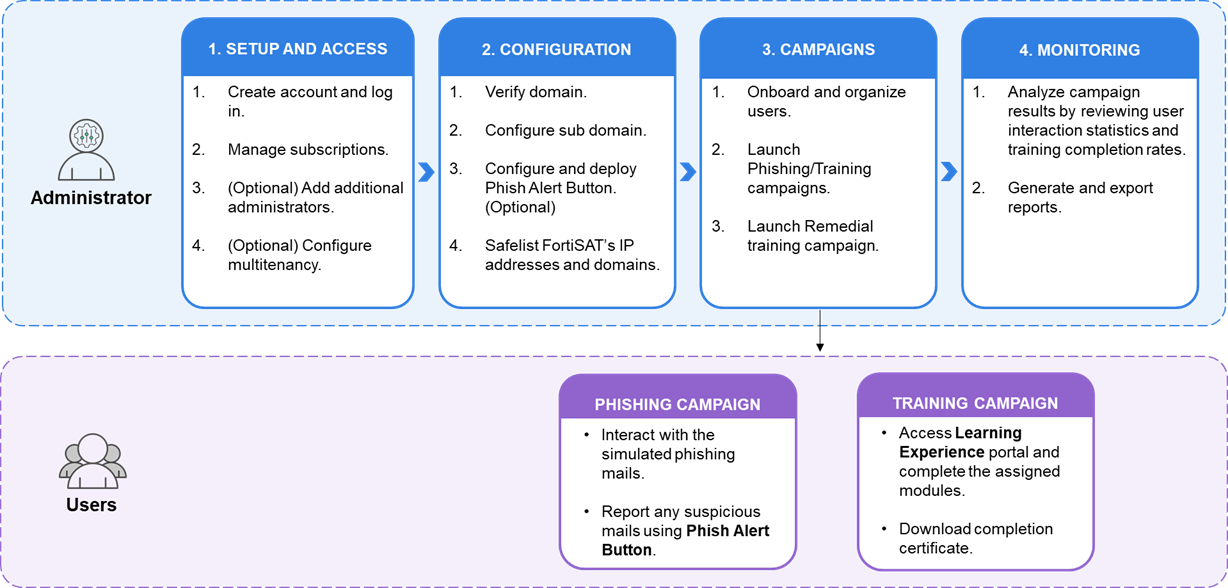
The following diagram illustrates the operational workflow of FortiSAT.
Administrator Actions

Administrators manage the platform through four key phases.

  1. Setup and Access: Initialize the environment by creating an account and managing subscriptions. Administrators can also optionally add additional administrators or configure multitenancy for larger organizations.

  2. Configuration: Prepare the technical environment by verifying domain ownership, setting up the custom portal domain, configuring the FortiSAT Phish Alert Button (PAB), and safelisting system IPs to ensure delivery.

  3. Campaigns: Onboard your users and organize them into groups. Launch Phishing Campaigns to test behavior or Training Campaigns to build knowledge. Enable Remedial Enrollment to automate education for users who fail simulations or based on their actions.

  4. Monitoring: Analyze campaign results by reviewing user interaction statistics and training completion rates. Finally, generate and export audit-ready reports to track progress and compliance.

User Interaction

While the administrator governs the platform, users interact with it in two primary ways.

  • Phishing Campaign users receive and interact with simulated phishing emails. They practice positive security habits by reporting suspicious messages using the PAB.

  • Training Campaign users access the Learning Experience portal to complete their assigned educational modules and quizzes. Once finished, they can download their completion certificates.

Types of Training

There are two distinct methods for delivering educational content to users:

  • On Click Training: This is a just-in-time learning experience assigned during the creation of a Phishing Campaign. It is triggered immediately when a user interacts with a simulation (e.g., clicking a link or submitting data), directing them to a landing page with an embedded educational video.

  • Training Campaigns: These are comprehensive educational modules and quizzes managed independently through the Training Campaigns section.

Operational Workflow

Operational Workflow

The following diagram illustrates the operational workflow of FortiSAT.

Administrator Actions

Administrators manage the platform through four key phases.

  1. Setup and Access: Initialize the environment by creating an account and managing subscriptions. Administrators can also optionally add additional administrators or configure multitenancy for larger organizations.

  2. Configuration: Prepare the technical environment by verifying domain ownership, setting up the custom portal domain, configuring the FortiSAT Phish Alert Button (PAB), and safelisting system IPs to ensure delivery.

  3. Campaigns: Onboard your users and organize them into groups. Launch Phishing Campaigns to test behavior or Training Campaigns to build knowledge. Enable Remedial Enrollment to automate education for users who fail simulations or based on their actions.

  4. Monitoring: Analyze campaign results by reviewing user interaction statistics and training completion rates. Finally, generate and export audit-ready reports to track progress and compliance.

User Interaction

While the administrator governs the platform, users interact with it in two primary ways.

  • Phishing Campaign users receive and interact with simulated phishing emails. They practice positive security habits by reporting suspicious messages using the PAB.

  • Training Campaign users access the Learning Experience portal to complete their assigned educational modules and quizzes. Once finished, they can download their completion certificates.

Types of Training

There are two distinct methods for delivering educational content to users:

  • On Click Training: This is a just-in-time learning experience assigned during the creation of a Phishing Campaign. It is triggered immediately when a user interacts with a simulation (e.g., clicking a link or submitting data), directing them to a landing page with an embedded educational video.

  • Training Campaigns: These are comprehensive educational modules and quizzes managed independently through the Training Campaigns section.