

Viewing on sale compromised systems
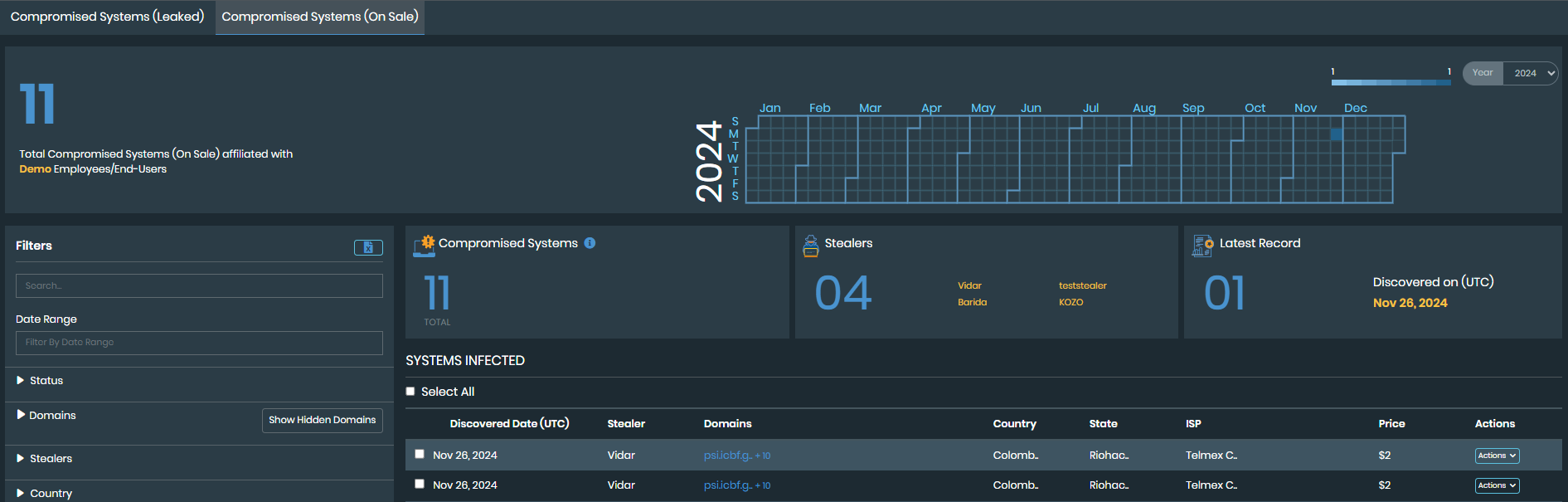
The Adversary Centric Intelligence > Stealer Infections > Compromised Systems(On Sale) page displays information about possible infected systems that are affiliated with your employees or end-users and are for sale on darknet market places.
To view on sale compromised systems information:
- Go to Adversary Centric Intelligence > Stealer Infections > Compromised Systems(On Sale).
-
Use the following widgets to review information about on sale compromised systems:
Total Compromised Systems(On Sale) affiliated with <organization name>
Displays the total number of compromised systems on sale affiliated with your organization.
The calendar displays a summary of the on sale stealer events in the selected calendar year.
Colored blocked indicate a stealer event. Light colors blocks indicate few affected credentials, and dark colored blocks indicate many affected credentials.
Hover your mouse over each block to view the discovery date and the number of affected credentials.
Compromised Systems
Displays the total number of compromised systems.
No of Stealers Found
Displays the number of stealers found and the names of the stealers.
Latest Record
Displays the latest number of stealer events and the date that the event was discovered.
Systems Infected
Displays a list of infected systems.
-
The values in all widgets are updated based on the filters applied, except for Total Compromised Systems(On Sale) affiliated with <organization name> value.
-
Click Run Automation in the Actions dropdown to run playbooks. See Security Orchestration.
-
The Discovered Date is displayed in Coordinated Universal Time (UTC).