
Fortinet white logo
Fortinet white logo

Use case

Use case

This use case shows how to configure the LDAP authentication server in Windows 2008 R2 or Windows 2012.

The Lightweight Directory Access Protocol (LDAP) is an application protocol for accessing and maintaining distributed directory information services.

The FortiProxy LDAP client sends these requests:

  • Bind: Authentication.
  • StartTLS: Encryption.
  • Search: Query.
  • Unbind: Close the connection.

LDAP structure

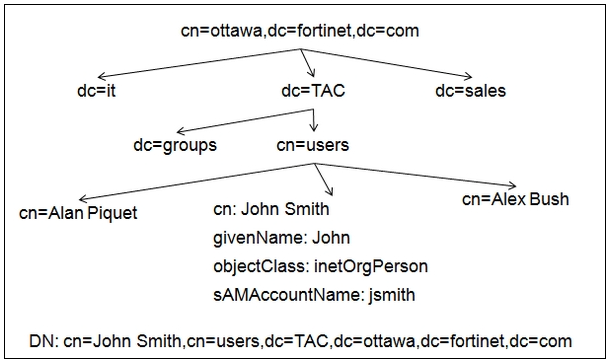
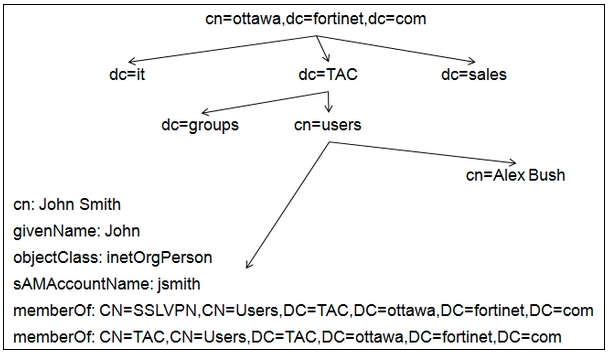
The LDAP structure is similar to a tree that contains entries (objects) in each branch.

Each entry has a unique ID, the Distinguished Name (DN).

Each entry also has attributes.

Each attribute has a name and one or more values.

The attributes are defined in a directory schema.

LDAP structure example
LDAP configuration

There are three bind types:

  • Simple: Bind without user search. It can be used only if all the users belong to the same “branch.”
  • Anonymous: Bind with user search. It can be used when users are in the different “branches” and only if the server allows “anonymous search.”
  • Regular: Bind with user search. It can be used when users are in the different “branches” and the server does not allow “anonymous search.”

Simple bind configuration

If cn is used as the Common Name Identifier, users have to authenticate using their full names, such as John Smith.

If SAMAccountName is used as the Common Name Identifier, users have to authenticate using their login name, such as jsmith.

The Distinguished Name field is where all users are located.
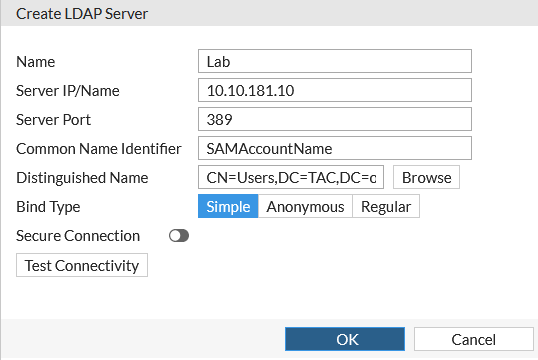
Simple bind example
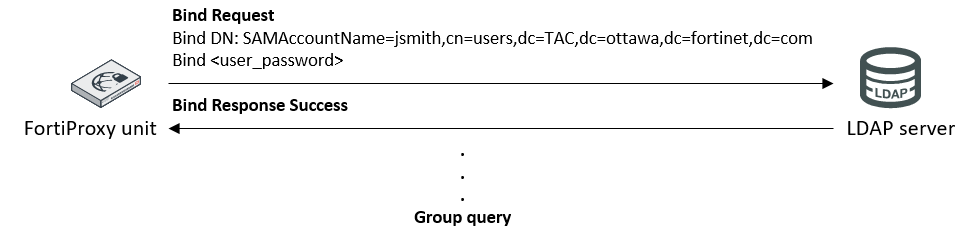
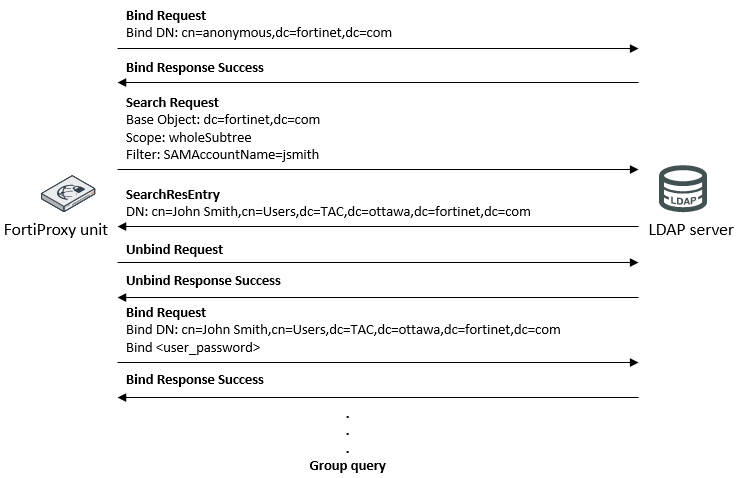
Anonymous bind configuration

The FortiProxy unit will search for the user through all the subbranches, starting from the entry in the Distinguished Name field.
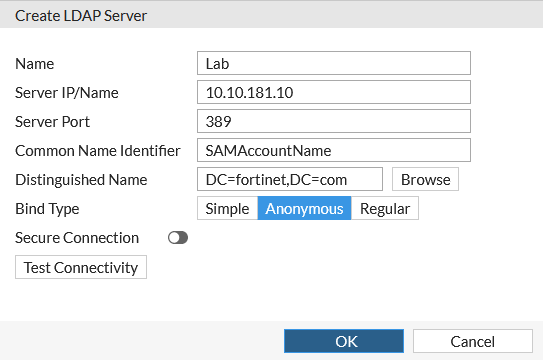
Anonymous bind example
Regular bind configuration

The Username field specifies the credentials for an LDAP administrator user.
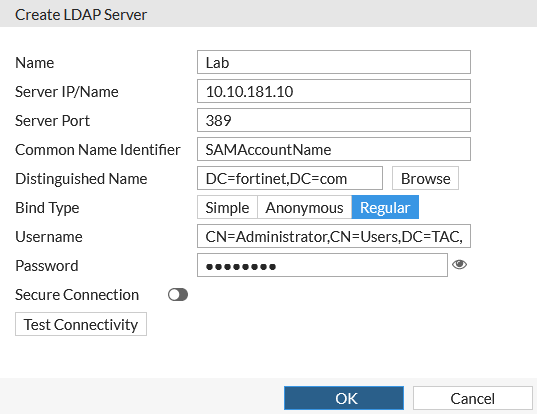
Regular bind example
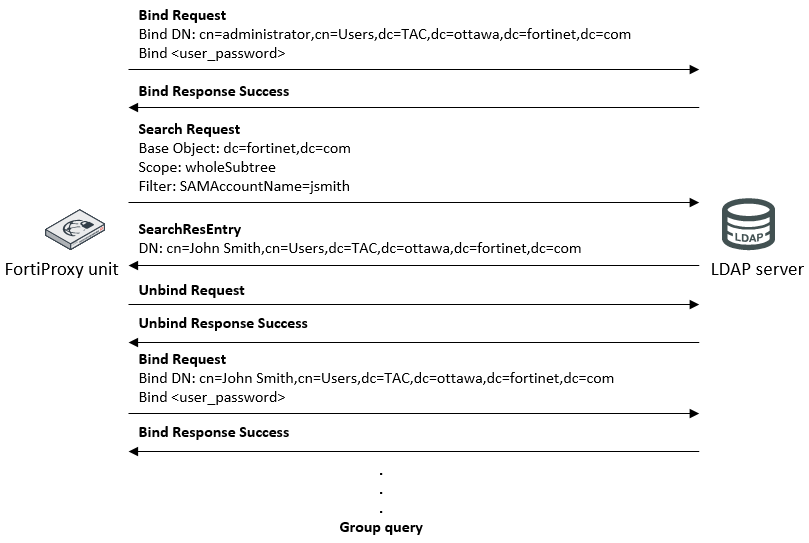
To find the “Distinguished Name,” you can run either of the following two commands from the LDAP server’s command prompt:

  • dsquery user –name <full_user_name>
  • dsquery user –samid <login_user_name>

For example, if you get the following output:

C:\> dsquery user –samid jsmith
“cn=John Smith,cn=users,dc=tac,dc=ottawa,dc=fortinet,dc=com”

You can configure the “Distinguished Name” as:

dc=tac,dc=ottawa,dc=fortinet,dc=com

To find the “User DN” (or Bind DN), you can run either of the following two commands in the LDAP server’s command prompt:

  • dsquery user –name <admin_full_user_name>
  • dsquery user –samid <admin_login_username>

The complete DN has to be used as the “User DN.” For example, if you get the following output:

C:\> dsquery user –samid administrator
cn=Administrator,cn=users,dc=tac,dc=ottawa,dc=fortinet,dc=com

You have to configure the “User DN” as:

cn=Administrator,cn=users,dc=tac,dc=ottawa,dc=fortinet,dc=com

Regular bind configuration summary

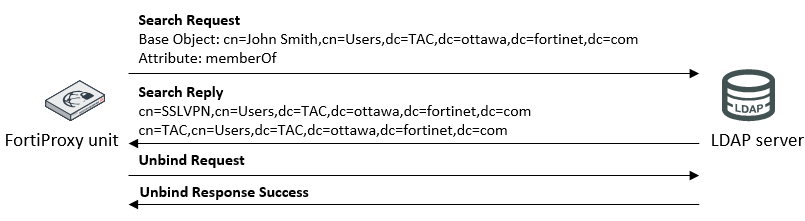
In most of the schemas, the user entries have an attribute containing the DNS of the groups to which the user belongs. By default, the FortiProxy unit will try to get the group list from the ‘memberOf’ attribute (Microsoft AD). If the group information is stored in a different attribute, you must set the attribute name using the CLI:

config user ldap
	edit <Server_name>
		set member-attr <attribute_name>

Group query—Microsoft AD case
Group query—Microsoft AD case
Use case

Use case

This use case shows how to configure the LDAP authentication server in Windows 2008 R2 or Windows 2012.

The Lightweight Directory Access Protocol (LDAP) is an application protocol for accessing and maintaining distributed directory information services.

The FortiProxy LDAP client sends these requests:

  • Bind: Authentication.
  • StartTLS: Encryption.
  • Search: Query.
  • Unbind: Close the connection.

LDAP structure

The LDAP structure is similar to a tree that contains entries (objects) in each branch.

Each entry has a unique ID, the Distinguished Name (DN).

Each entry also has attributes.

Each attribute has a name and one or more values.

The attributes are defined in a directory schema.

LDAP structure example

LDAP configuration

There are three bind types:

  • Simple: Bind without user search. It can be used only if all the users belong to the same “branch.”
  • Anonymous: Bind with user search. It can be used when users are in the different “branches” and only if the server allows “anonymous search.”
  • Regular: Bind with user search. It can be used when users are in the different “branches” and the server does not allow “anonymous search.”

Simple bind configuration

If cn is used as the Common Name Identifier, users have to authenticate using their full names, such as John Smith.

If SAMAccountName is used as the Common Name Identifier, users have to authenticate using their login name, such as jsmith.

The Distinguished Name field is where all users are located.

Simple bind example

Anonymous bind configuration

The FortiProxy unit will search for the user through all the subbranches, starting from the entry in the Distinguished Name field.

Anonymous bind example

Regular bind configuration

The Username field specifies the credentials for an LDAP administrator user.

Regular bind example

To find the “Distinguished Name,” you can run either of the following two commands from the LDAP server’s command prompt:

  • dsquery user –name <full_user_name>
  • dsquery user –samid <login_user_name>

For example, if you get the following output:

C:\> dsquery user –samid jsmith
“cn=John Smith,cn=users,dc=tac,dc=ottawa,dc=fortinet,dc=com”

You can configure the “Distinguished Name” as:

dc=tac,dc=ottawa,dc=fortinet,dc=com

To find the “User DN” (or Bind DN), you can run either of the following two commands in the LDAP server’s command prompt:

  • dsquery user –name <admin_full_user_name>
  • dsquery user –samid <admin_login_username>

The complete DN has to be used as the “User DN.” For example, if you get the following output:

C:\> dsquery user –samid administrator
cn=Administrator,cn=users,dc=tac,dc=ottawa,dc=fortinet,dc=com

You have to configure the “User DN” as:

cn=Administrator,cn=users,dc=tac,dc=ottawa,dc=fortinet,dc=com

Regular bind configuration summary

In most of the schemas, the user entries have an attribute containing the DNS of the groups to which the user belongs. By default, the FortiProxy unit will try to get the group list from the ‘memberOf’ attribute (Microsoft AD). If the group information is stored in a different attribute, you must set the attribute name using the CLI:

config user ldap
	edit <Server_name>
		set member-attr <attribute_name>

Group query—Microsoft AD case

Group query—Microsoft AD case