
Fortinet white logo
Fortinet white logo

Examples

Configuring FortiGate forwarding access request from FortiPAM to the private target

Configuring FortiGate forwarding access request from FortiPAM to the private target

Setting up a forward gateway on FortiPAM gives you access to private resources from anywhere.

For more information about the forward gateway feature, see Gateway in the latest FortiPAM Administration Guide.

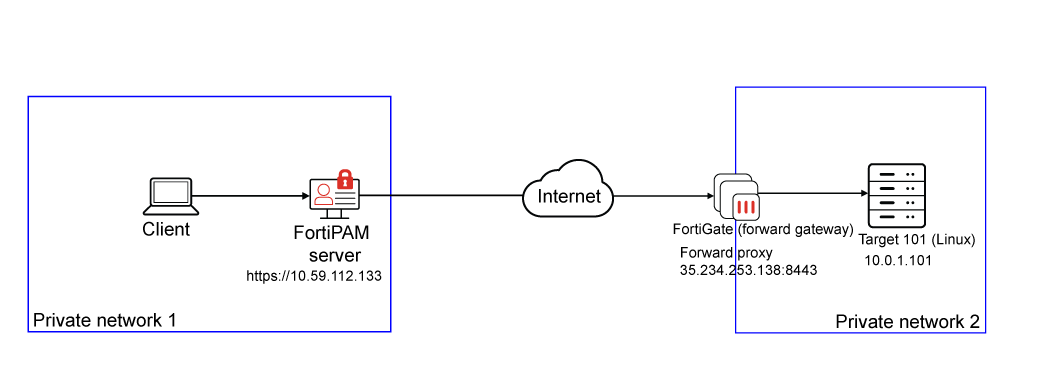
The example demonstrates FortiGate forwarding the access request from FortiPAM to a private target.

There are two methods to configure a FortiGate forward gateway:

  1. Legacy access proxy: firewall.access-proxy is involved.
  2. New ZTNA forward proxy: ztna.traffic-forward-proxy is involved (applicable to FortiGate 7.6.3 or above).

Topology
Prerequisites

  • FortiPAM 1.4.0 or above

To configure FortiGate forwarding access request from FortiPAM to the private target:
  1. Configuring forward gateway on FortiGate
  2. Configuring a gateway on the FortiPAM server
  3. Configuring a target using the forward gateway on FortiPAM server
  4. Creating a secret for the target
  5. Launching the secret from the FortiPAM server
  6. Monitoring the secret
  7. Troubleshooting

Configuring FortiGate forwarding access request from FortiPAM to the private target

Configuring FortiGate forwarding access request from FortiPAM to the private target

Setting up a forward gateway on FortiPAM gives you access to private resources from anywhere.

For more information about the forward gateway feature, see Gateway in the latest FortiPAM Administration Guide.

The example demonstrates FortiGate forwarding the access request from FortiPAM to a private target.

There are two methods to configure a FortiGate forward gateway:

  1. Legacy access proxy: firewall.access-proxy is involved.
  2. New ZTNA forward proxy: ztna.traffic-forward-proxy is involved (applicable to FortiGate 7.6.3 or above).

Topology

Prerequisites

  • FortiPAM 1.4.0 or above

To configure FortiGate forwarding access request from FortiPAM to the private target:
  1. Configuring forward gateway on FortiGate
  2. Configuring a gateway on the FortiPAM server
  3. Configuring a target using the forward gateway on FortiPAM server
  4. Creating a secret for the target
  5. Launching the secret from the FortiPAM server
  6. Monitoring the secret
  7. Troubleshooting