
Fortinet white logo
Fortinet white logo

Examples

Launching the FortiGate secret

Launching the FortiGate secret

To launch the FortiGate secret:
  1. Go to Secrets > Secrets.
  2. From the list, double-click to open the secret created in Creating a secret for the target that uses the FortiGate reverse gateway.
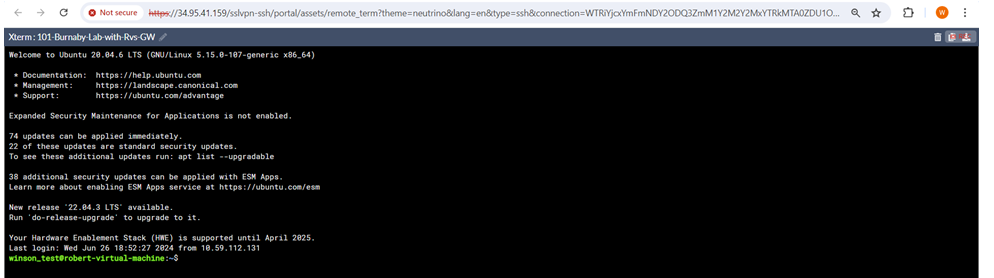
  3. Launch the secret.

    You can now access the target Linux server.
To oversee activities of the launched secret:
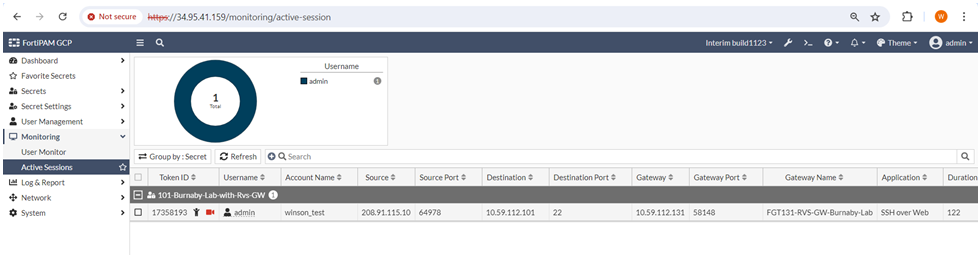
  1. Go to Monitoring > Active Sessions.

    The gateway information is displayed for the launched secret.
Launching the FortiGate secret

Launching the FortiGate secret

To launch the FortiGate secret:
  1. Go to Secrets > Secrets.
  2. From the list, double-click to open the secret created in Creating a secret for the target that uses the FortiGate reverse gateway.
  3. Launch the secret.

    You can now access the target Linux server.

To oversee activities of the launched secret:
  1. Go to Monitoring > Active Sessions.

    The gateway information is displayed for the launched secret.