
Fortinet white logo
Fortinet white logo

Examples

JWT (JSON Web Token) integration with DevOps

JWT (JSON Web Token) integration with DevOps

For improved security when integrating FortiPAM with DevOps platform (such as, GitLab, Jenkins), JWT is introduced into FortiPAM 1.6.0.

It provides the following advantages:

  • FortiPAM creates a dynamic token to GitLab or Jenkins. This ensures you are not required to save a permanent token for GitLab or Jenkins.

  • After some time, the dynamic token expires for improved security.

In FortiPAM 1.6.0, the feature is only supported via the CLI console.

The following shows how JWT works to integrate FortiPAM and DevOps:
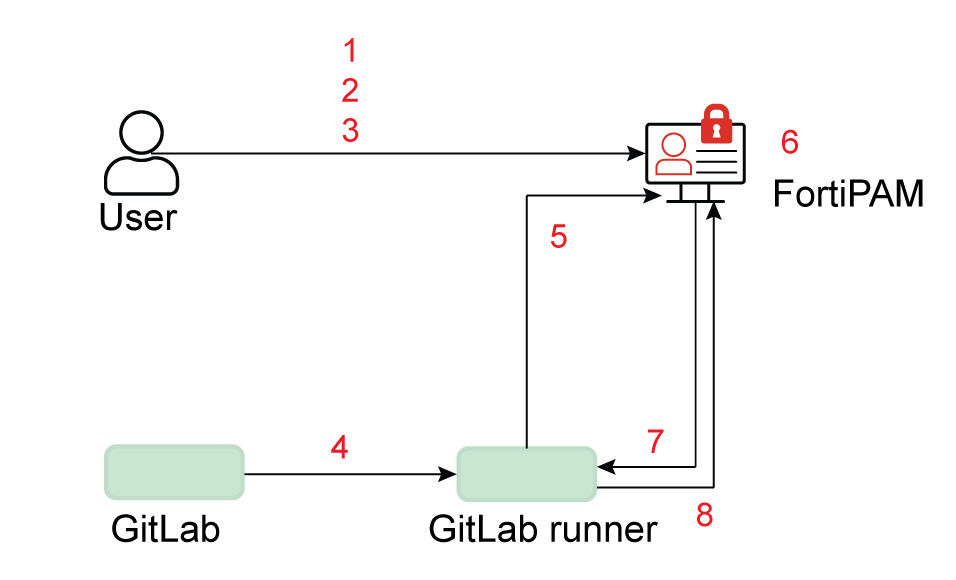
  1. Configure JWKS to retrieve JWT public key from GitLab
  2. Configure JWT user with claims
  3. Grant secret permission to users created in 2
  4. Provide JWT to the CI job
  5. Authentication with JWT
  6. Verify JWT and match user claims to generate an access token
  7. Return the access token
  8. Retrieve secrets from FortiPAM with the access token
To configure JWT authentication via the CLI:
  1. Integrating FortiPAM and GitLab
  2. Integrating FortiPAM and Jenkins

JWT (JSON Web Token) integration with DevOps

JWT (JSON Web Token) integration with DevOps

For improved security when integrating FortiPAM with DevOps platform (such as, GitLab, Jenkins), JWT is introduced into FortiPAM 1.6.0.

It provides the following advantages:

  • FortiPAM creates a dynamic token to GitLab or Jenkins. This ensures you are not required to save a permanent token for GitLab or Jenkins.

  • After some time, the dynamic token expires for improved security.

In FortiPAM 1.6.0, the feature is only supported via the CLI console.

The following shows how JWT works to integrate FortiPAM and DevOps:

  1. Configure JWKS to retrieve JWT public key from GitLab
  2. Configure JWT user with claims
  3. Grant secret permission to users created in 2
  4. Provide JWT to the CI job
  5. Authentication with JWT
  6. Verify JWT and match user claims to generate an access token
  7. Return the access token
  8. Retrieve secrets from FortiPAM with the access token
To configure JWT authentication via the CLI:
  1. Integrating FortiPAM and GitLab
  2. Integrating FortiPAM and Jenkins