
Fortinet white logo
Fortinet white logo

Examples

Launching the FortiPAM secret

Launching the FortiPAM secret

To launch the FortiPAM secret:
  1. Go to Secrets > Secrets.
  2. From the list, double-click to open the secret created in Creating a secret for the target that uses the FortiPAM reverse gateway.
  3. From the top, select Remote Desktop - Windows.

    The Launch Progress dialog open:

    Select No to launch the secret using the gateway in the Reverse mode.

    Select Yes to launch the secret using the gateway in the Service mode.
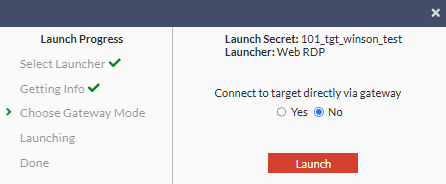
  4. Select Launch.

    You can now access the target Windows server.
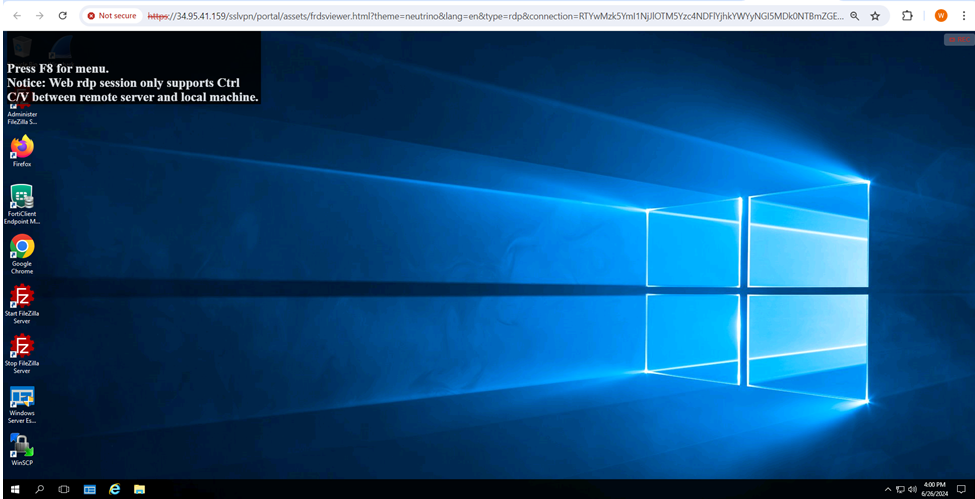
To oversee activities of the launched secret:
  1. From the secret server, go to Monitoring > Active Sessions.

    The gateway information is displayed for the launched secret.
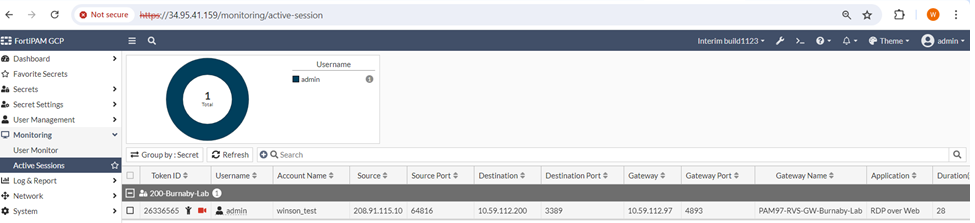
  2. For secret launch using the Service mode, you can monitor the ongoing secret sessions from the secret server.

    Also, you can monitor the secret sessions from the service gateway.

    In the service gateway, the username contains @<secret server SN> suffix.

Launching the FortiPAM secret

Launching the FortiPAM secret

To launch the FortiPAM secret:
  1. Go to Secrets > Secrets.
  2. From the list, double-click to open the secret created in Creating a secret for the target that uses the FortiPAM reverse gateway.
  3. From the top, select Remote Desktop - Windows.

    The Launch Progress dialog open:

    Select No to launch the secret using the gateway in the Reverse mode.

    Select Yes to launch the secret using the gateway in the Service mode.

  4. Select Launch.

    You can now access the target Windows server.

To oversee activities of the launched secret:
  1. From the secret server, go to Monitoring > Active Sessions.

    The gateway information is displayed for the launched secret.

  2. For secret launch using the Service mode, you can monitor the ongoing secret sessions from the secret server.

    Also, you can monitor the secret sessions from the service gateway.

    In the service gateway, the username contains @<secret server SN> suffix.
