

File Analysis
File analysis extracts files transferred over supported network protocols and inspects them for malicious content. Extracted files are automatically submitted for multi‑layered inspection using antivirus and AI‑driven detection engines.
File Analysis provides advanced threat detection by inspecting files in transit across network protocols. Using the Antivirus (AV) engine and AI-driven analysis, the system identifies and logs malicious activity that may bypass standard network telemetry. When enabled, the system automatically extracts files and submits them for multi-layered inspection.
|
Feature / Attribute |
Description |
|---|---|
| Supported Protocols | HTTP, SMB, FTP |
| File Type Scope | Limited to Windows Executable files (including .exe) |
| Recursive Inspection |
For archive files, the signature corresponds to the first malicious file identified within the archive |
|
Size limit |
200 MB |
Detection Engines
Detected threats are categorized by the engine:
- AV Engine: Produces high-confidence detections for known malware.
- AI Analysis Engine: An AI-based malware detection engine that analyzes file characteristics to identify zero-day or evolved threats. Files detected by the AI Engine contain AI.Pallas.Suspicious in the signature name.
Event Metadata
File analysis events are generated only for known or highly suspicious malicious files. Each event includes contextual data to support threat hunting and incident response. For more information, see File Analysis fields.
Enabling File Analysis
To enable File Analysis:
- Go to Settings > Sensors. The Sensor page opens.
- Click the Sensor ID. The sensor Status page opens.
- Click the Settings tab.
- Click Edit Features Settings.
- Enable the following options:
Option
Description
Packet Inspection Engine
- Fortinet DPI
- File Scanning
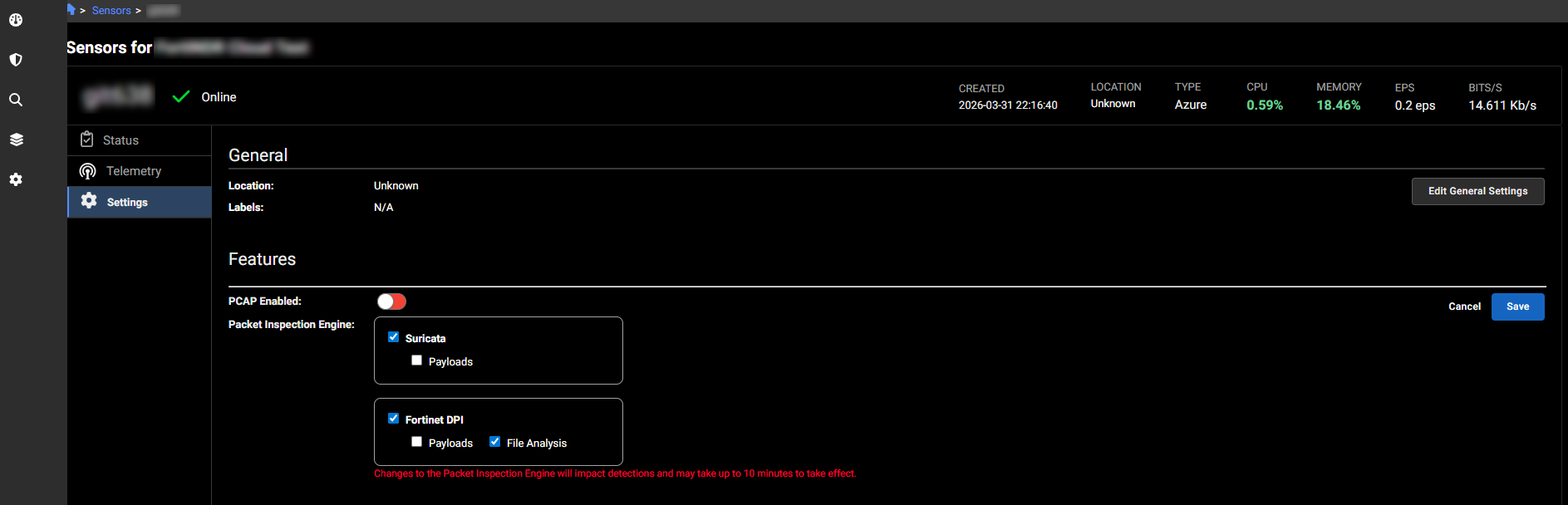
- Fortinet DPI
Interpreting File Analysis scores and signatures
Use the following table to prioritize and triage file analysis events:
| Detection Type | Score | Confidence Level | Analysis Guidance |
|---|---|---|---|
| av_alert | null | Malicious | Treat as malicious. A null score in this context indicates a high-confidence signature match. |
| av_alert | 100 | Highly Suspicious |
High Confidence malicious match via AV signature. |
| pallas_alert | 100 | Highly Suspicious | AI engine has maximum confidence in malware classification. |
| av_alert | 90 - 99 | Suspicious | Strong signature match; warrants immediate investigation. |
| pallas_alert | 90 - 99 | Suspicious |
High-probability AI detection; warrants immediate investigation. |
Pallas signatures will always include a Pallas score. AV signatures may not always include a score; any event with a null AV score must be treated as a confirmed malicious detection.