
Fortinet white logo
Fortinet white logo

Upgrade information

Upgrade information

You can upgrade FortiManager Cloud firmware to 6.4.7 by using the FortiManager Cloud & Service portal or the FortiManager Cloud GUI.

To upgrade the firmware:
  1. Log into FortiCare. An alert icon appears next your account when a new version of firmware is available.
  2. Expand your account.
  3. Click Upgrade Now to update the firmware immediately, or click Upgrade Later to schedule the upgrade of the firmware for a later date.
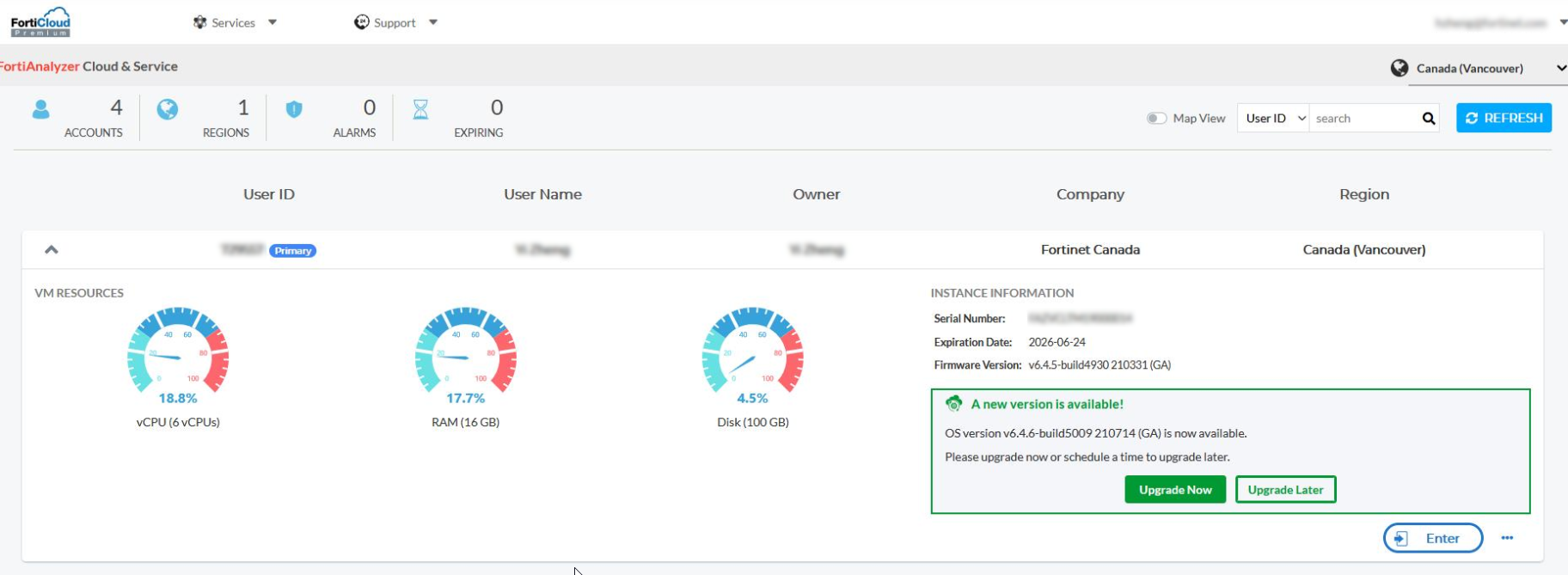
  4. Click OK.
  5. Click Enter to open FortiManager Cloud.

Upgrade information

Upgrade information

You can upgrade FortiManager Cloud firmware to 6.4.7 by using the FortiManager Cloud & Service portal or the FortiManager Cloud GUI.

To upgrade the firmware:
  1. Log into FortiCare. An alert icon appears next your account when a new version of firmware is available.
  2. Expand your account.
  3. Click Upgrade Now to update the firmware immediately, or click Upgrade Later to schedule the upgrade of the firmware for a later date.

  4. Click OK.
  5. Click Enter to open FortiManager Cloud.