

Support for India's Digital Personal Data Protection Act
In support of India's Digital Personal Data Protection (DPDP) Act, 2023, FortiIdentity Cloud (FIC) service is now hosted in India, offering data residency in India-based data centers to ensure that customer data in the region remains within the India jurisdiction. The service collects only the minimum personal information required for authentication. All data collected are secured through encryption both in transit and at rest. With granular access controls, audit logging, hardened security, and incident response procedures, FIC enables organizations to maintain data protection, accountability, and operational transparency.
New customers
If you are a new FortiIdentity Cloud customer in India, you can set up your account by selecting IN (India Region) when you launch the India-specific FIC admin portal (infic.fortinet.com), as shown in the following screen capture.
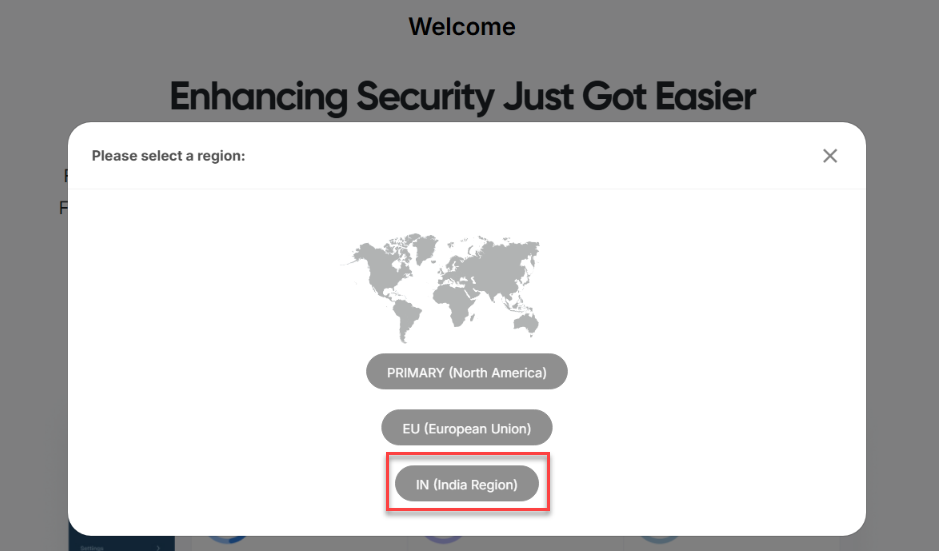
You can then start adding devices (FortiProducts) and end users to this account.
Alternatively, if you have a FortiGate device running on FortiOS 7.4.8 or later, you can launch the FortiGate Console and update your system with the following commands:
-
Run
"config system global",making sure that"set fortitoken-cloud-region"is set to“infic.fortinet.com”.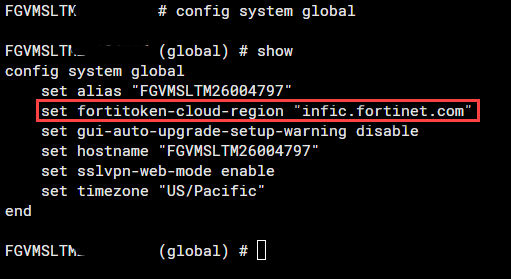
-
Run
"execute fortitoken-cloud trial".
This will set the FIC account specifically for the IN (India Region).
Existing customers
If you are an existing FIC customer in India with your accounts originally set up for North America (fic.fortinet .com), you cannot migrate your data or services directly to the new IN (India Region). Instead, you must first delete end users from your devices and your existing FIC account, and then create your new accounts by selecting the IN (India Region), and add the devices and end users to the accounts.
Use Case 1: Migrating devices from an existing North America account to a IN (India Region) account
-
From the FIC admin portal
(fic.fornet.com),delete all users on your device(s), and remove the device(s) from your account. -
Submit a request to FortiCare (support.fortinet.com) to transfer your device(s) to your new IN (India Region) account. For information about transferring devices, see Transferring devices on FIC.
-
After transferring the device(s) to your IN (India Region) account, add the users to the device(s). This will synchronize the users and the device(s) to your new IN (India Region) account.
Use Case 2: Moving the same account from North America to IN (India Region)
-
From FIC portal
(fic.fortinet.com),delete all users from your device(s). -
In FortiOS 7.4.8 or later, run
"execute fortitoken cloud region-reset".This will wipe out all the old data, including the old regional setting, from the device. -
Log into the new FIC-India admin portal
(infic.fortinet.com)with your old account credentials, and choose IN (India Region) to set the region. Alternatively, if you have a FortiGate device running on FortiOS 7.4.8 or later that is registered with your account, you can configure the system's global setting by setting"fortitoken-cloud-region"to"infic.fortinet,com", and then adding an end user to synchronize to your new IN (India Region) account. Your other devices in the same account are now be able to synchronize to your IN (India Region) account.
Accounts using SSO applications
-
Create a new account in
infic.fortinet.com. -
Recreate all SSO applications, user source(s), and SSO application users in your new IN (India Region) account.

|
The same steps apply to local IdP users as well. |
Adding new devices
To add a new FortiGate device (running on FortiOS 7.4.8 or later) to your IN (India Region) account, you must first ensure that the device is registered to the same FortiCare account as your infic.fortinet.com service, and then connect the FortiGate to the IN (India Region) using one of the following CLI commands in FortiOS:
Option 1:
config system global
set fortitoken-cloud-region infic.fortinet.com
end
Option 2:
execute fortitoken-cloud region-info
This command communicates with FortiIdentity Cloud to retrieve the account details and automatically populates the "infic.fortinet.com" region setting under config system global.
When you add a new user in the FortiGate and enable FortiToken Cloud for two-factor authentication, the system will automatically update the "fortitoken-cloud-region" to "infic.fortinet.com" in its global configuration.