Agentic AI protocol support in FortiOS
Application control can now be used to detect agentic AI protocols, such as Model Context Protocol (MCP) and Agent-to-Agent Protocol (A2A). New AI-specific log fields and FortiView enhancements provide deeper insights into AI-driven activity, improving oversight and security for emerging AI workloads.
Example
This example describes how to configure FortiGate to detect the MCP and A2A protocols using application control. It also describes how to review the results in FortiGate logs and FortiView. It includes the following sections:
See also Limitations.
Configuring FortiGate to detect agentic AI protocols
On FortiGate, create an application control sensor, and apply the default application control profile in a firewall policy with deep-inspection enabled to monitor all applications.
Some signatures require deep inspection and some do not. You can use the GUI to identify whether a signature requires deep inspection.
After you configure FortiGate, you can monitor Agentic AI protocols:
Extended UTM log should be enabled to capture extra information in the log, such as AI Method, AI Arguments, AI Function, AI Message, AI URI, and so on. Extended UTM logging requires deep inspection.
config application list
    edit <profile name>
        set extended-log enable
    next
end
To create an application control sensor for generative AI in the GUI:
-
Go to Security Profiles > Application Control.
-
Click Create New.
-
Enter a Name, such as GenAI.
-
Set the Generative AI category to Monitor.
-
Configure other fields as needed.
-
Click OK.
To create an application control sensor for generative AI in the CLI:
config application list
    edit "GenAI"
        config entries
            edit 1
                set category 36
                set action pass
            next
        end
    next
end
Apply the default appctrl profile in firewall policy with deep-inspection to monitor all applications:
config firewall policy
    edit 1
        set uuid 13a56522-b12b-51f0-1d35-f6ecfe4e2568
        set srcintf "port2"
        set dstintf "port1"
        set action accept
        set srcaddr "all"
        set dstaddr "all"
        set schedule "always"
        set service "ALL"
        set utm-status enable
        set ssl-ssh-profile "new-deep-inspection"
        set application-list "g-default"
        set nat enable
    next
end
To identify which signatures require deep inspection:
-
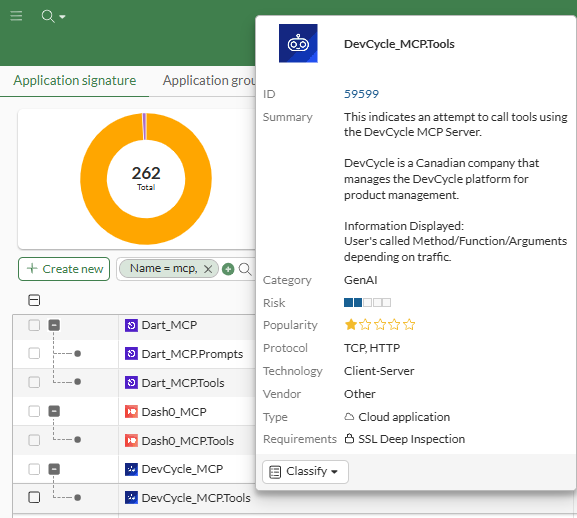
Go to Security Profiles > Application Signatures, and locate the Generative AI signature, such as DevCycle_MCP.Tools.
-
Hover over the signature to display the popup.
-
View the Requirements field to see whether SSL Deep Inspection is required.
Viewing MCP results in logs and FortiView
When a device on the network uses MCP tools and prompts, related MCP signatures (Protocol.MCP, Protocol.MCP.Tools, and Protocol.MCP.Prompts) are triggered on the FortiGate, and you can view the results in logs and FortiView.
To view logs in the GUI:
-
Go to Log & Report > Security Events > Application Control Logs.
AI Method, AI Arguments, AI Function, AI Agent are displayed in the application logs:

To view logs in the CLI:
The aimethod, aifunc, aiargs, and cloudaiagent fields are shown in application logs.
120: date=2026-02-27 time=10:54:42 eventtime=1772218482338739800 tz="-0800" logid="1059028704" type="utm" subtype="app-ctrl" eventtype="signature" level="information" vd="vd1" appid=59249 srcip=10.1.100.126 srccountry="Reserved" dstip=172.16.200.214 dstcountry="Reserved" srcport=60047 dstport=3333 srcintf="port2" srcintfrole="undefined" dstintf="port1" dstintfrole="undefined" proto=6 service="HTTP" direction="outgoing" policyid=1 poluuid="13a56522-b12b-51f0-1d35-f6ecfe4e2568" policytype="policy" sessionid=454 applist="g-default" action="pass" appcat="GenAI" app="Protocol.MCP.Prompts" hostname="172.16.200.214" incidentserialno=36700313 url="/mcp" agent="node" httpmethod="POST" msg="GenAI: Protocol.MCP.Prompts" usecase="Utility_Tools" aimethod="prompts/get" aifunc="simple-prompt" cloudaiagent="APP=Protocol MCP, UseCase=Utility_Tools, Method=prompts/get, Function=simple-prompt" apprisk="low"

121: date=2026-02-27 time=10:53:36 eventtime=1772218415610539888 tz="-0800" logid="1059028704" type="utm" subtype="app-ctrl" eventtype="signature" level="information" vd="vd1" appid=59072 srcip=10.1.100.126 srccountry="Reserved" dstip=172.16.200.214 dstcountry="Reserved" srcport=60037 dstport=3333 srcintf="port2" srcintfrole="undefined" dstintf="port1" dstintfrole="undefined" proto=6 service="HTTP" direction="outgoing" policyid=1 poluuid="13a56522-b12b-51f0-1d35-f6ecfe4e2568" policytype="policy" sessionid=439 applist="g-default" action="pass" appcat="GenAI" app="Protocol.MCP.Tools" hostname="172.16.200.214" incidentserialno=36700297 url="/mcp" agent="node" httpmethod="POST" msg="GenAI: Protocol.MCP.Tools" usecase="Utility_Tools" aimethod="tools/call" aifunc="echo" aiargs="\"message\":\"message mcp 1\"" cloudaiagent="APP=Protocol MCP, UseCase=Utility_Tools, Method=tools/call, Function=echo, Arguments='\"message\":\"message mcp 1\"'" apprisk="low"

122: date=2026-02-27 time=10:53:14 eventtime=1772218393538655508 tz="-0800" logid="1059028704" type="utm" subtype="app-ctrl" eventtype="signature" level="information" vd="vd1" appid=59070 srcip=10.1.100.126 srccountry="Reserved" dstip=172.16.200.214 dstcountry="Reserved" srcport=60025 dstport=3333 srcintf="port2" srcintfrole="undefined" dstintf="port1" dstintfrole="undefined" proto=6 service="HTTP" direction="outgoing" policyid=1 poluuid="13a56522-b12b-51f0-1d35-f6ecfe4e2568" policytype="policy" sessionid=418 applist="g-default" action="pass" appcat="GenAI" app="Protocol.MCP" hostname="172.16.200.214" incidentserialno=36700275 url="/mcp" agent="node" httpmethod="POST" msg="GenAI: Protocol.MCP" usecase="Utility_Tools" aimethod="initialize" cloudaiagent="APP=Protocol MCP, UseCase=Utility_Tools, Method=initialize" apprisk="elevated"
To view FortiView:
-
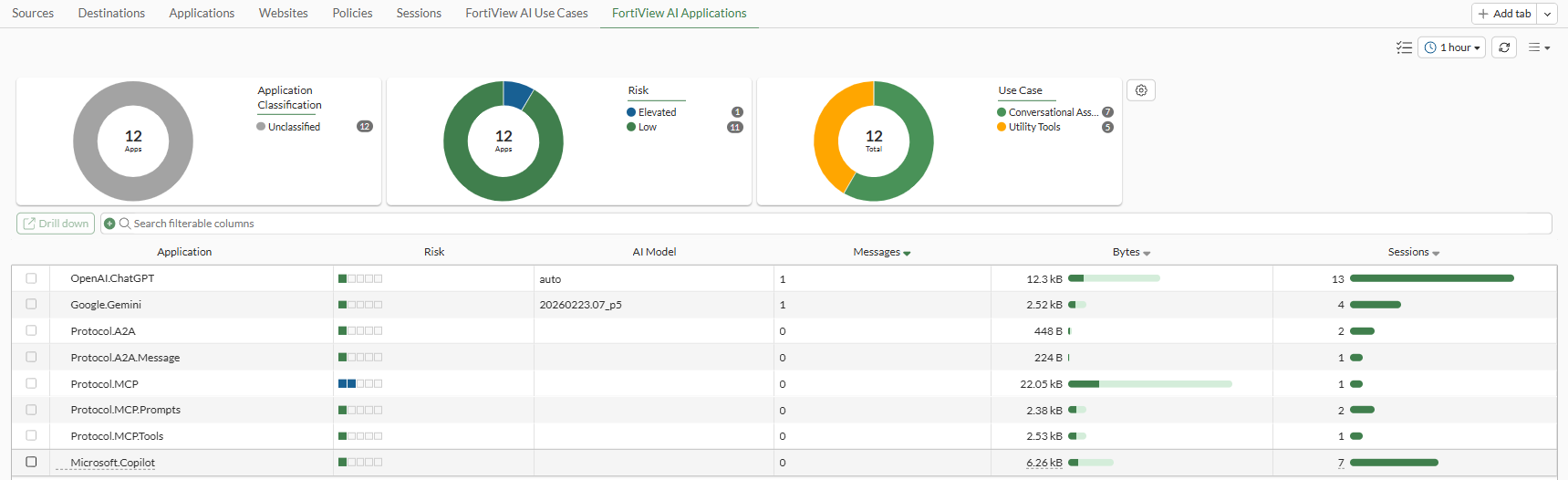
Go to Dashboard > FortiView > FortiView AI Applications to monitor MCP activities.
A new Use Case chart is available at the top of the page.
-
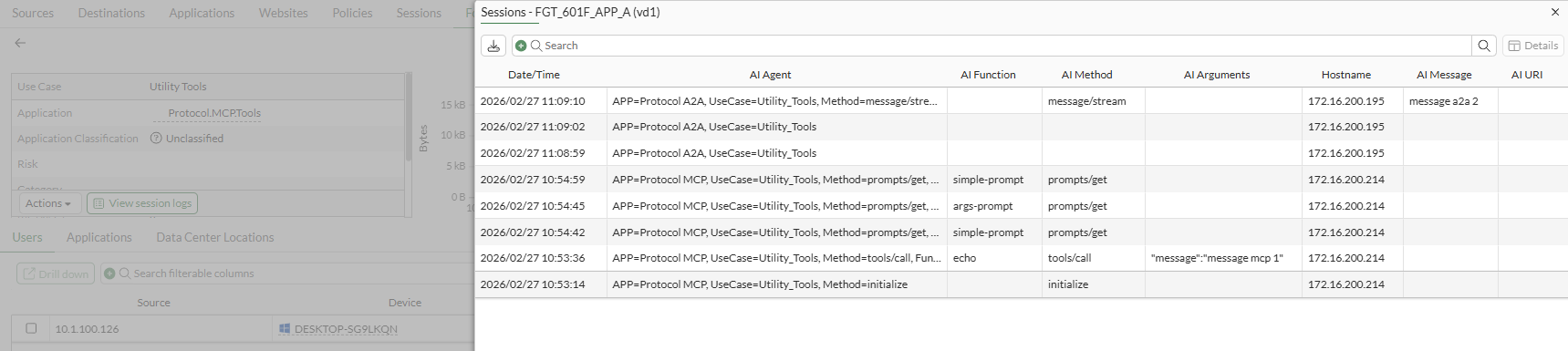
Drill down on an entry, such as Protocol.MCP. The Sessions pane is displayed, and it includes the following columns of information: AI Agent, AI Function, AI Method, AI Arguments, Hostname, and AI URI:

-
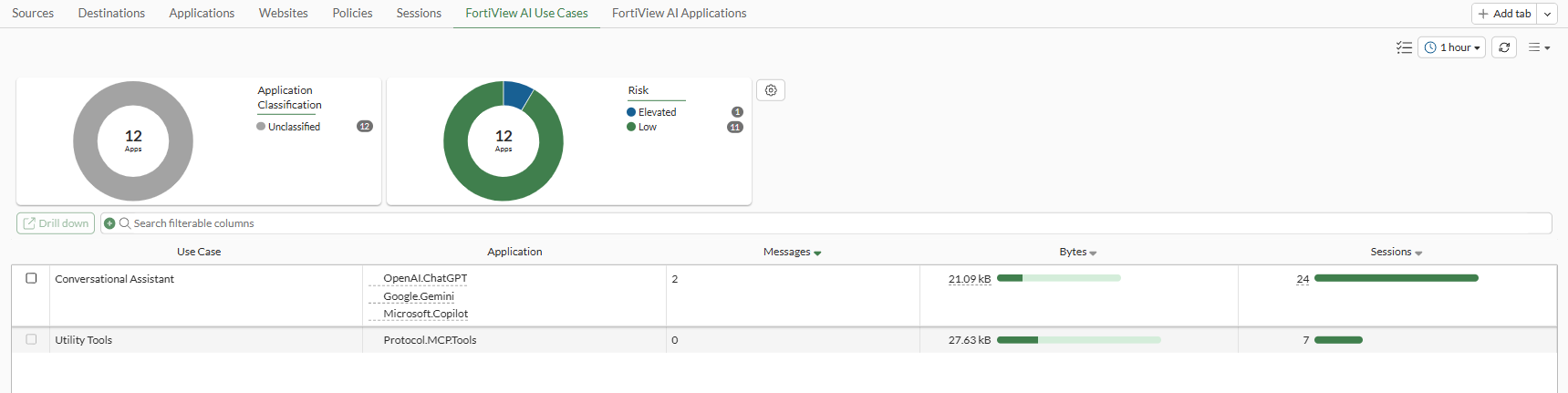
Click the FortiView AI Use Cases tab to view MCP activities. The type of use case is Utility Tools.
-
Drill down on a Utility Tools entry. The Sessions pane is displayed, and it includes the following columns of information: AI Agent, AI Function, AI Method, AI Arguments, Hostname, and AI URI for MCP protocol.
Viewing A2A results in logs and FortiView
When a device on the network uses A2A messages, related A2A signatures (Protocol.A2A and Protocol.A2A.Message) are triggered on the FortiGate, and you can view the results in logs and FortiView.
To view logs in the GUI:
-
Go to Log & Report > Security Events > Application Control Logs.
AI Method, AI Message, AI Agent are shown in application logs:

To view logs in the CLI:
The aimethod, aimessage, and cloudaiagent fields are shown in application logs.
115: date=2026-02-27 time=11:09:10 eventtime=1772219349846174869 tz="-0800" logid="1059028704" type="utm" subtype="app-ctrl" eventtype="signature" level="information" vd="vd1" appid=59162 srcip=10.1.100.126 srccountry="Reserved" dstip=172.16.200.195 dstcountry="Reserved" srcport=60174 dstport=10101 srcintf="port2" srcintfrole="undefined" dstintf="port1" dstintfrole="undefined" proto=6 service="HTTP" direction="outgoing" policyid=1 poluuid="13a56522-b12b-51f0-1d35-f6ecfe4e2568" policytype="policy" sessionid=828 applist="g-default" action="pass" appcat="GenAI" app="Protocol.A2A.Message" hostname="172.16.200.195" incidentserialno=36700549 url="/v1/message:stream" agent="python-httpx/0.28.1" httpmethod="POST" msg="GenAI: Protocol.A2A.Message" usecase="Utility_Tools" aimethod="message/stream" aimessage="message a2a 2" cloudaiagent="APP=Protocol A2A, UseCase=Utility_Tools, Method=message/stream, Message='message a2a 2'" apprisk="low"

116: date=2026-02-27 time=11:09:02 eventtime=1772219341608208341 tz="-0800" logid="1059028704" type="utm" subtype="app-ctrl" eventtype="signature" level="information" vd="vd1" appid=59157 srcip=10.1.100.126 srccountry="Reserved" dstip=172.16.200.195 dstcountry="Reserved" srcport=60173 dstport=10101 srcintf="port2" srcintfrole="undefined" dstintf="port1" dstintfrole="undefined" proto=6 service="HTTP" direction="outgoing" policyid=1 poluuid="13a56522-b12b-51f0-1d35-f6ecfe4e2568" policytype="policy" sessionid=827 applist="g-default" action="pass" appcat="GenAI" app="Protocol.A2A" hostname="172.16.200.195" incidentserialno=36700547 url="/.well-known/agent-card.json" agent="python-httpx/0.28.1" httpmethod="GET" msg="GenAI: Protocol.A2A" usecase="Utility_Tools" cloudaiagent="APP=Protocol A2A, UseCase=Utility_Tools" apprisk="low"
To view FortiView:
-
Go to Dashboard > FortiView > FortiView AI Applications to monitor A2A activities.
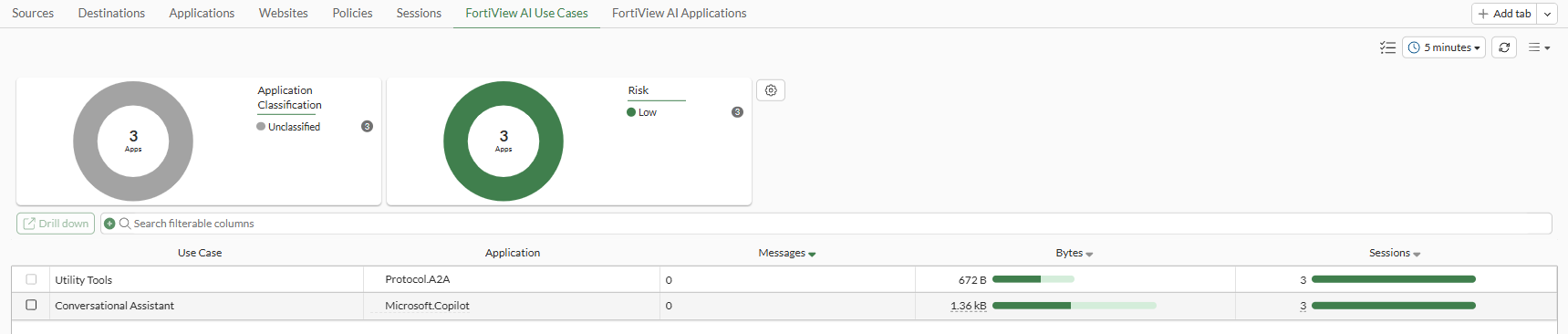
A new Use Case chart is available at the top of the page.
-
Drill down on an entry, such as Protocol.Z2A. The Sessions pane is displayed, and it includes the following columns of information: AI Agent, AI Function, AI Method, AI Arguments, Hostname, and AI URI:

-
Click the FortiView AI Use Cases tab to view A2A activities. The type of use case is Utility Tools.
-
Drill down on a Utility Tools entry. The Sessions pane is displayed, and it includes the following columns of information: AI Agent, AI Function, AI Method, AI Arguments, Hostname, and AI URI for A2A protocol.
Limitations
-
For the AIAP database to be updated, ensure that at least one firewall policy is utilizing an application control profile. Database updates require FMWR contract.
To review the generative AI database:
# diagnose autoupdate versions | grep -A 6 GenAI
GenAI Application Definitions
---------
Version: 33.00033 signed
Contract Expiry Date: Thu Jan  3 2030
Last Updated using scheduled update on Tue Jun 24 20:59:43 2025
Last Update Attempt: Tue Jun 24 23:10:03 2025
Result: No Updates
-
Proxy inline-ips does not support MCP and A2A protocol.
Inline IPS must be disabled when using a firewall policy with an inspection-mode proxy, as well as an explicit proxy policy.
config ips settings set proxy-inline-ips disable end -
NGFW security policy does not support MCP and A2A protocol.