
Fortinet white logo
Fortinet white logo

New Features

Control SD-WAN interface usage based on monthly traffic volume (quota)

Control SD-WAN interface usage based on monthly traffic volume (quota)

Sometimes, SD-WAN underlay members may have monthly total bandwidth usage limits, which incurs overage costs with their ISPs once the limit is exceeded. To accomplish traffic steering based on monthly traffic volume, volume quota limit, billing start day, and related settings are added to SD-WAN members.

If accumulated traffic volume on one member exceeds the specified quota limit within one-month billing period, the member's cost, weight, or volume-ratio value can be automatically adjusted to force or redirect traffic to other members.

Traffic billing and steering based on monthly traffic volume supports high availability (HA).

The config system sdwan command has new options:

config system sdwan
    config members
      edit 1
        set quota-limit <integer>
        set billing-start-day <integer>
        set overage {enable | disable}
        set overage-cost <integer>
        set overage-weight <integer>
        set overage-volume-ratio <integer>
      next
    end
endd

Option

Description

quota-limit <integer>

Volume quota limit assigned to this member in gigabytes (0 - 10485760, default = 0).

billing-start-day <integer>

Volume billing start day when this member's volume usage will begin to calculate (1 - 31, default = 1).

Available when quota-limit is set.

overage {enable | disable}

Enable/disable the volume overage when member's volume usage reaches quota-limit.

Available when quota-limit is set.

overage-cost <integer>

Cost value for this member when its volume is over quota and overage is enabled (0 - 4294967295, default = 0).

Available when quota-limit is set.

overage-weight <integer>

Weight value for this member when its volume is over quota and overage is enabled (0 - 255, default = 1).

Available when quota-limit is set.

overage-volume-ratio <integer>

Volume ratio value for this member when its volume is over quota and overage is enabled (1 - 255, default = 1).

Available when quota-limit is set.

A new diagnose command is available:

# diagnose sys sdwan bill  member 1

Example

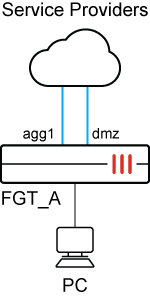
In this example,

  • FGT_A has two SD-WAN members: agg1 and dmz.

  • The service provider grants 2 GB bandwidth to agg1 per month. If 2 GB bandwidth on agg1 is reached within the one month billing period, traffic will switch to dmz for the rest of the billing period by increasing agg1's cost to deprioritize agg1.

  • On the next billing day, 2 GB quota and cost will be reset and traffic switches back to agg1.
To configure interface usage based on monthly traffic volume:
  1. Configure SD-WAN members.

    In this example:

    • Traffic volume limit is 2 GB within one-month billing period (quota-limit 2).

    • The start day is the first day in the month (billing-start-day 1).

    • The overage function is enabled (overage enable).

    • Cost 10 will be set when accumulated traffic volume on it exceeds 2 GB (overage-cost 10).

    • The overage weight will be set when accumulated traffic volume on it exceeds 2 GB (overage-weight 1).

    • The volume ratio will be set when accumulated traffic volume on it exceeds 2 GB (overage-volume-ratio 1).

    In addition, mode sla is set for IPv4 and IPv6 services.

    config system sdwan
        set status enable
        config zone
            edit "virtual-wan-link"
            next
        end
        config members
            edit 1
                set interface "agg1"
                set gateway 172.16.203.2
                set gateway6 2000:172:16:203::2
                set quota-limit 2 
                set billing-start-day 1 
                set overage enable 
                set overage-cost 10 
                set overage-weight 1 
                set overage-volume-ratio 1
            next
            edit 2
                set interface "dmz"
                set gateway 172.16.208.2
                set gateway6 2000:172:16:208::2
            next
        end
        config health-check
            edit "1"
                set server "2.2.2.2"
                set update-static-route disable
                set members 0
                config sla
                    edit 1
                    next
                end
            next
            edit "2"
                set addr-mode ipv6
                set server "2000::2:2:2:2"
                set update-static-route disable
                set members 0
                config sla
                    edit 1
                    next
                end
            next
        end
        config service
            edit 1
                set name "1"
                set mode sla 
                set dst "all"
                set src "172.16.205.0"
                config sla
                    edit "1"
                        set id 1
                    next
                end
                set priority-members 1 2
            next
            edit 2
                set name "2"
                set addr-mode ipv6
                set mode sla
                config sla
                    edit "2"
                        set id 1
                    next
                end
                set priority-members 1 2
                set dst6 "all"
                set src6 "2000:172:16:205::0"
            next
        end
    end
  2. Check SD-WAN status:

    The agg1 interface is preferred to forward IPv4 and IPv6 traffic. The 2 GB quota limit has not been reached.

    # diagnose sys sdwan  service4
    
    Service(1): Address Mode(IPV4) flags=0x4200 use-shortcut-sla use-shortcut
     Tie break: cfg
     Shortcut priority: 2
      Gen(1), TOS(0x0/0x0), Protocol(0): src(1->65535):dst(1->65535), Mode(sla), sla-compare-order
      Members(2):
        1: Seq_num(1 agg1 virtual-wan-link), alive, sla(0x1), gid(0), cfg_order(0), local cost(0), selected
        2: Seq_num(2 dmz virtual-wan-link), alive, sla(0x1), gid(0), cfg_order(1), local cost(0), selected
      Src address(1):
            172.16.205.0-172.16.205.255
      Dst address(1):
            0.0.0.0-255.255.255.255
    
    # diagnose sys sdwan  service6
    
    Service(2): Address Mode(IPV6) flags=0x4200 use-shortcut-sla use-shortcut
     Tie break: cfg
     Shortcut priority: 2
      Gen(2), TOS(0x0/0x0), Protocol(0): src(1->65535):dst(1->65535), Mode(sla), sla-compare-order
      Members(2):
        1: Seq_num(1 agg1 virtual-wan-link), alive, sla(0x1), gid(0), cfg_order(0), local cost(0), selected
        2: Seq_num(2 dmz virtual-wan-link), alive, sla(0x1), gid(0), cfg_order(1), local cost(0), selected
      Src6 address(1): 2000:172:16:205::/64
      Dst6 address(1): ::/0
    
    # diagnose sys sdwan bill member 1
    Member interface(agg1): Volume overage:enable, Quota_limit:2(GB), Volume is not overaged, Reset_in_billing_day(0), Intf_set:up, Overage_cost(10), Overage_weight(1), Overage_volume(1),
    Billing_start_day:1, Reset_accumulated_bytes:0, Current_bytes:234756493, Billing_start_bytes:221780698, Billing_latest_bytes:234756049 Used_bytes since billing day:12975351 
  3. From the PC, initiate traffic.

    The traffic matches SD-WAN SLA-mode service and goes through agg1 on FGT_A for IPv4 and IPv6 traffic:

    # diagnose sniffer packet any 'host 2.0.0.1' 4  
    interfaces=[any]
    filters=[host 2.0.0.1]
    4137.955796 port5 in 172.16.205.100 -> 2.0.0.1: icmp: echo request
    4137.955895 agg1 out 172.16.205.100 -> 2.0.0.1: icmp: echo request
    4137.955901 port4 out 172.16.205.100 -> 2.0.0.1: icmp: echo request
    4137.956171 port4 in 2.0.0.1 -> 172.16.205.100: icmp: echo reply
    4137.956176 agg1 in 2.0.0.1 -> 172.16.205.100: icmp: echo reply
    4137.956203 port5 out 2.0.0.1 -> 172.16.205.100: icmp: echo reply
    
    
    # diagnose sniffer packet any 'host 2000::2:0:0:1' 4 
    interfaces=[any]
    filters=[host 2000::2:0:0:1]
    4126.153276 port5 in 2000:172:16:205::100 -> 2000::2:0:0:1: icmp6: echo request seq 1 [flowlabel 0xb1863]
    4126.153392 agg1 out 2000:172:16:205::100 -> 2000::2:0:0:1: icmp6: echo request seq 1 [flowlabel 0xb1863]
    4126.153399 port4 out 2000:172:16:205::100 -> 2000::2:0:0:1: icmp6: echo request seq 1 [flowlabel 0xb1863]
    4126.153577 port4 in 2000::2:0:0:1 -> 2000:172:16:205::100: icmp6: echo reply seq 1
    4126.153585 agg1 in 2000::2:0:0:1 -> 2000:172:16:205::100: icmp6: echo reply seq 1
    4126.153629 port5 out 2000::2:0:0:1 -> 2000:172:16:205::100: icmp6: echo reply seq 1
  4. When accumulated traffic volume on agg1 exceeds 2 GB, traffic switches to dmz because the cost is increased to 10 in memory.

    # diagnose sys sdwan bill  member 1
    Member interface(agg1): Volume overage:enable, Quota_limit:2(GB), Volume is overaged, Reset_in_billing_day(0) Intf_set:up, Overage_cost(10), Overage_weight(1), Overage_volume(1),
    Billing_start_day:1,Reset_accumulated_bytes:0, Current_bytess:2231650140, Billing_start_bytes:221780698, Billing_latest_bytes:2231647804 Used_bytes since billing day:2009867106  
    
    # diagnose sys sdwan  service4
    
    Service(1): Address Mode(IPV4) flags=0x4200 use-shortcut-sla use-shortcut
     Tie break: cfg
     Shortcut priority: 2
      Gen(2), TOS(0x0/0x0), Protocol(0): src(1->65535):dst(1->65535), Mode(sla), sla-compare-order
      Members(2):
        1: Seq_num(2 dmz virtual-wan-link), alive, sla(0x1), gid(0), cfg_order(1), local cost(0), selected                                           
        2: Seq_num(1 agg1 virtual-wan-link), alive, sla(0x1), gid(0), cfg_order(0), local cost(0), selected
      Src address(1):
            172.16.205.0-172.16.205.255
      Dst address(1):
            0.0.0.0-255.255.255.255
    
    # diagnose sys sdwan  service6
    
    Service(2): Address Mode(IPV6) flags=0x4200 use-shortcut-sla use-shortcut
     Tie break: cfg
     Shortcut priority: 2
      Gen(2), TOS(0x0/0x0), Protocol(0): src(1->65535):dst(1->65535), Mode(sla), sla-compare-order
      Members(2):
        1: Seq_num(2 dmz virtual-wan-link), alive, sla(0x1), gid(0), cfg_order(1), local cost(0), selected
        2: Seq_num(1 agg1 virtual-wan-link), alive, sla(0x1), gid(0), cfg_order(0), local cost(0), selected
      Src6 address(1): 2000:172:16:205::/64
      Dst6 address(1): ::/0
    
    # diagnose sniffer packet any 'host 2.0.0.1' 4
    interfaces=[any]
    filters=[host 2.0.0.1]
    ....
    6012.130521 port5 in 172.16.205.100 -> 2.0.0.1: icmp: echo request
    6012.130612 dmz out 172.16.205.100 -> 2.0.0.1: icmp: echo request
    6012.130784 dmz in 2.0.0.1 -> 172.16.205.100: icmp: echo reply
    6012.130860 port5 out 2.0.0.1 -> 172.16.205.100: icmp: echo reply
    6013.154504 port5 in 172.16.205.100 -> 2.0.0.1: icmp: echo request
    6013.154557 dmz out 172.16.205.100 -> 2.0.0.1: icmp: echo request
    
    # diagnose sniffer packet any 'host 2000::2:0:0:1' 4 
    interfaces=[any]
    filters=[host 2000::2:0:0:1]
    ......
    6002.927740 port5 in 2000:172:16:205::100 -> 2000::2:0:0:1: icmp6: echo request seq 1835 [flowlabel 0xb1863]
    6002.927818 dmz out 2000:172:16:205::100 -> 2000::2:0:0:1: icmp6: echo request seq 1835 [flowlabel 0xb1863]
    6002.927962 dmz in 2000::2:0:0:1 -> 2000:172:16:205::100: icmp6: echo reply seq 1835
    6002.928009 port5 out 2000::2:0:0:1 -> 2000:172:16:205::100: icmp6: echo reply seq 1835
    6003.947726 port5 in 2000:172:16:205::100 -> 2000::2:0:0:1: icmp6: echo request seq 1836 [flowlabel 0xb1863]
    6003.947779 dmz out 2000:172:16:205::100 -> 2000::2:0:0:1: icmp6: echo request seq 1836 [flowlabel 0xb1863]
  5. On the next billing day, 2 GB quota and cost are reset, and traffic switches back to agg1.

    # diagnose sys sdwan bill  member 1
    Member interface(agg1): Volume overage:enable, Quota_limit:2(GB), Volume is not overaged, Reset_in_billing_day(1) Intf_set:up, Overage_cost(10), Overage_weight(1), Overage_volume(1),
    Billing_start_day:1,Reset_accumulated_bytes:0, Current_bytess:2243437973, Billing_start_bytes:2233333177, Billing_latest_bytes:2237462051 Used_bytes since billing day:4128874
    
    # diagnose sys sdwan service4
    
    Service(1): Address Mode(IPV4) flags=0x4200 use-shortcut-sla use-shortcut
     Tie break: cfg
     Shortcut priority: 2
      Gen(3), TOS(0x0/0x0), Protocol(0): src(1->65535):dst(1->65535), Mode(sla), sla-compare-order
      Members(2):
        1: Seq_num(1 agg1 virtual-wan-link), alive, sla(0x1), gid(0), cfg_order(0), local cost(0), selected 
        2: Seq_num(2 dmz virtual-wan-link), alive, sla(0x1), gid(0), cfg_order(1), local cost(0), selected
      Src address(1):
            172.16.205.0-172.16.205.255
      Dst address(1):
            0.0.0.0-255.255.255.255
    
    # diagnose sys sdwan service6
    
    Service(2): Address Mode(IPV6) flags=0x4200 use-shortcut-sla use-shortcut
     Tie break: cfg
     Shortcut priority: 2
      Gen(3), TOS(0x0/0x0), Protocol(0): src(1->65535):dst(1->65535), Mode(sla), sla-compare-order
      Members(2):
        1: Seq_num(1 agg1 virtual-wan-link), alive, sla(0x1), gid(0), cfg_order(0), local cost(0), selected
        2: Seq_num(2 dmz virtual-wan-link), alive, sla(0x1), gid(0), cfg_order(1), local cost(0), selected
      Src6 address(1): 2000:172:16:205::/64
      Dst6 address(1): ::/0
    
    # diagnose sniffer packet any 'host 2.0.0.1' 4
    interfaces=[any]
    filters=[host 2.0.0.1]
    
    ......
    
    352023.096120 port5 in 172.16.205.100 -> 2.0.0.1: icmp: echo request
    352023.096170 agg1 out 172.16.205.100 -> 2.0.0.1: icmp: echo request
    352023.096175 port4 out 172.16.205.100 -> 2.0.0.1: icmp: echo request
    352023.096325 port4 in 2.0.0.1 -> 172.16.205.100: icmp: echo reply
    352023.096331 agg1 in 2.0.0.1 -> 172.16.205.100: icmp: echo reply
    352023.096373 port5 out 2.0.0.1 -> 172.16.205.100: icmp: echo reply
    352024.120110 port5 in 172.16.205.100 -> 2.0.0.1: icmp: echo request
    352024.120149 agg1 out 172.16.205.100 -> 2.0.0.1: icmp: echo request
    352024.120153 port4 out 172.16.205.100 -> 2.0.0.1: icmp: echo request
    
    # diagnose sniffer packet any 'host 2000::2:0:0:1' 4
    interfaces=[any]
    filters=[host 2000::2:0:0:1]
    .......
    352013.825337 port5 in 2000:172:16:205::100 -> 2000::2:0:0:1: icmp6: echo request seq 2237 [flowlabel 0xb1863]
    352013.825413 agg1 out 2000:172:16:205::100 -> 2000::2:0:0:1: icmp6: echo request seq 2237 [flowlabel 0xb1863]
    352013.825418 port4 out 2000:172:16:205::100 -> 2000::2:0:0:1: icmp6: echo request seq 2237 [flowlabel 0xb1863]
    352013.825594 port4 in 2000::2:0:0:1 -> 2000:172:16:205::100: icmp6: echo reply seq 2237
    352013.825601 agg1 in 2000::2:0:0:1 -> 2000:172:16:205::100: icmp6: echo reply seq 2237
    352013.825643 port5 out 2000::2:0:0:1 -> 2000:172:16:205::100: icmp6: echo reply seq 2237
    352014.849326 port5 in 2000:172:16:205::100 -> 2000::2:0:0:1: icmp6: echo request seq 2238 [flowlabel 0xb1863]
    352014.849377 agg1 out 2000:172:16:205::100 -> 2000::2:0:0:1: icmp6: echo request seq 2238 [flowlabel 0xb1863]
    352014.849382 port4 out 2000:172:16:205::100 -> 2000::2:0:0:1: icmp6: echo request seq 2238 [flowlabel 0xb1863]

Control SD-WAN interface usage based on monthly traffic volume (quota)

Control SD-WAN interface usage based on monthly traffic volume (quota)

Sometimes, SD-WAN underlay members may have monthly total bandwidth usage limits, which incurs overage costs with their ISPs once the limit is exceeded. To accomplish traffic steering based on monthly traffic volume, volume quota limit, billing start day, and related settings are added to SD-WAN members.

If accumulated traffic volume on one member exceeds the specified quota limit within one-month billing period, the member's cost, weight, or volume-ratio value can be automatically adjusted to force or redirect traffic to other members.

Traffic billing and steering based on monthly traffic volume supports high availability (HA).

The config system sdwan command has new options:

config system sdwan
    config members
      edit 1
        set quota-limit <integer>
        set billing-start-day <integer>
        set overage {enable | disable}
        set overage-cost <integer>
        set overage-weight <integer>
        set overage-volume-ratio <integer>
      next
    end
endd

Option

Description

quota-limit <integer>

Volume quota limit assigned to this member in gigabytes (0 - 10485760, default = 0).

billing-start-day <integer>

Volume billing start day when this member's volume usage will begin to calculate (1 - 31, default = 1).

Available when quota-limit is set.

overage {enable | disable}

Enable/disable the volume overage when member's volume usage reaches quota-limit.

Available when quota-limit is set.

overage-cost <integer>

Cost value for this member when its volume is over quota and overage is enabled (0 - 4294967295, default = 0).

Available when quota-limit is set.

overage-weight <integer>

Weight value for this member when its volume is over quota and overage is enabled (0 - 255, default = 1).

Available when quota-limit is set.

overage-volume-ratio <integer>

Volume ratio value for this member when its volume is over quota and overage is enabled (1 - 255, default = 1).

Available when quota-limit is set.

A new diagnose command is available:

# diagnose sys sdwan bill  member 1

Example

In this example,

  • FGT_A has two SD-WAN members: agg1 and dmz.

  • The service provider grants 2 GB bandwidth to agg1 per month. If 2 GB bandwidth on agg1 is reached within the one month billing period, traffic will switch to dmz for the rest of the billing period by increasing agg1's cost to deprioritize agg1.

  • On the next billing day, 2 GB quota and cost will be reset and traffic switches back to agg1.

To configure interface usage based on monthly traffic volume:
  1. Configure SD-WAN members.

    In this example:

    • Traffic volume limit is 2 GB within one-month billing period (quota-limit 2).

    • The start day is the first day in the month (billing-start-day 1).

    • The overage function is enabled (overage enable).

    • Cost 10 will be set when accumulated traffic volume on it exceeds 2 GB (overage-cost 10).

    • The overage weight will be set when accumulated traffic volume on it exceeds 2 GB (overage-weight 1).

    • The volume ratio will be set when accumulated traffic volume on it exceeds 2 GB (overage-volume-ratio 1).

    In addition, mode sla is set for IPv4 and IPv6 services.

    config system sdwan
        set status enable
        config zone
            edit "virtual-wan-link"
            next
        end
        config members
            edit 1
                set interface "agg1"
                set gateway 172.16.203.2
                set gateway6 2000:172:16:203::2
                set quota-limit 2 
                set billing-start-day 1 
                set overage enable 
                set overage-cost 10 
                set overage-weight 1 
                set overage-volume-ratio 1
            next
            edit 2
                set interface "dmz"
                set gateway 172.16.208.2
                set gateway6 2000:172:16:208::2
            next
        end
        config health-check
            edit "1"
                set server "2.2.2.2"
                set update-static-route disable
                set members 0
                config sla
                    edit 1
                    next
                end
            next
            edit "2"
                set addr-mode ipv6
                set server "2000::2:2:2:2"
                set update-static-route disable
                set members 0
                config sla
                    edit 1
                    next
                end
            next
        end
        config service
            edit 1
                set name "1"
                set mode sla 
                set dst "all"
                set src "172.16.205.0"
                config sla
                    edit "1"
                        set id 1
                    next
                end
                set priority-members 1 2
            next
            edit 2
                set name "2"
                set addr-mode ipv6
                set mode sla
                config sla
                    edit "2"
                        set id 1
                    next
                end
                set priority-members 1 2
                set dst6 "all"
                set src6 "2000:172:16:205::0"
            next
        end
    end
  2. Check SD-WAN status:

    The agg1 interface is preferred to forward IPv4 and IPv6 traffic. The 2 GB quota limit has not been reached.

    # diagnose sys sdwan  service4
    
    Service(1): Address Mode(IPV4) flags=0x4200 use-shortcut-sla use-shortcut
     Tie break: cfg
     Shortcut priority: 2
      Gen(1), TOS(0x0/0x0), Protocol(0): src(1->65535):dst(1->65535), Mode(sla), sla-compare-order
      Members(2):
        1: Seq_num(1 agg1 virtual-wan-link), alive, sla(0x1), gid(0), cfg_order(0), local cost(0), selected
        2: Seq_num(2 dmz virtual-wan-link), alive, sla(0x1), gid(0), cfg_order(1), local cost(0), selected
      Src address(1):
            172.16.205.0-172.16.205.255
      Dst address(1):
            0.0.0.0-255.255.255.255
    
    # diagnose sys sdwan  service6
    
    Service(2): Address Mode(IPV6) flags=0x4200 use-shortcut-sla use-shortcut
     Tie break: cfg
     Shortcut priority: 2
      Gen(2), TOS(0x0/0x0), Protocol(0): src(1->65535):dst(1->65535), Mode(sla), sla-compare-order
      Members(2):
        1: Seq_num(1 agg1 virtual-wan-link), alive, sla(0x1), gid(0), cfg_order(0), local cost(0), selected
        2: Seq_num(2 dmz virtual-wan-link), alive, sla(0x1), gid(0), cfg_order(1), local cost(0), selected
      Src6 address(1): 2000:172:16:205::/64
      Dst6 address(1): ::/0
    
    # diagnose sys sdwan bill member 1
    Member interface(agg1): Volume overage:enable, Quota_limit:2(GB), Volume is not overaged, Reset_in_billing_day(0), Intf_set:up, Overage_cost(10), Overage_weight(1), Overage_volume(1),
    Billing_start_day:1, Reset_accumulated_bytes:0, Current_bytes:234756493, Billing_start_bytes:221780698, Billing_latest_bytes:234756049 Used_bytes since billing day:12975351 
  3. From the PC, initiate traffic.

    The traffic matches SD-WAN SLA-mode service and goes through agg1 on FGT_A for IPv4 and IPv6 traffic:

    # diagnose sniffer packet any 'host 2.0.0.1' 4  
    interfaces=[any]
    filters=[host 2.0.0.1]
    4137.955796 port5 in 172.16.205.100 -> 2.0.0.1: icmp: echo request
    4137.955895 agg1 out 172.16.205.100 -> 2.0.0.1: icmp: echo request
    4137.955901 port4 out 172.16.205.100 -> 2.0.0.1: icmp: echo request
    4137.956171 port4 in 2.0.0.1 -> 172.16.205.100: icmp: echo reply
    4137.956176 agg1 in 2.0.0.1 -> 172.16.205.100: icmp: echo reply
    4137.956203 port5 out 2.0.0.1 -> 172.16.205.100: icmp: echo reply
    
    
    # diagnose sniffer packet any 'host 2000::2:0:0:1' 4 
    interfaces=[any]
    filters=[host 2000::2:0:0:1]
    4126.153276 port5 in 2000:172:16:205::100 -> 2000::2:0:0:1: icmp6: echo request seq 1 [flowlabel 0xb1863]
    4126.153392 agg1 out 2000:172:16:205::100 -> 2000::2:0:0:1: icmp6: echo request seq 1 [flowlabel 0xb1863]
    4126.153399 port4 out 2000:172:16:205::100 -> 2000::2:0:0:1: icmp6: echo request seq 1 [flowlabel 0xb1863]
    4126.153577 port4 in 2000::2:0:0:1 -> 2000:172:16:205::100: icmp6: echo reply seq 1
    4126.153585 agg1 in 2000::2:0:0:1 -> 2000:172:16:205::100: icmp6: echo reply seq 1
    4126.153629 port5 out 2000::2:0:0:1 -> 2000:172:16:205::100: icmp6: echo reply seq 1
  4. When accumulated traffic volume on agg1 exceeds 2 GB, traffic switches to dmz because the cost is increased to 10 in memory.

    # diagnose sys sdwan bill  member 1
    Member interface(agg1): Volume overage:enable, Quota_limit:2(GB), Volume is overaged, Reset_in_billing_day(0) Intf_set:up, Overage_cost(10), Overage_weight(1), Overage_volume(1),
    Billing_start_day:1,Reset_accumulated_bytes:0, Current_bytess:2231650140, Billing_start_bytes:221780698, Billing_latest_bytes:2231647804 Used_bytes since billing day:2009867106  
    
    # diagnose sys sdwan  service4
    
    Service(1): Address Mode(IPV4) flags=0x4200 use-shortcut-sla use-shortcut
     Tie break: cfg
     Shortcut priority: 2
      Gen(2), TOS(0x0/0x0), Protocol(0): src(1->65535):dst(1->65535), Mode(sla), sla-compare-order
      Members(2):
        1: Seq_num(2 dmz virtual-wan-link), alive, sla(0x1), gid(0), cfg_order(1), local cost(0), selected                                           
        2: Seq_num(1 agg1 virtual-wan-link), alive, sla(0x1), gid(0), cfg_order(0), local cost(0), selected
      Src address(1):
            172.16.205.0-172.16.205.255
      Dst address(1):
            0.0.0.0-255.255.255.255
    
    # diagnose sys sdwan  service6
    
    Service(2): Address Mode(IPV6) flags=0x4200 use-shortcut-sla use-shortcut
     Tie break: cfg
     Shortcut priority: 2
      Gen(2), TOS(0x0/0x0), Protocol(0): src(1->65535):dst(1->65535), Mode(sla), sla-compare-order
      Members(2):
        1: Seq_num(2 dmz virtual-wan-link), alive, sla(0x1), gid(0), cfg_order(1), local cost(0), selected
        2: Seq_num(1 agg1 virtual-wan-link), alive, sla(0x1), gid(0), cfg_order(0), local cost(0), selected
      Src6 address(1): 2000:172:16:205::/64
      Dst6 address(1): ::/0
    
    # diagnose sniffer packet any 'host 2.0.0.1' 4
    interfaces=[any]
    filters=[host 2.0.0.1]
    ....
    6012.130521 port5 in 172.16.205.100 -> 2.0.0.1: icmp: echo request
    6012.130612 dmz out 172.16.205.100 -> 2.0.0.1: icmp: echo request
    6012.130784 dmz in 2.0.0.1 -> 172.16.205.100: icmp: echo reply
    6012.130860 port5 out 2.0.0.1 -> 172.16.205.100: icmp: echo reply
    6013.154504 port5 in 172.16.205.100 -> 2.0.0.1: icmp: echo request
    6013.154557 dmz out 172.16.205.100 -> 2.0.0.1: icmp: echo request
    
    # diagnose sniffer packet any 'host 2000::2:0:0:1' 4 
    interfaces=[any]
    filters=[host 2000::2:0:0:1]
    ......
    6002.927740 port5 in 2000:172:16:205::100 -> 2000::2:0:0:1: icmp6: echo request seq 1835 [flowlabel 0xb1863]
    6002.927818 dmz out 2000:172:16:205::100 -> 2000::2:0:0:1: icmp6: echo request seq 1835 [flowlabel 0xb1863]
    6002.927962 dmz in 2000::2:0:0:1 -> 2000:172:16:205::100: icmp6: echo reply seq 1835
    6002.928009 port5 out 2000::2:0:0:1 -> 2000:172:16:205::100: icmp6: echo reply seq 1835
    6003.947726 port5 in 2000:172:16:205::100 -> 2000::2:0:0:1: icmp6: echo request seq 1836 [flowlabel 0xb1863]
    6003.947779 dmz out 2000:172:16:205::100 -> 2000::2:0:0:1: icmp6: echo request seq 1836 [flowlabel 0xb1863]
  5. On the next billing day, 2 GB quota and cost are reset, and traffic switches back to agg1.

    # diagnose sys sdwan bill  member 1
    Member interface(agg1): Volume overage:enable, Quota_limit:2(GB), Volume is not overaged, Reset_in_billing_day(1) Intf_set:up, Overage_cost(10), Overage_weight(1), Overage_volume(1),
    Billing_start_day:1,Reset_accumulated_bytes:0, Current_bytess:2243437973, Billing_start_bytes:2233333177, Billing_latest_bytes:2237462051 Used_bytes since billing day:4128874
    
    # diagnose sys sdwan service4
    
    Service(1): Address Mode(IPV4) flags=0x4200 use-shortcut-sla use-shortcut
     Tie break: cfg
     Shortcut priority: 2
      Gen(3), TOS(0x0/0x0), Protocol(0): src(1->65535):dst(1->65535), Mode(sla), sla-compare-order
      Members(2):
        1: Seq_num(1 agg1 virtual-wan-link), alive, sla(0x1), gid(0), cfg_order(0), local cost(0), selected 
        2: Seq_num(2 dmz virtual-wan-link), alive, sla(0x1), gid(0), cfg_order(1), local cost(0), selected
      Src address(1):
            172.16.205.0-172.16.205.255
      Dst address(1):
            0.0.0.0-255.255.255.255
    
    # diagnose sys sdwan service6
    
    Service(2): Address Mode(IPV6) flags=0x4200 use-shortcut-sla use-shortcut
     Tie break: cfg
     Shortcut priority: 2
      Gen(3), TOS(0x0/0x0), Protocol(0): src(1->65535):dst(1->65535), Mode(sla), sla-compare-order
      Members(2):
        1: Seq_num(1 agg1 virtual-wan-link), alive, sla(0x1), gid(0), cfg_order(0), local cost(0), selected
        2: Seq_num(2 dmz virtual-wan-link), alive, sla(0x1), gid(0), cfg_order(1), local cost(0), selected
      Src6 address(1): 2000:172:16:205::/64
      Dst6 address(1): ::/0
    
    # diagnose sniffer packet any 'host 2.0.0.1' 4
    interfaces=[any]
    filters=[host 2.0.0.1]
    
    ......
    
    352023.096120 port5 in 172.16.205.100 -> 2.0.0.1: icmp: echo request
    352023.096170 agg1 out 172.16.205.100 -> 2.0.0.1: icmp: echo request
    352023.096175 port4 out 172.16.205.100 -> 2.0.0.1: icmp: echo request
    352023.096325 port4 in 2.0.0.1 -> 172.16.205.100: icmp: echo reply
    352023.096331 agg1 in 2.0.0.1 -> 172.16.205.100: icmp: echo reply
    352023.096373 port5 out 2.0.0.1 -> 172.16.205.100: icmp: echo reply
    352024.120110 port5 in 172.16.205.100 -> 2.0.0.1: icmp: echo request
    352024.120149 agg1 out 172.16.205.100 -> 2.0.0.1: icmp: echo request
    352024.120153 port4 out 172.16.205.100 -> 2.0.0.1: icmp: echo request
    
    # diagnose sniffer packet any 'host 2000::2:0:0:1' 4
    interfaces=[any]
    filters=[host 2000::2:0:0:1]
    .......
    352013.825337 port5 in 2000:172:16:205::100 -> 2000::2:0:0:1: icmp6: echo request seq 2237 [flowlabel 0xb1863]
    352013.825413 agg1 out 2000:172:16:205::100 -> 2000::2:0:0:1: icmp6: echo request seq 2237 [flowlabel 0xb1863]
    352013.825418 port4 out 2000:172:16:205::100 -> 2000::2:0:0:1: icmp6: echo request seq 2237 [flowlabel 0xb1863]
    352013.825594 port4 in 2000::2:0:0:1 -> 2000:172:16:205::100: icmp6: echo reply seq 2237
    352013.825601 agg1 in 2000::2:0:0:1 -> 2000:172:16:205::100: icmp6: echo reply seq 2237
    352013.825643 port5 out 2000::2:0:0:1 -> 2000:172:16:205::100: icmp6: echo reply seq 2237
    352014.849326 port5 in 2000:172:16:205::100 -> 2000::2:0:0:1: icmp6: echo request seq 2238 [flowlabel 0xb1863]
    352014.849377 agg1 out 2000:172:16:205::100 -> 2000::2:0:0:1: icmp6: echo request seq 2238 [flowlabel 0xb1863]
    352014.849382 port4 out 2000:172:16:205::100 -> 2000::2:0:0:1: icmp6: echo request seq 2238 [flowlabel 0xb1863]