

Hyperscale CGNAT EIF session timer options
On FortiGates licensed for Hyperscale firewall, the following new options are available to improve control over timers related to EIF sessions.
config system npu
    set eif-tcp-refresh-dir {both | outgoing | incoming}
    set eif-udp-refresh-dir {both | outgoing | incoming}
    set eif-tcp-ttl <time>
    set eif-udp-ttl <time>
    set extra-timeout-tcp <time>
    set extra-timeout-udp <time>
end
eif-tcp-refresh-dirthe SSE timeout TCP refresh direction for EIF sessions.
eif-udp-refresh-dirthe SSE timeout TCP refresh direction for EIF sessions.
both refresh the timer in both directions, this is the default option.
outgoing refresh the outgoing timer, the timer setup with the session is first started.
incoming refresh the incoming timer.
eif-tcp-ttl SSE timeout TCP TTL for EIF sessions in seconds. The range can be 300 to 72000 seconds. The default timeout is 3600 seconds.
eif-udp-ttl SSE timeout TCP TTL for EIF sessions in seconds. The range can be 300 to 72000 seconds. The default timeout is 180 seconds.
extra-timeout-tcp extra timeout for TCP with eif-tcp-refresh-dir set to incoming or both and the scan-stale option of the config background-sse-scan command is set to 1. The range can be 0 to 7200 sec, default 0 sec. You can use this option to close an incoming TCP EIF session that has been open longer than intended.
extra-timeout-udp extra timeout for UDP with eif-udp-refresh-dir set to incoming or both and the scan-stale option of the config background-sse-scan command is set to 1. The range can be 0 to 7200 sec, default 0 sec. You can use this option to close an incoming UDP EIF session that has been open longer than intended.
Example configurations
The following example configurations use this example topology:
Example topology
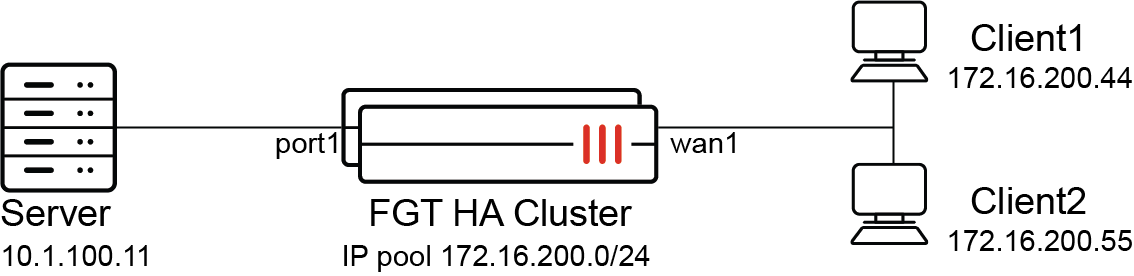
Example 1: setting the EIF refresh timer and timeout for outgoing EIF sessions
Set NP7 processors to refresh and set a timeout for outgoing EIF sessions.
config system npu
    set eif-tcp-refresh-dir outgoing
    set eif-udp-refresh-dir outgoing
    set eif-tcp-ttl 600
    set eif-udp-ttl 300
end
Create a firewall policy with EIF enabled:
config firewall policy
    edit 1
        set name cgn-hw1-policy4-1
        set srcintf port1
        set dstintf wan1
        set action accept
        set srcaddr all
        set dstaddr all
        set service ALL
        set nat enable
        set cgn-eif enable
        set cgn-log-server-grp test-syslog-svrgrp-1
        set ippool enable
        set poolname test-cgn-pba-1
    next
end
Generate a SNAT UDP session from the server to Client1. The following session appears on the FortiGate:
session info: proto=6 proto_state=11 duration=19 expire=3580 timeout=3600 refresh_dir=both flags=00000000 socktype=0 sockport=0 av_idx=0 use=0
origin-shaper=
reply-shaper=
per_ip_shaper=
class_id=0 ha_id=0 policy_dir=0 tunnel=/ vlan_cos=0/0
state=log hw_ses log-start
statistic(bytes/packets/allow_err): org=112/2/0 reply=60/1/0 tuples=2
tx speed(Bps/kbps): 5/0 rx speed(Bps/kbps): 3/0
orgin->sink: org pre->post, reply pre->post dev=70->71/71->70 gwy=172.16.200.44/10.1.100.11
hook=post dir=org act=snat 10.1.100.11:4155->172.16.200.44:80(172.16.201.181:34325)
hook=pre dir=reply act=dnat 172.16.200.44:80->172.16.201.181:34325(10.1.100.11:4155)
pos/(before,after) 0/(0,0), 0/(0,0)
misc=0 policy_id=1 pol_uuid_idx=20028 auth_info=0 chk_client_info=0 vd=500
serial=7c845805 tos=00/00 app_list=0 app=0 url_cat=0
rpdb_link_id=00000000 ngfw_id=n/a duplicaton_id=0
  setup by offloaded-policy: origin=native
  O: npid=2/0, in: OID=215/VID=20, out: NHI=23028 OID=215/VID=30
  R: npid=0/2, in: OID=215/VID=30, out: NHI=17110 OID=215/VID=20
# hardware-session = 1
Generate a TCP EIF session from Client 1:
-
Verify that the
eif-tcp-refresh-dir and eif-tcp-ttlsettings apply to TCP EIF sessions. This example uses host logging, so you need to use thediagnose sys npu-session list-fullcommand. The session should showtimeout=600andrefresh_dir=org. -
Verify the org packet will refresh the session's expire time.
-
Verify TCP EIF sessions will expire after timeout (600 seconds) has been reached.
diagnose sys npu-session list-full

session info: proto=6 proto_state=11 duration=36 expire=563 timeout=600 refresh_dir=org flags=00000000 socktype=0 sockport=0 av_idx=0 use=0
origin-shaper=
reply-shaper=
per_ip_shaper=
class_id=0 ha_id=0 policy_dir=0 tunnel=/ vlan_cos=0/0
state=log hw_ses log-start
statistic(bytes/packets/allow_err): org=112/2/0 reply=60/1/0 tuples=2
tx speed(Bps/kbps): 3/0 rx speed(Bps/kbps): 1/0
orgin->sink: org pre->post, reply pre->post dev=71->70/70->71 gwy=10.1.100.11/172.16.200.55
hook=pre dir=org act=dnat 172.16.200.55:12346->172.16.201.181:34325(10.1.100.11:4155)
hook=post dir=reply act=snat 10.1.100.11:4155->172.16.200.55:12346(172.16.201.181:34325)
pos/(before,after) 0/(0,0), 0/(0,0)
misc=0 policy_id=1 pol_uuid_idx=20028 auth_info=0 chk_client_info=0 vd=500
serial=55e72604 tos=00/00 app_list=0 app=0 url_cat=0
rpdb_link_id=00000000 ngfw_id=n/a duplicaton_id=0
  setup by offloaded-policy: origin=native
  O: npid=1/2, in: OID=215/VID=30, out: NHI=17110 OID=215/VID=20
  R: npid=2/1, in: OID=215/VID=20, out: NHI=23028 OID=215/VID=30
# hardware-session = 1
After the timeout, the diagnose sys npu-session list-full command shows no hardware sessions:
diagnose sys npu-session list-full
# hardware-session = 0
Generate UDP EIF sessions from Client 1:
-
Verify that the
eif-udp-refresh-dir and eif-udp-ttlsettings apply to UDP EIF sessions. This example uses host logging, so you need to use thediagnose sys npu-session list-fullcommand. The session should showtimeout=300amdrefresh_dir=org. -
Verify the org packets will refresh the session's expire time.
-
Verify UDP EIF sessions will expire after timeout (300 seconds) has been reached.
diagnose sys npu-session list-full

session info: proto=17 proto_state=00 duration=123 expire=176 timeout=300 refresh_dir=org flags=00000000 socktype=0 sockport=0 av_idx=0 use=0
origin-shaper=
reply-shaper=
per_ip_shaper=
class_id=0 ha_id=0 policy_dir=0 tunnel=/ vlan_cos=0/0
state=log hw_ses log-start
statistic(bytes/packets/allow_err): org=28/1/0 reply=0/0/0 tuples=2
tx speed(Bps/kbps): 0/0 rx speed(Bps/kbps): 0/0
orgin->sink: org pre->post, reply pre->post dev=71->70/70->71 gwy=10.1.100.11/172.16.200.55
hook=pre dir=org act=dnat 172.16.200.55:4117->172.16.201.181:34325(10.1.100.11:4155)
hook=post dir=reply act=snat 10.1.100.11:4155->172.16.200.55:4117(172.16.201.181:34325)
misc=0 policy_id=1 pol_uuid_idx=20028 auth_info=0 chk_client_info=0 vd=500
serial=fcea3dc7 tos=00/00 app_list=0 app=0 url_cat=0
rpdb_link_id=00000000 ngfw_id=n/a duplicaton_id=0
  setup by offloaded-policy: origin=native
  O: npid=1/2, in: OID=215/VID=30, out: NHI=17110 OID=215/VID=20
  R: npid=2/1, in: OID=215/VID=20, out: NHI=23028 OID=215/VID=30
Example 2: using the extra-timeout options
With the following configuration, when eif-udp-refresh-dir is set to incoming, and when you set a timeout using the extra-timeout-udp option, even when incoming traffic is received, if there isn't any corresponding outgoing traffic the EIF session is deleted. This example uses UDP traffic, but would work the same for TCP traffic.
config system npu
    config background-sse-scan
        set scan-stale 1
    end
config system npu
set eif-udp-refresh-dir incoming
set eif-udp-ttl 100
set extra-timeout-udp 30
end
Create a firewall policy with EIF enabled:
config firewall policy
    edit 1
        set name cgn-hw1-policy4-1
        set srcintf port1
        set dstintf wan1
        set action accept
        set srcaddr all
        set dstaddr all
        set service ALL
        set nat enable
        set cgn-eif enable
        set cgn-log-server-grp test-syslog-svrgrp-1
        set ippool enable
        set poolname test-cgn-pba-1
    next
end
Generate a SNAT UDP session from the server to Client1. Then send EIF traffic from Client 1 to the server. After a time interval typically slightly longer than the eif-udp-ttl time of 100 plus extra-timeout-udp time of 30 seconds the EIF session should be deleted and client 1 can no longer connect to the server.
diagnose sys npu-session list

session info: proto=17 proto_state=00 duration=195 expire=91 timeout=100 refresh_dir=reply flags=00000000 socktype=0 sockport=0 av_idx=0 use=0
origin-shaper=
reply-shaper=
per_ip_shaper=
class_id=0 ha_id=0 policy_dir=0 tunnel=/ vlan_cos=0/0
state=log hw_ses log-start
statistic(bytes/packets/allow_err): org=28/1/0 reply=1008/36/0 tuples=2
tx speed(Bps/kbps): 0/0 rx speed(Bps/kbps): 5/0
orgin->sink: org pre->post, reply pre->post dev=71->70/70->71 gwy=10.1.100.11/172.16.200.55
hook=pre dir=org act=dnat 172.16.200.55:5155->172.16.201.181:34325(10.1.100.11:1155)
hook=post dir=reply act=snat 10.1.100.11:1155->172.16.200.55:5155(172.16.201.181:34325)
misc=0 policy_id=1 pol_uuid_idx=20029 auth_info=0 chk_client_info=0 vd=500
serial=099654e7 tos=00/00 app_list=0 app=0 url_cat=0
rpdb_link_id=00000000 ngfw_id=n/a duplicaton_id=0
  setup by offloaded-policy: origin=native
  O: npid=1/2, in: OID=217/VID=30, out: NHI=17110 OID=217/VID=20
  R: npid=2/1, in: OID=217/VID=20, out: NHI=23028 OID=217/VID=30
# hardware-session = 1