Fortinet white logo
Fortinet white logo

New Features

FortiGuard rating server prioritization improvements

FortiGuard rating server prioritization improvements

This information is also available in the FortiOS 8.0 Administration Guide:

FortiGuard rating servers are now selected by fastest round-trip time (RTT) instead of timezone-based weight, ensuring the closest, fastest FortiGuard servers are used. The System > Settings > FortiGuard > FortiGuard settings page also changes from a service-based status to a server-specific status with an updated FortiGuard Filter Ratings Servers table and a new View details button. The GUI updates provide granular visibility into server IPs, response times, and packet loss, making troubleshooting more efficient.

Before this enhancement, the output of diagnose debug rating indicated FortiGuard servers were sorted by Weight over RTT with the lower weight servers at the top.

# diagnose debug rating
Locale       : english

Service      : Web-filter
Status       : Enable
License      : Contract

Service      : Antispam
Status       : Disable

Service      : Virus Outbreak Prevention
Status       : Disable

Num. of servers : 9
Protocol        : https
Port            : 443
Anycast         : Disable
Default servers : Included

-=- Server List (Wed Feb 25 02:15:16 2026) -=-

IP                                             Weight    RTT Flags   TZ   FortiGuard-requests  Curr Lost Total Lost             Updated Time
154.52.11.78                                        0    541          0                     1          0          0 Wed Feb 25 02:13:42 2026
194.69.172.58                                       0    545          0                     1          0          0 Wed Feb 25 02:13:42 2026
154.52.24.78                                        0    639          0                     1          0          0 Wed Feb 25 02:13:43 2026
149.5.232.18                                        0    651          0                     1          0          0 Wed Feb 25 02:13:43 2026
12.34.97.18                                        50     64 DI      -5                     4          0          0 Wed Feb 25 02:13:42 2026
140.174.22.68                                      50    242         -5                     1          0          0 Wed Feb 25 02:13:42 2026
209.40.106.70                                      60    230         -6                     1          0          0 Wed Feb 25 02:13:42 2026
173.243.138.96                                     80      1 D       -8                     3          0          0 Wed Feb 25 02:13:42 2026
210.7.96.18                                        90    581          9                     1          0          0 Wed Feb 25 02:13:43 2026

With this enhancement, the output of diagnose debug rating indicates FortiGuard servers are sorted by RTT, and Weight is ignored. The lowest RTT servers are at the top.

# diagnose debug rating
Locale       : english

Service      : Web-filter
Status       : Enable
License      : Contract

Service      : Antispam
Status       : Disable

Service      : Virus Outbreak Prevention
Status       : Disable

Num. of servers : 9
Protocol        : https
Port            : 443
Anycast         : Disable
Default servers : Included

-=- Server List (Wed Feb 25 00:54:45 2026) -=-

IP                                             Weight    RTT Flags   TZ   FortiGuard-requests  Curr Lost Total Lost             Updated Time
173.243.138.96                                     80      2 D       -8                    58          0          0 Wed Feb 25 00:54:38 2026
209.40.106.70                                      60     56         -6                    56          0          0 Wed Feb 25 00:54:39 2026
140.174.22.68                                      50     61         -5                    56          0          0 Wed Feb 25 00:54:39 2026
12.34.97.18                                        50     63 DI      -5                    59          0          0 Wed Feb 25 00:54:39 2026
154.52.11.78                                        0    134          0                    56          0          0 Wed Feb 25 00:54:39 2026
194.69.172.58                                       0    137          0                    56          0          0 Wed Feb 25 00:54:39 2026
210.7.96.18                                        90    142          9                    56          0          0 Wed Feb 25 00:54:39 2026
154.52.24.78                                        0    156          0                    56          0          0 Wed Feb 25 00:54:39 2026
149.5.232.18                                        0    161          0                    56          0          0 Wed Feb 25 00:54:39 2026
To view connectivity status:
  1. Go to System > FortiGuard > FortiGuard settings.
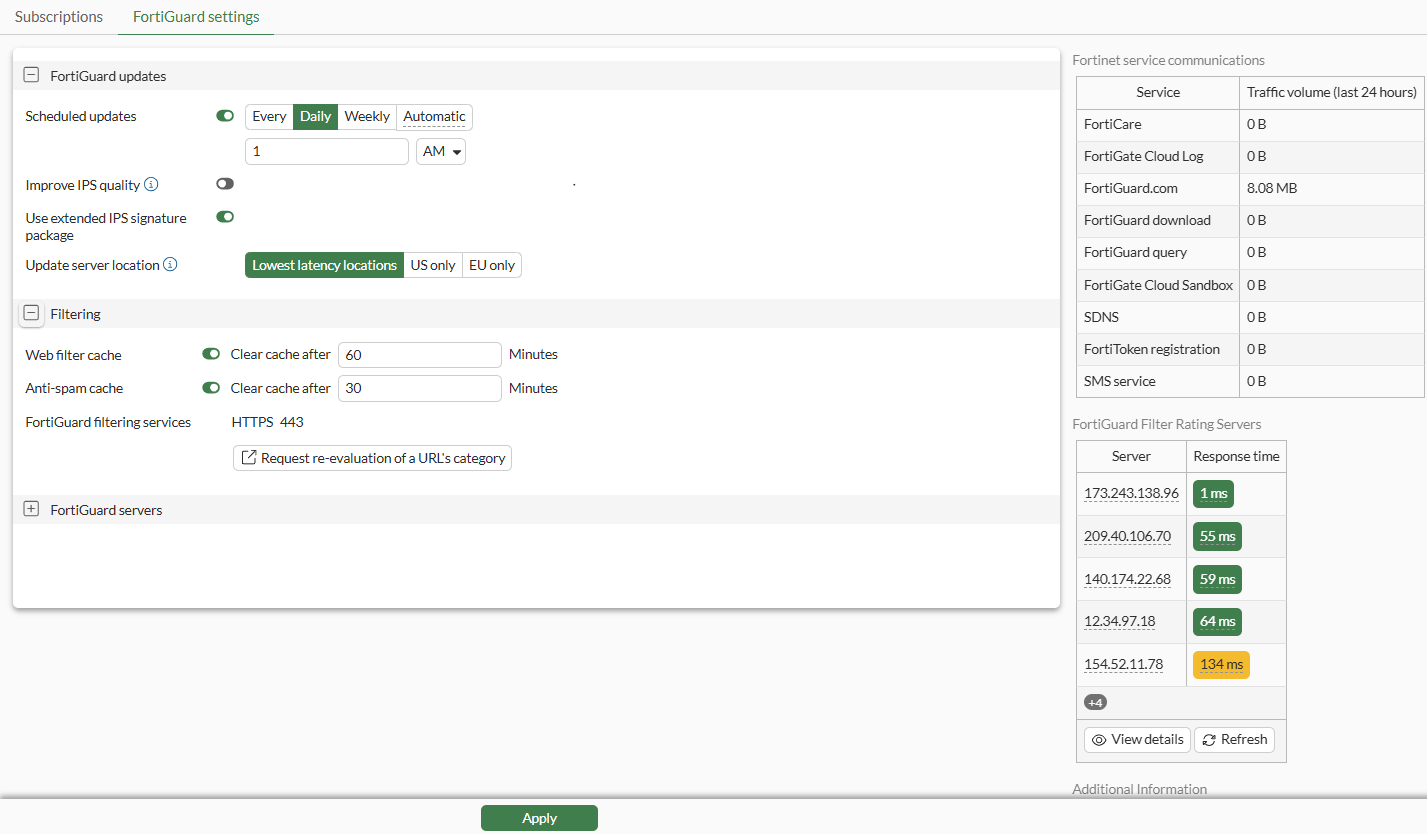
  2. In the right-side gutter, the FortiGuard Filter Rating Servers displays connectivity information for each server in the following columns:

    • Server: Displays the IP address for each server.

    • Response time: Displays a color-coded round-trip time.

    The colors in the Response time column indicate latency:

    • Green: Indicates less than or equal to 100 ms.

    • Yellow: Indicates 101 - 200 ms.

    • Red: Indicates 201 ms and higher.

  3. Click Refresh for the latest connectivity information.

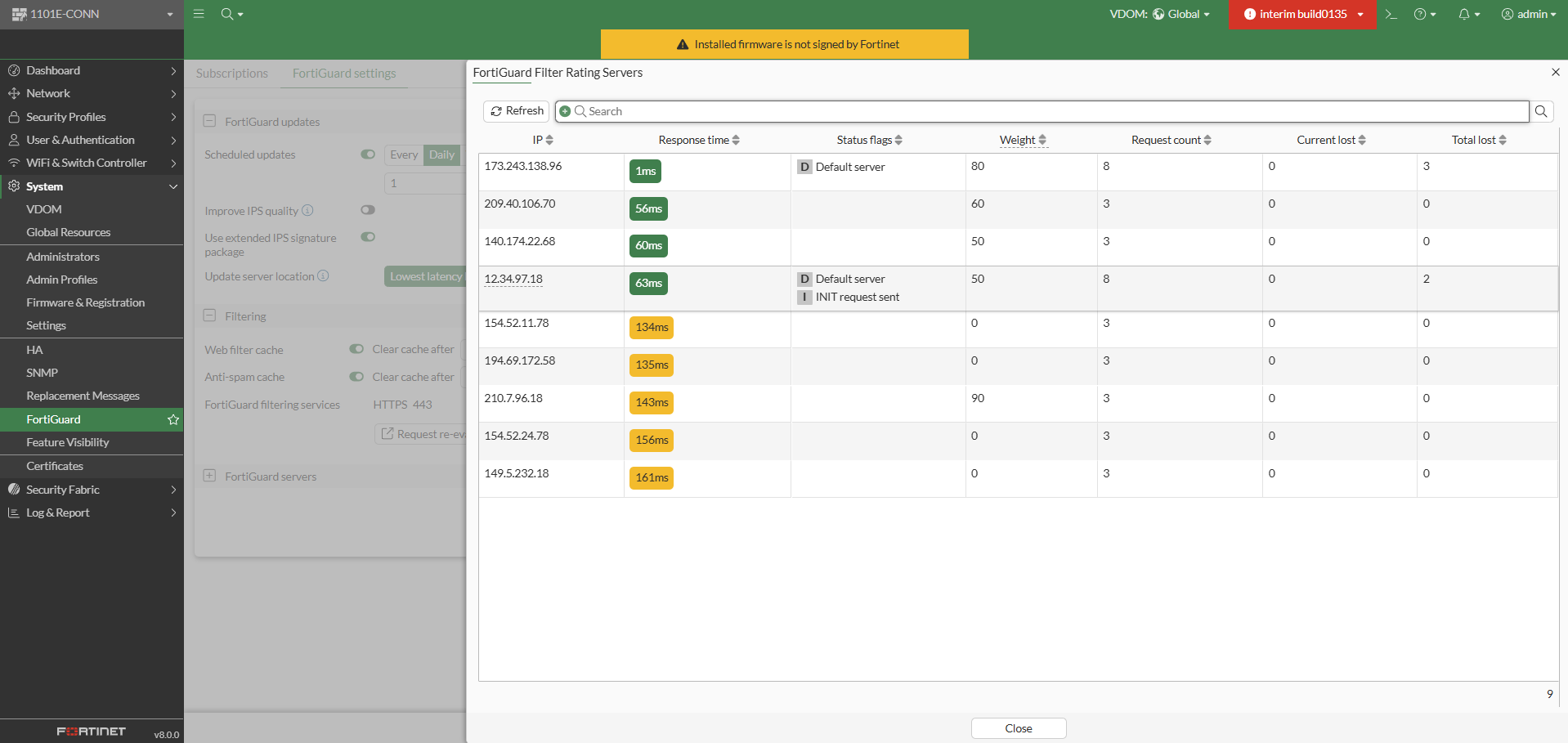
  4. Click View Details. The following columns of information are displayed:

    The same information can be viewed with the diagnose debug rating command.

  5. Click Close.

FortiGuard rating server prioritization improvements

FortiGuard rating server prioritization improvements

This information is also available in the FortiOS 8.0 Administration Guide:

FortiGuard rating servers are now selected by fastest round-trip time (RTT) instead of timezone-based weight, ensuring the closest, fastest FortiGuard servers are used. The System > Settings > FortiGuard > FortiGuard settings page also changes from a service-based status to a server-specific status with an updated FortiGuard Filter Ratings Servers table and a new View details button. The GUI updates provide granular visibility into server IPs, response times, and packet loss, making troubleshooting more efficient.

Before this enhancement, the output of diagnose debug rating indicated FortiGuard servers were sorted by Weight over RTT with the lower weight servers at the top.

# diagnose debug rating
Locale       : english

Service      : Web-filter
Status       : Enable
License      : Contract

Service      : Antispam
Status       : Disable

Service      : Virus Outbreak Prevention
Status       : Disable

Num. of servers : 9
Protocol        : https
Port            : 443
Anycast         : Disable
Default servers : Included

-=- Server List (Wed Feb 25 02:15:16 2026) -=-

IP                                             Weight    RTT Flags   TZ   FortiGuard-requests  Curr Lost Total Lost             Updated Time
154.52.11.78                                        0    541          0                     1          0          0 Wed Feb 25 02:13:42 2026
194.69.172.58                                       0    545          0                     1          0          0 Wed Feb 25 02:13:42 2026
154.52.24.78                                        0    639          0                     1          0          0 Wed Feb 25 02:13:43 2026
149.5.232.18                                        0    651          0                     1          0          0 Wed Feb 25 02:13:43 2026
12.34.97.18                                        50     64 DI      -5                     4          0          0 Wed Feb 25 02:13:42 2026
140.174.22.68                                      50    242         -5                     1          0          0 Wed Feb 25 02:13:42 2026
209.40.106.70                                      60    230         -6                     1          0          0 Wed Feb 25 02:13:42 2026
173.243.138.96                                     80      1 D       -8                     3          0          0 Wed Feb 25 02:13:42 2026
210.7.96.18                                        90    581          9                     1          0          0 Wed Feb 25 02:13:43 2026

With this enhancement, the output of diagnose debug rating indicates FortiGuard servers are sorted by RTT, and Weight is ignored. The lowest RTT servers are at the top.

# diagnose debug rating
Locale       : english

Service      : Web-filter
Status       : Enable
License      : Contract

Service      : Antispam
Status       : Disable

Service      : Virus Outbreak Prevention
Status       : Disable

Num. of servers : 9
Protocol        : https
Port            : 443
Anycast         : Disable
Default servers : Included

-=- Server List (Wed Feb 25 00:54:45 2026) -=-

IP                                             Weight    RTT Flags   TZ   FortiGuard-requests  Curr Lost Total Lost             Updated Time
173.243.138.96                                     80      2 D       -8                    58          0          0 Wed Feb 25 00:54:38 2026
209.40.106.70                                      60     56         -6                    56          0          0 Wed Feb 25 00:54:39 2026
140.174.22.68                                      50     61         -5                    56          0          0 Wed Feb 25 00:54:39 2026
12.34.97.18                                        50     63 DI      -5                    59          0          0 Wed Feb 25 00:54:39 2026
154.52.11.78                                        0    134          0                    56          0          0 Wed Feb 25 00:54:39 2026
194.69.172.58                                       0    137          0                    56          0          0 Wed Feb 25 00:54:39 2026
210.7.96.18                                        90    142          9                    56          0          0 Wed Feb 25 00:54:39 2026
154.52.24.78                                        0    156          0                    56          0          0 Wed Feb 25 00:54:39 2026
149.5.232.18                                        0    161          0                    56          0          0 Wed Feb 25 00:54:39 2026
To view connectivity status:
  1. Go to System > FortiGuard > FortiGuard settings.

  2. In the right-side gutter, the FortiGuard Filter Rating Servers displays connectivity information for each server in the following columns:

    • Server: Displays the IP address for each server.

    • Response time: Displays a color-coded round-trip time.

    The colors in the Response time column indicate latency:

    • Green: Indicates less than or equal to 100 ms.

    • Yellow: Indicates 101 - 200 ms.

    • Red: Indicates 201 ms and higher.

  3. Click Refresh for the latest connectivity information.

  4. Click View Details. The following columns of information are displayed:

    The same information can be viewed with the diagnose debug rating command.

  5. Click Close.