
Fortinet white logo
Fortinet white logo

New Features

Support tags in dual stack IPv4/IPv6 ZTNA policies

Support tags in dual stack IPv4/IPv6 ZTNA policies

IPv6 security posture tags and groups can be applied to dual stack IPv4/IPv6 ZTNA policies.

FortiClient and FortiClient EMS 7.4.5 or 8.0.0 or later are required to support this feature.

A new option is available to set the address sub-type to ems-tag:

config firewall address6
    edit 1
        set type dynamic
        set sub-type {sdn | ems-tag | 8021x}
        ...
    next
end

Option

Description

sub-type

Set the sub-type for the address:

  • sdn: SDN address.

  • ems-tag: FortiClient EMS tag.

  • 8021x: 802.1x address

Available when type is set to dynamic.

A new parameter is available to identify IPv6 security posture tags from FortiClient EMS:

config firewall policy
    edit 1
        ...
        set ztna-status enable
        set ztna-ems-tag6 <name>
        ...
    next
end

Option

Description

ztna-ems-tag6 <name>

Specify the name of the IPv6 security posture tag. Available when ztna-status is set to enable.

Example

To add IPv6 security posture tags to a firewall policy in the GUI:
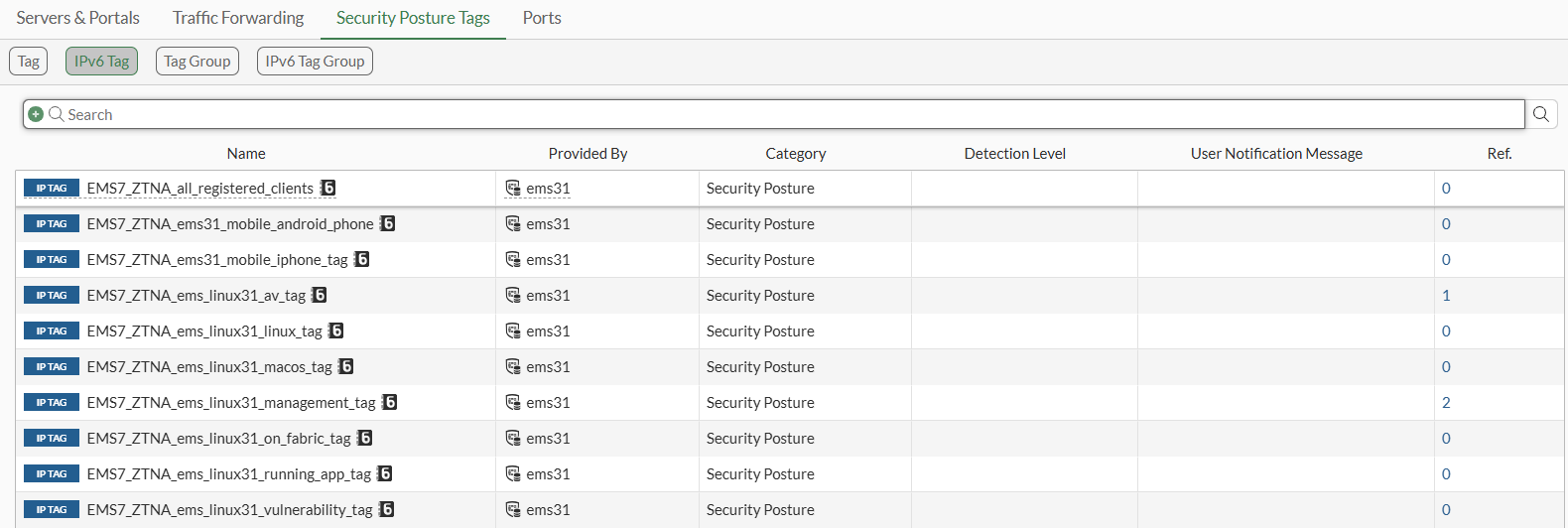
  1. Go to Policy & Objects > ZTNA > Security Posture Tags > IPv6 Tag to view a list of security posture tags for IPv6.
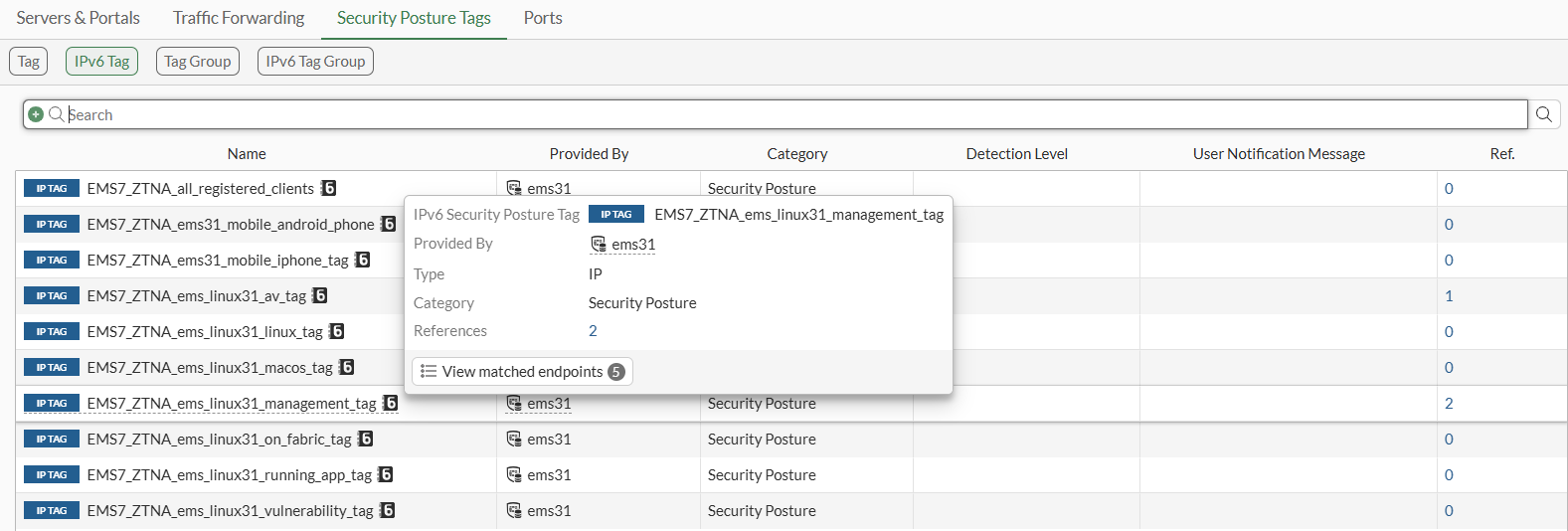
    Hover over a tag to display a tooltip of information.
  2. Click IPv6 Tag Group to view a group of IPv6 tags.

  3. Go to Policy & Objects > Firewall Policy and open for editing a firewall policy with Source configured to support IPv4 and IPv6.

  4. Enable Security posture tag and select a security posture tag for IPv6.
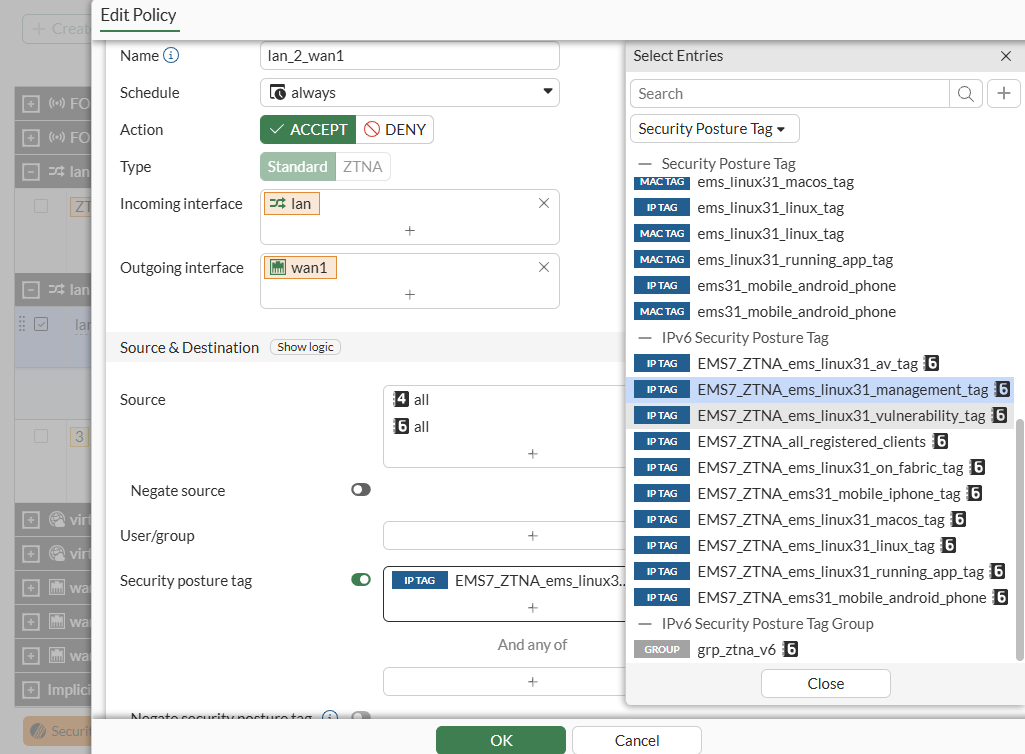
  5. Click OK to save the policy.

To add IPv6 security posture tags to a firewall policy in the CLI:
  1. Enable the sub-type ems-tag option for an IPv6 security posture tag:

    In this example, sub-type ems-tag is set for the EMS7_ZTNA_ems_linux31_management_tag IPv6 security posture tag.

    config firewall address6
        edit "EMS7_ZTNA_ems_linux31_management_tag"
            set uuid 880ef31c-fcba-51f0-e348-1f01acd82c22
            set type dynamic
            set sub-type ems-tag
            set dirty clean
            set obj-tag "ems_linux31_management_tag"
            set tag-type "zero_trust"
        next
    end
  2. Select the IPv6 security posture tag in a firewall policy configured to support IPv4 and IPv6 sources:

    In this example ztna-ems-tag6 is set to the EMS7_ZTNA_ems_linux31_management_tag IPv6 tag.

    config firewall policy
        edit 1
            set name "lan_2_wan1"
            set uuid de52dcac-fc17-51ee-6a37-645e65221a24
            set srcintf "lan"
            set dstintf "wan1"
            set action accept
            set ztna-status enable
            set srcaddr "all"
            set dstaddr "all"
            set srcaddr6 "all"
            set dstaddr6 "all"
            set ztna-ems-tag6 "EMS7_ZTNA_ems_linux31_management_tag"
            set schedule "always"
            set service "ALL"
            set logtraffic all
            set nat enable
        next
    end

Support tags in dual stack IPv4/IPv6 ZTNA policies

Support tags in dual stack IPv4/IPv6 ZTNA policies

IPv6 security posture tags and groups can be applied to dual stack IPv4/IPv6 ZTNA policies.

FortiClient and FortiClient EMS 7.4.5 or 8.0.0 or later are required to support this feature.

A new option is available to set the address sub-type to ems-tag:

config firewall address6
    edit 1
        set type dynamic
        set sub-type {sdn | ems-tag | 8021x}
        ...
    next
end

Option

Description

sub-type

Set the sub-type for the address:

  • sdn: SDN address.

  • ems-tag: FortiClient EMS tag.

  • 8021x: 802.1x address

Available when type is set to dynamic.

A new parameter is available to identify IPv6 security posture tags from FortiClient EMS:

config firewall policy
    edit 1
        ...
        set ztna-status enable
        set ztna-ems-tag6 <name>
        ...
    next
end

Option

Description

ztna-ems-tag6 <name>

Specify the name of the IPv6 security posture tag. Available when ztna-status is set to enable.

Example

To add IPv6 security posture tags to a firewall policy in the GUI:
  1. Go to Policy & Objects > ZTNA > Security Posture Tags > IPv6 Tag to view a list of security posture tags for IPv6.

    Hover over a tag to display a tooltip of information.

  2. Click IPv6 Tag Group to view a group of IPv6 tags.

  3. Go to Policy & Objects > Firewall Policy and open for editing a firewall policy with Source configured to support IPv4 and IPv6.

  4. Enable Security posture tag and select a security posture tag for IPv6.

  5. Click OK to save the policy.

To add IPv6 security posture tags to a firewall policy in the CLI:
  1. Enable the sub-type ems-tag option for an IPv6 security posture tag:

    In this example, sub-type ems-tag is set for the EMS7_ZTNA_ems_linux31_management_tag IPv6 security posture tag.

    config firewall address6
        edit "EMS7_ZTNA_ems_linux31_management_tag"
            set uuid 880ef31c-fcba-51f0-e348-1f01acd82c22
            set type dynamic
            set sub-type ems-tag
            set dirty clean
            set obj-tag "ems_linux31_management_tag"
            set tag-type "zero_trust"
        next
    end
  2. Select the IPv6 security posture tag in a firewall policy configured to support IPv4 and IPv6 sources:

    In this example ztna-ems-tag6 is set to the EMS7_ZTNA_ems_linux31_management_tag IPv6 tag.

    config firewall policy
        edit 1
            set name "lan_2_wan1"
            set uuid de52dcac-fc17-51ee-6a37-645e65221a24
            set srcintf "lan"
            set dstintf "wan1"
            set action accept
            set ztna-status enable
            set srcaddr "all"
            set dstaddr "all"
            set srcaddr6 "all"
            set dstaddr6 "all"
            set ztna-ems-tag6 "EMS7_ZTNA_ems_linux31_management_tag"
            set schedule "always"
            set service "ALL"
            set logtraffic all
            set nat enable
        next
    end