

Enhanced FGCP monitoring with interface group awareness
Enhances HA monitoring by allowing interfaces to be grouped and monitored collectively. Administrators can now define failover behavior based on group status instead of individual interfaces, improving stability in complex topologies and reducing unnecessary failover events.
New options are available:
config system ha
    config link-group
        edit <name>
            set *member <string>
            set min-members <integer>
        next
    end
    set link-group-monitor <string>
end
|
Option |
Description |
|---|---|
|
|
Configure link group table. |
|
|
Name of the link group. |
|
|
Member interfaces in this link group. |
|
|
Minimum number of members that must be up before this link group is considered up. Enter an integer value from 1 to 64 (default = 1). |
|
|
Link groups to check for port monitoring. |
config system ha
    set vcluster-status enable
    config vcluster
        edit <id>
            set link-group-monitor <group_1>, ... [group_n]
        next
    end
end
|
Option |
Description |
|---|---|
|
|
Enter the name of the link groups to check for port monitoring. |
Example
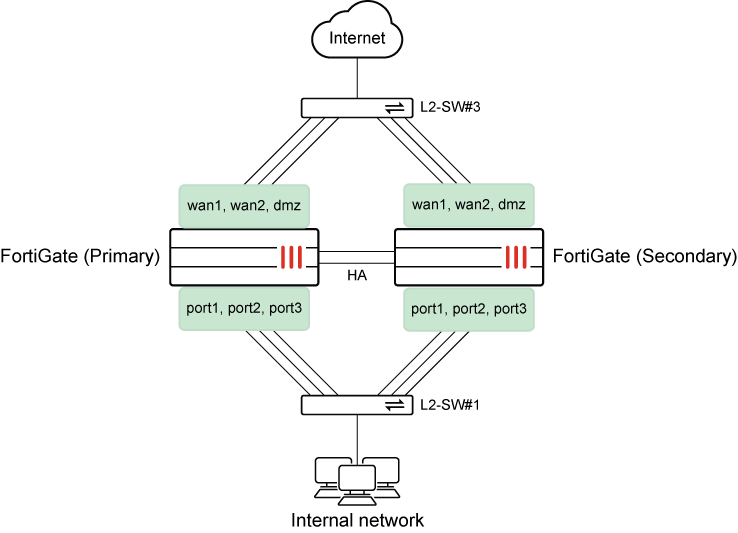
In this HA example, two link monitor groups are created with multiple group members:
-
The internal group contains the following members: port1, port2, port3, and a minimum of one member must be up by default for the group to be up.
-
The outgoing group contains the following members: wan1, wan2 and dmz, and a minimum of two members must be up for the group to be up.
The groups are monitored. When one member of each group goes down, no failover occurs because enough group members are up for the groups to be up. However, when two members of the outgoing group go down, the minimum number of up members is not met, and FortiGate fails over to the secondary unit in the cluster.
To configure link group monitoring:
-
On the primary FortiGate in the HA cluster, configure link groups, and enable link group monitoring:
Two link monitor groups are created: internal and outgoing.
The internal group is up when at least one group member is up, which is the default setting. The outgoing group is up when at least two group members are up (
set min-members 2).config system ha config link-group edit "internal" set member "port1" "port2" "port3" next edit "outgoing" set member "wan1" "wan2" "dmz" set min-members 2 next end set override enable set priority 200 set link-group-monitor "internal" "outgoing" end -
On the primary FortiGate, view the vcluster information:
(Primary)# diagnose sys ha dump-by vcluster
            HA information.

vcluster_nr=1
vcluster-1: state/o/chg_time=2(work)/1(helo)/1774297178(2026-03-23 13:19:38)
        pingsvr_flip_timeout/expire=3600s/0s
        link group:
        internal(prio=50,status=up), member status: port1(up) port2(up) port3(down)
        outgoing(prio=50,status=up), member status: wan1(up) wan2(up) dmz(down)
        'FG101FTK19003069': ha_prio/o=1/1, link_failure=0, pingsvr_failure=0, flag=0x00000000, mem_failover=0, uptime/reset_cnt=7/1
        'FG101FTK19003370': ha_prio/o=0/0, link_failure=0, pingsvr_failure=0, flag=0x00000001, mem_failover=0, uptime/reset_cnt=0/1
In the
internalgroup, two of the three ports are up (port1 and port2), and port3 is down. The link group is up because it meets the requirements of at least one up group member.In the
outgoinggroup, two of the three ports are up (wan1 and wan2), and dmz is down. The link group is up because it meets the requirements of at least two up group members. -
On the secondary FortiGate, view the vcluster information after wan2 and port2 go down:
(Secondary)# diagnose sys ha dump-by vcluster
            HA information.

vcluster_nr=1
vcluster-1: state/o/chg_time=3(standby)/2(work)/1774308016(2026-03-23 16:20:16)
        pingsvr_flip_timeout/expire=3600s/3561s
        link group:
        internal(prio=50,status=up), member status: port1(up) port2(down) port3(down)
        outgoing(prio=50,status=down), member status: wan1(up) wan2(down) dmz(down)
        'FG101FTK19003069': ha_prio/o=0/0, link_failure=0, pingsvr_failure=0, flag=0x00000001, mem_failover=0, uptime/reset_cnt=10845/1
        'FG101FTK19003370': ha_prio/o=1/1, link_failure=50, pingsvr_failure=0, flag=0x00000000, mem_failover=0, uptime/reset_cnt=0/2
In the
internallink monitor group, two of the three ports are down (port2 and port3), and port1 is up. The link group is up because it meets the requirements of at least one up group member.In the
outgoinglink monitor group, two of the three ports are down (wan2 and dmz), and wan1 is up. The link group is down because only one group member is up, which fails to meet the minimum requirement of at least two up group members.The HA cluster fails over to the secondary unit.
-
On the secondary FortiGate, view the HA status:
(Secondary)# get sys ha status
HA Health Status: OK
Model: FortiGate-101F
Mode: HA A-P
Group Name: mmmlll
Group ID: 300
Debug: 0
Cluster Uptime: 0 days 3h:4m:16s
Cluster state change time: 2026-03-23 16:20:16
Primary selected using:
    <2026/03/23 16:20:16> vcluster-1: FG101FTK19003069 is selected as the primary because the value of link-failure + pingsvr-failure is less than peer member FG101FTK19003370.
    <2026/03/23 13:19:38> vcluster-1: FG101FTK19003370 is selected as the primary because its override priority is larger than peer member FG101FTK19003069.
ses_pickup: enable, ses_pickup_delay=disable
override: enable
Configuration Status:
    FG101FTK19003370(updated 0 seconds ago): in-sync
    FG101FTK19003370 chksum dump: 89 0f 35 97 80 c3 b0 74 62 eb 25 ab 43 25 eb dd
    FG101FTK19003069(updated 2 seconds ago): in-sync
    FG101FTK19003069 chksum dump: 89 0f 35 97 80 c3 b0 74 62 eb 25 ab 43 25 eb dd
System Usage stats:
    FG101FTK19003370(updated 0 seconds ago):
        sessions=0, average-cpu-user/nice/system/idle=4%/0%/0%/95%, memory=34%
    FG101FTK19003069(updated 2 seconds ago):
        sessions=6, average-cpu-user/nice/system/idle=5%/0%/7%/87%, memory=36%
HBDEV stats:
    FG101FTK19003370(updated 0 seconds ago):
        ha1: physical/1000auto, up, rx-bytes/packets/dropped/errors=705942/5298/0/0, tx=28233056/55261/0/0
        ha2: physical/1000auto, up, rx-bytes/packets/dropped/errors=88653370/195779/0/0, tx=40464030/84449/0/0
    FG101FTK19003069(updated 2 seconds ago):
        ha1: physical/1000auto, up, rx-bytes/packets/dropped/errors=465634559/867811/0/0, tx=28092032/55289/0/0
        ha2: physical/1000auto, up, rx-bytes/packets/dropped/errors=97389244/200257/0/0, tx=31745955/80008/0/0
number of member: 2
EEEEEEEEEEEEEEEEEEE, FG101FTK19003370, HA cluster index = 0
FFFFF           , FG101FTK19003069, HA cluster index = 1
number of vcluster: 1
vcluster 1: standby 169.254.0.2
Secondary: FG101FTK19003370, HA operating index = 1
Primary: FG101FTK19003069, HA operating index = 0
2