
Fortinet white logo
Fortinet white logo

New Features

On-demand duplication at the Hub using remote health-check

On-demand duplication at the Hub using remote health-check

Packet duplication on hub devices can be configured to automatically activate when a spoke begins sending out-of-SLA remote health checks. Duplication continues until the hub once again receives in-SLA health checks from that spoke. The duplication is limited to the affected spoke's tunnels. For each original packet, the hub sends one duplicate per tunnel until either all tunnels have transmitted the same packet or the configured maximum (duplication-max-num) is reached.
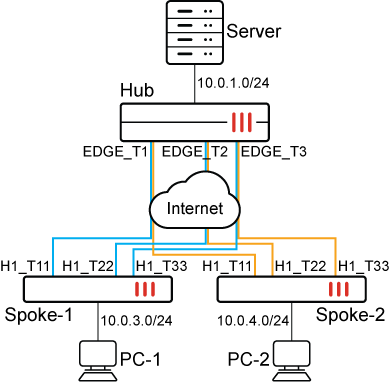
In this example, the Hub has three dial-up tunnels to Spoke-1 and Spoke-2. On-demand duplication is configured on the Hub, and active health-check is configured on the spokes to detect the overlays' SLA.

To configure the Hub:
config system sdwan
    set status enable
    set duplication-max-num 4
    config zone
        ...
        edit "overlay"
        next
    end
    config members
        edit 1
            set interface "EDGE_T1"
            set zone "overlay"
        next
        edit 2
            set interface "EDGE_T2"
            set zone "overlay"
        next
        edit 3
            set interface "EDGE_T3"
            set zone "overlay"
        next
       ...
    end
    config health-check
        edit "passive_hc"
            set detect-mode remote
            set sla-id-redistribute 1                                               
            set members 1 2 3
            config sla
                edit 1
                    set link-cost-factor remote
                next
            end
        next
    end
    ...
    config duplication
        edit 1
            set srcaddr "CORP_LAN"
            set dstaddr "CORP_LAN"
            set srcintf "lan_zone" "overlay"
            set dstintf "overlay" "lan_zone"
            set service "PING"
            set packet-duplication on-demand
        next
    end
end
To configure Spoke-1:
config system sdwan
    set status enable
    config zone
        ...
        edit "overlay"
        next
    end
    config members
        ...
        edit 4
            set interface "H1_T11"
            set zone "overlay"
            set source 172.31.0.65
            set priority 10
        next
        edit 5
            set interface "H1_T22"
            set zone "overlay"
            set source 172.31.0.65
            set priority 10
        next
        edit 6
            set interface "H1_T33"
            set zone "overlay"
            set source 172.31.0.65
            set priority 10
        next
        ...
    end
    config health-check
        edit "HUB"
            set server "172.31.100.100"
            set embed-measured-health enable
            set sla-id-redistribute 1                                                   
            set members 4 5 6
            config sla
                edit 1
                    set link-cost-factor latency
                    set latency-threshold 100
                next
            end
        next
    end
    ...
end
To configure Spoke-2:
config system sdwan
    set status enable
    config zone
    ...
        edit "overlay"
    end
    config members
        edit 4
            set interface "H1_T11"
            set zone "overlay"
            set source 172.31.0.66
            set cost 2
            set priority 10
        next
        edit 5
            set interface "H1_T22"
            set zone "overlay"
            set source 172.31.0.66
            set priority 10
        next
        edit 6
            set interface "H1_T33"
            set zone "overlay"
            set source 172.31.0.66
            set priority 10
        next
    ...
    end
    config health-check
        edit "HUB"
            set server "172.31.100.100"
            set embed-measured-health enable
            set sla-id-redistribute 1                                                           
            set members 4 5 6
            config sla
                edit 1
                    set link-cost-factor latency
                    set latency-threshold 200
                next
            end
        next
     end
    ...
end
To check the routes:
  1. On the Hub, check the subnets behind Spoke-1 (10.0.3.0/24) and Spoke-2 (10.0.4.0/24):

    # get router info routing-table details 10.0.3.0/24
    
    Routing table for VRF=0
    Routing entry for 10.0.3.0/24
      Known via "bgp", distance 200, metric 0, best
      Last update 01:10:23 ago
      * vrf 0 172.31.0.65 priority 1 (recursive via EDGE_T1 tunnel 172.31.0.65 [1])
                                     (recursive via EDGE_T2 tunnel 10.0.0.14 [1])
                                     (recursive via EDGE_T3 tunnel 10.0.0.15 [1])
    
    # get router info routing-table details 10.0.4.0/24
    
    Routing table for VRF=0
    Routing entry for 10.0.4.0/24
      Known via "bgp", distance 200, metric 0, best
      Last update 01:09:45 ago
      * vrf 0 172.31.0.66 priority 1 (recursive via EDGE_T1 tunnel 172.31.0.66 [1])
                                     (recursive via EDGE_T2 tunnel 10.0.0.16 [1])
                                     (recursive via EDGE_T3 tunnel 10.0.0.17 [1])
  2. On Spoke-1, check the subnet behind the Hub:

    # get router info routing-table details 10.0.1.0/24
    
    Routing table for VRF=0
    Routing entry for 10.0.1.0/24
      Known via "bgp", distance 200, metric 0, best
      Last update 01:40:18 ago
      * vrf 0 172.31.0.1, tag 1 priority 1 (recursive via H1_T11 tunnel 172.31.1.1), best-match
                                           (recursive via H1_T22 tunnel 172.31.1.5), best-match
                                           (recursive via H1_T33 tunnel 172.31.2.1), best-match
  3. On Spoke-2, check the subnet behind the Hub:

    # get router info routing-table details 10.0.1.0/24
    
    Routing table for VRF=0
    Routing entry for 10.0.1.0/24
      Known via "bgp", distance 200, metric 0, best
      Last update 01:11:37 ago
      * vrf 0 172.31.0.1, tag 1 priority 1 (recursive via H1_T11 tunnel 172.31.1.1), best-match
                                           (recursive via H1_T22 tunnel 172.31.1.5), best-match
                                           (recursive via H1_T33 tunnel 172.31.2.1), best-match
  4. On the Hub, check the remote health status and that all child tunnels are in-SLA:

    # diagnose sys sdwan health-check remote
    Remote Health Check: passive_hc(3)
      Passive remote statistics of EDGE_T3(47):
    EDGE_T3_0(10.0.0.15): timestamp=02-19 12:10:03.556, src=172.31.0.65, latency=0.150, jitter=0.007, pktloss=0.000%, mos=4.404, SLA id=1(pass), rmt_ver=1, rmt_sla=in, rmt_prio=0, last_sla_change=02-19 10:23:45.877
    EDGE_T3_1(10.0.0.17): timestamp=02-19 12:10:03.368, src=172.31.0.66, latency=0.159, jitter=0.022, pktloss=0.000%, mos=4.404, SLA id=1(pass), rmt_ver=1, rmt_sla=in, rmt_prio=0, last_sla_change=02-19 10:51:17.377
    Remote Health Check: passive_hc(2)
      Passive remote statistics of EDGE_T2(46):
    EDGE_T2_1(10.0.0.14): timestamp=02-19 12:10:03.556, src=172.31.0.65, latency=0.210, jitter=0.004, pktloss=0.000%, mos=4.404, SLA id=1(pass), rmt_ver=1, rmt_sla=in, rmt_prio=0, last_sla_change=02-19 10:21:44.967
    EDGE_T2_0(10.0.0.16): timestamp=02-19 12:10:03.368, src=172.31.0.66, latency=0.229, jitter=0.017, pktloss=0.000%, mos=4.404, SLA id=1(pass), rmt_ver=1, rmt_sla=in, rmt_prio=0, last_sla_change=02-19 10:51:08.667
    Remote Health Check: passive_hc(1)
      Passive remote statistics of EDGE_T1(45):
    EDGE_T1_1(172.31.0.65): timestamp=02-19 12:10:03.556, src=172.31.0.65, latency=0.262, jitter=0.019, pktloss=0.000%, mos=4.404, SLA id=1(pass), rmt_ver=1, rmt_sla=in, rmt_prio=0, last_sla_change=02-19 12:05:34.137
    EDGE_T1_0(172.31.0.66): timestamp=02-19 12:10:03.368, src=172.31.0.66, latency=0.285, jitter=0.021, pktloss=0.000%, mos=4.404, SLA id=1(pass), rmt_ver=1, rmt_sla=in, rmt_prio=0, last_sla_change=02-19 10:51:08.157
  5. Ping from the server to PC-1 and PC-2 and on the Hub, confirm that traffic goes on EDGE_T1 and no duplication occurs because the child tunnels of EDGE_T1 are in-SLA.

    1. PC-1:

      test@server:~$ ping 10.0.3.2
      PING 10.0.3.2 (10.0.3.2) 56(84) bytes of data.
      64 bytes from 10.0.3.2: icmp_seq=1 ttl=62 time=1.09 ms
      64 bytes from 10.0.3.2: icmp_seq=2 ttl=62 time=0.684 ms
      64 bytes from 10.0.3.2: icmp_seq=3 ttl=62 time=0.679 ms

      Packet sniffer on the Hub:

      # diagnose sniffer packet any 'host 10.0.3.2' 4                      
      interfaces=[any]
      filters=[host 10.0.3.2]
      39.588602 port4 in 10.0.1.2 -> 10.0.3.2: icmp: echo request
      39.588763 EDGE_T1 out 10.0.1.2 -> 10.0.3.2: icmp: echo request
      39.589555 EDGE_T1 in 10.0.3.2 -> 10.0.1.2: icmp: echo reply
      39.589626 port4 out 10.0.3.2 -> 10.0.1.2: icmp: echo reply
      40.588399 port4 in 10.0.1.2 -> 10.0.3.2: icmp: echo request
      40.588472 EDGE_T1 out 10.0.1.2 -> 10.0.3.2: icmp: echo request
      40.588946 EDGE_T1 in 10.0.3.2 -> 10.0.1.2: icmp: echo reply
      40.588998 port4 out 10.0.3.2 -> 10.0.1.2: icmp: echo reply
      41.587411 port4 in 10.0.1.2 -> 10.0.3.2: icmp: echo request
      41.587491 EDGE_T1 out 10.0.1.2 -> 10.0.3.2: icmp: echo request
      41.587972 EDGE_T1 in 10.0.3.2 -> 10.0.1.2: icmp: echo reply
      41.588028 port4 out 10.0.3.2 -> 10.0.1.2: icmp: echo reply
    2. PC-2:

      test@server:~$ ping 10.0.4.2
      PING 10.0.4.2 (10.0.4.2) 56(84) bytes of data.
      64 bytes from 10.0.4.2: icmp_seq=1 ttl=62 time=0.959 ms
      64 bytes from 10.0.4.2: icmp_seq=2 ttl=62 time=0.630 ms
      64 bytes from 10.0.4.2: icmp_seq=3 ttl=62 time=0.650 ms

      Packet sniffer on the Hub:

      # diagnose sniffer packet any 'host 10.0.4.2' 4                             
      interfaces=[any]
      filters=[host 10.0.4.2]
      2.598946 port4 in 10.0.1.2 -> 10.0.4.2: icmp: echo request
      2.599055 EDGE_T1 out 10.0.1.2 -> 10.0.4.2: icmp: echo request
      2.599777 EDGE_T1 in 10.0.4.2 -> 10.0.1.2: icmp: echo reply
      2.599810 port4 out 10.0.4.2 -> 10.0.1.2: icmp: echo reply
      3.598778 port4 in 10.0.1.2 -> 10.0.4.2: icmp: echo request
      3.598819 EDGE_T1 out 10.0.1.2 -> 10.0.4.2: icmp: echo request
      3.599262 EDGE_T1 in 10.0.4.2 -> 10.0.1.2: icmp: echo reply
      3.599295 port4 out 10.0.4.2 -> 10.0.1.2: icmp: echo reply
      4.598782 port4 in 10.0.1.2 -> 10.0.4.2: icmp: echo request
      4.598819 EDGE_T1 out 10.0.1.2 -> 10.0.4.2: icmp: echo request
      4.599279 EDGE_T1 in 10.0.4.2 -> 10.0.1.2: icmp: echo reply
      4.599316 port4 out 10.0.4.2 -> 10.0.1.2: icmp: echo reply
  6. Increase the latency to 120ms on overlay H1_T11 of Spoke-1, then confirm that the corresponding child tunnel on the Hub is out-of-SLA. Also confirm that duplication occurs from the Hub to Spoke-1.

    1. Check the health status on the HUB:

      # diagnose sys sdwan health-check  remote
      Remote Health Check: passive_hc(3)
        Passive remote statistics of EDGE_T3(47):
      EDGE_T3_0(10.0.0.15): timestamp=02-19 13:28:14.680, src=172.31.0.65, latency=0.158, jitter=0.009, pktloss=0.000%, mos=4.404, SLA id=1(pass), rmt_ver=1, rmt_sla=in, rmt_prio=0, last_sla_change=02-19 10:23:45.877
      EDGE_T3_1(10.0.0.17): timestamp=02-19 13:28:14.504, src=172.31.0.66, latency=0.149, jitter=0.019, pktloss=0.000%, mos=4.404, SLA id=1(pass), rmt_ver=1, rmt_sla=in, rmt_prio=0, last_sla_change=02-19 10:51:17.377
      Remote Health Check: passive_hc(2)
        Passive remote statistics of EDGE_T2(46):
      EDGE_T2_1(10.0.0.14): timestamp=02-19 13:28:14.680, src=172.31.0.65, latency=0.220, jitter=0.009, pktloss=0.000%, mos=4.404, SLA id=1(pass), rmt_ver=1, rmt_sla=in, rmt_prio=0, last_sla_change=02-19 10:21:44.967
      EDGE_T2_0(10.0.0.16): timestamp=02-19 13:28:14.504, src=172.31.0.66, latency=0.213, jitter=0.014, pktloss=0.000%, mos=4.404, SLA id=1(pass), rmt_ver=1, rmt_sla=in, rmt_prio=0, last_sla_change=02-19 10:51:08.667
      Remote Health Check: passive_hc(1)
        Passive remote statistics of EDGE_T1(45):
      EDGE_T1_1(172.31.0.65): timestamp=02-19 13:28:14.680, src=172.31.0.65, latency=120.247, jitter=0.017, pktloss=0.000%, mos=4.338, SLA id=1(remote), rmt_ver=1, rmt_sla=out, rmt_prio=0, last_sla_change=02-19 13:25:41.227
      EDGE_T1_0(172.31.0.66): timestamp=02-19 13:28:14.504, src=172.31.0.66, latency=0.255, jitter=0.031, pktloss=0.000%, mos=4.404, SLA id=1(pass), rmt_ver=1, rmt_sla=in, rmt_prio=0, last_sla_change=02-19 10:51:08.157
    2. Ping PC-1:

      The duplication takes place from Hub to Spoke-1.

      test@server:~$ ping 10.0.3.2 
      
      64 bytes from 10.0.3.2: icmp_seq=51 ttl=62 time=120 ms
      64 bytes from 10.0.3.2: icmp_seq=52 ttl=62 time=120 ms
      64 bytes from 10.0.3.2: icmp_seq=53 ttl=62 time=120 ms
      64 bytes from 10.0.3.2: icmp_seq=54 ttl=62 time=0.899 ms
      64 bytes from 10.0.3.2: icmp_seq=54 ttl=62 time=0.931 ms (DUP!)
      64 bytes from 10.0.3.2: icmp_seq=54 ttl=62 time=120 ms (DUP!)
      64 bytes from 10.0.3.2: icmp_seq=55 ttl=62 time=0.820 ms
      64 bytes from 10.0.3.2: icmp_seq=55 ttl=62 time=0.855 ms (DUP!)                         
      64 bytes from 10.0.3.2: icmp_seq=55 ttl=62 time=120 ms (DUP!)
      64 bytes from 10.0.3.2: icmp_seq=56 ttl=62 time=0.793 ms
      64 bytes from 10.0.3.2: icmp_seq=56 ttl=62 time=0.827 ms (DUP!)
      64 bytes from 10.0.3.2: icmp_seq=56 ttl=62 time=120 ms (DUP!)

      Because one tunnel is out-of-SLA, the ping test changes from single echo replies (as indicated by the sequence number increasing by one and the latency remaining at 120ms) to three echo replies per sequence and only one with 120ms latency, indicating that all tunnels are used at once. Note that the duplication was configured to send four duplicate packets, but only two duplicates are received as a result of only three eligible tunnels.

  7. Increase the latency to 220ms on overlay H1_T11 of Spoke-2, then confirm that corresponding child tunnel on the Hub is out-of-SLA. Also confirm that duplication occurs from the Hub to Spoke-2.

    1. Check the health status on the HUB:

      # diagnose sys sdwan health-check  remote
      Remote Health Check: passive_hc(3)
        Passive remote statistics of EDGE_T3(47):
      EDGE_T3_0(10.0.0.15): timestamp=02-19 13:40:38.693, src=172.31.0.65, latency=0.157, jitter=0.008, pktloss=0.000%, mos=4.404, SLA id=1(pass), rmt_ver=1, rmt_sla=in, rmt_prio=0, last_sla_change=02-19 10:23:45.877
      EDGE_T3_1(10.0.0.17): timestamp=02-19 13:40:38.766, src=172.31.0.66, latency=0.145, jitter=0.017, pktloss=0.000%, mos=4.404, SLA id=1(pass), rmt_ver=1, rmt_sla=in, rmt_prio=0, last_sla_change=02-19 10:51:17.377
      Remote Health Check: passive_hc(2)
        Passive remote statistics of EDGE_T2(46):
      EDGE_T2_1(10.0.0.14): timestamp=02-19 13:40:38.692, src=172.31.0.65, latency=0.220, jitter=0.006, pktloss=0.000%, mos=4.404, SLA id=1(pass), rmt_ver=1, rmt_sla=in, rmt_prio=0, last_sla_change=02-19 10:21:44.967
      EDGE_T2_0(10.0.0.16): timestamp=02-19 13:40:38.766, src=172.31.0.66, latency=0.219, jitter=0.012, pktloss=0.000%, mos=4.404, SLA id=1(pass), rmt_ver=1, rmt_sla=in, rmt_prio=0, last_sla_change=02-19 10:51:08.667
      Remote Health Check: passive_hc(1)
        Passive remote statistics of EDGE_T1(45):
      EDGE_T1_1(172.31.0.65): timestamp=02-19 13:40:38.692, src=172.31.0.65, latency=120.245, jitter=0.010, pktloss=0.000%, mos=4.338, SLA id=1(remote), rmt_ver=1, rmt_sla=out, rmt_prio=0, last_sla_change=02-19 13:25:41.227
      EDGE_T1_0(172.31.0.66): timestamp=02-19 13:40:38.766, src=172.31.0.66, latency=220.242, jitter=0.018, pktloss=0.000%, mos=4.103, SLA id=1(remote), rmt_ver=1, rmt_sla=out, rmt_prio=0, last_sla_change=02-19 13:39:12.427
    2. Ping PC-2:

      The duplication takes place from Hub to Spoke-2.

      test@server:~$ ping 10.0.4.2
      
      64 bytes from 10.0.4.2: icmp_seq=103 ttl=62 time=220 ms
      64 bytes from 10.0.4.2: icmp_seq=104 ttl=62 time=220 ms
      64 bytes from 10.0.4.2: icmp_seq=105 ttl=62 time=220 ms
      64 bytes from 10.0.4.2: icmp_seq=106 ttl=62 time=0.735 ms
      64 bytes from 10.0.4.2: icmp_seq=106 ttl=62 time=0.742 ms (DUP!)
      64 bytes from 10.0.4.2: icmp_seq=106 ttl=62 time=220 ms (DUP!)
      64 bytes from 10.0.4.2: icmp_seq=107 ttl=62 time=0.721 ms
      64 bytes from 10.0.4.2: icmp_seq=107 ttl=62 time=0.729 ms (DUP!)
      64 bytes from 10.0.4.2: icmp_seq=107 ttl=62 time=220 ms (DUP!)
      64 bytes from 10.0.4.2: icmp_seq=108 ttl=62 time=0.719 ms
      64 bytes from 10.0.4.2: icmp_seq=108 ttl=62 time=0.731 ms (DUP!)
      64 bytes from 10.0.4.2: icmp_seq=108 ttl=62 time=220 ms (DUP!)
  8. Remove the latency impairment and see that the duplication stops.

    1. Check the health status on the HUB:

      # diagnose sys sdwan health-check  remote
      Remote Health Check: passive_hc(3)
        Passive remote statistics of EDGE_T3(47):
      EDGE_T3_0(10.0.0.15): timestamp=02-19 13:44:03.213, src=172.31.0.65, latency=0.156, jitter=0.013, pktloss=0.000%, mos=4.404, SLA id=1(pass), rmt_ver=1, rmt_sla=in, rmt_prio=0, last_sla_change=02-19 10:23:45.877
      EDGE_T3_1(10.0.0.17): timestamp=02-19 13:44:03.307, src=172.31.0.66, latency=0.151, jitter=0.022, pktloss=0.000%, mos=4.404, SLA id=1(pass), rmt_ver=1, rmt_sla=in, rmt_prio=0, last_sla_change=02-19 10:51:17.377
      Remote Health Check: passive_hc(2)
        Passive remote statistics of EDGE_T2(46):
      EDGE_T2_1(10.0.0.14): timestamp=02-19 13:44:03.213, src=172.31.0.65, latency=0.211, jitter=0.008, pktloss=0.000%, mos=4.404, SLA id=1(pass), rmt_ver=1, rmt_sla=in, rmt_prio=0, last_sla_change=02-19 10:21:44.967
      EDGE_T2_0(10.0.0.16): timestamp=02-19 13:44:03.307, src=172.31.0.66, latency=0.224, jitter=0.016, pktloss=0.000%, mos=4.404, SLA id=1(pass), rmt_ver=1, rmt_sla=in, rmt_prio=0, last_sla_change=02-19 10:51:08.667
      Remote Health Check: passive_hc(1)
        Passive remote statistics of EDGE_T1(45):
      EDGE_T1_1(172.31.0.65): timestamp=02-19 13:44:03.213, src=172.31.0.65, latency=0.269, jitter=0.028, pktloss=0.000%, mos=4.404, SLA id=1(pass), rmt_ver=1, rmt_sla=in, rmt_prio=0, last_sla_change=02-19 13:43:36.967
      EDGE_T1_0(172.31.0.66): timestamp=02-19 13:44:03.307, src=172.31.0.66, latency=0.263, jitter=0.036, pktloss=0.000%, mos=4.404, SLA id=1(pass), rmt_ver=1, rmt_sla=in, rmt_prio=0, last_sla_change=02-19 13:43:35.947
    2. Ping PC-1:

      Note where the duplication stops.

      test@server:$ ping 10.0.3.2
      
      64 bytes from 10.0.3.2: icmp_seq=150 ttl=62 time=0.579 ms
      64 bytes from 10.0.3.2: icmp_seq=150 ttl=62 time=0.640 ms (DUP!)
      64 bytes from 10.0.3.2: icmp_seq=150 ttl=62 time=0.643 ms (DUP!)
      64 bytes from 10.0.3.2: icmp_seq=151 ttl=62 time=0.531 ms
      64 bytes from 10.0.3.2: icmp_seq=152 ttl=62 time=0.578 ms
      64 bytes from 10.0.3.2: icmp_seq=153 ttl=62 time=0.572 ms
      64 bytes from 10.0.3.2: icmp_seq=154 ttl=62 time=0.557 ms
    3. Ping PC-2:

      Note where the duplication stops.

      test@server:~$ ping 10.0.4.2
      
      64 bytes from 10.0.4.2: icmp_seq=200 ttl=62 time=0.730 ms
      64 bytes from 10.0.4.2: icmp_seq=200 ttl=62 time=0.767 ms (DUP!)
      64 bytes from 10.0.4.2: icmp_seq=200 ttl=62 time=0.769 ms (DUP!)
      64 bytes from 10.0.4.2: icmp_seq=201 ttl=62 time=0.672 ms
      64 bytes from 10.0.4.2: icmp_seq=202 ttl=62 time=0.551 ms
      64 bytes from 10.0.4.2: icmp_seq=203 ttl=62 time=0.543 ms
      64 bytes from 10.0.4.2: icmp_seq=204 ttl=62 time=0.568 ms

On-demand duplication at the Hub using remote health-check

On-demand duplication at the Hub using remote health-check

Packet duplication on hub devices can be configured to automatically activate when a spoke begins sending out-of-SLA remote health checks. Duplication continues until the hub once again receives in-SLA health checks from that spoke. The duplication is limited to the affected spoke's tunnels. For each original packet, the hub sends one duplicate per tunnel until either all tunnels have transmitted the same packet or the configured maximum (duplication-max-num) is reached.

In this example, the Hub has three dial-up tunnels to Spoke-1 and Spoke-2. On-demand duplication is configured on the Hub, and active health-check is configured on the spokes to detect the overlays' SLA.

To configure the Hub:
config system sdwan
    set status enable
    set duplication-max-num 4
    config zone
        ...
        edit "overlay"
        next
    end
    config members
        edit 1
            set interface "EDGE_T1"
            set zone "overlay"
        next
        edit 2
            set interface "EDGE_T2"
            set zone "overlay"
        next
        edit 3
            set interface "EDGE_T3"
            set zone "overlay"
        next
       ...
    end
    config health-check
        edit "passive_hc"
            set detect-mode remote
            set sla-id-redistribute 1                                               
            set members 1 2 3
            config sla
                edit 1
                    set link-cost-factor remote
                next
            end
        next
    end
    ...
    config duplication
        edit 1
            set srcaddr "CORP_LAN"
            set dstaddr "CORP_LAN"
            set srcintf "lan_zone" "overlay"
            set dstintf "overlay" "lan_zone"
            set service "PING"
            set packet-duplication on-demand
        next
    end
end
To configure Spoke-1:
config system sdwan
    set status enable
    config zone
        ...
        edit "overlay"
        next
    end
    config members
        ...
        edit 4
            set interface "H1_T11"
            set zone "overlay"
            set source 172.31.0.65
            set priority 10
        next
        edit 5
            set interface "H1_T22"
            set zone "overlay"
            set source 172.31.0.65
            set priority 10
        next
        edit 6
            set interface "H1_T33"
            set zone "overlay"
            set source 172.31.0.65
            set priority 10
        next
        ...
    end
    config health-check
        edit "HUB"
            set server "172.31.100.100"
            set embed-measured-health enable
            set sla-id-redistribute 1                                                   
            set members 4 5 6
            config sla
                edit 1
                    set link-cost-factor latency
                    set latency-threshold 100
                next
            end
        next
    end
    ...
end
To configure Spoke-2:
config system sdwan
    set status enable
    config zone
    ...
        edit "overlay"
    end
    config members
        edit 4
            set interface "H1_T11"
            set zone "overlay"
            set source 172.31.0.66
            set cost 2
            set priority 10
        next
        edit 5
            set interface "H1_T22"
            set zone "overlay"
            set source 172.31.0.66
            set priority 10
        next
        edit 6
            set interface "H1_T33"
            set zone "overlay"
            set source 172.31.0.66
            set priority 10
        next
    ...
    end
    config health-check
        edit "HUB"
            set server "172.31.100.100"
            set embed-measured-health enable
            set sla-id-redistribute 1                                                           
            set members 4 5 6
            config sla
                edit 1
                    set link-cost-factor latency
                    set latency-threshold 200
                next
            end
        next
     end
    ...
end
To check the routes:
  1. On the Hub, check the subnets behind Spoke-1 (10.0.3.0/24) and Spoke-2 (10.0.4.0/24):

    # get router info routing-table details 10.0.3.0/24
    
    Routing table for VRF=0
    Routing entry for 10.0.3.0/24
      Known via "bgp", distance 200, metric 0, best
      Last update 01:10:23 ago
      * vrf 0 172.31.0.65 priority 1 (recursive via EDGE_T1 tunnel 172.31.0.65 [1])
                                     (recursive via EDGE_T2 tunnel 10.0.0.14 [1])
                                     (recursive via EDGE_T3 tunnel 10.0.0.15 [1])
    
    # get router info routing-table details 10.0.4.0/24
    
    Routing table for VRF=0
    Routing entry for 10.0.4.0/24
      Known via "bgp", distance 200, metric 0, best
      Last update 01:09:45 ago
      * vrf 0 172.31.0.66 priority 1 (recursive via EDGE_T1 tunnel 172.31.0.66 [1])
                                     (recursive via EDGE_T2 tunnel 10.0.0.16 [1])
                                     (recursive via EDGE_T3 tunnel 10.0.0.17 [1])
  2. On Spoke-1, check the subnet behind the Hub:

    # get router info routing-table details 10.0.1.0/24
    
    Routing table for VRF=0
    Routing entry for 10.0.1.0/24
      Known via "bgp", distance 200, metric 0, best
      Last update 01:40:18 ago
      * vrf 0 172.31.0.1, tag 1 priority 1 (recursive via H1_T11 tunnel 172.31.1.1), best-match
                                           (recursive via H1_T22 tunnel 172.31.1.5), best-match
                                           (recursive via H1_T33 tunnel 172.31.2.1), best-match
  3. On Spoke-2, check the subnet behind the Hub:

    # get router info routing-table details 10.0.1.0/24
    
    Routing table for VRF=0
    Routing entry for 10.0.1.0/24
      Known via "bgp", distance 200, metric 0, best
      Last update 01:11:37 ago
      * vrf 0 172.31.0.1, tag 1 priority 1 (recursive via H1_T11 tunnel 172.31.1.1), best-match
                                           (recursive via H1_T22 tunnel 172.31.1.5), best-match
                                           (recursive via H1_T33 tunnel 172.31.2.1), best-match
  4. On the Hub, check the remote health status and that all child tunnels are in-SLA:

    # diagnose sys sdwan health-check remote
    Remote Health Check: passive_hc(3)
      Passive remote statistics of EDGE_T3(47):
    EDGE_T3_0(10.0.0.15): timestamp=02-19 12:10:03.556, src=172.31.0.65, latency=0.150, jitter=0.007, pktloss=0.000%, mos=4.404, SLA id=1(pass), rmt_ver=1, rmt_sla=in, rmt_prio=0, last_sla_change=02-19 10:23:45.877
    EDGE_T3_1(10.0.0.17): timestamp=02-19 12:10:03.368, src=172.31.0.66, latency=0.159, jitter=0.022, pktloss=0.000%, mos=4.404, SLA id=1(pass), rmt_ver=1, rmt_sla=in, rmt_prio=0, last_sla_change=02-19 10:51:17.377
    Remote Health Check: passive_hc(2)
      Passive remote statistics of EDGE_T2(46):
    EDGE_T2_1(10.0.0.14): timestamp=02-19 12:10:03.556, src=172.31.0.65, latency=0.210, jitter=0.004, pktloss=0.000%, mos=4.404, SLA id=1(pass), rmt_ver=1, rmt_sla=in, rmt_prio=0, last_sla_change=02-19 10:21:44.967
    EDGE_T2_0(10.0.0.16): timestamp=02-19 12:10:03.368, src=172.31.0.66, latency=0.229, jitter=0.017, pktloss=0.000%, mos=4.404, SLA id=1(pass), rmt_ver=1, rmt_sla=in, rmt_prio=0, last_sla_change=02-19 10:51:08.667
    Remote Health Check: passive_hc(1)
      Passive remote statistics of EDGE_T1(45):
    EDGE_T1_1(172.31.0.65): timestamp=02-19 12:10:03.556, src=172.31.0.65, latency=0.262, jitter=0.019, pktloss=0.000%, mos=4.404, SLA id=1(pass), rmt_ver=1, rmt_sla=in, rmt_prio=0, last_sla_change=02-19 12:05:34.137
    EDGE_T1_0(172.31.0.66): timestamp=02-19 12:10:03.368, src=172.31.0.66, latency=0.285, jitter=0.021, pktloss=0.000%, mos=4.404, SLA id=1(pass), rmt_ver=1, rmt_sla=in, rmt_prio=0, last_sla_change=02-19 10:51:08.157
  5. Ping from the server to PC-1 and PC-2 and on the Hub, confirm that traffic goes on EDGE_T1 and no duplication occurs because the child tunnels of EDGE_T1 are in-SLA.

    1. PC-1:

      test@server:~$ ping 10.0.3.2
      PING 10.0.3.2 (10.0.3.2) 56(84) bytes of data.
      64 bytes from 10.0.3.2: icmp_seq=1 ttl=62 time=1.09 ms
      64 bytes from 10.0.3.2: icmp_seq=2 ttl=62 time=0.684 ms
      64 bytes from 10.0.3.2: icmp_seq=3 ttl=62 time=0.679 ms

      Packet sniffer on the Hub:

      # diagnose sniffer packet any 'host 10.0.3.2' 4                      
      interfaces=[any]
      filters=[host 10.0.3.2]
      39.588602 port4 in 10.0.1.2 -> 10.0.3.2: icmp: echo request
      39.588763 EDGE_T1 out 10.0.1.2 -> 10.0.3.2: icmp: echo request
      39.589555 EDGE_T1 in 10.0.3.2 -> 10.0.1.2: icmp: echo reply
      39.589626 port4 out 10.0.3.2 -> 10.0.1.2: icmp: echo reply
      40.588399 port4 in 10.0.1.2 -> 10.0.3.2: icmp: echo request
      40.588472 EDGE_T1 out 10.0.1.2 -> 10.0.3.2: icmp: echo request
      40.588946 EDGE_T1 in 10.0.3.2 -> 10.0.1.2: icmp: echo reply
      40.588998 port4 out 10.0.3.2 -> 10.0.1.2: icmp: echo reply
      41.587411 port4 in 10.0.1.2 -> 10.0.3.2: icmp: echo request
      41.587491 EDGE_T1 out 10.0.1.2 -> 10.0.3.2: icmp: echo request
      41.587972 EDGE_T1 in 10.0.3.2 -> 10.0.1.2: icmp: echo reply
      41.588028 port4 out 10.0.3.2 -> 10.0.1.2: icmp: echo reply
    2. PC-2:

      test@server:~$ ping 10.0.4.2
      PING 10.0.4.2 (10.0.4.2) 56(84) bytes of data.
      64 bytes from 10.0.4.2: icmp_seq=1 ttl=62 time=0.959 ms
      64 bytes from 10.0.4.2: icmp_seq=2 ttl=62 time=0.630 ms
      64 bytes from 10.0.4.2: icmp_seq=3 ttl=62 time=0.650 ms

      Packet sniffer on the Hub:

      # diagnose sniffer packet any 'host 10.0.4.2' 4                             
      interfaces=[any]
      filters=[host 10.0.4.2]
      2.598946 port4 in 10.0.1.2 -> 10.0.4.2: icmp: echo request
      2.599055 EDGE_T1 out 10.0.1.2 -> 10.0.4.2: icmp: echo request
      2.599777 EDGE_T1 in 10.0.4.2 -> 10.0.1.2: icmp: echo reply
      2.599810 port4 out 10.0.4.2 -> 10.0.1.2: icmp: echo reply
      3.598778 port4 in 10.0.1.2 -> 10.0.4.2: icmp: echo request
      3.598819 EDGE_T1 out 10.0.1.2 -> 10.0.4.2: icmp: echo request
      3.599262 EDGE_T1 in 10.0.4.2 -> 10.0.1.2: icmp: echo reply
      3.599295 port4 out 10.0.4.2 -> 10.0.1.2: icmp: echo reply
      4.598782 port4 in 10.0.1.2 -> 10.0.4.2: icmp: echo request
      4.598819 EDGE_T1 out 10.0.1.2 -> 10.0.4.2: icmp: echo request
      4.599279 EDGE_T1 in 10.0.4.2 -> 10.0.1.2: icmp: echo reply
      4.599316 port4 out 10.0.4.2 -> 10.0.1.2: icmp: echo reply
  6. Increase the latency to 120ms on overlay H1_T11 of Spoke-1, then confirm that the corresponding child tunnel on the Hub is out-of-SLA. Also confirm that duplication occurs from the Hub to Spoke-1.

    1. Check the health status on the HUB:

      # diagnose sys sdwan health-check  remote
      Remote Health Check: passive_hc(3)
        Passive remote statistics of EDGE_T3(47):
      EDGE_T3_0(10.0.0.15): timestamp=02-19 13:28:14.680, src=172.31.0.65, latency=0.158, jitter=0.009, pktloss=0.000%, mos=4.404, SLA id=1(pass), rmt_ver=1, rmt_sla=in, rmt_prio=0, last_sla_change=02-19 10:23:45.877
      EDGE_T3_1(10.0.0.17): timestamp=02-19 13:28:14.504, src=172.31.0.66, latency=0.149, jitter=0.019, pktloss=0.000%, mos=4.404, SLA id=1(pass), rmt_ver=1, rmt_sla=in, rmt_prio=0, last_sla_change=02-19 10:51:17.377
      Remote Health Check: passive_hc(2)
        Passive remote statistics of EDGE_T2(46):
      EDGE_T2_1(10.0.0.14): timestamp=02-19 13:28:14.680, src=172.31.0.65, latency=0.220, jitter=0.009, pktloss=0.000%, mos=4.404, SLA id=1(pass), rmt_ver=1, rmt_sla=in, rmt_prio=0, last_sla_change=02-19 10:21:44.967
      EDGE_T2_0(10.0.0.16): timestamp=02-19 13:28:14.504, src=172.31.0.66, latency=0.213, jitter=0.014, pktloss=0.000%, mos=4.404, SLA id=1(pass), rmt_ver=1, rmt_sla=in, rmt_prio=0, last_sla_change=02-19 10:51:08.667
      Remote Health Check: passive_hc(1)
        Passive remote statistics of EDGE_T1(45):
      EDGE_T1_1(172.31.0.65): timestamp=02-19 13:28:14.680, src=172.31.0.65, latency=120.247, jitter=0.017, pktloss=0.000%, mos=4.338, SLA id=1(remote), rmt_ver=1, rmt_sla=out, rmt_prio=0, last_sla_change=02-19 13:25:41.227
      EDGE_T1_0(172.31.0.66): timestamp=02-19 13:28:14.504, src=172.31.0.66, latency=0.255, jitter=0.031, pktloss=0.000%, mos=4.404, SLA id=1(pass), rmt_ver=1, rmt_sla=in, rmt_prio=0, last_sla_change=02-19 10:51:08.157
    2. Ping PC-1:

      The duplication takes place from Hub to Spoke-1.

      test@server:~$ ping 10.0.3.2 
      
      64 bytes from 10.0.3.2: icmp_seq=51 ttl=62 time=120 ms
      64 bytes from 10.0.3.2: icmp_seq=52 ttl=62 time=120 ms
      64 bytes from 10.0.3.2: icmp_seq=53 ttl=62 time=120 ms
      64 bytes from 10.0.3.2: icmp_seq=54 ttl=62 time=0.899 ms
      64 bytes from 10.0.3.2: icmp_seq=54 ttl=62 time=0.931 ms (DUP!)
      64 bytes from 10.0.3.2: icmp_seq=54 ttl=62 time=120 ms (DUP!)
      64 bytes from 10.0.3.2: icmp_seq=55 ttl=62 time=0.820 ms
      64 bytes from 10.0.3.2: icmp_seq=55 ttl=62 time=0.855 ms (DUP!)                         
      64 bytes from 10.0.3.2: icmp_seq=55 ttl=62 time=120 ms (DUP!)
      64 bytes from 10.0.3.2: icmp_seq=56 ttl=62 time=0.793 ms
      64 bytes from 10.0.3.2: icmp_seq=56 ttl=62 time=0.827 ms (DUP!)
      64 bytes from 10.0.3.2: icmp_seq=56 ttl=62 time=120 ms (DUP!)

      Because one tunnel is out-of-SLA, the ping test changes from single echo replies (as indicated by the sequence number increasing by one and the latency remaining at 120ms) to three echo replies per sequence and only one with 120ms latency, indicating that all tunnels are used at once. Note that the duplication was configured to send four duplicate packets, but only two duplicates are received as a result of only three eligible tunnels.

  7. Increase the latency to 220ms on overlay H1_T11 of Spoke-2, then confirm that corresponding child tunnel on the Hub is out-of-SLA. Also confirm that duplication occurs from the Hub to Spoke-2.

    1. Check the health status on the HUB:

      # diagnose sys sdwan health-check  remote
      Remote Health Check: passive_hc(3)
        Passive remote statistics of EDGE_T3(47):
      EDGE_T3_0(10.0.0.15): timestamp=02-19 13:40:38.693, src=172.31.0.65, latency=0.157, jitter=0.008, pktloss=0.000%, mos=4.404, SLA id=1(pass), rmt_ver=1, rmt_sla=in, rmt_prio=0, last_sla_change=02-19 10:23:45.877
      EDGE_T3_1(10.0.0.17): timestamp=02-19 13:40:38.766, src=172.31.0.66, latency=0.145, jitter=0.017, pktloss=0.000%, mos=4.404, SLA id=1(pass), rmt_ver=1, rmt_sla=in, rmt_prio=0, last_sla_change=02-19 10:51:17.377
      Remote Health Check: passive_hc(2)
        Passive remote statistics of EDGE_T2(46):
      EDGE_T2_1(10.0.0.14): timestamp=02-19 13:40:38.692, src=172.31.0.65, latency=0.220, jitter=0.006, pktloss=0.000%, mos=4.404, SLA id=1(pass), rmt_ver=1, rmt_sla=in, rmt_prio=0, last_sla_change=02-19 10:21:44.967
      EDGE_T2_0(10.0.0.16): timestamp=02-19 13:40:38.766, src=172.31.0.66, latency=0.219, jitter=0.012, pktloss=0.000%, mos=4.404, SLA id=1(pass), rmt_ver=1, rmt_sla=in, rmt_prio=0, last_sla_change=02-19 10:51:08.667
      Remote Health Check: passive_hc(1)
        Passive remote statistics of EDGE_T1(45):
      EDGE_T1_1(172.31.0.65): timestamp=02-19 13:40:38.692, src=172.31.0.65, latency=120.245, jitter=0.010, pktloss=0.000%, mos=4.338, SLA id=1(remote), rmt_ver=1, rmt_sla=out, rmt_prio=0, last_sla_change=02-19 13:25:41.227
      EDGE_T1_0(172.31.0.66): timestamp=02-19 13:40:38.766, src=172.31.0.66, latency=220.242, jitter=0.018, pktloss=0.000%, mos=4.103, SLA id=1(remote), rmt_ver=1, rmt_sla=out, rmt_prio=0, last_sla_change=02-19 13:39:12.427
    2. Ping PC-2:

      The duplication takes place from Hub to Spoke-2.

      test@server:~$ ping 10.0.4.2
      
      64 bytes from 10.0.4.2: icmp_seq=103 ttl=62 time=220 ms
      64 bytes from 10.0.4.2: icmp_seq=104 ttl=62 time=220 ms
      64 bytes from 10.0.4.2: icmp_seq=105 ttl=62 time=220 ms
      64 bytes from 10.0.4.2: icmp_seq=106 ttl=62 time=0.735 ms
      64 bytes from 10.0.4.2: icmp_seq=106 ttl=62 time=0.742 ms (DUP!)
      64 bytes from 10.0.4.2: icmp_seq=106 ttl=62 time=220 ms (DUP!)
      64 bytes from 10.0.4.2: icmp_seq=107 ttl=62 time=0.721 ms
      64 bytes from 10.0.4.2: icmp_seq=107 ttl=62 time=0.729 ms (DUP!)
      64 bytes from 10.0.4.2: icmp_seq=107 ttl=62 time=220 ms (DUP!)
      64 bytes from 10.0.4.2: icmp_seq=108 ttl=62 time=0.719 ms
      64 bytes from 10.0.4.2: icmp_seq=108 ttl=62 time=0.731 ms (DUP!)
      64 bytes from 10.0.4.2: icmp_seq=108 ttl=62 time=220 ms (DUP!)
  8. Remove the latency impairment and see that the duplication stops.

    1. Check the health status on the HUB:

      # diagnose sys sdwan health-check  remote
      Remote Health Check: passive_hc(3)
        Passive remote statistics of EDGE_T3(47):
      EDGE_T3_0(10.0.0.15): timestamp=02-19 13:44:03.213, src=172.31.0.65, latency=0.156, jitter=0.013, pktloss=0.000%, mos=4.404, SLA id=1(pass), rmt_ver=1, rmt_sla=in, rmt_prio=0, last_sla_change=02-19 10:23:45.877
      EDGE_T3_1(10.0.0.17): timestamp=02-19 13:44:03.307, src=172.31.0.66, latency=0.151, jitter=0.022, pktloss=0.000%, mos=4.404, SLA id=1(pass), rmt_ver=1, rmt_sla=in, rmt_prio=0, last_sla_change=02-19 10:51:17.377
      Remote Health Check: passive_hc(2)
        Passive remote statistics of EDGE_T2(46):
      EDGE_T2_1(10.0.0.14): timestamp=02-19 13:44:03.213, src=172.31.0.65, latency=0.211, jitter=0.008, pktloss=0.000%, mos=4.404, SLA id=1(pass), rmt_ver=1, rmt_sla=in, rmt_prio=0, last_sla_change=02-19 10:21:44.967
      EDGE_T2_0(10.0.0.16): timestamp=02-19 13:44:03.307, src=172.31.0.66, latency=0.224, jitter=0.016, pktloss=0.000%, mos=4.404, SLA id=1(pass), rmt_ver=1, rmt_sla=in, rmt_prio=0, last_sla_change=02-19 10:51:08.667
      Remote Health Check: passive_hc(1)
        Passive remote statistics of EDGE_T1(45):
      EDGE_T1_1(172.31.0.65): timestamp=02-19 13:44:03.213, src=172.31.0.65, latency=0.269, jitter=0.028, pktloss=0.000%, mos=4.404, SLA id=1(pass), rmt_ver=1, rmt_sla=in, rmt_prio=0, last_sla_change=02-19 13:43:36.967
      EDGE_T1_0(172.31.0.66): timestamp=02-19 13:44:03.307, src=172.31.0.66, latency=0.263, jitter=0.036, pktloss=0.000%, mos=4.404, SLA id=1(pass), rmt_ver=1, rmt_sla=in, rmt_prio=0, last_sla_change=02-19 13:43:35.947
    2. Ping PC-1:

      Note where the duplication stops.

      test@server:$ ping 10.0.3.2
      
      64 bytes from 10.0.3.2: icmp_seq=150 ttl=62 time=0.579 ms
      64 bytes from 10.0.3.2: icmp_seq=150 ttl=62 time=0.640 ms (DUP!)
      64 bytes from 10.0.3.2: icmp_seq=150 ttl=62 time=0.643 ms (DUP!)
      64 bytes from 10.0.3.2: icmp_seq=151 ttl=62 time=0.531 ms
      64 bytes from 10.0.3.2: icmp_seq=152 ttl=62 time=0.578 ms
      64 bytes from 10.0.3.2: icmp_seq=153 ttl=62 time=0.572 ms
      64 bytes from 10.0.3.2: icmp_seq=154 ttl=62 time=0.557 ms
    3. Ping PC-2:

      Note where the duplication stops.

      test@server:~$ ping 10.0.4.2
      
      64 bytes from 10.0.4.2: icmp_seq=200 ttl=62 time=0.730 ms
      64 bytes from 10.0.4.2: icmp_seq=200 ttl=62 time=0.767 ms (DUP!)
      64 bytes from 10.0.4.2: icmp_seq=200 ttl=62 time=0.769 ms (DUP!)
      64 bytes from 10.0.4.2: icmp_seq=201 ttl=62 time=0.672 ms
      64 bytes from 10.0.4.2: icmp_seq=202 ttl=62 time=0.551 ms
      64 bytes from 10.0.4.2: icmp_seq=203 ttl=62 time=0.543 ms
      64 bytes from 10.0.4.2: icmp_seq=204 ttl=62 time=0.568 ms