
Fortinet white logo
Fortinet white logo

New Features

Using NAC with 802.1X authentication in the FortiOS GUI

Using NAC with 802.1X authentication in the FortiOS GUI

The FortiOS GUI now supports using both FortiSwitch network access control (NAC) and 802.1X authentication on the same switch port. Previously, this feature was supported only in the FortiOS CLI.

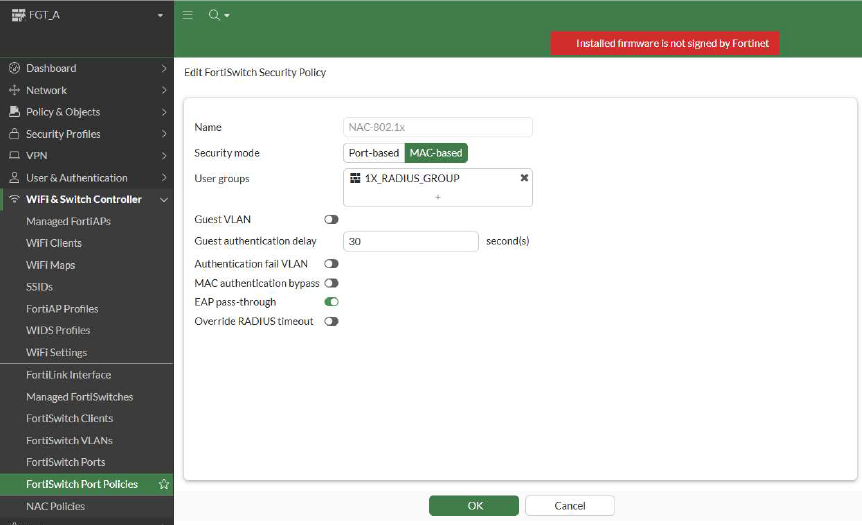
To use NAC with 802.1 authentication, you must specify 802.1X MAC-based authentication. 802.1X port-based authentication is not supported.

The following are the prerequisites for this feature:

  • The RADIUS server must return the Fortinet-Group-Name RADIUS attribute with the user group information.

  • The FortiGate device must have a user group matching the Fortinet-Group-Name RADIUS attribute, and the RADIUS server can be added as a member to the user group.

Using the GUI:
  1. Configure an 802.1X MAC-based security policy.
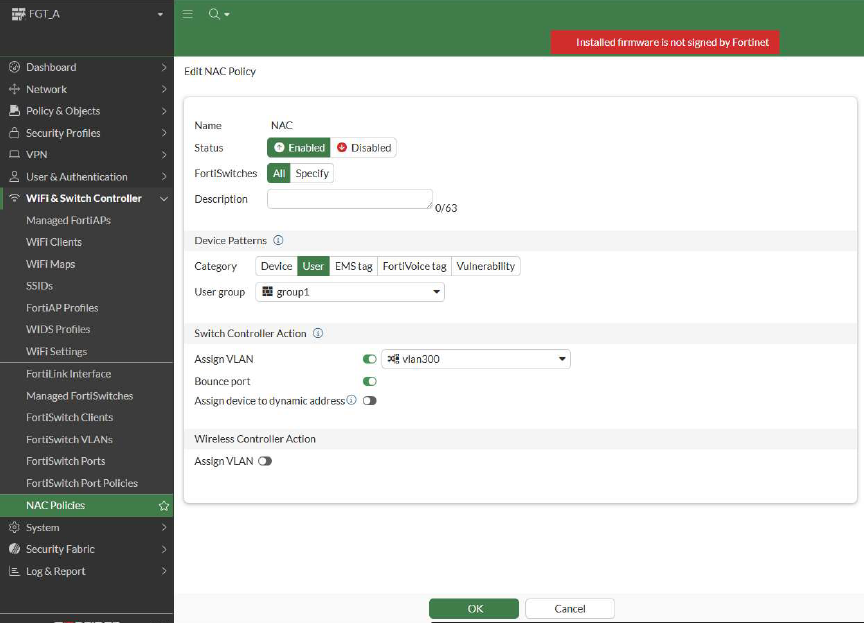
  2. Configure a NAC user policy on the same user group.
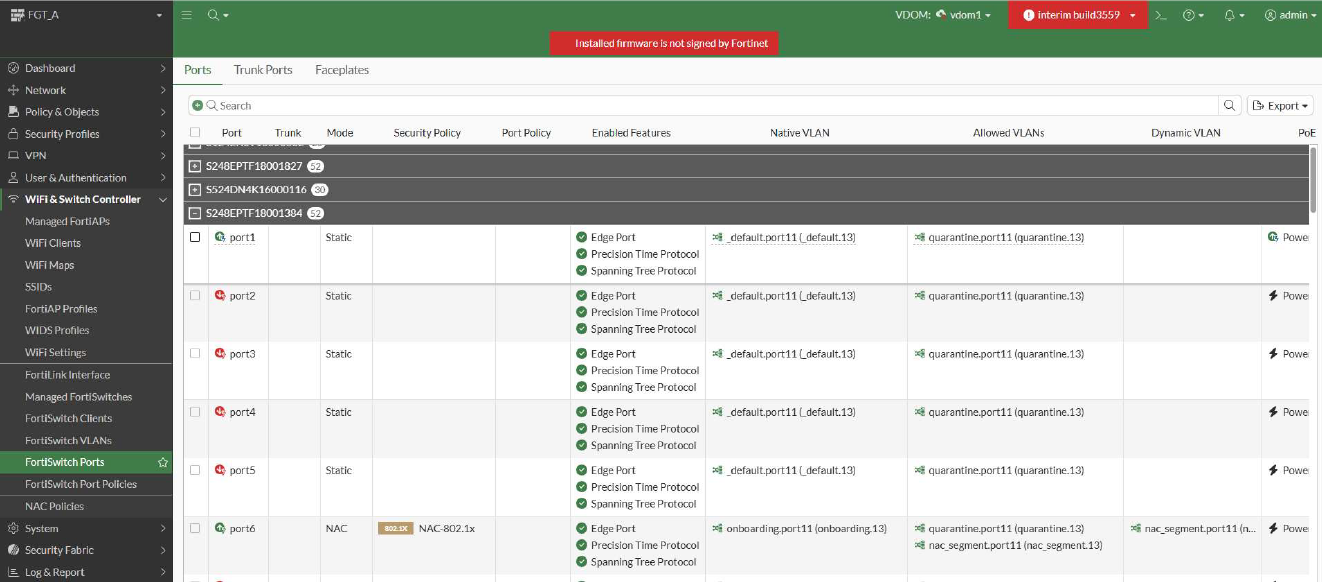
  3. Apply the NAC user policy and 802.1X security policy to the same FortiSwitch port.
  4. Perform 802.1X authentication on the client device.

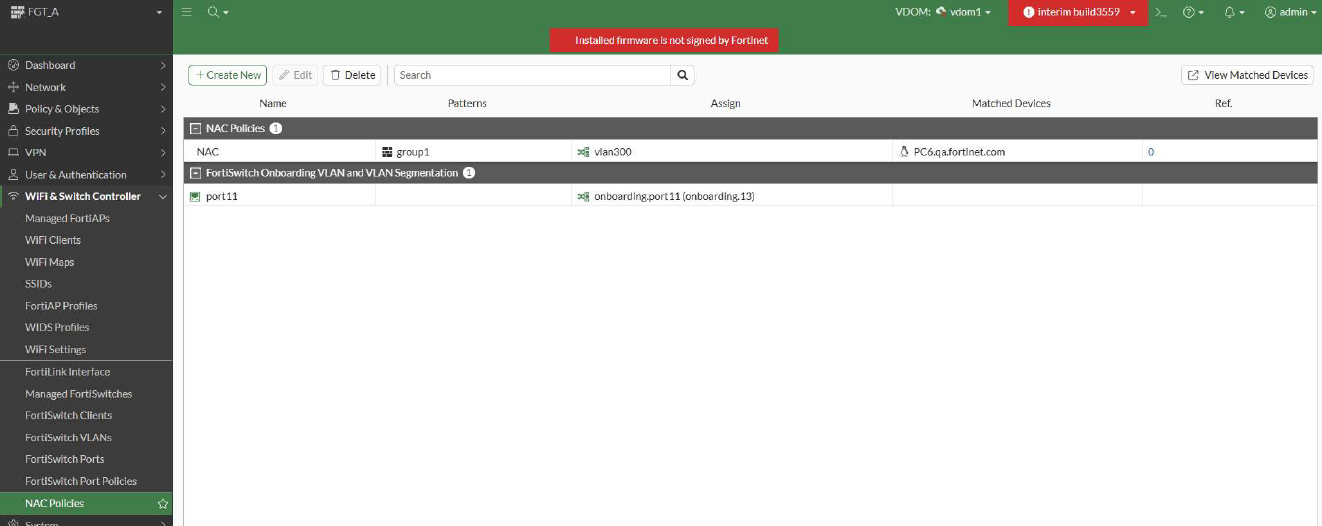
  5. After thesuccessful authentication, go to the WiFi & Switch Controller > NAC Policies page to check that the client device was matched by the NAC policy.
Using NAC with 802.1X authentication in the FortiOS GUI

Using NAC with 802.1X authentication in the FortiOS GUI

The FortiOS GUI now supports using both FortiSwitch network access control (NAC) and 802.1X authentication on the same switch port. Previously, this feature was supported only in the FortiOS CLI.

To use NAC with 802.1 authentication, you must specify 802.1X MAC-based authentication. 802.1X port-based authentication is not supported.

The following are the prerequisites for this feature:

  • The RADIUS server must return the Fortinet-Group-Name RADIUS attribute with the user group information.

  • The FortiGate device must have a user group matching the Fortinet-Group-Name RADIUS attribute, and the RADIUS server can be added as a member to the user group.

Using the GUI:
  1. Configure an 802.1X MAC-based security policy.

  2. Configure a NAC user policy on the same user group.

  3. Apply the NAC user policy and 802.1X security policy to the same FortiSwitch port.

  4. Perform 802.1X authentication on the client device.

  5. After thesuccessful authentication, go to the WiFi & Switch Controller > NAC Policies page to check that the client device was matched by the NAC policy.