
Fortinet white logo
Fortinet white logo

New Features

HA monitoring support for software switch member interfaces

HA monitoring support for software switch member interfaces

Software switch member interfaces can be used as HA monitor interfaces. Previously, these interfaces could not be monitored. This enhancement improves configuration flexibility and enables more reliable failover using existing interface layouts.

Example
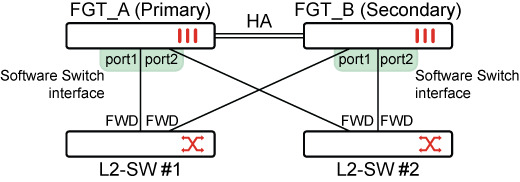
To check that the software switch member interfaces are used as HA monitor interfaces:
  1. Configure a software switch interface:

    config system switch-interface
        edit "sw1"
            set vdom "root"
            set member "port1" "port2"
        next
    end
  2. Configure HA to monitor the software switch member interfaces:

    config system ha
        set group-id 240
        set group-name "FG_HA"
        set mode a-p
        set password ENC 5BgrSGI4E
        set hbdev "ha1" 50 "ha2" 100
        set session-pickup enable
        set override enable
        set priority 200
        set monitor "port1" "port2" "wan1" "wan2"
    end
  3. Check the interface status:

    FGT_A # get system ha status
    HA Health Status: OK
    Model: FortiGate-101F
    Mode: HA A-P
    Group Name: FG_HA
    Group ID: 240
    Debug: 0
    Cluster Uptime: 0 days 0h:1m:19s
    Cluster state change time: 2026-02-03 11:05:52
    Primary selected using:
        <2026/02/03 11:05:52> vcluster-1: FG101FTK19003737 is selected as the primary because its override priority is larger than peer member FG101FTK19002788.
    ses_pickup: enable, ses_pickup_delay=disable
    override: enable
    Configuration Status:
        FG101FTK19003737(updated 3 seconds ago): in-sync
        FG101FTK19003737 chksum dump: 75 36 6e e1 b5 e5 d4 c9 9f 06 04 ff e4 d1 5c c9
        FG101FTK19002788(updated 4 seconds ago): in-sync
        FG101FTK19002788 chksum dump: 75 36 6e e1 b5 e5 d4 c9 9f 06 04 ff e4 d1 5c c9
    System Usage stats:
        FG101FTK19003737(updated 3 seconds ago):
            sessions=5, average-cpu-user/nice/system/idle=0%/0%/0%/99%, memory=35%
        FG101FTK19002788(updated 4 seconds ago):
            sessions=3, average-cpu-user/nice/system/idle=0%/0%/0%/99%, memory=34%
    HBDEV stats:
        FG101FTK19003737(updated 3 seconds ago):
            ha1: physical/1000auto, up, rx-bytes/packets/dropped/errors=207719/438/0/0, tx=173193/337/0/0
            ha2: physical/1000auto, up, rx-bytes/packets/dropped/errors=762549/2018/0/0, tx=365824/982/0/0
        FG101FTK19002788(updated 4 seconds ago):
            ha1: physical/1000auto, up, rx-bytes/packets/dropped/errors=177032/379/0/0, tx=199336/391/0/0
            ha2: physical/1000auto, up, rx-bytes/packets/dropped/errors=857970/1991/0/0, tx=318297/1107/0/0
    MONDEV stats:
        FG101FTK19003737(updated 3 seconds ago):
            port1: physical/1000auto, up, rx-bytes/packets/dropped/errors=9714/136/0/0, tx=1795/13/0/0
            port2: physical/1000auto, up, rx-bytes/packets/dropped/errors=4374/47/0/0, tx=5777/81/0/0
            wan1: physical/1000auto, up, rx-bytes/packets/dropped/errors=135184/614/0/0, tx=191326/490/0/0
            wan2: physical/1000auto, up, rx-bytes/packets/dropped/errors=2368/14/0/0, tx=1770/3/0/0
        FG101FTK19002788(updated 4 seconds ago):
            port1: physical/1000auto, up, rx-bytes/packets/dropped/errors=11196/157/0/0, tx=1337/7/0/0
            port2: physical/1000auto, up, rx-bytes/packets/dropped/errors=5016/54/0/0, tx=1337/7/0/0
            wan1: physical/1000auto, up, rx-bytes/packets/dropped/errors=12847/156/0/0, tx=0/0/0/0
            wan2: physical/1000auto, up, rx-bytes/packets/dropped/errors=1838/11/0/0, tx=0/0/0/0
    number of member: 2
    FGT_A           , FG101FTK19003737, HA cluster index = 0
    FGT_B           , FG101FTK19002788, HA cluster index = 1
    number of vcluster: 1
    vcluster 1: work 169.254.0.1
    Primary: FG101FTK19003737, HA operating index = 0
    Secondary: FG101FTK19002788, HA operating index = 1
  4. Shutdown the port2 connection on the switch side and confirm that the link is down:

    FGT_A # diagnose hardware deviceinfo nic port2
    Description         :FortiASIC NP6XLITE Adapter
    Driver Name         :FortiASIC NP6XLITE Driver
    Current_HWaddr       04:d5:90:04:f8:a1
    Permanent_HWaddr     04:d5:90:04:f8:a1
    ========== Link Status ==========
    Speed               :N/A
    Duplex              :N/A
    link_status         :Down
    ============ Counters ===========
    Rx Pkts             :212
    Rx Bytes            :16716
  5. Check that failover occurred and FGT_A became the secondary after the failover:

    FGT_A # get system ha status
    HA Health Status:
        WARNING: FG101FTK19003737 has mondev down;
    Model: FortiGate-101F
    Mode: HA A-P
    Group Name: FG_HA
    Group ID: 240
    Debug: 0
    Cluster Uptime: 0 days 0h:9m:41s
    Cluster state change time: 2026-02-03 11:12:21
    Primary selected using:
        <2026/02/03 11:12:21> vcluster-1: FG101FTK19002788 is selected as the primary because the value of link-failure + pingsvr-failure is less than peer member FG101FTK19003737.
        <2026/02/03 11:05:52> vcluster-1: FG101FTK19003737 is selected as the primary because its override priority is larger than peer member FG101FTK19002788.
    ses_pickup: enable, ses_pickup_delay=disable
    override: enable
    
    MONDEV stats:
        FG101FTK19003737(updated 4 seconds ago):
            port1: physical/1000auto, up, rx-bytes/packets/dropped/errors=61541/932/0/0, tx=5960/34/0/0
            port2: physical/00, down, rx-bytes/packets/dropped/errors=16716/212/0/0, tx=28485/435/0/0    
            wan1: physical/1000auto, up, rx-bytes/packets/dropped/errors=686500/3018/0/0, tx=1007397/2263/0/0
            wan2: physical/1000auto, up, rx-bytes/packets/dropped/errors=9146/47/0/0, tx=7080/12/0/0
        FG101FTK19002788(updated 5 seconds ago):
            port1: physical/1000auto, up, rx-bytes/packets/dropped/errors=62501/948/0/0, tx=5597/32/0/0
            port2: physical/1000auto, up, rx-bytes/packets/dropped/errors=23868/309/0/0, tx=17183/223/0/0
            wan1: physical/1000auto, up, rx-bytes/packets/dropped/errors=330856/1711/0/0, tx=433062/950/0/0
            wan2: physical/1000auto, up, rx-bytes/packets/dropped/errors=8616/44/0/0, tx=4720/8/0/0
    number of member: 2
    FGT_A           , FG101FTK19003737, HA cluster index = 0
    FGT_B           , FG101FTK19002788, HA cluster index = 1
    number of vcluster: 1
    vcluster 1: standby 169.254.0.2
    Secondary: FG101FTK19003737, HA operating index = 1
    Primary: FG101FTK19002788, HA operating index = 0

HA monitoring support for software switch member interfaces

HA monitoring support for software switch member interfaces

Software switch member interfaces can be used as HA monitor interfaces. Previously, these interfaces could not be monitored. This enhancement improves configuration flexibility and enables more reliable failover using existing interface layouts.

Example

To check that the software switch member interfaces are used as HA monitor interfaces:
  1. Configure a software switch interface:

    config system switch-interface
        edit "sw1"
            set vdom "root"
            set member "port1" "port2"
        next
    end
  2. Configure HA to monitor the software switch member interfaces:

    config system ha
        set group-id 240
        set group-name "FG_HA"
        set mode a-p
        set password ENC 5BgrSGI4E
        set hbdev "ha1" 50 "ha2" 100
        set session-pickup enable
        set override enable
        set priority 200
        set monitor "port1" "port2" "wan1" "wan2"
    end
  3. Check the interface status:

    FGT_A # get system ha status
    HA Health Status: OK
    Model: FortiGate-101F
    Mode: HA A-P
    Group Name: FG_HA
    Group ID: 240
    Debug: 0
    Cluster Uptime: 0 days 0h:1m:19s
    Cluster state change time: 2026-02-03 11:05:52
    Primary selected using:
        <2026/02/03 11:05:52> vcluster-1: FG101FTK19003737 is selected as the primary because its override priority is larger than peer member FG101FTK19002788.
    ses_pickup: enable, ses_pickup_delay=disable
    override: enable
    Configuration Status:
        FG101FTK19003737(updated 3 seconds ago): in-sync
        FG101FTK19003737 chksum dump: 75 36 6e e1 b5 e5 d4 c9 9f 06 04 ff e4 d1 5c c9
        FG101FTK19002788(updated 4 seconds ago): in-sync
        FG101FTK19002788 chksum dump: 75 36 6e e1 b5 e5 d4 c9 9f 06 04 ff e4 d1 5c c9
    System Usage stats:
        FG101FTK19003737(updated 3 seconds ago):
            sessions=5, average-cpu-user/nice/system/idle=0%/0%/0%/99%, memory=35%
        FG101FTK19002788(updated 4 seconds ago):
            sessions=3, average-cpu-user/nice/system/idle=0%/0%/0%/99%, memory=34%
    HBDEV stats:
        FG101FTK19003737(updated 3 seconds ago):
            ha1: physical/1000auto, up, rx-bytes/packets/dropped/errors=207719/438/0/0, tx=173193/337/0/0
            ha2: physical/1000auto, up, rx-bytes/packets/dropped/errors=762549/2018/0/0, tx=365824/982/0/0
        FG101FTK19002788(updated 4 seconds ago):
            ha1: physical/1000auto, up, rx-bytes/packets/dropped/errors=177032/379/0/0, tx=199336/391/0/0
            ha2: physical/1000auto, up, rx-bytes/packets/dropped/errors=857970/1991/0/0, tx=318297/1107/0/0
    MONDEV stats:
        FG101FTK19003737(updated 3 seconds ago):
            port1: physical/1000auto, up, rx-bytes/packets/dropped/errors=9714/136/0/0, tx=1795/13/0/0
            port2: physical/1000auto, up, rx-bytes/packets/dropped/errors=4374/47/0/0, tx=5777/81/0/0
            wan1: physical/1000auto, up, rx-bytes/packets/dropped/errors=135184/614/0/0, tx=191326/490/0/0
            wan2: physical/1000auto, up, rx-bytes/packets/dropped/errors=2368/14/0/0, tx=1770/3/0/0
        FG101FTK19002788(updated 4 seconds ago):
            port1: physical/1000auto, up, rx-bytes/packets/dropped/errors=11196/157/0/0, tx=1337/7/0/0
            port2: physical/1000auto, up, rx-bytes/packets/dropped/errors=5016/54/0/0, tx=1337/7/0/0
            wan1: physical/1000auto, up, rx-bytes/packets/dropped/errors=12847/156/0/0, tx=0/0/0/0
            wan2: physical/1000auto, up, rx-bytes/packets/dropped/errors=1838/11/0/0, tx=0/0/0/0
    number of member: 2
    FGT_A           , FG101FTK19003737, HA cluster index = 0
    FGT_B           , FG101FTK19002788, HA cluster index = 1
    number of vcluster: 1
    vcluster 1: work 169.254.0.1
    Primary: FG101FTK19003737, HA operating index = 0
    Secondary: FG101FTK19002788, HA operating index = 1
  4. Shutdown the port2 connection on the switch side and confirm that the link is down:

    FGT_A # diagnose hardware deviceinfo nic port2
    Description         :FortiASIC NP6XLITE Adapter
    Driver Name         :FortiASIC NP6XLITE Driver
    Current_HWaddr       04:d5:90:04:f8:a1
    Permanent_HWaddr     04:d5:90:04:f8:a1
    ========== Link Status ==========
    Speed               :N/A
    Duplex              :N/A
    link_status         :Down
    ============ Counters ===========
    Rx Pkts             :212
    Rx Bytes            :16716
  5. Check that failover occurred and FGT_A became the secondary after the failover:

    FGT_A # get system ha status
    HA Health Status:
        WARNING: FG101FTK19003737 has mondev down;
    Model: FortiGate-101F
    Mode: HA A-P
    Group Name: FG_HA
    Group ID: 240
    Debug: 0
    Cluster Uptime: 0 days 0h:9m:41s
    Cluster state change time: 2026-02-03 11:12:21
    Primary selected using:
        <2026/02/03 11:12:21> vcluster-1: FG101FTK19002788 is selected as the primary because the value of link-failure + pingsvr-failure is less than peer member FG101FTK19003737.
        <2026/02/03 11:05:52> vcluster-1: FG101FTK19003737 is selected as the primary because its override priority is larger than peer member FG101FTK19002788.
    ses_pickup: enable, ses_pickup_delay=disable
    override: enable
    
    MONDEV stats:
        FG101FTK19003737(updated 4 seconds ago):
            port1: physical/1000auto, up, rx-bytes/packets/dropped/errors=61541/932/0/0, tx=5960/34/0/0
            port2: physical/00, down, rx-bytes/packets/dropped/errors=16716/212/0/0, tx=28485/435/0/0    
            wan1: physical/1000auto, up, rx-bytes/packets/dropped/errors=686500/3018/0/0, tx=1007397/2263/0/0
            wan2: physical/1000auto, up, rx-bytes/packets/dropped/errors=9146/47/0/0, tx=7080/12/0/0
        FG101FTK19002788(updated 5 seconds ago):
            port1: physical/1000auto, up, rx-bytes/packets/dropped/errors=62501/948/0/0, tx=5597/32/0/0
            port2: physical/1000auto, up, rx-bytes/packets/dropped/errors=23868/309/0/0, tx=17183/223/0/0
            wan1: physical/1000auto, up, rx-bytes/packets/dropped/errors=330856/1711/0/0, tx=433062/950/0/0
            wan2: physical/1000auto, up, rx-bytes/packets/dropped/errors=8616/44/0/0, tx=4720/8/0/0
    number of member: 2
    FGT_A           , FG101FTK19003737, HA cluster index = 0
    FGT_B           , FG101FTK19002788, HA cluster index = 1
    number of vcluster: 1
    vcluster 1: standby 169.254.0.2
    Secondary: FG101FTK19003737, HA operating index = 1
    Primary: FG101FTK19002788, HA operating index = 0