
Fortinet white logo
Fortinet white logo

Administration Guide

FGCP internal communication and IP assignment

FGCP internal communication and IP assignment

An FGCP cluster communicates heartbeat packets using Layer 2 frames over the physical heartbeat interface, but it also communicates other synchronization traffic, logs, and locally generated traffic from subordinate devices over Layer 3 IP packets. Additional virtual interfaces are created in the hidden vsys_ha VDOM, which need to be addressed with IPv4 addresses.
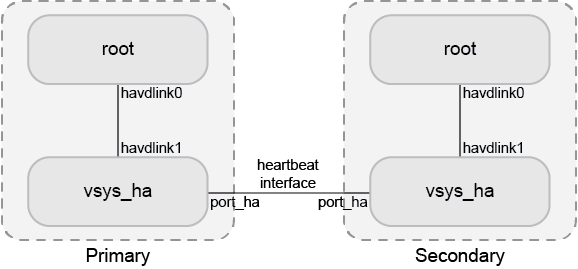
The FGCP uses link-local IPv4 addresses (see RFC 3927) in the 169.254.0.x range for the virtual HA heartbeat interface (port_ha) and for the inter-VDOM link interfaces between the vsys_ha and management VDOM. When members join an HA cluster, each member's heartbeat interface (port_ha) is assigned an IP address from the range of 169.254.0.1 to 169.254.0.63/26. HA inter-VDOM link interfaces (havdlink0 and havdlink1) are assigned IP address from the range of 169.254.0.65 to 169.254.0.66/26.

The IP address that is assigned to a virtual heartbeat interface depends on the serial number priority of the member. Higher serial numbers have a higher priority, and therefore a lower serialno_prio number, for example:

# diagnose sys ha status
...
FGVM08TM20002002:    Secondary, serialno_prio=0, usr_priority=128, hostname=FGVM08TM20002002
FGVM08TM19003001:      Primary, serialno_prio=1, usr_priority=128, hostname=FGVM08TM19003001

The member with serialno_prio=0 is assigned IP address 169.254.0.1, serialno_prio=1 is assigned 169.254.0.2, and so forth.

To view the HA heartbeat interface IP address of the primary unit:
# get system ha status
...
vcluster 1: work 169.254.0.2
...
To view all the assigned IP addresses of a device:
# diagnose ip address list
IP=172.16.151.84->172.16.151.84/255.255.255.0 index=3 devname=port1
IP=192.168.2.204->192.168.2.204/255.255.255.0 index=6 devname=port2
IP=10.10.10.1->10.10.10.1/255.255.255.0 index=9 devname=port3
IP=127.0.0.1->127.0.0.1/255.0.0.0 index=13 devname=root
IP=127.0.0.1->127.0.0.1/255.0.0.0 index=16 devname=vsys_ha
IP=169.254.0.2->169.254.0.2/255.255.255.192 index=17 devname=port_ha
IP=127.0.0.1->127.0.0.1/255.0.0.0 index=18 devname=vsys_fgfm
IP=169.254.0.65->169.254.0.65/255.255.255.192 index=19 devname=havdlink0
IP=169.254.0.66->169.254.0.66/255.255.255.192 index=20 devname=havdlink1

When generating traffic from a subordinate unit, traffic will be routed to the primary unit’s port_ha virtual heartbeat interface. From there, if traffic is destined to another network, the traffic is routed from the vsys_ha VDOM to the management VDOM by the havdlink interfaces.

Use the execute traceroute command on the subordinate unit to display HA heartbeat IP addresses and the HA inter-VDOM link IP addresses.

To trace the route to an IP address on a subordinate unit:
# execute ha manage 1
# execute traceroute 172.20.20.10
traceroute to 172.20.20.10 (172.20.20.10), 32 hops max, 72 byte packets
1 169.254.0.1 0 ms 0 ms 0 ms
2 169.254.0.66 0 ms 0 ms 0 ms
3 172.20.20.10 0 ms 0 ms 0 ms
To run a sniffer trace on the primary unit to view the traffic flow:
# diagnose sniffer packet any 'net 169.254.0.0/24' 4 0 l

FGCP internal communication and IP assignment

FGCP internal communication and IP assignment

An FGCP cluster communicates heartbeat packets using Layer 2 frames over the physical heartbeat interface, but it also communicates other synchronization traffic, logs, and locally generated traffic from subordinate devices over Layer 3 IP packets. Additional virtual interfaces are created in the hidden vsys_ha VDOM, which need to be addressed with IPv4 addresses.

The FGCP uses link-local IPv4 addresses (see RFC 3927) in the 169.254.0.x range for the virtual HA heartbeat interface (port_ha) and for the inter-VDOM link interfaces between the vsys_ha and management VDOM. When members join an HA cluster, each member's heartbeat interface (port_ha) is assigned an IP address from the range of 169.254.0.1 to 169.254.0.63/26. HA inter-VDOM link interfaces (havdlink0 and havdlink1) are assigned IP address from the range of 169.254.0.65 to 169.254.0.66/26.

The IP address that is assigned to a virtual heartbeat interface depends on the serial number priority of the member. Higher serial numbers have a higher priority, and therefore a lower serialno_prio number, for example:

# diagnose sys ha status
...
FGVM08TM20002002:    Secondary, serialno_prio=0, usr_priority=128, hostname=FGVM08TM20002002
FGVM08TM19003001:      Primary, serialno_prio=1, usr_priority=128, hostname=FGVM08TM19003001

The member with serialno_prio=0 is assigned IP address 169.254.0.1, serialno_prio=1 is assigned 169.254.0.2, and so forth.

To view the HA heartbeat interface IP address of the primary unit:
# get system ha status
...
vcluster 1: work 169.254.0.2
...
To view all the assigned IP addresses of a device:
# diagnose ip address list
IP=172.16.151.84->172.16.151.84/255.255.255.0 index=3 devname=port1
IP=192.168.2.204->192.168.2.204/255.255.255.0 index=6 devname=port2
IP=10.10.10.1->10.10.10.1/255.255.255.0 index=9 devname=port3
IP=127.0.0.1->127.0.0.1/255.0.0.0 index=13 devname=root
IP=127.0.0.1->127.0.0.1/255.0.0.0 index=16 devname=vsys_ha
IP=169.254.0.2->169.254.0.2/255.255.255.192 index=17 devname=port_ha
IP=127.0.0.1->127.0.0.1/255.0.0.0 index=18 devname=vsys_fgfm
IP=169.254.0.65->169.254.0.65/255.255.255.192 index=19 devname=havdlink0
IP=169.254.0.66->169.254.0.66/255.255.255.192 index=20 devname=havdlink1

When generating traffic from a subordinate unit, traffic will be routed to the primary unit’s port_ha virtual heartbeat interface. From there, if traffic is destined to another network, the traffic is routed from the vsys_ha VDOM to the management VDOM by the havdlink interfaces.

Use the execute traceroute command on the subordinate unit to display HA heartbeat IP addresses and the HA inter-VDOM link IP addresses.

To trace the route to an IP address on a subordinate unit:
# execute ha manage 1
# execute traceroute 172.20.20.10
traceroute to 172.20.20.10 (172.20.20.10), 32 hops max, 72 byte packets
1 169.254.0.1 0 ms 0 ms 0 ms
2 169.254.0.66 0 ms 0 ms 0 ms
3 172.20.20.10 0 ms 0 ms 0 ms
To run a sniffer trace on the primary unit to view the traffic flow:
# diagnose sniffer packet any 'net 169.254.0.0/24' 4 0 l