
Fortinet white logo
Fortinet white logo

Administration Guide

FGSP synchronizes firewall-authenticated users

FGSP synchronizes firewall-authenticated users

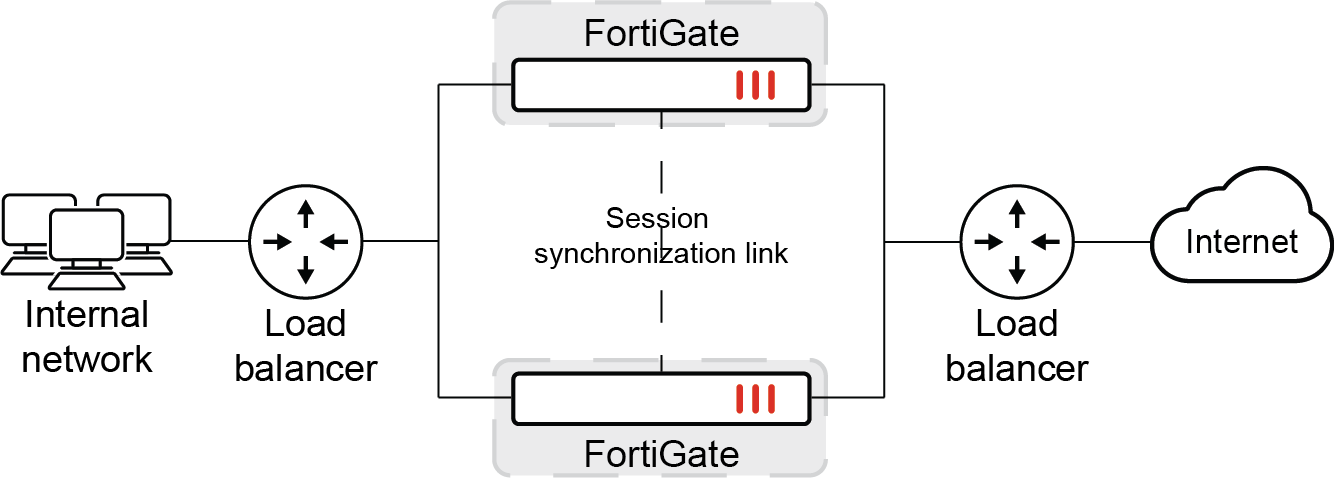
FGSP synchronizes firewall-authenticated users between FGSP peers. If authenticated users sessions change to a different FGSP peer they do not have to re-authenticate. No special FGSP configuration is required to support this synchronization.

A firewall authenticated user is a user who has been authenticated by a user group that has been added to a firewall policy (see User groups.)

Example configuration
First FGSP peer configuration

This simple example includes setting up a basic FCSP configuration with two FGSP peers. The configuration uses local firewall users as the example authentication configuration.

config system standalone-cluster
    set standalone-group-id 222
    set group-member-id 8
    config cluster-peer
        edit 1
            set peerip 10.2.2.2
        next
    end
end
diagnose sys ha fgsp-zone
Local standalone-member-id: 8
Primary FGSP peer_num = 1, ver=3
        peer[1]: standalone-member-id=9, IP=10.2.2.2,vd=root, serial_no=FG101FTK19002788, prio=1, rsso_sync_done=0

Second FGSP peer configuration

config system standalone-cluster
    set standalone-group-id 222
    set group-member-id 9
    config cluster-peer
        edit 1
            set peerip 10.2.2.1
        next
    end
end
diagnose sys ha fgsp-zone
Local standalone-member-id: 9
Primary FGSP peer_num = 1, ver=6
        peer[1]: standalone-member-id=8, IP=10.2.2.1,vd=root, serial_no=FG101FTK19003737, prio=1, rsso_sync_done=0

Local user and firewall configuration

The following local user configuration must be the same for all FGSP peers:

config user local
    edit "tt"
        set type password
        set passwd *
    next
end
config user group
    edit "g1"
        set member "tt"
    next
end
config firewall policy
    edit 1
        set srcintf "port1"
        set dstintf "wan1"
        set action accept
        set srcaddr "all"
        set dstaddr "all"
        set schedule "always"
        set service "ALL"
        set groups "g1" <-------------------- local user group
    next

Generate HTTP traffic

The peer FortiGate that processes the traffic could have the following session information:

diagnose firewall auth list

10.1.100.24, tt
        src_mac: 00:0c:29:a7:3e:3b
        type: fw, id: 0, duration: 4984, idled: 8
        expire: 292, allow-idle: 300
        server: tt
        packets: in 2610 out 4784, bytes: in 321123 out 304220
        user_id: 16777218
        group_id: 2
        group_name: g1

----- 1 listed, 0 filtered ------
diagnose sys session list


session info: proto=6 proto_state=01 duration=9 expire=3590 timeout=3600 refresh_dir=both flags=00000000 socktype=0 sockport=0 av_idx=0 use=3
origin-shaper=
reply-shaper=
per_ip_shaper=
class_id=0 ha_id=8:0 policy_dir=0 tunnel=/ vlan_cos=0/255
user=tt auth_server=tt state=may_dirty npu authed synced acct-ext
statistic(bytes/packets/allow_err): org=92/2/1 reply=52/1/1 tuples=2
tx speed(Bps/kbps): 0/0 rx speed(Bps/kbps): 0/0
orgin->sink: org pre->post, reply pre->post dev=11->7/7->11 gwy=172.16.200.55/10.1.100.24
hook=post dir=org act=snat 10.1.100.24:50851->172.16.200.55:80(172.16.200.1:50851)
hook=pre dir=reply act=dnat 172.16.200.55:80->172.16.200.1:50851(10.1.100.24:50851)
pos/(before,after) 0/(0,0), 0/(0,0)
misc=0 policy_id=1 pol_uuid_idx=4072 auth_info=2 chk_client_info=0 vd=0
serial=00005500 tos=ff/ff app_list=0 app=0 url_cat=0
rpdb_link_id=00000000 ngfw_id=n/a duplicaton_id=0
npu_state=0x000c00 ofld-O ofld-R
npu info: flag=0x81/0x81, offload=8/8, ips_offload=0/0, epid=66/70, ipid=70/66, vlan=0x0000/0x0000
vlifid=70/66, vtag_in=0x0000/0x0000 in_npu=1/1, out_npu=1/1, fwd_en=0/0, qid=4/7, ha_divert=0/0
hrx info: valid=1/1, qid=5/8, npuid=1/1, sublink=0/0
total session: 1

Similar sessions appear on the other peer FortiGate:

diagnose firewall auth list

10.1.100.24, tt
        src_mac: 00:0c:29:a7:3e:3b
        type: fw, id: 0, duration: 81, idled: 88
        expire: 212, allow-idle: 300
        flag(400): ha
        server: tt
        packets: in 0 out 0, bytes: in 0 out 0
        user_id: 16777218
        group_id:
        group_name:

----- 1 listed, 0 filtered ------
diagnose sys session list

session info: proto=6 proto_state=01 duration=14 expire=3585 timeout=3600 refresh_dir=both flags=00000000 socktype=0 sockport=0 av_idx=0 use=3
origin-shaper=
reply-shaper=
per_ip_shaper=
class_id=0 ha_id=8:0 policy_dir=0 tunnel=/ vlan_cos=0/255
state=dirty may_dirty npu syn_ses
statistic(bytes/packets/allow_err): org=0/0/0 reply=0/0/0 tuples=2
tx speed(Bps/kbps): 0/0 rx speed(Bps/kbps): 0/0
orgin->sink: org pre->post, reply pre->post dev=11->7/7->11 gwy=0.0.0.0/0.0.0.0
hook=post dir=org act=snat 10.1.100.24:50851->172.16.200.55:80(172.16.200.1:50851)
hook=pre dir=reply act=dnat 172.16.200.55:80->172.16.200.1:50851(10.1.100.24:50851)
pos/(before,after) 0/(0,0), 0/(0,0)
misc=0 policy_id=1 pol_uuid_idx=0 auth_info=0 chk_client_info=0 vd=0
serial=00005500 tos=ff/ff app_list=0 app=0 url_cat=0
rpdb_link_id=00000000 ngfw_id=n/a duplicaton_id=0
npu_state=00000000
npu info: flag=0x00/0x00, offload=0/0, ips_offload=0/0, epid=0/0, ipid=0/0, vlan=0x0000/0x0000
vlifid=0/0, vtag_in=0x0000/0x0000 in_npu=0/0, out_npu=0/0, fwd_en=0/0, qid=0/0, ha_divert=0/0
no_ofld_reason:
hrx info: valid=0/0, qid=0/0, npuid=0/0, sublink=0/0
total session: 1

After a failover

You can simulate a failover by restarting the peer FortiGate that is processing traffic. The authenticated user can continue to send traffic through the second peer FortiGate without re-authenticating.

diagnose firewall auth list

10.1.100.24, tt
        src_mac: 00:0c:29:a7:3e:3b
        type: fw, id: 0, duration: 81, idled: 88
        expire: 212, allow-idle: 300
        flag(400): ha
        server: tt
        packets: in 0 out 0, bytes: in 0 out 0
        user_id: 16777218
        group_id:
        group_name:

----- 1 listed, 0 filtered ------
diagnose sys session list

session info: proto=6 proto_state=01 duration=14 expire=3585 timeout=3600 refresh_dir=both flags=00000000 socktype=0 sockport=0 av_idx=0 use=3
origin-shaper=
reply-shaper=
per_ip_shaper=
class_id=0 ha_id=8:0 policy_dir=0 tunnel=/ vlan_cos=0/255
state=dirty may_dirty npu syn_ses
statistic(bytes/packets/allow_err): org=230/5/0 reply=52/1/1 tuples=2
tx speed(Bps/kbps): 0/0 rx speed(Bps/kbps): 0/0
orgin->sink: org pre->post, reply pre->post dev=11->7/7->11 gwy=0.0.0.0/0.0.0.0
hook=post dir=org act=snat 10.1.100.24:50851->172.16.200.55:80(172.16.200.1:50851)
hook=pre dir=reply act=dnat 172.16.200.55:80->172.16.200.1:50851(10.1.100.24:50851)
pos/(before,after) 0/(0,0), 0/(0,0)
misc=0 policy_id=1 pol_uuid_idx=0 auth_info=0 chk_client_info=0 vd=0
serial=00005500 tos=ff/ff app_list=0 app=0 url_cat=0
rpdb_link_id=00000000 ngfw_id=n/a duplicaton_id=0
npu_state=00000000
npu info: flag=0x00/0x00, offload=0/0, ips_offload=0/0, epid=0/0, ipid=0/0, vlan=0x0000/0x0000
vlifid=0/0, vtag_in=0x0000/0x0000 in_npu=0/0, out_npu=0/0, fwd_en=0/0, qid=0/0, ha_divert=0/0
no_ofld_reason:
hrx info: valid=0/0, qid=0/0, npuid=0/0, sublink=0/0
total session: 1

FGSP synchronizes firewall-authenticated users

FGSP synchronizes firewall-authenticated users

FGSP synchronizes firewall-authenticated users between FGSP peers. If authenticated users sessions change to a different FGSP peer they do not have to re-authenticate. No special FGSP configuration is required to support this synchronization.

A firewall authenticated user is a user who has been authenticated by a user group that has been added to a firewall policy (see User groups.)

Example configuration

First FGSP peer configuration

This simple example includes setting up a basic FCSP configuration with two FGSP peers. The configuration uses local firewall users as the example authentication configuration.

config system standalone-cluster
    set standalone-group-id 222
    set group-member-id 8
    config cluster-peer
        edit 1
            set peerip 10.2.2.2
        next
    end
end
diagnose sys ha fgsp-zone
Local standalone-member-id: 8
Primary FGSP peer_num = 1, ver=3
        peer[1]: standalone-member-id=9, IP=10.2.2.2,vd=root, serial_no=FG101FTK19002788, prio=1, rsso_sync_done=0

Second FGSP peer configuration

config system standalone-cluster
    set standalone-group-id 222
    set group-member-id 9
    config cluster-peer
        edit 1
            set peerip 10.2.2.1
        next
    end
end
diagnose sys ha fgsp-zone
Local standalone-member-id: 9
Primary FGSP peer_num = 1, ver=6
        peer[1]: standalone-member-id=8, IP=10.2.2.1,vd=root, serial_no=FG101FTK19003737, prio=1, rsso_sync_done=0

Local user and firewall configuration

The following local user configuration must be the same for all FGSP peers:

config user local
    edit "tt"
        set type password
        set passwd *
    next
end
config user group
    edit "g1"
        set member "tt"
    next
end
config firewall policy
    edit 1
        set srcintf "port1"
        set dstintf "wan1"
        set action accept
        set srcaddr "all"
        set dstaddr "all"
        set schedule "always"
        set service "ALL"
        set groups "g1" <-------------------- local user group
    next

Generate HTTP traffic

The peer FortiGate that processes the traffic could have the following session information:

diagnose firewall auth list

10.1.100.24, tt
        src_mac: 00:0c:29:a7:3e:3b
        type: fw, id: 0, duration: 4984, idled: 8
        expire: 292, allow-idle: 300
        server: tt
        packets: in 2610 out 4784, bytes: in 321123 out 304220
        user_id: 16777218
        group_id: 2
        group_name: g1

----- 1 listed, 0 filtered ------
diagnose sys session list


session info: proto=6 proto_state=01 duration=9 expire=3590 timeout=3600 refresh_dir=both flags=00000000 socktype=0 sockport=0 av_idx=0 use=3
origin-shaper=
reply-shaper=
per_ip_shaper=
class_id=0 ha_id=8:0 policy_dir=0 tunnel=/ vlan_cos=0/255
user=tt auth_server=tt state=may_dirty npu authed synced acct-ext
statistic(bytes/packets/allow_err): org=92/2/1 reply=52/1/1 tuples=2
tx speed(Bps/kbps): 0/0 rx speed(Bps/kbps): 0/0
orgin->sink: org pre->post, reply pre->post dev=11->7/7->11 gwy=172.16.200.55/10.1.100.24
hook=post dir=org act=snat 10.1.100.24:50851->172.16.200.55:80(172.16.200.1:50851)
hook=pre dir=reply act=dnat 172.16.200.55:80->172.16.200.1:50851(10.1.100.24:50851)
pos/(before,after) 0/(0,0), 0/(0,0)
misc=0 policy_id=1 pol_uuid_idx=4072 auth_info=2 chk_client_info=0 vd=0
serial=00005500 tos=ff/ff app_list=0 app=0 url_cat=0
rpdb_link_id=00000000 ngfw_id=n/a duplicaton_id=0
npu_state=0x000c00 ofld-O ofld-R
npu info: flag=0x81/0x81, offload=8/8, ips_offload=0/0, epid=66/70, ipid=70/66, vlan=0x0000/0x0000
vlifid=70/66, vtag_in=0x0000/0x0000 in_npu=1/1, out_npu=1/1, fwd_en=0/0, qid=4/7, ha_divert=0/0
hrx info: valid=1/1, qid=5/8, npuid=1/1, sublink=0/0
total session: 1

Similar sessions appear on the other peer FortiGate:

diagnose firewall auth list

10.1.100.24, tt
        src_mac: 00:0c:29:a7:3e:3b
        type: fw, id: 0, duration: 81, idled: 88
        expire: 212, allow-idle: 300
        flag(400): ha
        server: tt
        packets: in 0 out 0, bytes: in 0 out 0
        user_id: 16777218
        group_id:
        group_name:

----- 1 listed, 0 filtered ------
diagnose sys session list

session info: proto=6 proto_state=01 duration=14 expire=3585 timeout=3600 refresh_dir=both flags=00000000 socktype=0 sockport=0 av_idx=0 use=3
origin-shaper=
reply-shaper=
per_ip_shaper=
class_id=0 ha_id=8:0 policy_dir=0 tunnel=/ vlan_cos=0/255
state=dirty may_dirty npu syn_ses
statistic(bytes/packets/allow_err): org=0/0/0 reply=0/0/0 tuples=2
tx speed(Bps/kbps): 0/0 rx speed(Bps/kbps): 0/0
orgin->sink: org pre->post, reply pre->post dev=11->7/7->11 gwy=0.0.0.0/0.0.0.0
hook=post dir=org act=snat 10.1.100.24:50851->172.16.200.55:80(172.16.200.1:50851)
hook=pre dir=reply act=dnat 172.16.200.55:80->172.16.200.1:50851(10.1.100.24:50851)
pos/(before,after) 0/(0,0), 0/(0,0)
misc=0 policy_id=1 pol_uuid_idx=0 auth_info=0 chk_client_info=0 vd=0
serial=00005500 tos=ff/ff app_list=0 app=0 url_cat=0
rpdb_link_id=00000000 ngfw_id=n/a duplicaton_id=0
npu_state=00000000
npu info: flag=0x00/0x00, offload=0/0, ips_offload=0/0, epid=0/0, ipid=0/0, vlan=0x0000/0x0000
vlifid=0/0, vtag_in=0x0000/0x0000 in_npu=0/0, out_npu=0/0, fwd_en=0/0, qid=0/0, ha_divert=0/0
no_ofld_reason:
hrx info: valid=0/0, qid=0/0, npuid=0/0, sublink=0/0
total session: 1

After a failover

You can simulate a failover by restarting the peer FortiGate that is processing traffic. The authenticated user can continue to send traffic through the second peer FortiGate without re-authenticating.

diagnose firewall auth list

10.1.100.24, tt
        src_mac: 00:0c:29:a7:3e:3b
        type: fw, id: 0, duration: 81, idled: 88
        expire: 212, allow-idle: 300
        flag(400): ha
        server: tt
        packets: in 0 out 0, bytes: in 0 out 0
        user_id: 16777218
        group_id:
        group_name:

----- 1 listed, 0 filtered ------
diagnose sys session list

session info: proto=6 proto_state=01 duration=14 expire=3585 timeout=3600 refresh_dir=both flags=00000000 socktype=0 sockport=0 av_idx=0 use=3
origin-shaper=
reply-shaper=
per_ip_shaper=
class_id=0 ha_id=8:0 policy_dir=0 tunnel=/ vlan_cos=0/255
state=dirty may_dirty npu syn_ses
statistic(bytes/packets/allow_err): org=230/5/0 reply=52/1/1 tuples=2
tx speed(Bps/kbps): 0/0 rx speed(Bps/kbps): 0/0
orgin->sink: org pre->post, reply pre->post dev=11->7/7->11 gwy=0.0.0.0/0.0.0.0
hook=post dir=org act=snat 10.1.100.24:50851->172.16.200.55:80(172.16.200.1:50851)
hook=pre dir=reply act=dnat 172.16.200.55:80->172.16.200.1:50851(10.1.100.24:50851)
pos/(before,after) 0/(0,0), 0/(0,0)
misc=0 policy_id=1 pol_uuid_idx=0 auth_info=0 chk_client_info=0 vd=0
serial=00005500 tos=ff/ff app_list=0 app=0 url_cat=0
rpdb_link_id=00000000 ngfw_id=n/a duplicaton_id=0
npu_state=00000000
npu info: flag=0x00/0x00, offload=0/0, ips_offload=0/0, epid=0/0, ipid=0/0, vlan=0x0000/0x0000
vlifid=0/0, vtag_in=0x0000/0x0000 in_npu=0/0, out_npu=0/0, fwd_en=0/0, qid=0/0, ha_divert=0/0
no_ofld_reason:
hrx info: valid=0/0, qid=0/0, npuid=0/0, sublink=0/0
total session: 1