

Check HA synchronization status
The HA synchronization status can be viewed in the GUI through either a widget on the Dashboard or on the System > HA page. It can also be confirmed through the CLI.
When a cluster is out of synchronization, configuration changes may not propagate, leading to potential management and failover inconsistencies that affect configuration integrity.
When units are out of synchronization in an HA cluster, the GUI will compare the HA checksums and display the tables that caused HA to be out of synchronization. This can be visualized on the HA monitor page and in the HA status widget.
Initial verification
Before performing advanced troubleshooting, ensure that both cluster members are running the identical firmware version using the following command on both units:
get system status
To access the secondary unit's CLI for verification, use the execute ha manage <id> <username> command from the primary unit.
HA synchronization status in the GUI
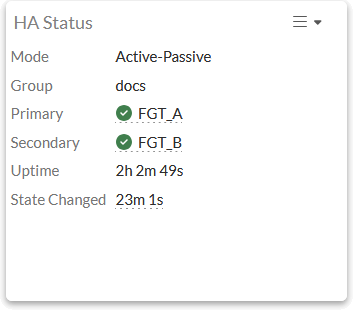
Following HA setup, the HA Status widget can be added to the Dashboard. It shows the HA synchronization statuses of the members.
A green checkmark is shown next to each member that is in synchronization.
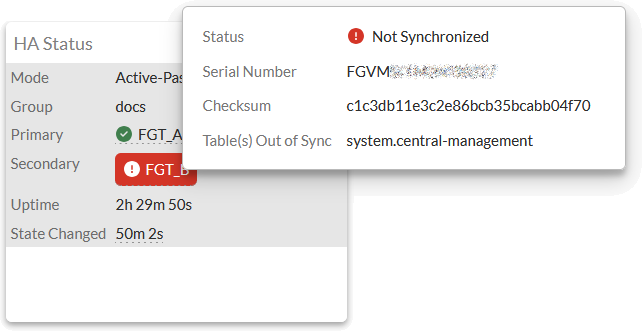
A member that is out of synchronization is highlighted in red. Hover the cursor over the Not Synchronized status to see a pop-up information panel showing the HA checksums and specific tables and objects that caused the cluster to the be out of synchronization.
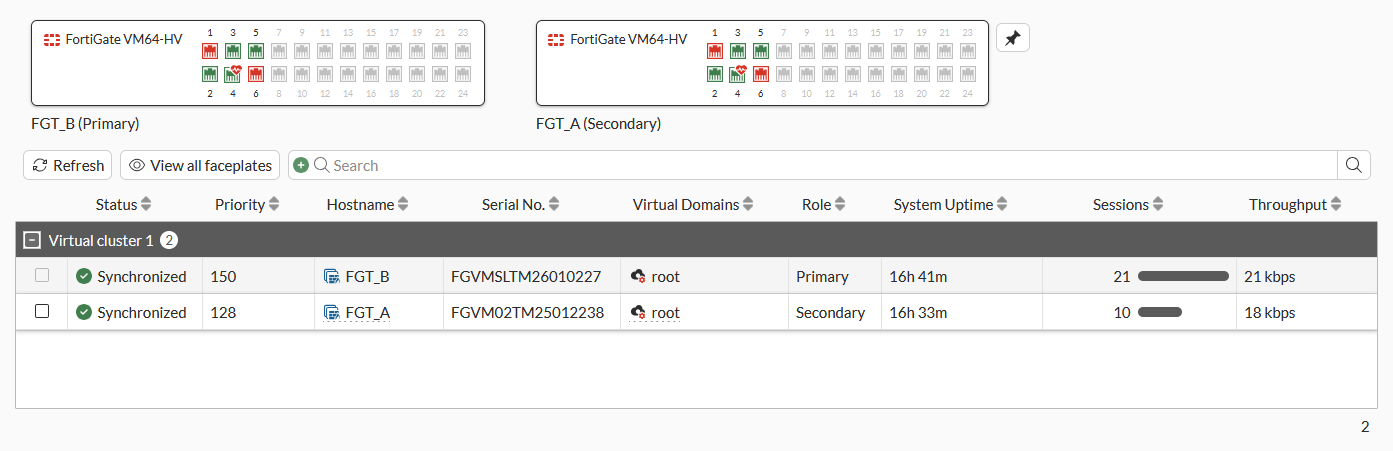
You can also go to System > HA to see the synchronization statuses of the members. A member that is out of synchronization will have a red icon next to its name. Hover the cursor over the not synchronized device to see the tables that are out of synchronization and the checksum values.
Synchronized:
Unsynchronized:
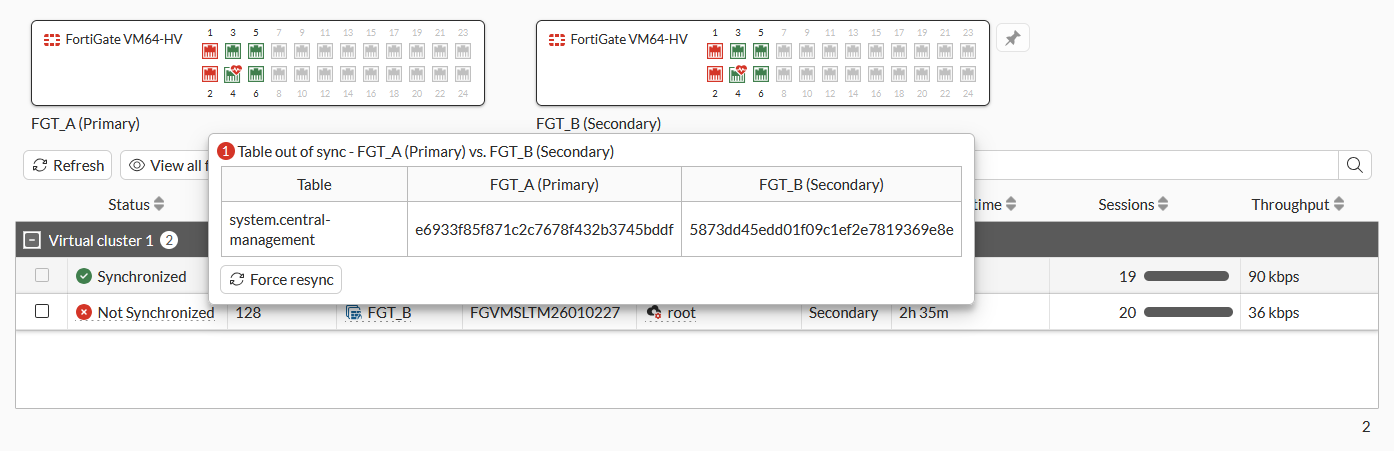
Click Force resync in the pop-up to force the not synchronized unit to try to synchronize with the Primary unit.
HA synchronization status in the CLI
In the CLI, run the get system ha status command to see if the cluster is in synchronization . The synchronization status is reported under Configuration Status.
Key output sections to monitor:
-
Primary selected using: Indicates why the current primary was elected (such as uptime or priority). -
Configuration Status: Shows whether each serial number is in-sync or out-of-sync. It also displays the checksum dump; if these strings do not match between members, they are out of synchronization. -
HBDEV / MONDEV stats: Verifies that heartbeat and monitoring interfaces are up and passing traffic.
When both members are in synchronization:
# get system ha status
HA Health Status: OK
Model: FortiGate-VM64-HV
Mode: HA A-P
Group Name: docs
Group ID: 7
Debug: 0
Cluster Uptime: 0 days 16h:42m:32s
Cluster state change time: 2026-04-10 07:19:26
Primary selected using:
    <2026/04/10 07:19:26> vcluster-1: FGVMXXXX00000007 is selected as the primary because its override priority is larger than peer member FGVMXXXX00000008.
    <2026/04/09 08:10:09> vcluster-1: FGVMXXXX00000007 is selected as the primary because it's the only member in the cluster.
    <2026/04/08 12:21:00> vcluster-1: FGVMXXXX00000008 is selected as the primary because its override priority is larger than peer member FGVMXXXX00000007.
    <2026/04/08 12:21:00> vcluster-1: FGVMXXXX00000007 is selected as the primary because it's the only member in the cluster.
ses_pickup: disable
override: disable
unicast_hb: peerip=172.24.168.8, myip=172.24.168.8, hasync_port='port4'
Configuration Status:
    FGVMXXXX00000007(updated 5 seconds ago): in-sync
    FGVMXXXX00000007 chksum dump: 93 e1 51 4f f4 05 09 d6 ff 31 41 26 66 55 57 74
    FGVMXXXX00000008(updated 90237 seconds ago): out-of-sync
    FGVMXXXX00000008 chksum dump: 82 9b 70 77 88 01 e7 0a 21 ba c5 72 fc 9f 6d da
System Usage stats:
    FGVMXXXX00000007(updated 5 seconds ago):
        sessions=10, average-cpu-user/nice/system/idle=1%/0%/2%/96%, memory=70%
    FGVMXXXX00000008(updated 90237 seconds ago):
        sessions=13, average-cpu-user/nice/system/idle=1%/0%/0%/97%, memory=76%
HBDEV stats:
    FGVMXXXX00000007(updated 5 seconds ago):
        port4: physical/10000full, up, rx-bytes/packets/dropped/errors=105722696/253867/0/0, tx=94453091/232594/0/0
    FGVMXXXX00000008(updated 90237 seconds ago):
        port4: physical/10000full, up, rx-bytes/packets/dropped/errors=56255256/179632/0/0, tx=88333718/182761/0/0
number of member: 2
FGT_B           , FGVMXXXX00000007, HA cluster index = 0
FGT_A           , FGVMXXXX00000008, HA cluster index = 1
number of vcluster: 1
vcluster 1: work 172.24.168.8
Primary: FGVMXXXX00000007, HA operating index = 0
Secondary: FGVMXXXX00000008, HA operating index = 1
When one of the members is out of synchronization:
# get system ha status
HA Health Status: OK
Model: FortiGate-VM64-HV
Mode: HA A-P
Group Name: docs
Group ID: 7
Debug: 0
Cluster Uptime: 0 days 16h:30m:41s
Cluster state change time: 2026-04-10 07:19:26
Primary selected using:
    <2026/04/10 07:19:26> vcluster-1: FGVMXXXX00000007 is selected as the primary because its override priority is larger than peer member FGVMXXXX00000008.
    <2026/04/09 08:10:09> vcluster-1: FGVMXXXX00000007 is selected as the primary because it's the only member in the cluster.
    <2026/04/08 12:21:00> vcluster-1: FGVMXXXX00000008 is selected as the primary because its override priority is larger than peer member FGVMXXXX00000007.
    <2026/04/08 12:21:00> vcluster-1: FGVMXXXX00000007 is selected as the primary because it's the only member in the cluster.
ses_pickup: disable
override: disable
unicast_hb: peerip=172.24.168.8, myip=172.24.168.8, hasync_port='port4'
Configuration Status:
    FGVMXXXX00000007(updated 4 seconds ago): in-sync
    FGVMXXXX00000007 chksum dump: 93 e1 51 4f f4 05 09 d6 ff 31 41 26 66 55 57 74
    FGVMXXXX00000008(updated 89526 seconds ago): out-of-sync
    FGVMXXXX00000008 chksum dump: 82 9b 70 77 88 01 e7 0a 21 ba c5 72 fc 9f 6d da
System Usage stats:
    FGVMXXXX00000007(updated 4 seconds ago):
        sessions=10, average-cpu-user/nice/system/idle=0%/0%/0%/100%, memory=70%
    FGVMXXXX00000008(updated 89526 seconds ago):
        sessions=13, average-cpu-user/nice/system/idle=1%/0%/0%/97%, memory=76%
HBDEV stats:
    FGVMXXXX00000007(updated 4 seconds ago):
        port4: physical/10000full, up, rx-bytes/packets/dropped/errors=103951517/248888/0/0, tx=92482453/228316/0/0
    FGVMXXXX00000008(updated 89526 seconds ago):
        port4: physical/10000full, up, rx-bytes/packets/dropped/errors=56255256/179632/0/0, tx=88333718/182761/0/0
number of member: 2
FGT_B           , FGVMXXXX00000007, HA cluster index = 0
FGT_A           , FGVMXXXX00000008, HA cluster index = 1
number of vcluster: 1
vcluster 1: work 172.24.168.8
Primary: FGVMXXXX00000007, HA operating index = 0
Secondary: FGVMXXXX00000008, HA operating index = 1
Filtering the synchronization status by virtual cluster ID
The HA status information can be filtered for a specific virtual cluster in the CLI. The following example HA configuration has 10 virtual clusters, and the status information is filtered for virtual cluster 8.
To view the HA synchronization status of the entire cluster:
# get system ha status
HA Health Status:
    WARNING: FG101FTK19000007 has hbdev down;
    WARNING: FG101FTK19000009 has hbdev down;
Model: FortiGate-101F
Mode: HA A-P
Group Name: FGDocs
Group ID: 5
Debug: 0
Cluster Uptime: 0 days 0:8:29
Cluster state change time: 2023-05-24 15:00:56
Primary selected using:
  virtual cluster 1:
<2023/05/24 14:53:11> vcluster-1: FG101FTK19000007 is selected as the primary because its override priority is larger than peer member FG101FTK19000009.
  virtual cluster 2:
<2023/05/24 14:58:49> vcluster-2: FG101FTK19000007 is selected as the primary because its override priority is larger than peer member FG101FTK19000009.
  virtual cluster 3:
<2023/05/24 14:58:49> vcluster-3: FG101FTK19000007 is selected as the primary because its override priority is larger than peer member FG101FTK19000009.
  ...
  virtual cluster 10:
<2023/05/24 15:00:56> vcluster-10: FG101FTK19000009 is selected as the primary because its override priority is larger than peer member FG101FTK19000007.
<2023/05/24 15:00:55> vcluster-10: FG101FTK19000007 is selected as the primary because its override priority is larger than peer member FG101FTK19000009.
ses_pickup: disable
override:
    vcluster_1 disable
    vcluster_2 disable
    vcluster_3 disable
    ...
    vcluster_10 disable
Configuration Status:
    FG101FTK19000007(updated 2 seconds ago): in-sync
    FG101FTK19000007 chksum dump: bb 79 03 7c bf 28 16 dc 14 99 23 9f 53 94 1a f0
    FG101FTK19000009(updated 1 seconds ago): out-of-sync
    FG101FTK19000009 chksum dump: 92 24 8c 43 db ed a3 f2 6f 6c cc 06 56 f5 0f 76
System Usage stats:
    FG101FTK19000007(updated 2 seconds ago):
        sessions=11, average-cpu-user/nice/system/idle=0%/0%/0%/99%, memory=33%
    FG101FTK19000009(updated 1 seconds ago):
        sessions=0, average-cpu-user/nice/system/idle=0%/0%/0%/99%, memory=32%
HBDEV stats:
    FG101FTK19000007(updated 2 seconds ago):
        ha1: physical/1000auto, up, rx-bytes/packets/dropped/errors=8490968/16615/0/0, tx=3116622/7352/0/0
        ha2: physical/00, down, rx-bytes/packets/dropped/errors=0/0/0/0, tx=0/0/0/0
    FG101FTK19000009(updated 1 seconds ago):
        ha1: physical/1000auto, up, rx-bytes/packets/dropped/errors=7359328/16036/0/0, tx=4369340/8183/0/0
        ha2: physical/00, down, rx-bytes/packets/dropped/errors=0/0/0/0, tx=0/0/0/0
Primary     : FortiGate-101F  , FG101FTK19000007, HA cluster index = 0
Secondary   : FortiGate-101F  , FG101FTK19000009, HA cluster index = 1
number of vcluster: 10
vcluster 1: work 169.254.0.1
Primary: FG101FTK19000007, HA operating index = 0
Secondary: FG101FTK19000009, HA operating index = 1
vcluster 2: work 169.254.0.1
Primary: FG101FTK19000007, HA operating index = 0
Secondary: FG101FTK19000009, HA operating index = 1
vcluster 3: work 169.254.0.1
Primary: FG101FTK19000007, HA operating index = 0
Secondary: FG101FTK19000009, HA operating index = 1
...
vcluster 10: standby 169.254.0.2
Secondary: FG101FTK19000007, HA operating index = 1
Primary: FG101FTK19000009, HA operating index = 0
To view the HA synchronization status of virtual cluster 8:
# get system ha status 8
HA Health Status:
    WARNING: FG101FTK19000007 has hbdev down;
    WARNING: FG101FTK19000009 has hbdev down;
Model: FortiGate-101F
Mode: HA A-P
Group Name: FGDocs
Group ID: 5
Debug: 0
Cluster Uptime: 0 days 0:8:48
Cluster state change time: 2023-05-24 15:00:56
Primary selected using:
  virtual cluster 8:
<2023/05/24 15:00:55> vcluster-8: FG101FTK19000007 is selected as the primary because its override priority is larger than peer member FG101FTK19000009.
ses_pickup: disable
override:
    vcluster_8 disable
Configuration Status:
    FG101FTK19000007(updated 2 seconds ago): in-sync
    FG101FTK19000007 chksum dump: bb 79 03 7c bf 28 16 dc 14 99 23 9f 53 94 1a f0
    FG101FTK19000009(updated 1 seconds ago): out-of-sync
    FG101FTK19000009 chksum dump: 92 24 8c 43 db ed a3 f2 6f 6c cc 06 56 f5 0f 76
System Usage stats:
    FG101FTK19000007(updated 2 seconds ago):
        sessions=11, average-cpu-user/nice/system/idle=0%/0%/0%/99%, memory=33%
    FG101FTK19000009(updated 1 seconds ago):
        sessions=0, average-cpu-user/nice/system/idle=0%/0%/0%/99%, memory=32%
HBDEV stats:
    FG101FTK19000007(updated 2 seconds ago):
        ha1: physical/1000auto, up, rx-bytes/packets/dropped/errors=8721683/17144/0/0, tx=3214512/7536/0/0
        ha2: physical/00, down, rx-bytes/packets/dropped/errors=0/0/0/0, tx=0/0/0/0
    FG101FTK19000009(updated 1 seconds ago):
        ha1: physical/1000auto, up, rx-bytes/packets/dropped/errors=7616471/16547/0/0, tx=4440283/8383/0/0
        ha2: physical/00, down, rx-bytes/packets/dropped/errors=0/0/0/0, tx=0/0/0/0
Primary     : FortiGate-101F  , FG101FTK19000007, HA cluster index = 0
Secondary   : FortiGate-101F  , FG101FTK19000009, HA cluster index = 1
number of vcluster: 10
vcluster 8: work 169.254.0.1
Primary: FG101FTK19000007, HA operating index = 0
Secondary: FG101FTK19000009, HA operating index = 1
Advanced troubleshooting and hardware checks
In some cases, synchronization fails due to environmental factors or local database mismatches.
-
ISDB Versions: Ensure the Internet Service Database (ISDB) versions match. Update the unit that has the lower version if they are different.
-
Disk Matching: Use the
diagnose hardware device diskcommand to verify that disk sizes and statuses match. If a disk showsNeed formatthe unit must be removed from the cluster and the disk formatted. -
Config Error Log: Run the
diagnose debug config-error-log readcommand to see if specific commands were rejected by the secondary unit during the synchronization process. -
Certificate Bundles: Always verify the Certificate Bundle versions using the
diagnose autoupdate versions | grep Certificate -A6command. Mismatched CA bundles are a common cause of invisible synchronization failures.
Hard reset of secondary unit
If software troubleshooting fails, re-imaging the secondary unit with a primary unit backup is the most reliable recovery method:
-
Backup: Take a global configuration backup from the primary unit.
-
Isolate: Disconnect all data and heartbeat cables from the secondary unit.
-
Restore: Upload the primary unit's backup to the secondary unit using a console connection.
-
Modify: Change the hostname and lower the HA priority on the secondary unit to ensure that it does not trigger a failover upon reconnection. If a Reserved Management Interface is used, you must also update its unique IP address (and gateway if on a different subnet) to avoid conflicts and maintain out-of-band management.
-
Reconnect: Connect heartbeat cables first, verify synchronization with the
get system ha statuscommand, and then reconnect data cables.