
Fortinet white logo
Fortinet white logo

Administration Guide

VPN over TCP with Fortinet proprietary encapsulation

VPN over TCP with Fortinet proprietary encapsulation

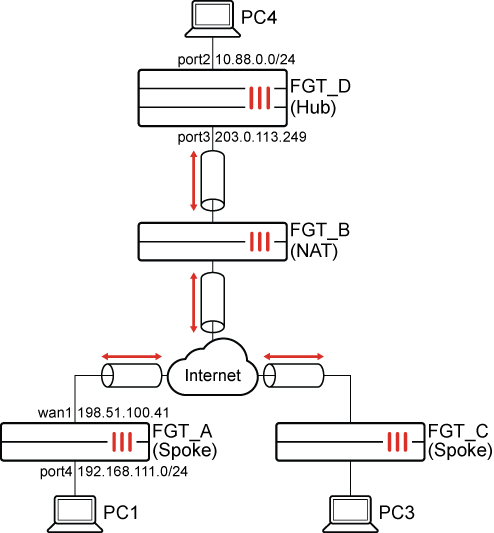
In this example, IPsec VPN crosses over a carrier network which blocks UDP and ESP packets. NAT is also applied between the Spokes and the Hub. Therefore, using Fortinet’s proprietary encapsulation, IPsec VPN traffic is encapsulated in TCP on port 1443 to be transported over the carrier.
To configure the IKE TCP port settings in the GUI:
  1. On each FortiGate, go to VPN > VPN Tunnels > Settings.

  2. Enable Allow VPN negotiations over TCP and change the TCP port to 1443.

  3. Click Apply.

To configure the IKE TCP port settings in the CLI:
config system settings
    set ike-tcp-service enable
    set ike-tcp-port 1443
end
To disable anti-replay in the global settings on the FGT_B (NAT) FortiGate:
config system global
    set anti-replay disable
    set hostname "FGT-B"
end

See Verify the ESP packets sniffed on the NAT device for more details.

To configure the FGT_D (hub) FortiGate in the GUI:
  1. Go to VPN > VPN Wizard.

  2. Set Tunnel name to Hub.

  3. Set Select a template to Site to Site.

  4. Click Begin.

  5. Configure the VPN tunnel settings:

    Field

    Value

    Authentication method

    Pre-shared key

    For better security, use Signature.

    Pre-shared key

    Enter an appropriate key

    IKE

    Version 2

    Transport

    Auto

    Use Fortinet encapsulation

    Enable

  6. Click Next.

  7. Configure the Remote site settings:

    Field

    Value

    Remote site device type

    FortiGate

    Remote site device

    Behind NAT or dynamic

    Remote site subnets that can access VPN

    0.0.0.0/0

    For better security, enter the remote subnets individually.

  8. Click Next.

  9. Configure the Local site settings:

    Field

    Value

    Outgoing interface that binds to tunnel

    WAN (port3)

    Create and add interface to zone

    Disable

    Local interface

    DMZ (port2)

    Local subnets that can access VPN

    10.88.0.0/24

  10. Click Next.

  11. Review the configuration and, if everything is correct, click Submit.

To configure the FGT_A (spoke) FortiGate in the GUI:
  1. Go to VPN > VPN Wizard.

  2. Set Tunnel name to Spoke.

  3. Set Select a template to Site to Site.

  4. Click Begin.

  5. Configure the VPN tunnel settings:

    Field

    Value

    Authentication method

    Pre-shared key

    For better security, use Signature.

    Pre-shared key

    Enter an appropriate key

    IKE

    Version 2

    Transport

    Auto

    Use Fortinet encapsulation

    Enable

  6. Click Next.

  7. Configure the Remote site settings:

    Field

    Value

    Remote site device type

    FortiGate

    Remote site device

    Accessible and static

    IP/FQDN

    203.0.113.249

    Route this device's internet traffic through the remote site

    Disable

    Remote site subnets that can access VPN

    0.0.0.0/0

    For better security, enter the remote subnets individually.

  8. Click Next.

  9. Configure the Local site settings:

    Field

    Value

    Outgoing interface that binds to tunnel

    wan1

    Create and add interface to zone

    Disable

    Local interface

    port4

    Local subnets that can access VPN

    192.168.111.0/24

  10. Click Next.

  11. Review the configuration and, if everything is correct, click Submit.

Configure the FGT_C (spoke) FortiGate similar to FGT_A.

To configure the FGT_D (hub) FortiGate in the CLI:
  1. Configure the IPsec phase 1 settings:

    config vpn ipsec phase1-interface
        edit "Hub"
            set type dynamic
            set interface "port3"
            set ike-version 2
            set peertype any
            set net-device disable
            set proposal aes128-sha256 aes256-sha256 aes128gcm-prfsha256 aes256gcm-prfsha384 chacha20poly1305-prfsha256
            set dhgrp 20 21
            set fortinet-esp enable
            set psksecret **********
        next
    end
  2. Configure the IPsec phase 2 settings:

    config vpn ipsec phase2-interface
        edit "Hub"
            set proposal aes128-sha256 aes256-sha256 aes128gcm aes256gcm chacha20poly1305
            set dhgrp 20 21
        next
    end
To configure the FGT_A (spoke) FortiGate in the CLI:
  1. Configure the IPsec phase 1 settings:

    config vpn ipsec phase1-interface
        edit "spoke"
            set interface "wan1"
            set ike-version 2
            set peertype any
            set net-device disable
            set proposal aes128-sha256 aes256-sha256 aes128gcm-prfsha256 aes256gcm-prfsha384 chacha20poly1305-prfsha256
            set dhgrp 20 21
            set transport auto
            set fortinet-esp enable
            set remote-gw 203.0.113.249
            set psksecret **********
        next
    end
  2. Configure the IPsec phase 2 settings:

    config vpn ipsec phase2-interface
        edit "spoke"
            set phase1name "spoke"
            set proposal aes128-sha256 aes256-sha256 aes128gcm aes256gcm chacha20poly1305
            set dhgrp 20 21
        next
    end

    IKE and ESP will be encapsulated into TCP, and ESP packets encapsulated into a non-standard TCP header.

Configure the FGT_C (spoke) FortiGate similar to FGT_A.

To verify the tunnel:
  1. On the Hub, go to Dashboard > Network Monitor > VPN.
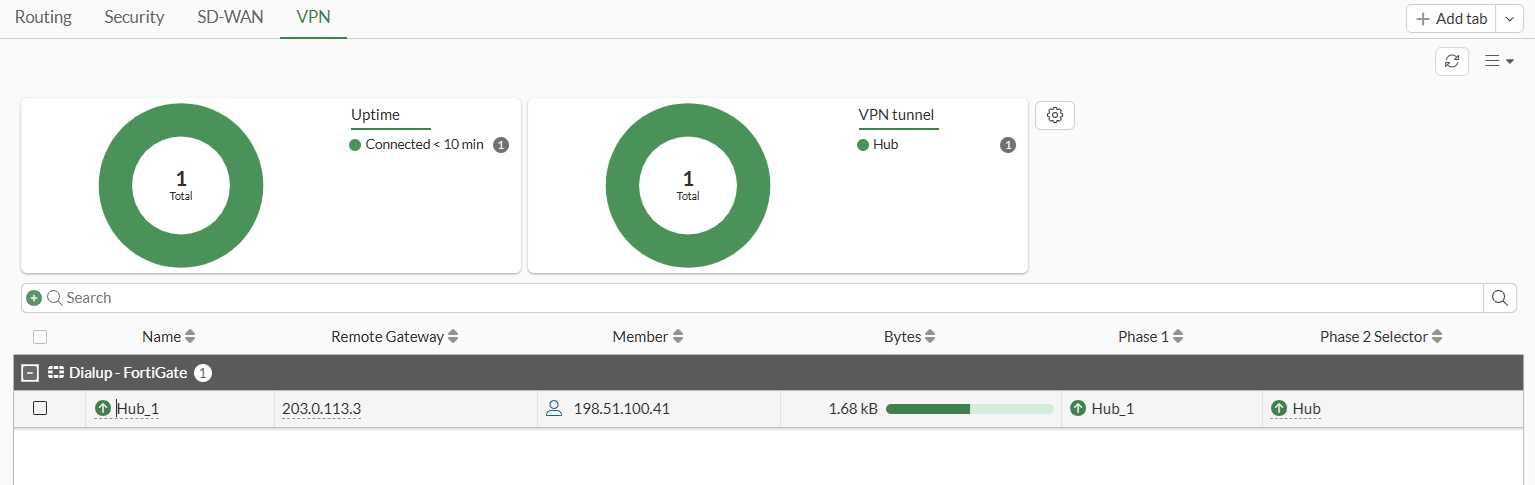
    The tunnel shows the remote member’s IP address (198.51.100.41), and the NAT’d IP (203.0.113.3) as the Remote Gateway.

  2. Verify the IPsec VPN tunnel state from the CLI or from the Command palette (CTRL+P) > CLI diagnostics:

    # diagnose vpn ike gateway list
    	
    vd: root/0
    name: Hub_1
    version: 2
    interface: port3 5
    addr: 203.0.113.249:1443 -> 203.0.113.3:7782
    tun_id: 10.0.0.7/::10.0.0.11
    remote_location: 0.0.0.0
    network-id: 0
    transport: TCP
    tcp-tx-1m-rate : 0 kbps
    tcp-tx-5m-rate : 0 kbps
    tcp-tx-drop    : 0
    tcp-rx-1m-rate : 0 kbps
    tcp-rx-5m-rate : 0 kbps
    tcp-rx-drop    : 0
    created: 485s ago
    peer-id: 198.51.100.41
    peer-id-auth: no
    nat: peer
    pending-queue: 0
    PPK: no
    IKE SA: created 1/1  established 1/1  time 150/150/150 ms
    IPsec SA: created 1/1  established 1/1  time 0/0/0 ms
    
      id/spi: 2 089657727774ac21/4dde1b606f0602d6
      direction: responder
      status: established 485-485s ago = 150ms
      proposal: aes128-sha256
      child: no
      SK_ei: 25e18afd01da3dbf-74885d4e54ec223c
      SK_er: 35d8eb67940c92a8-32a7407626149f08
      SK_ai: 91cc3bf8b0c06216-5c32132ecac319c7-ff5d08f1bbbf5f1b-540cf4d98a403663
      SK_ar: 5a9c70e487a1709f-b5824d00ca25e6c0-9208ab6413c73258-72df047d0ee05736
      PPK: no
      message-id sent/recv: 0/2
      QKD: no
      PQC-KEM (IKE): no
      PQC-KEM (all IPsec): no
      lifetime/rekey: 86400/85644
      DPD sent/recv: 00000000/00000000
      peer-id: 198.51.100.41
  3. Use the following command to see the tunnel information:

    # diagnose vpn tunnel list
    
    list all ipsec tunnel in vd 0
    ------------------------------------------------------
    name=Hub ver=2 serial=e 203.0.113.249:0->0.0.0.0:0 nexthop= tun_id=10.0.0.6 tun_id6=::10.0.0.6 status=up dst_mtu=0 weight=1
    bound_if=5 real_if=0 lgwy=static/1 tun=intf mode=dialup/2 encap=none options[0x20228]=npu frag-rfc  role=primary accept_traffic=1 overlay_id=0
    
    proxyid_num=0 child_num=1 refcnt=3 ilast=44162444 olast=44162444 ad=/0
    stat: rxp=25 txp=25 rxb=2100 txb=2100
    dpd: mode=on-demand on=0 status=ok idle=20000ms retry=3 count=0 seqno=0
    natt: mode=none draft=0 interval=0 remote_port=0
    fec: egress=0 ingress=0 
    ------------------------------------------------------
    name=Hub_1 ver=2 serial=11 203.0.113.249:1443->203.0.113.3:7782 nexthop=0.0.0.0 tun_id=10.0.0.7 tun_id6=::10.0.0.11 status=up dst_mtu=1500 weight=1 country=ZZ
    bound_if=5 real_if=5 lgwy=static/1 tun=intf mode=dial_inst/3 encap=none options[0x223a8]=npu rgwy-chg rport-chg frag-rfc  run_state=0 role=primary accept_traffic=1 overlay_id=0
    
    parent=Hub index=1
    proxyid_num=1 child_num=0 refcnt=6 ilast=650 olast=650 ad=/0
    stat: rxp=10 txp=10 rxb=840 txb=840
    dpd: mode=on-demand on=1 status=ok idle=20000ms retry=3 count=0 seqno=0
    natt: mode=none draft=0 interval=0 remote_port=0
    proxyid=Hub proto=0 sa=1 ref=2 serial=1 add-route
      src: 0:10.88.0.0-10.88.0.255:0
      dst: 0:192.168.111.0-192.168.111.255:0
      SA:  ref=3 options=20682 type=00 soft=0 mtu=1406 expire=42469/0B replaywin=2048
           seqno=b esn=0 replaywin_lastseq=0000000b qat=0 rekey=0 hash_search_len=1
      life: type=01 bytes=0/0 timeout=43190/43200
      dec: spi=81de5114 esp=aes key=16 20a323f2850fc89bd274f5192893c178
           ah=sha256 key=32 3f8af0b8c4352a1d169651abed35190921929c81eacc68c09c0986ec30ec04f4
      enc: spi=ec013982 esp=aes key=16 e91b4810924fcf2d1b031abfd47d4b7f
           ah=sha256 key=32 5dca604e0171ec94ed2c997040a97fabf9eecf7dd91ad604e2e8e3d479316863
      dec:pkts/bytes=10/840, enc:pkts/bytes=10/840
      npu_flag=00 npu_rgwy=0.0.0.0:0 npu_lgwy=0.0.0.0:0 npu_selid=0
      dec_npuid=0 enc_npuid=0 dec_engid=-1 enc_engid=-1 dec_saidx=-1 enc_saidx=-1
  4. Verify the ESP packets sniffed on the NAT device:
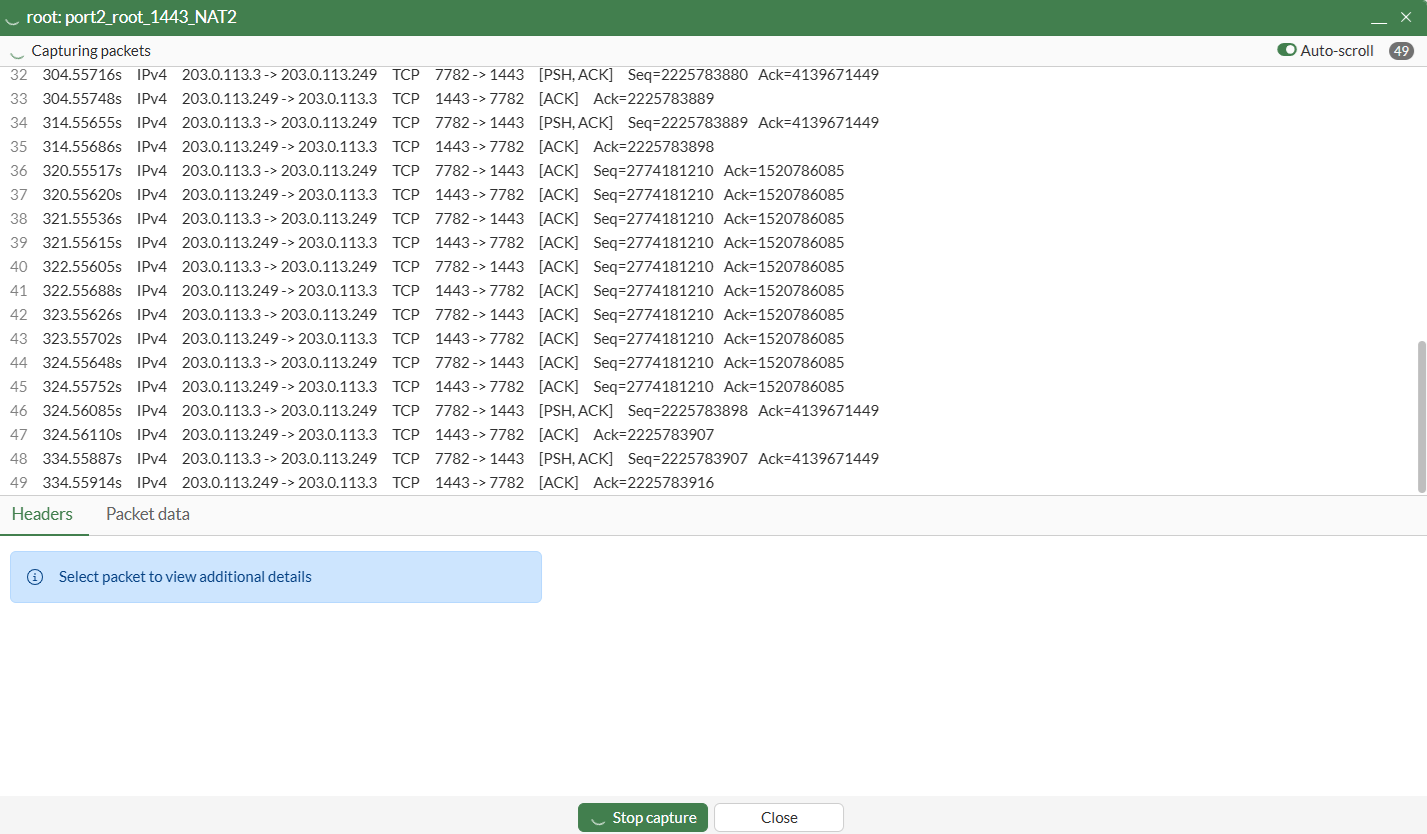
    In the packet capture, when data traffic passes through the tunnel, ESP packets are encapsulated into TCP ACK packets with the same sequence number. This is why anti-replay must be disabled on the NAT FortiGate.

VPN over TCP with Fortinet proprietary encapsulation

VPN over TCP with Fortinet proprietary encapsulation

In this example, IPsec VPN crosses over a carrier network which blocks UDP and ESP packets. NAT is also applied between the Spokes and the Hub. Therefore, using Fortinet’s proprietary encapsulation, IPsec VPN traffic is encapsulated in TCP on port 1443 to be transported over the carrier.

To configure the IKE TCP port settings in the GUI:
  1. On each FortiGate, go to VPN > VPN Tunnels > Settings.

  2. Enable Allow VPN negotiations over TCP and change the TCP port to 1443.

  3. Click Apply.

To configure the IKE TCP port settings in the CLI:
config system settings
    set ike-tcp-service enable
    set ike-tcp-port 1443
end
To disable anti-replay in the global settings on the FGT_B (NAT) FortiGate:
config system global
    set anti-replay disable
    set hostname "FGT-B"
end

See Verify the ESP packets sniffed on the NAT device for more details.

To configure the FGT_D (hub) FortiGate in the GUI:
  1. Go to VPN > VPN Wizard.

  2. Set Tunnel name to Hub.

  3. Set Select a template to Site to Site.

  4. Click Begin.

  5. Configure the VPN tunnel settings:

    Field

    Value

    Authentication method

    Pre-shared key

    For better security, use Signature.

    Pre-shared key

    Enter an appropriate key

    IKE

    Version 2

    Transport

    Auto

    Use Fortinet encapsulation

    Enable

  6. Click Next.

  7. Configure the Remote site settings:

    Field

    Value

    Remote site device type

    FortiGate

    Remote site device

    Behind NAT or dynamic

    Remote site subnets that can access VPN

    0.0.0.0/0

    For better security, enter the remote subnets individually.

  8. Click Next.

  9. Configure the Local site settings:

    Field

    Value

    Outgoing interface that binds to tunnel

    WAN (port3)

    Create and add interface to zone

    Disable

    Local interface

    DMZ (port2)

    Local subnets that can access VPN

    10.88.0.0/24

  10. Click Next.

  11. Review the configuration and, if everything is correct, click Submit.

To configure the FGT_A (spoke) FortiGate in the GUI:
  1. Go to VPN > VPN Wizard.

  2. Set Tunnel name to Spoke.

  3. Set Select a template to Site to Site.

  4. Click Begin.

  5. Configure the VPN tunnel settings:

    Field

    Value

    Authentication method

    Pre-shared key

    For better security, use Signature.

    Pre-shared key

    Enter an appropriate key

    IKE

    Version 2

    Transport

    Auto

    Use Fortinet encapsulation

    Enable

  6. Click Next.

  7. Configure the Remote site settings:

    Field

    Value

    Remote site device type

    FortiGate

    Remote site device

    Accessible and static

    IP/FQDN

    203.0.113.249

    Route this device's internet traffic through the remote site

    Disable

    Remote site subnets that can access VPN

    0.0.0.0/0

    For better security, enter the remote subnets individually.

  8. Click Next.

  9. Configure the Local site settings:

    Field

    Value

    Outgoing interface that binds to tunnel

    wan1

    Create and add interface to zone

    Disable

    Local interface

    port4

    Local subnets that can access VPN

    192.168.111.0/24

  10. Click Next.

  11. Review the configuration and, if everything is correct, click Submit.

Configure the FGT_C (spoke) FortiGate similar to FGT_A.

To configure the FGT_D (hub) FortiGate in the CLI:
  1. Configure the IPsec phase 1 settings:

    config vpn ipsec phase1-interface
        edit "Hub"
            set type dynamic
            set interface "port3"
            set ike-version 2
            set peertype any
            set net-device disable
            set proposal aes128-sha256 aes256-sha256 aes128gcm-prfsha256 aes256gcm-prfsha384 chacha20poly1305-prfsha256
            set dhgrp 20 21
            set fortinet-esp enable
            set psksecret **********
        next
    end
  2. Configure the IPsec phase 2 settings:

    config vpn ipsec phase2-interface
        edit "Hub"
            set proposal aes128-sha256 aes256-sha256 aes128gcm aes256gcm chacha20poly1305
            set dhgrp 20 21
        next
    end
To configure the FGT_A (spoke) FortiGate in the CLI:
  1. Configure the IPsec phase 1 settings:

    config vpn ipsec phase1-interface
        edit "spoke"
            set interface "wan1"
            set ike-version 2
            set peertype any
            set net-device disable
            set proposal aes128-sha256 aes256-sha256 aes128gcm-prfsha256 aes256gcm-prfsha384 chacha20poly1305-prfsha256
            set dhgrp 20 21
            set transport auto
            set fortinet-esp enable
            set remote-gw 203.0.113.249
            set psksecret **********
        next
    end
  2. Configure the IPsec phase 2 settings:

    config vpn ipsec phase2-interface
        edit "spoke"
            set phase1name "spoke"
            set proposal aes128-sha256 aes256-sha256 aes128gcm aes256gcm chacha20poly1305
            set dhgrp 20 21
        next
    end

    IKE and ESP will be encapsulated into TCP, and ESP packets encapsulated into a non-standard TCP header.

Configure the FGT_C (spoke) FortiGate similar to FGT_A.

To verify the tunnel:
  1. On the Hub, go to Dashboard > Network Monitor > VPN.

    The tunnel shows the remote member’s IP address (198.51.100.41), and the NAT’d IP (203.0.113.3) as the Remote Gateway.

  2. Verify the IPsec VPN tunnel state from the CLI or from the Command palette (CTRL+P) > CLI diagnostics:

    # diagnose vpn ike gateway list
    	
    vd: root/0
    name: Hub_1
    version: 2
    interface: port3 5
    addr: 203.0.113.249:1443 -> 203.0.113.3:7782
    tun_id: 10.0.0.7/::10.0.0.11
    remote_location: 0.0.0.0
    network-id: 0
    transport: TCP
    tcp-tx-1m-rate : 0 kbps
    tcp-tx-5m-rate : 0 kbps
    tcp-tx-drop    : 0
    tcp-rx-1m-rate : 0 kbps
    tcp-rx-5m-rate : 0 kbps
    tcp-rx-drop    : 0
    created: 485s ago
    peer-id: 198.51.100.41
    peer-id-auth: no
    nat: peer
    pending-queue: 0
    PPK: no
    IKE SA: created 1/1  established 1/1  time 150/150/150 ms
    IPsec SA: created 1/1  established 1/1  time 0/0/0 ms
    
      id/spi: 2 089657727774ac21/4dde1b606f0602d6
      direction: responder
      status: established 485-485s ago = 150ms
      proposal: aes128-sha256
      child: no
      SK_ei: 25e18afd01da3dbf-74885d4e54ec223c
      SK_er: 35d8eb67940c92a8-32a7407626149f08
      SK_ai: 91cc3bf8b0c06216-5c32132ecac319c7-ff5d08f1bbbf5f1b-540cf4d98a403663
      SK_ar: 5a9c70e487a1709f-b5824d00ca25e6c0-9208ab6413c73258-72df047d0ee05736
      PPK: no
      message-id sent/recv: 0/2
      QKD: no
      PQC-KEM (IKE): no
      PQC-KEM (all IPsec): no
      lifetime/rekey: 86400/85644
      DPD sent/recv: 00000000/00000000
      peer-id: 198.51.100.41
  3. Use the following command to see the tunnel information:

    # diagnose vpn tunnel list
    
    list all ipsec tunnel in vd 0
    ------------------------------------------------------
    name=Hub ver=2 serial=e 203.0.113.249:0->0.0.0.0:0 nexthop= tun_id=10.0.0.6 tun_id6=::10.0.0.6 status=up dst_mtu=0 weight=1
    bound_if=5 real_if=0 lgwy=static/1 tun=intf mode=dialup/2 encap=none options[0x20228]=npu frag-rfc  role=primary accept_traffic=1 overlay_id=0
    
    proxyid_num=0 child_num=1 refcnt=3 ilast=44162444 olast=44162444 ad=/0
    stat: rxp=25 txp=25 rxb=2100 txb=2100
    dpd: mode=on-demand on=0 status=ok idle=20000ms retry=3 count=0 seqno=0
    natt: mode=none draft=0 interval=0 remote_port=0
    fec: egress=0 ingress=0 
    ------------------------------------------------------
    name=Hub_1 ver=2 serial=11 203.0.113.249:1443->203.0.113.3:7782 nexthop=0.0.0.0 tun_id=10.0.0.7 tun_id6=::10.0.0.11 status=up dst_mtu=1500 weight=1 country=ZZ
    bound_if=5 real_if=5 lgwy=static/1 tun=intf mode=dial_inst/3 encap=none options[0x223a8]=npu rgwy-chg rport-chg frag-rfc  run_state=0 role=primary accept_traffic=1 overlay_id=0
    
    parent=Hub index=1
    proxyid_num=1 child_num=0 refcnt=6 ilast=650 olast=650 ad=/0
    stat: rxp=10 txp=10 rxb=840 txb=840
    dpd: mode=on-demand on=1 status=ok idle=20000ms retry=3 count=0 seqno=0
    natt: mode=none draft=0 interval=0 remote_port=0
    proxyid=Hub proto=0 sa=1 ref=2 serial=1 add-route
      src: 0:10.88.0.0-10.88.0.255:0
      dst: 0:192.168.111.0-192.168.111.255:0
      SA:  ref=3 options=20682 type=00 soft=0 mtu=1406 expire=42469/0B replaywin=2048
           seqno=b esn=0 replaywin_lastseq=0000000b qat=0 rekey=0 hash_search_len=1
      life: type=01 bytes=0/0 timeout=43190/43200
      dec: spi=81de5114 esp=aes key=16 20a323f2850fc89bd274f5192893c178
           ah=sha256 key=32 3f8af0b8c4352a1d169651abed35190921929c81eacc68c09c0986ec30ec04f4
      enc: spi=ec013982 esp=aes key=16 e91b4810924fcf2d1b031abfd47d4b7f
           ah=sha256 key=32 5dca604e0171ec94ed2c997040a97fabf9eecf7dd91ad604e2e8e3d479316863
      dec:pkts/bytes=10/840, enc:pkts/bytes=10/840
      npu_flag=00 npu_rgwy=0.0.0.0:0 npu_lgwy=0.0.0.0:0 npu_selid=0
      dec_npuid=0 enc_npuid=0 dec_engid=-1 enc_engid=-1 dec_saidx=-1 enc_saidx=-1
  4. Verify the ESP packets sniffed on the NAT device:

    In the packet capture, when data traffic passes through the tunnel, ESP packets are encapsulated into TCP ACK packets with the same sequence number. This is why anti-replay must be disabled on the NAT FortiGate.