
Fortinet white logo
Fortinet white logo

Administration Guide

Running speed tests from the hub to the spokes in dial-up IPsec tunnels

Running speed tests from the hub to the spokes in dial-up IPsec tunnels

In this hub and spoke example, the hub is configured as an IPsec VPN dial-up server with an IPsec tunnel connected to the spoke. The hub is configured as a speed-test server to listen on custom ports (6000 and 7000), and the spoke is configured as a speed test client. This setup allows speed tests to successfully perform when spokes are behind NAT devices. The results of the speed test will be applied to the hub-phase1 overlay tunnel(s) as specified on the hub VPN interface.
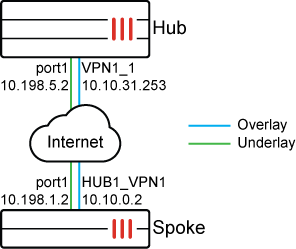
The spokes are configured to initiate speed tests on a schedule on UDP. After the speed test completes, the results are sent to the hub, and the hub applies the results on its IPsec tunnel as egress traffic shaping. The results are also cached and can be used if an IPsec tunnel is disconnected and reconnected again.

To configure the Hub FortiGate as the speed test server:
  1. Configure a shaping profile. In this example, the shaping profile is named profile_1.

    Three classes are used in the profile for low, medium, and high priority traffic. Each class is assigned a guaranteed and maximum bandwidth as a percentage of the measured bandwidth from the speed test.

    config firewall shaping-profile
        edit "profile_1"
            set default-class-id 2
            config shaping-entries
                edit 1
                    set class-id 2
                    set priority low
                    set guaranteed-bandwidth-percentage 10
                    set maximum-bandwidth-percentage 10
                next
                edit 2
                    set class-id 3
                    set priority medium
                    set guaranteed-bandwidth-percentage 30
                    set maximum-bandwidth-percentage 40
                next
                edit 3
                    set class-id 4
                    set guaranteed-bandwidth-percentage 20
                    set maximum-bandwidth-percentage 60
                next
            end
        end
    end
  2. Configure a shaping policy to assign certain traffic as a class ID. In this example, all traffic destined to the dialup tunnels are assigned class 3.

    config firewall shaping-policy
        edit 0
            set service "ALL"
            set schedule "always"
            set dstintf "VPN1"
            set class-id 3
            set srcaddr "all"
            set dstaddr "all"
        next
    end
  3. Enable a speed test server with custom speed-test listening ports.

    A speed test server is enabled on the hub. Port 7000 will run speed tests, and port 6000 will be the controller used to issue access tokens for speed test authentication.

    config system global
         set speedtest-server enable
         set speedtestd-ctrl-port 6000
         set speedtestd-server-port 7000
    end
  4. Allow speed tests on the underlay:

    config system interface                
        edit "port1" 
            set allowaccess ping speed-test
        next
    end
  5. Allow the speed test on the overlay and use the shaping profile in the interface. Ensure that the interface outbandwidth value uses the measured value from the speed test:

    config system interface                
        edit "hub-phase1" 
            set allowaccess ping speed-test      
            set egress-shaping-profile "profile_1" 
            set interface "port1"
            set outbandwidth-source measured        
        next
    end
To configure the spoke FortiGate as a speed test client:
  1. Configure a recurring schedule for the speed tests to run at 08:37 every day of the week:

    config firewall schedule recurring
        edit "1"
            set start 08:37
            set day sunday monday tuesday wednesday thursday friday saturday
        next
    end
  2. Configure system speed-test-schedule:

    The protocol mode is set to UDP. The custom controller port used for authentication is set to 6000, and the custom port used to run the speed tests is set to 7000.

    config system speed-test-schedule
        edit "spoke11-p1"
            set mode UDP
            set schedules "1"
            set dynamic-server enable
            set ctrl-port 6000
            set server-port 7000
        next
    end
To view the speed test results:

On the spoke, authentication succeeds through port 6000, and the test runs on port 7000. UDP mode is used, and the test is successful.

Enable the following debugs prior to the start of the speedtest time:

Spoke # diagnose debug application speedtest -1
Spoke # diagnose debug enable
Hub # diagnose debug application speedtestd -1
Hub # diagnose debug enable

Once the speed test starts, the following output will be generated:

  • Spoke:

    zfcron_speedtest_ipsec_send_request()-580: root: HUB1-VPN1(HUB1-VPN1) try=0 token request=0.0.0.0:0 -> 10.10.31.253:6000, test=10.198.1.2:0 -> 10.198.5.2:0
    fcron_sptest_ipsec_on_start()-531: root: (00130007) HUB1-VPN1(HUB1-VPN1) server 10.198.5.2:7000 notify start token=7434e4fe-2ec5-51f1-78ae-4c3d21826993
    __fork_run_ipsec_test()-991: [4598] Run test 00130007 for 'HUB1-VPN1'(port1) to server 10.198.5.2:7000 (tunnel:HUB1-VPN1)
    [speedtest(4598)] blksize adjusted: 131072 -> 1460
    [speedtest(4598)] start uploading test.
    
    <Upload speed test results omitted>
    
    [speedtest(4598)] speed test Done.
    [speedtest(4598)] start downloading test.
    [speedtest(4598)] Connecting to host 10.198.5.2, port 7000
    [speedtest(4598)] Reverse mode, remote host 10.198.5.2 is sending
    [speedtest(4598)] [ 27] local 10.198.1.2 port 10410 connected to 10.198.5.2 port 7000
    [speedtest(4598)] [ ID] Interval           Transfer     Bitrate         Jitter    Lost/Total Datagrams
    [speedtest(4598)] [ 27]   0.00-1.00   sec   100 MBytes   838 Mbits/sec  0.007 ms  179312/251121 (71%)  
    [speedtest(4598)] [ 27]   1.00-2.00   sec  93.4 MBytes   784 Mbits/sec  0.549 ms  176136/243220 (72%)  
    [speedtest(4598)] [ 27]   2.00-3.00   sec  87.1 MBytes   730 Mbits/sec  0.134 ms  196479/259043 (76%)  
    [speedtest(4598)] [ 27]   3.00-4.00   sec  90.7 MBytes   761 Mbits/sec  0.130 ms  183786/248934 (74%)  
    [speedtest(4598)] [ 27]   4.00-5.00   sec   105 MBytes   884 Mbits/sec  0.082 ms  197132/272787 (72%)  
    [speedtest(4598)] [ ID] Interval           Transfer     Bitrate         Jitter    Lost/Total Datagrams
    [speedtest(4598)] [ 27]   0.00-5.00   sec  1.76 GBytes  3.03 Gbits/sec  0.000 ms  0/1297300 (0%)  sender
    [speedtest(4598)] [SUM]  0.0- 5.0 sec  16 datagrams received out-of-order
    [speedtest(4598)] [ 27]   0.00-5.00   sec   477 MBytes   799 Mbits/sec  0.082 ms  932845/1275105 (73%)  receiver
    [speedtest(4598)] client(recver): bytes_recv=499699600, bytes_sent=1894058000, sender_time=5.000, recver_time=5.000
    [speedtest(4598)] client(recver): down_speed:  799 Mbits/sec
    [speedtest(4598)] 
    [speedtest(4598)] speed test Done.
    fcron_speedtest_notify_func()-1570: Speed test pid=4598 done
    
    fcron_speedtest_on_test_finish()-1533: test 0x00130007 for 'HUB1-VPN1' succeed with up=1509474, down=799469
    fcron_speedtest_save_results()-1428: Write logs to disk: succ=1, fail=0
    fcron_speedtest_sync_results()-1456: Sync cached results to secondary devices.
  • Hub:

    [sptestd::ctrl(0480):root] VPN1 ipv4(fd=11) recv request from=10.10.0.2, tun_id=10.10.0.2
    [sptestd::ctrl(0522):root] VPN1(VPN1_1, 10.10.0.2) set client:addr=10.10.0.2,uuid=7434e4fe-2ec5-51f1-78ae-4c3d21826993, wait=0
    [speedtest(4002)::serv(0056)] auth result: 2, uuid=7434e4fe-2ec5-51f1-78ae-4c3d21826993, peerv4=10.10.31.254
    [speedtest(4002)] Accepted connection from 10.198.1.2, port 6868, dev port1(3), vf root(0)
    [speedtest(4002)] [  9] local 10.198.5.2 port 7000 connected to 10.198.1.2 port 15316
    [speedtest(4002)] notify SD-WAN test start, vfid=0, if=19 (VPN1), ip=10.10.31.254
    
    <Download speed test results omitted>
    
    [speedtest(4002)] server listening on 7000 (fd=5)
    [speedtest(4002)::serv(0056)] auth result: 2, uuid=7434e4fe-2ec5-51f1-78ae-4c3d21826993, peerv4=10.10.31.254
    [speedtest(4002)] Accepted connection from 10.198.1.2, port 6872, dev port1(3), vf root(0)
    [speedtest(4002)] [  9] local 10.198.5.2 port 7000 connected to 10.198.1.2 port 10410
    [speedtest(4002)] notify SD-WAN test start, vfid=0, if=19 (VPN1), ip=10.10.31.254
    [speedtest(4002)] [ ID] Interval           Transfer     Bitrate         Jitter    Lost/Total Datagrams
    [speedtest(4002)] [  9]   0.00-5.06   sec  1.76 GBytes  2.99 Gbits/sec  0.000 ms  0/1297300 (0%)  sender
    [speedtest(4002)] [  9]   0.00-5.00   sec   477 MBytes   800 Mbits/sec  0.000 ms  932845/1275105 (73%)  receiver
    [speedtest(4002)] server(sender): bytes_recv=499699600, bytes_sent=1894058000, sender_time=5.060, recver_time=5.000
    [speedtest(4002)] server(sender): up_speed:  800 Mbits/sec
    [speedtest(4002)] notify SD-WAN test stop, vfid=0, if=19, ip=10.10.31.254
    [sptestd::ctrl(0303):root] VPN1(VPN1_1, 10.10.0.2) del client uuid=7434e4fe-2ec5-51f1-78ae-4c3d21826993.
    [sptestd::ctrl(0083):global] save logs to disk: succ=1  err=0
    [speedtest(4002)::serv(0089)] report result uuid=7434e4fe-2ec5-51f1-78ae-4c3d21826993, done=1, up=799519, down=0
    [speedtest(4002)] server listening on 7000 (fd=5)
To verify that the result is cached on the spoke:
Hub # diagnose vpn tunnel list
......
------------------------------------------------------
name=VPN1_1 ver=2 serial=5 10.198.5.2:0->10.198.1.2:0 nexthop=10.198.5.1 tun_id=10.10.0.2 tun_id6=::10.0.0.5 status=up dst_mtu=1500 weight=1 country=ZZ
bound_if=3 real_if=3 lgwy=static/1 tun=intf mode=dial_inst/3 encap=none options[0x22a8]=npu rgwy-chg frag-rfc  run_state=0 role=primary accept_traffic=1 overlay_id=1

parent=VPN1 index=1
proxyid_num=1 child_num=0 refcnt=5 ilast=0 olast=0 ad=s/1
stat: rxp=23697 txp=23697 rxb=958226 txb=958637
dpd: mode=on-idle on=1 status=ok idle=60000ms retry=3 count=0 seqno=1
natt: mode=none draft=0 interval=0 remote_port=0
fec: egress=0 ingress=0 
.......
egress traffic control:
        bandwidth=799519(kbps) lock_hit=0 default_class=2 n_active_class=3
        class-id=2      allocated-bandwidth=79951(kbps)         guaranteed-bandwidth=79951(kbps)
                        max-bandwidth=79951(kbps)       current-bandwidth=0(kbps)
                        priority=low    forwarded_bytes=1120
                        dropped_packets=0       dropped_bytes=0
        class-id=3      allocated-bandwidth=239856(kbps)        guaranteed-bandwidth=239855(kbps)
                        max-bandwidth=319807(kbps)      current-bandwidth=0(kbps)
                        priority=medium         forwarded_bytes=0
                        dropped_packets=0       dropped_bytes=0
        class-id=4      allocated-bandwidth=479711(kbps)        guaranteed-bandwidth=159903(kbps)
                        max-bandwidth=479711(kbps)      current-bandwidth=0(kbps)
                        priority=high   forwarded_bytes=0
                        dropped_packets=0       dropped_bytes=0
------------------------------------------------------

Running speed tests from the hub to the spokes in dial-up IPsec tunnels

Running speed tests from the hub to the spokes in dial-up IPsec tunnels

In this hub and spoke example, the hub is configured as an IPsec VPN dial-up server with an IPsec tunnel connected to the spoke. The hub is configured as a speed-test server to listen on custom ports (6000 and 7000), and the spoke is configured as a speed test client. This setup allows speed tests to successfully perform when spokes are behind NAT devices. The results of the speed test will be applied to the hub-phase1 overlay tunnel(s) as specified on the hub VPN interface.

The spokes are configured to initiate speed tests on a schedule on UDP. After the speed test completes, the results are sent to the hub, and the hub applies the results on its IPsec tunnel as egress traffic shaping. The results are also cached and can be used if an IPsec tunnel is disconnected and reconnected again.

To configure the Hub FortiGate as the speed test server:
  1. Configure a shaping profile. In this example, the shaping profile is named profile_1.

    Three classes are used in the profile for low, medium, and high priority traffic. Each class is assigned a guaranteed and maximum bandwidth as a percentage of the measured bandwidth from the speed test.

    config firewall shaping-profile
        edit "profile_1"
            set default-class-id 2
            config shaping-entries
                edit 1
                    set class-id 2
                    set priority low
                    set guaranteed-bandwidth-percentage 10
                    set maximum-bandwidth-percentage 10
                next
                edit 2
                    set class-id 3
                    set priority medium
                    set guaranteed-bandwidth-percentage 30
                    set maximum-bandwidth-percentage 40
                next
                edit 3
                    set class-id 4
                    set guaranteed-bandwidth-percentage 20
                    set maximum-bandwidth-percentage 60
                next
            end
        end
    end
  2. Configure a shaping policy to assign certain traffic as a class ID. In this example, all traffic destined to the dialup tunnels are assigned class 3.

    config firewall shaping-policy
        edit 0
            set service "ALL"
            set schedule "always"
            set dstintf "VPN1"
            set class-id 3
            set srcaddr "all"
            set dstaddr "all"
        next
    end
  3. Enable a speed test server with custom speed-test listening ports.

    A speed test server is enabled on the hub. Port 7000 will run speed tests, and port 6000 will be the controller used to issue access tokens for speed test authentication.

    config system global
         set speedtest-server enable
         set speedtestd-ctrl-port 6000
         set speedtestd-server-port 7000
    end
  4. Allow speed tests on the underlay:

    config system interface                
        edit "port1" 
            set allowaccess ping speed-test
        next
    end
  5. Allow the speed test on the overlay and use the shaping profile in the interface. Ensure that the interface outbandwidth value uses the measured value from the speed test:

    config system interface                
        edit "hub-phase1" 
            set allowaccess ping speed-test      
            set egress-shaping-profile "profile_1" 
            set interface "port1"
            set outbandwidth-source measured        
        next
    end
To configure the spoke FortiGate as a speed test client:
  1. Configure a recurring schedule for the speed tests to run at 08:37 every day of the week:

    config firewall schedule recurring
        edit "1"
            set start 08:37
            set day sunday monday tuesday wednesday thursday friday saturday
        next
    end
  2. Configure system speed-test-schedule:

    The protocol mode is set to UDP. The custom controller port used for authentication is set to 6000, and the custom port used to run the speed tests is set to 7000.

    config system speed-test-schedule
        edit "spoke11-p1"
            set mode UDP
            set schedules "1"
            set dynamic-server enable
            set ctrl-port 6000
            set server-port 7000
        next
    end
To view the speed test results:

On the spoke, authentication succeeds through port 6000, and the test runs on port 7000. UDP mode is used, and the test is successful.

Enable the following debugs prior to the start of the speedtest time:

Spoke # diagnose debug application speedtest -1
Spoke # diagnose debug enable
Hub # diagnose debug application speedtestd -1
Hub # diagnose debug enable

Once the speed test starts, the following output will be generated:

  • Spoke:

    zfcron_speedtest_ipsec_send_request()-580: root: HUB1-VPN1(HUB1-VPN1) try=0 token request=0.0.0.0:0 -> 10.10.31.253:6000, test=10.198.1.2:0 -> 10.198.5.2:0
    fcron_sptest_ipsec_on_start()-531: root: (00130007) HUB1-VPN1(HUB1-VPN1) server 10.198.5.2:7000 notify start token=7434e4fe-2ec5-51f1-78ae-4c3d21826993
    __fork_run_ipsec_test()-991: [4598] Run test 00130007 for 'HUB1-VPN1'(port1) to server 10.198.5.2:7000 (tunnel:HUB1-VPN1)
    [speedtest(4598)] blksize adjusted: 131072 -> 1460
    [speedtest(4598)] start uploading test.
    
    <Upload speed test results omitted>
    
    [speedtest(4598)] speed test Done.
    [speedtest(4598)] start downloading test.
    [speedtest(4598)] Connecting to host 10.198.5.2, port 7000
    [speedtest(4598)] Reverse mode, remote host 10.198.5.2 is sending
    [speedtest(4598)] [ 27] local 10.198.1.2 port 10410 connected to 10.198.5.2 port 7000
    [speedtest(4598)] [ ID] Interval           Transfer     Bitrate         Jitter    Lost/Total Datagrams
    [speedtest(4598)] [ 27]   0.00-1.00   sec   100 MBytes   838 Mbits/sec  0.007 ms  179312/251121 (71%)  
    [speedtest(4598)] [ 27]   1.00-2.00   sec  93.4 MBytes   784 Mbits/sec  0.549 ms  176136/243220 (72%)  
    [speedtest(4598)] [ 27]   2.00-3.00   sec  87.1 MBytes   730 Mbits/sec  0.134 ms  196479/259043 (76%)  
    [speedtest(4598)] [ 27]   3.00-4.00   sec  90.7 MBytes   761 Mbits/sec  0.130 ms  183786/248934 (74%)  
    [speedtest(4598)] [ 27]   4.00-5.00   sec   105 MBytes   884 Mbits/sec  0.082 ms  197132/272787 (72%)  
    [speedtest(4598)] [ ID] Interval           Transfer     Bitrate         Jitter    Lost/Total Datagrams
    [speedtest(4598)] [ 27]   0.00-5.00   sec  1.76 GBytes  3.03 Gbits/sec  0.000 ms  0/1297300 (0%)  sender
    [speedtest(4598)] [SUM]  0.0- 5.0 sec  16 datagrams received out-of-order
    [speedtest(4598)] [ 27]   0.00-5.00   sec   477 MBytes   799 Mbits/sec  0.082 ms  932845/1275105 (73%)  receiver
    [speedtest(4598)] client(recver): bytes_recv=499699600, bytes_sent=1894058000, sender_time=5.000, recver_time=5.000
    [speedtest(4598)] client(recver): down_speed:  799 Mbits/sec
    [speedtest(4598)] 
    [speedtest(4598)] speed test Done.
    fcron_speedtest_notify_func()-1570: Speed test pid=4598 done
    
    fcron_speedtest_on_test_finish()-1533: test 0x00130007 for 'HUB1-VPN1' succeed with up=1509474, down=799469
    fcron_speedtest_save_results()-1428: Write logs to disk: succ=1, fail=0
    fcron_speedtest_sync_results()-1456: Sync cached results to secondary devices.
  • Hub:

    [sptestd::ctrl(0480):root] VPN1 ipv4(fd=11) recv request from=10.10.0.2, tun_id=10.10.0.2
    [sptestd::ctrl(0522):root] VPN1(VPN1_1, 10.10.0.2) set client:addr=10.10.0.2,uuid=7434e4fe-2ec5-51f1-78ae-4c3d21826993, wait=0
    [speedtest(4002)::serv(0056)] auth result: 2, uuid=7434e4fe-2ec5-51f1-78ae-4c3d21826993, peerv4=10.10.31.254
    [speedtest(4002)] Accepted connection from 10.198.1.2, port 6868, dev port1(3), vf root(0)
    [speedtest(4002)] [  9] local 10.198.5.2 port 7000 connected to 10.198.1.2 port 15316
    [speedtest(4002)] notify SD-WAN test start, vfid=0, if=19 (VPN1), ip=10.10.31.254
    
    <Download speed test results omitted>
    
    [speedtest(4002)] server listening on 7000 (fd=5)
    [speedtest(4002)::serv(0056)] auth result: 2, uuid=7434e4fe-2ec5-51f1-78ae-4c3d21826993, peerv4=10.10.31.254
    [speedtest(4002)] Accepted connection from 10.198.1.2, port 6872, dev port1(3), vf root(0)
    [speedtest(4002)] [  9] local 10.198.5.2 port 7000 connected to 10.198.1.2 port 10410
    [speedtest(4002)] notify SD-WAN test start, vfid=0, if=19 (VPN1), ip=10.10.31.254
    [speedtest(4002)] [ ID] Interval           Transfer     Bitrate         Jitter    Lost/Total Datagrams
    [speedtest(4002)] [  9]   0.00-5.06   sec  1.76 GBytes  2.99 Gbits/sec  0.000 ms  0/1297300 (0%)  sender
    [speedtest(4002)] [  9]   0.00-5.00   sec   477 MBytes   800 Mbits/sec  0.000 ms  932845/1275105 (73%)  receiver
    [speedtest(4002)] server(sender): bytes_recv=499699600, bytes_sent=1894058000, sender_time=5.060, recver_time=5.000
    [speedtest(4002)] server(sender): up_speed:  800 Mbits/sec
    [speedtest(4002)] notify SD-WAN test stop, vfid=0, if=19, ip=10.10.31.254
    [sptestd::ctrl(0303):root] VPN1(VPN1_1, 10.10.0.2) del client uuid=7434e4fe-2ec5-51f1-78ae-4c3d21826993.
    [sptestd::ctrl(0083):global] save logs to disk: succ=1  err=0
    [speedtest(4002)::serv(0089)] report result uuid=7434e4fe-2ec5-51f1-78ae-4c3d21826993, done=1, up=799519, down=0
    [speedtest(4002)] server listening on 7000 (fd=5)
To verify that the result is cached on the spoke:
Hub # diagnose vpn tunnel list
......
------------------------------------------------------
name=VPN1_1 ver=2 serial=5 10.198.5.2:0->10.198.1.2:0 nexthop=10.198.5.1 tun_id=10.10.0.2 tun_id6=::10.0.0.5 status=up dst_mtu=1500 weight=1 country=ZZ
bound_if=3 real_if=3 lgwy=static/1 tun=intf mode=dial_inst/3 encap=none options[0x22a8]=npu rgwy-chg frag-rfc  run_state=0 role=primary accept_traffic=1 overlay_id=1

parent=VPN1 index=1
proxyid_num=1 child_num=0 refcnt=5 ilast=0 olast=0 ad=s/1
stat: rxp=23697 txp=23697 rxb=958226 txb=958637
dpd: mode=on-idle on=1 status=ok idle=60000ms retry=3 count=0 seqno=1
natt: mode=none draft=0 interval=0 remote_port=0
fec: egress=0 ingress=0 
.......
egress traffic control:
        bandwidth=799519(kbps) lock_hit=0 default_class=2 n_active_class=3
        class-id=2      allocated-bandwidth=79951(kbps)         guaranteed-bandwidth=79951(kbps)
                        max-bandwidth=79951(kbps)       current-bandwidth=0(kbps)
                        priority=low    forwarded_bytes=1120
                        dropped_packets=0       dropped_bytes=0
        class-id=3      allocated-bandwidth=239856(kbps)        guaranteed-bandwidth=239855(kbps)
                        max-bandwidth=319807(kbps)      current-bandwidth=0(kbps)
                        priority=medium         forwarded_bytes=0
                        dropped_packets=0       dropped_bytes=0
        class-id=4      allocated-bandwidth=479711(kbps)        guaranteed-bandwidth=159903(kbps)
                        max-bandwidth=479711(kbps)      current-bandwidth=0(kbps)
                        priority=high   forwarded_bytes=0
                        dropped_packets=0       dropped_bytes=0
------------------------------------------------------