

Dialup VPN with certificate and LDAP authentication
The previous example demonstrated how to use a client certificate as the primary authentication method for connecting to an IKEv2 remote access VPN. This example extends on that by utilizing EAP to authentication the client using username and password against the same Active Directory.
The topology and configurations remain largely the same. We will use the Principal name with LDAP integration verification method for the user certificate.
config user peer
    edit "ldap-peer"
        set ca "CA_Cert_1"
        set mfa-mode subject-identity
        set mfa-server "LDAP-fortiad"
    next
end
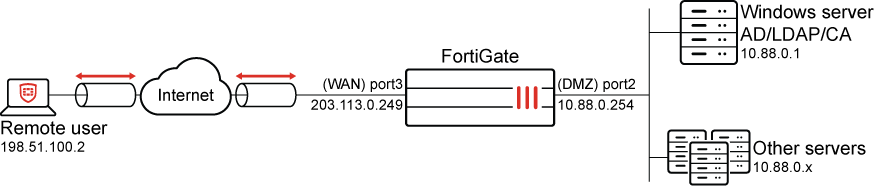
This example extends on the previous configurations with the addition of an LDAP user group for the user Tom Smith, that belongs to the MIS group on Active Directory.
Additionally, since the FortiClient endpoint must use EAP-TTLS for user authentication, it is important to configure the endpoint VPN settings on FortiClient EMS. The Remote Access endpoint profile settings will be pushed out to all connected FortiClient endpoints.
To configure an LDAP user group and assign it to the VPN:
-
On the FortiGate, go to User & Authentication > User Groups and click Create new.
-
Set the name to ldap-mis.
-
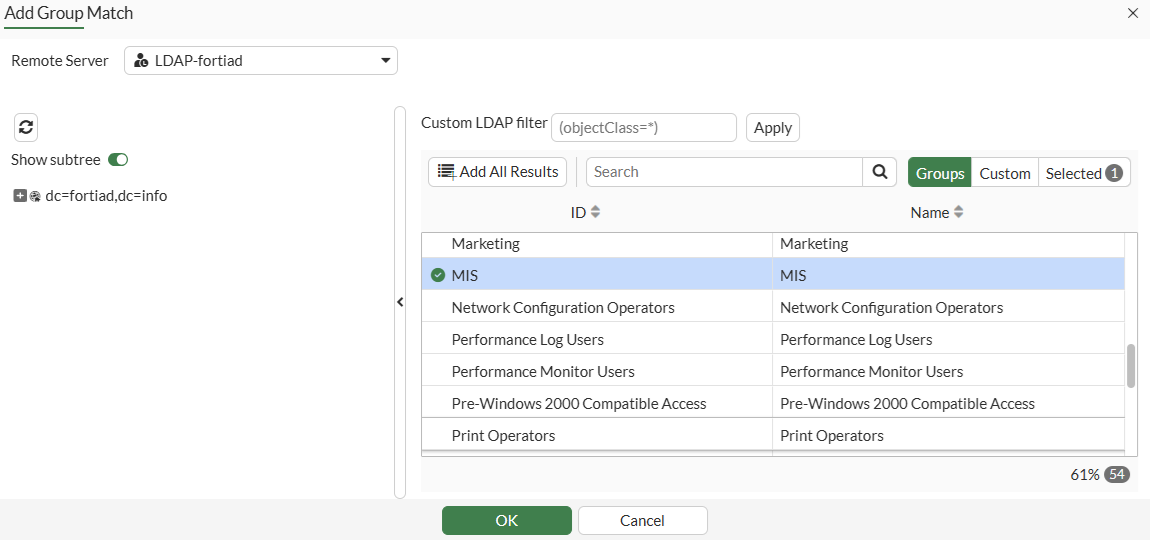
Under Remote Groups, click +Add.
-
For the Remote Server, select LDAP-fortiad.
-
When the groups are displayed, find the MIS group, right-click and select Add Selected.
-
Click OK.
-
Click OK to save the new user group.
To assign the LDAP user group to the VPN tunnel:
-
Go to VPN > VPN Tunnels.
-
Edit the dialup_cert tunnel.
-
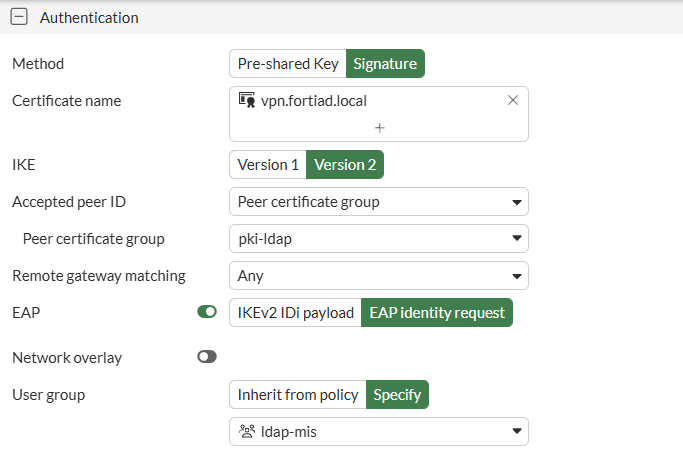
In the Authentication section, configure the following:
-
Enable EAP and select EAP Identity request.
-
Set User group to Specify.
-
Select the ldap-mis user group
-
-
Click OK to save the VPN changes.
To configure a remote access endpoint profile on EMS:
-
On FortiClient EMS, go to Endpoint Profiles > Remote Access.
-
Edit the Default profile.
-
Enable IPsec VPN.
-
Enable User Windows Store Certificates.
-
Enable Current User Windows Store Certificates.
-
-
Under VPN Tunnels, click Add Tunnel.
-
Select Manual and click Next.
-
In Basic settings, configure the following:
Field
Value
Name
ldap_cert_vpn
Remote Gateway
vpn.fortiad.local
Authentication Method
System Store Certificate
Prompt for Username
Enable
-
Switch to VPN Settings and confirm that the IKE version is Version 2 and Mode config is selected.
-
Switch to Phase 1 and edit the following:
Field
Value
IKE Proposal
AES128-SHA256
AES256-SHA256
DH Groups
20
EAP Authentication Method
EAP-TTLS
-
Switch to Phase 2 and update the IKE Proposal to AES128-SHA256 and AES256-SHA256.
-
Click Save to save the tunnel settings
-
Click Save to save the profile settings
-
Under Endpoint Policy & Components, ensure that the enabled profile has the Default VPN profile selected.
The Remote Access profile and VPN tunnel configurations will be pushed to the FortiClient.
Verification
This example is based on using the Windows version of FortiClient 7.4.4. Using other versions of FortiClient may differ slightly.
To connect to the VPN:
-
Open FortiClient on your endpoint and navigate to the Remote Access tab.
-
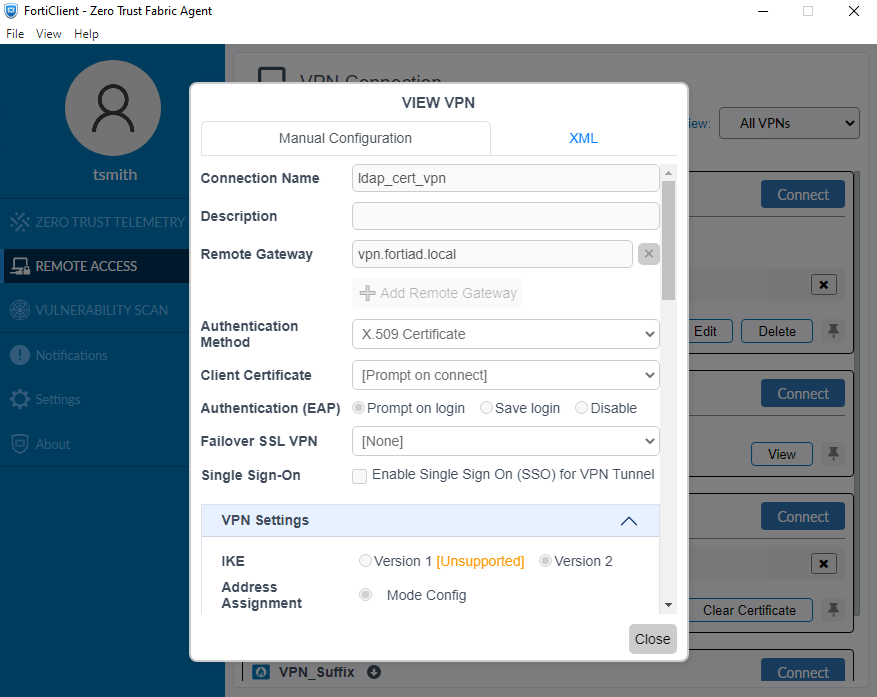
Find the new ldap_cert_vpn tunnel and click View.
-
Scroll through the VPN configurations to confirm the details.
-
Click Close.
-
Click Connect to start the VPN connection
-
You will first be prompted to select your client certificate
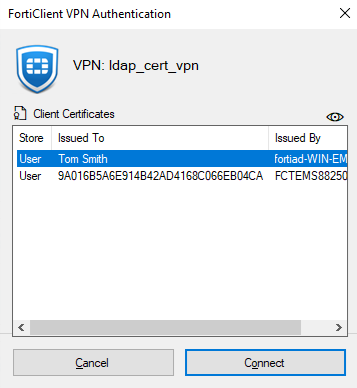
-
Once selected, you will be prompted for the username and password
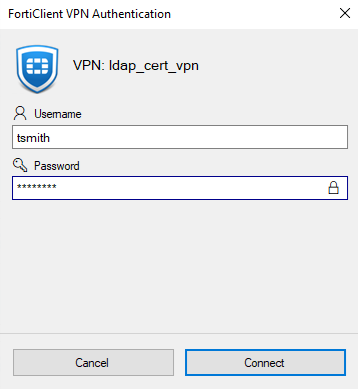
-
After both of these pass, your VPN will be connected.
-
From the command prompt, try to ping a server in the internal network.
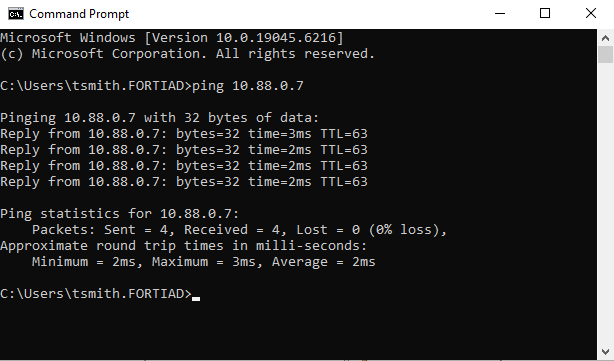
To verify from the FortiGate:
-
On the FortiGate, go to Dashboard > Network Monitor > VPN to view the VPN tunnel monitor.
The widget displays tunnel information and displays username from EAP authentication
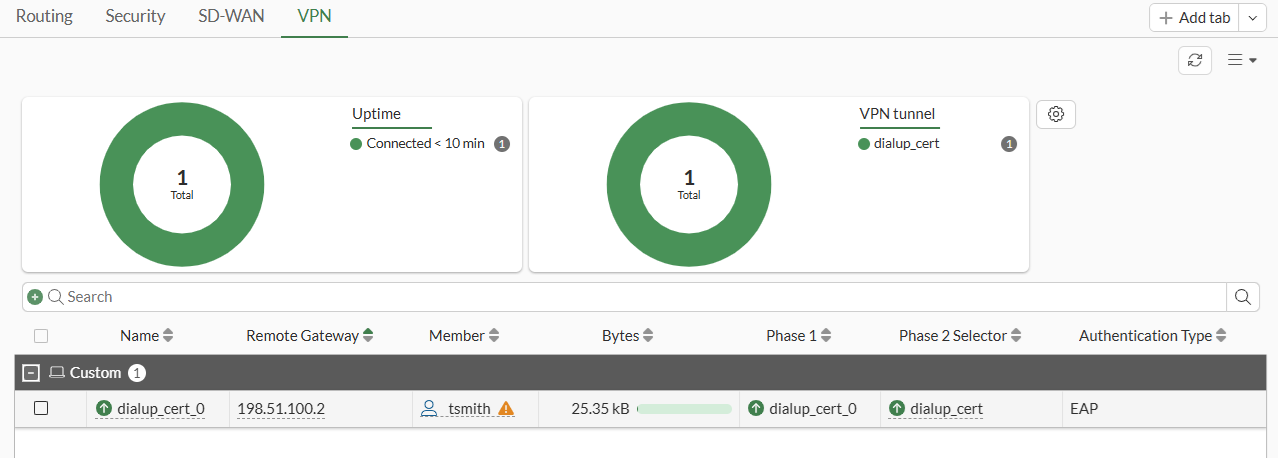
-
Go to Log & Report > System Events and switch to VPN Events from the drop-down. Several tunnel related logs are recorded.
The same logs can be viewed in the CLI:
# execute log filter category 1
# execute log filter field subtype vpn
# execute log display
1: date=2026-05-01 time=11:37:17 eventtime=1777660637248678009 tz="-0700" logid="0101037141" type="event" subtype="vpn" level="notice" vd="root" logdesc="IPsec tunnel statistics" msg="IPsec tunnel statistics" action="tunnel-stats" remip=198.51.100.2 locip=203.0.113.249 remport=62915 locport=4500 outintf="port3" srccountry="Reserved" cookies="3019f6aa301bd504/49d22338a0eaf8a3" user="CN = Tom Smith, emailAddress = tsmith@ztnademo.com" group="pki-ldap" useralt="CN = Tom Smith, emailAddress = tsmith@ztnademo.com" eapuser="tsmith" eapauthgroup="ldap-mis" assignip=172.18.200.10 vpntunnel="dialup_cert_0" tunnelip=172.18.200.10 tunnelid=244014029 tunneltype="ipsec" duration=335 sentbyte=240 rcvdbyte=25554 nextstat=600 fctuid="9A016B5A6E914B42AD4168C066EB04CA" advpnsc=0
-
To view tunnel info, go to the command palette (CTRL+P) > CLI diagnostics and look for
ike gatewaylist to see the detail tunnel information:vd: root/0 name: dialup_cert_0 version: 2 interface: port3 5 addr: 203.0.113.249:4500 -> 198.51.100.2:62915 tun_id: 172.18.200.10/::10.0.0.11 remote_location: 0.0.0.0 network-id: 0 transport: UDP created: 538s ago eap-user: tsmith 2FA: no peer-id: CN = Tom Smith, emailAddress = tsmith@ztnademo.com peer-id-auth: yes FortiClient UID: 9A016B5A6E914B42AD4168C066EB04CA assigned IPv4 address: 172.18.200.10/255.255.255.255 nat: me peer pending-queue: 0 PPK: no IKE SA: created 1/1 established 1/1 time 18140/18140/18140 ms IPsec SA: created 1/1 established 1/1 time 0/0/0 ms id/spi: 18 3019f6aa301bd504/49d22338a0eaf8a3 direction: responder status: established 538-520s ago = 18140ms proposal: aes128-sha256 child: no SK_ei: a17ecf0653ffdf34-1ec96e42ce289564 SK_er: 28cdf2ba3fbf52e6-f447d097ba692e32 SK_ai: 7319afe842921189-3cd73c44959294dc-f8c25592be553265-3bd47fafc816652e SK_ar: 0cb5eaee634df9d9-f7dce1763e9dbb3c-0bbcea6e5c1ef0b0-4bf63141d9af4124 PPK: no message-id sent/recv: 0/62 QKD: no PQC-KEM (IKE): no PQC-KEM (all IPsec): no lifetime/rekey: 86400/85609 DPD sent/recv: 00000000/00000000 peer-id: CN = Tom Smith, emailAddress = tsmith@ztnademo.com peer-group: pki-ldap
-
If any issues arise during the connection, run the following debug commands to troubleshoot the issue:
# diagnose debug application ike -1
# diagnose debug application fnbamd -1
# diagnose debug enable
-
Successful connection will have similar FNBAM debugs as these:
[554] fnbamd_cert_verify-Following cert chain depth 0
[628] fnbamd_cert_verify-Issuer found: CA_Cert_1 (SSL_DPI opt 1)
[554] fnbamd_cert_verify-Following cert chain depth 1
[1057] __cert_verify-peer_info.no_ocsp_query:0 cert->status:640.
[769] fnbamd_cert_check_group_list-checking group with name 'pki-ldap'
[581] __check_add_peer-check 'ldap-peer'
[440] peer_san_subject_check-SAN: host_good 1; email_good 1; ip_good 1
[454] peer_subject_cn_check-Cert subject 'CN = Tom Smith, emailAddress = tsmith@ztnademo.com'
[84] fnbamd_peer_ldap_push-Check LDAP setting of peer user 'ldap-peer'
[351] fnbamd_ldap_get-vfid=0, name='LDAP-fortiad'
[589] __check_add_peer-'ldap-peer' check ret:pending
[802] fnbamd_cert_check_group_list-LDAP servers
[808] fnbamd_cert_check_group_list-    'LDAP-fortiad', (Principle-Name), ref=2
[202] __get_default_ocsp_ctx-def_ocsp_ctx=(nil), no_ocsp_query=0, ocsp_enabled=0
[841] fnbamd_cert_check_group_list-Peer users
[848] fnbamd_cert_check_group_list-    'ldap-peer' ('LDAP-fortiad','N/A','N/A')
[1069] __cert_verify_do_next-req_id=9711170703385
[109] __cert_chg_st- 'Validation' -> 'Status-Query'
[793] __cert_status_query-req_id=9711170703385
[446] __cert_ldap_query-req_id=9711170703385
[457] __cert_ldap_query-LDAP query, idx 0
[771] __get_san_value-Obtained GEN_OTHERNAME 'tsmith@fortiad.info'
[472] __cert_ldap_query-cert_field_val: 'tsmith@fortiad.info'
[1899] fnbamd_ldap_auth_ctx_init-User: tsmith@fortiad.info, password query: 0, group list query: 0, group only: 0, UPN query: 1, user
 domain query: 0
…
[1482] __ldap_tcps_connect-tcps_connect(10.88.0.1) is established. Current state: Connecting.
[1161] __ldap_auth_ctx_reset-
[1004] __ldap_next_state-State: Connecting -> Admin Binding
[1496] __ldap_tcps_connect-Start ldap conn timer.
[1341] __ldap_rxtx-fd 14, state 2(Admin Binding)
[1342] __ldap_rxtx-Stop ldap conn timer.
[1349] __ldap_rxtx-
[472] __ldap_build_bind_req-Binding to 'fortiad\Administrator'
…
[1004] __ldap_next_state-State: Admin Binding -> DN Search
[1443] __ldap_rxtx-Start ldap conn timer.
[1341] __ldap_rxtx-fd 14, state 4(DN Search)
[1342] __ldap_rxtx-Stop ldap conn timer.
[1349] __ldap_rxtx-
[902] fnbamd_ldap_build_dn_search_req-base:'dc=fortiad,dc=info' filter:(&(userPrincipalName=tsmith@fortiad.info)(!(UserAccountControl
:1.2.840.113556.1.4.803:=2)))
…
[806] __ldap_membership_next-Auth accepted
[1161] __ldap_auth_ctx_reset-
[1004] __ldap_next_state-State: DN Search -> Done
[403] __cert_ldap_query_cb-LDAP ret=0, server='LDAP-fortiad', req_id=9711170703385
[414] __cert_ldap_query_cb-Matched peer 'ldap-peer'
…
[1330] fnbamd_cert_auth_copy_cert_status-Matched peer user 'ldap-peer'
[969] fnbamd_cert_check_matched_groups-checking group with name 'pki-ldap', peer_ctx->peer_user->setting.name:ldap-peer
[1033] fnbamd_cert_check_matched_groups-matched
…
[2500] handle_req-Rcvd auth req 9711170703386 for tsmith in ldap-mis opt=00000000 prot=7 svc=9
[399] __compose_group_list_from_req-Group 'ldap-mis', type 1
[574] create_auth_session-Session created for req id 9711170703386
[317] radius_start-eap_local=1
[892] fnbamd_cfg_get_radius_list-
[457] fnbamd_rad_get-vfid=0, name='EAP_PROXY'
…
[2500] handle_req-Rcvd auth req 9552247767045 for tsmith in  opt=00000000 prot=0 svc=9
[399] __compose_group_list_from_req-Group 'ldap-mis', type 1
[763] fnbamd_saml_auth_cache_lookup-Authenticating 'tsmith'.
[574] create_auth_session-Session created for req id 9552247767045
[419] auth_local-started for tsmith
…
[1482] __ldap_tcps_connect-tcps_connect(10.88.0.1) is established. Current state: Connecting.
[1161] __ldap_auth_ctx_reset-
[1004] __ldap_next_state-State: Connecting -> Admin Binding
…
[472] __ldap_build_bind_req-Binding to 'fortiad\Administrator'
…
[1004] __ldap_next_state-State: Admin Binding -> DN Search
…
[1004] __ldap_next_state-State: DN Search -> User Binding
[1443] __ldap_rxtx-Start ldap conn timer.
[1341] __ldap_rxtx-fd 16, state 3(User Binding)
[1342] __ldap_rxtx-Stop ldap conn timer.
[1349] __ldap_rxtx-
[708] fnbamd_ldap_build_userbind_req-Trying DN 'CN=Tom Smith,CN=Users,DC=fortiad,DC=info'
[472] __ldap_build_bind_req-Binding to 'CN=Tom Smith,CN=Users,DC=fortiad,DC=info'
…
[1004] __ldap_next_state-State: User Binding -> Attr Query
[1443] __ldap_rxtx-Start ldap conn timer.
[1341] __ldap_rxtx-fd 16, state 5(Attr Query)
[1342] __ldap_rxtx-Stop ldap conn timer.
[1349] __ldap_rxtx-
[763] fnbamd_ldap_build_attr_search_req-Adding attr 'memberOf'
[780] fnbamd_ldap_build_attr_search_req-base:'CN=Tom Smith,CN=Users,DC=fortiad,DC=info' filter:cn=*
…
[745] __retrieve_group_values- attr='memberOf', found 4 values
[754] __retrieve_group_values-val[0]='CN=MIS,CN=Users,DC=fortiad,DC=info'
[754] __retrieve_group_values-val[1]='CN=Domain Users,CN=Users,DC=fortiad,DC=info'
[754] __retrieve_group_values-val[2]='CN=Remote Desktop Users,CN=Builtin,DC=fortiad,DC=info'
[754] __retrieve_group_values-val[3]='CN=Administrators,CN=Builtin,DC=fortiad,DC=info'
…
[1004] __ldap_next_state-State: Primary Group Query -> Done
[1997] ldap_copy_grp_list-copied CN=MIS,CN=Users,DC=fortiad,DC=info
[1997] ldap_copy_grp_list-copied CN=Domain Users,CN=Users,DC=fortiad,DC=info
[1997] ldap_copy_grp_list-copied CN=Remote Desktop Users,CN=Builtin,DC=fortiad,DC=info
[1997] ldap_copy_grp_list-copied CN=Administrators,CN=Builtin,DC=fortiad,DC=info
[1997] ldap_copy_grp_list-copied CN=Remote-Allowed,CN=Users,DC=fortiad,DC=info
[781] fnbam_user_auth_group_match-req id: 9552247767045, server: LDAP-fortiad, local auth: 0, dn match: 1
[672] __group_match-Use 'tsmith' for user group matching.
[710] __group_match-Check if LDAP-fortiad is a group member
[716] __group_match-Group 'ldap-mis' passed group matching
[719] __group_match-Add matched group 'ldap-mis'(10)
[269] find_matched_usr_grps-Passed group matching
[3442] fnbamd_ldap_result-Result for ldap svr LDAP-fortiad is SUCCESS
…
[672] __group_match-Use 'tsmith' for user group matching.
[710] __group_match-Check if LDAP-fortiad is a group member
[716] __group_match-Group 'ldap-mis' passed group matching
[719] __group_match-Add matched group 'ldap-mis'(10)
[269] find_matched_usr_grps-Passed group matching
[1012] update_auth_token_session-config does not require 2fa
[357] fnbamd_comm_send_result-Sending result 0 (nid 0) for req 9711170703386, len=3012