

ZTNA web proxy with load balancing example
This example expands on the ZTNA web proxy example example, adding a second webserver that is to be load balanced for webserver.ztnademo.com requests and has health checks enabled. Configure the ZTNA web proxy example before continuing.
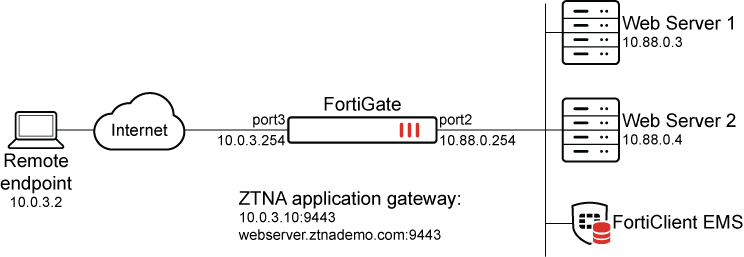
To add a second webserver as a real server in the existing web proxy:
It is not possible to configure a second real server for a web proxy in the GUI and, after configuring the second real server in the CLI, you cannot make further edits to the server in the GUI.
config ztna web-proxy
    edit "ZTNA-Webserver"
        set vip "Webserver:9443"
        set host "WebServer9443"
        config api-gateway
            edit 1
                config realservers
                    edit 1
                        set health-check enable
                    next
                    edit 2
                        set ip 10.88.0.4
                        set port 9043
                        set health-check enable
                    next
                end
                set ldb-method round-robin
            next
        end
    next
end
To verify that load balancing is working :
-
On the remote Windows PC, open a browser and enter the address of the server and the access port.

-
Refresh the page to load the second server.

These webservers are configured to display their hostname at the bottom of the page. You may need to verify server load balancing using packet capture on the FortiGate or by reviewing the ZTNA logs.
-
Close the browser to complete the session and generate a log.
Note that only one log will be generated, and it will reflect the second server accessed. To generate a second log, connect to the ZTNA web proxy a second time.
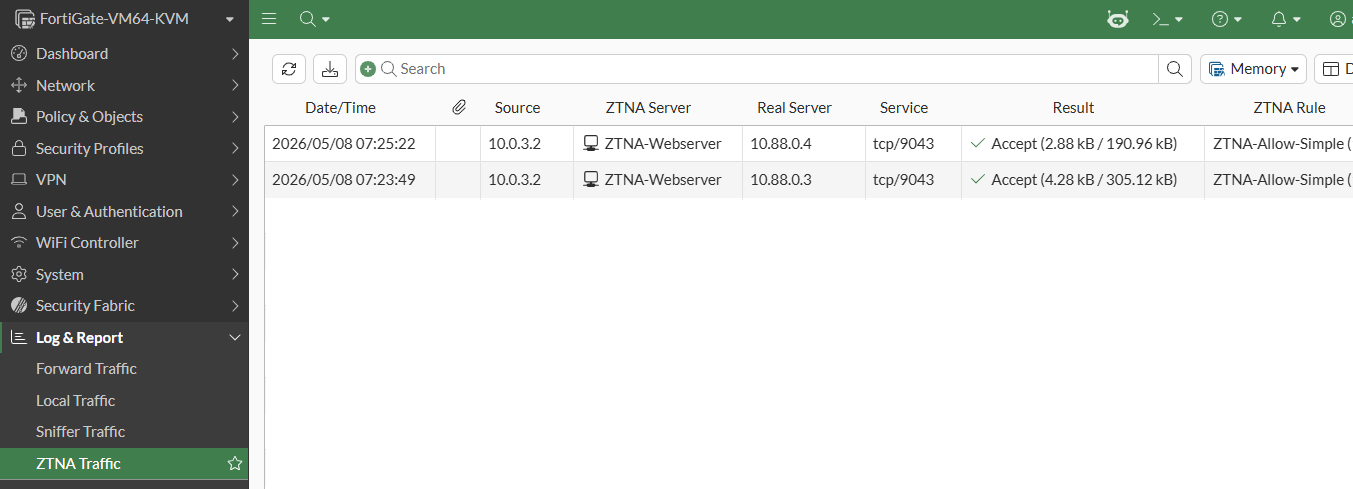
execute log filter category 0
execute log filter field subtype ztna
execute log display

1: date=2026-05-08 time=07:25:22 eventtime=1778211337861311393 tz="-0700" logid="0005000024" type="traffic" subtype="ztna" level="notice" vd="root" srcip=10.0.3.2 srcport=52396 srcintf="port3" srcintfrole="wan" dstcountry="Reserved" srccountry="Reserved" dstip=10.88.0.4 dstport=9043 dstintf="port2" dstintfrole="dmz" sessionid=36144 srcuuid="b458a65a-f759-51ea-d7df-ef2e750026d1" service="tcp/9043" proxyapptype="ztna-proxy" proto=6 action="accept" policyid=2 policytype="policy" poluuid="b77e7abe-4a8a-51f1-54f1-b73a574438e0" policyname="ZTNA-Allow-Simple" appcat="unscanned" duration=136 gatewayid=1 realserverid=2 vip="WebServer:9443" vipincomingip=10.0.3.10 accessproxy="ZTNA-Webserver" ztnaproxytype="ztna-web" clientdevicemanageable="manageable" clientcert="yes" wanin=513933 rcvdbyte=513933 wanout=8068 lanin=4551 sentbyte=4551 lanout=514704

2: date=2026-05-08 time=07:23:49 eventtime=1778211775251735907 tz="-0700" logid="0005000024" type="traffic" subtype="ztna" level="notice" vd="root" srcip=10.0.3.2 srcport=52425 srcintf="port3" srcintfrole="wan" dstcountry="Reserved" srccountry="Reserved" dstip=10.88.0.3 dstport=9043 dstintf="port2" dstintfrole="dmz" sessionid=36410 srcuuid="b458a65a-f759-51ea-d7df-ef2e750026d1" service="tcp/9043" proxyapptype="ztna-proxy" proto=6 action="accept" policyid=2 policytype="policy" poluuid="b77e7abe-4a8a-51f1-54f1-b73a574438e0" policyname="ZTNA-Allow-Simple" appcat="unscanned" duration=131 gatewayid=1 realserverid=1 vip="WebServer:9443" vipincomingip=10.0.3.10 accessproxy="ZTNA-Webserver" ztnaproxytype="ztna-web" clientdevicemanageable="manageable" clientcert="yes" wanin=503831 rcvdbyte=503831 wanout=7485 lanin=4476 sentbyte=4476 lanout=504533
To check the health status of both servers:
# diagnose wad ztna-web-proxy health-check status

Link Monitor: ZP-ZTNA-Webserver-1-1, Status: alive, Server num(1), cfg_version=0 Flags=0x1 init, Create time: Fri May  8 07:30:57 2026
VRF: 0
Interval: 1000 ms
Service-detect: disable
Diffservcode: 000000
Class-ID: 0
Transport-Group: 0
Class-ID: 0
  Peer: 10.88.0.3(10.88.0.3)
        protocol: ping(9043), state: alive
                Latency(Min/Max/Avg): 0.640/2.001/0.854 ms
                Jitter(Min/Max/Avg): 0.003/1.229/0.211 ms
                Packet lost: 0.000%
                MOS: 4.404
                Number of out-of-sequence packets: 0
                Fail Times(0/5)
                Packet sent: 729, received: 729, Sequence(sent/rcvd/exp): 730/730/731

Link Monitor: ZP-ZTNA-Webserver-1-2, Status: alive, Server num(1), cfg_version=0 Flags=0x1 init, Create time: Fri May  8 07:30:57 2026
VRF: 0
Interval: 1000 ms
Service-detect: disable
Diffservcode: 000000
Class-ID: 0
Transport-Group: 0
Class-ID: 0
  Peer: 10.88.0.4(10.88.0.4)
        protocol: ping(9043), state: alive
                Latency(Min/Max/Avg): 0.522/3.145/0.812 ms
                Jitter(Min/Max/Avg): 0.001/2.470/0.328 ms
                Packet lost: 0.000%
                MOS: 4.404
                Number of out-of-sequence packets: 0
                Fail Times(0/5)
                Packet sent: 729, received: 729, Sequence(sent/rcvd/exp): 730/730/731
To verify that the health check status will remove dead servers from the load balancing:
-
Make one of the servers unavailable.
In this example, a blackhole route for that host is configured:
config router static edit 0 set dst 10.88.0.3/32 set blackhole enable next end -
Review the health-check status for server status:
# diagnose wad ztna-web-proxy health-check status Link Monitor: ZP-ZTNA-Webserver-1-1, Status: dead, Server num(1), cfg_version=0 Flags=0x1 init, Create time: Fri May 8 07:30:57 2026 VRF: 0 Interval: 1000 ms Service-detect: disable Diffservcode: 000000 Class-ID: 0 Transport-Group: 0 Class-ID: 0 Peer: 10.88.0.3(10.88.0.3) protocol: ping(9043), state: dead Packet lost: 5.000% MOS: 4.041 Number of out-of-sequence packets: 0 Recovery times(0/5) Fail Times(0/5) Packet sent: 941, received: 935, Sequence(sent/rcvd/exp): 942/936/937 Link Monitor: ZP-ZTNA-Webserver-1-2, Status: alive, Server num(1), cfg_version=0 Flags=0x1 init, Create time: Fri May 8 07:30:57 2026 VRF: 0 Interval: 1000 ms Service-detect: disable Diffservcode: 000000 Class-ID: 0 Transport-Group: 0 Class-ID: 0 Peer: 10.88.0.4(10.88.0.4) protocol: ping(9043), state: alive Latency(Min/Max/Avg): 0.516/2.041/0.801 ms Jitter(Min/Max/Avg): 0.005/1.172/0.213 ms Packet lost: 0.000% MOS: 4.404 Number of out-of-sequence packets: 0 Fail Times(0/5) Packet sent: 941, received: 941, Sequence(sent/rcvd/exp): 942/942/943 -
Verify that webserver01 is no longer an option for ZTNA users to access via load balancing:
-
Connect to the webserver.ztnademo.com:9443 as you did previously. After accepting the certificate, webserver02 will load.
-
After refreshing several times, only webserver02 is displayed. Similarly, opening new connections will always return webserver02.
-
-
Review the logs to confirm your findings, particularly if the webpage served does not uniquely identify the server that provided it:
-
This example shows multiple connections to webserver.ztnademo.com. Note that all the connections are to 10.88.0.4:
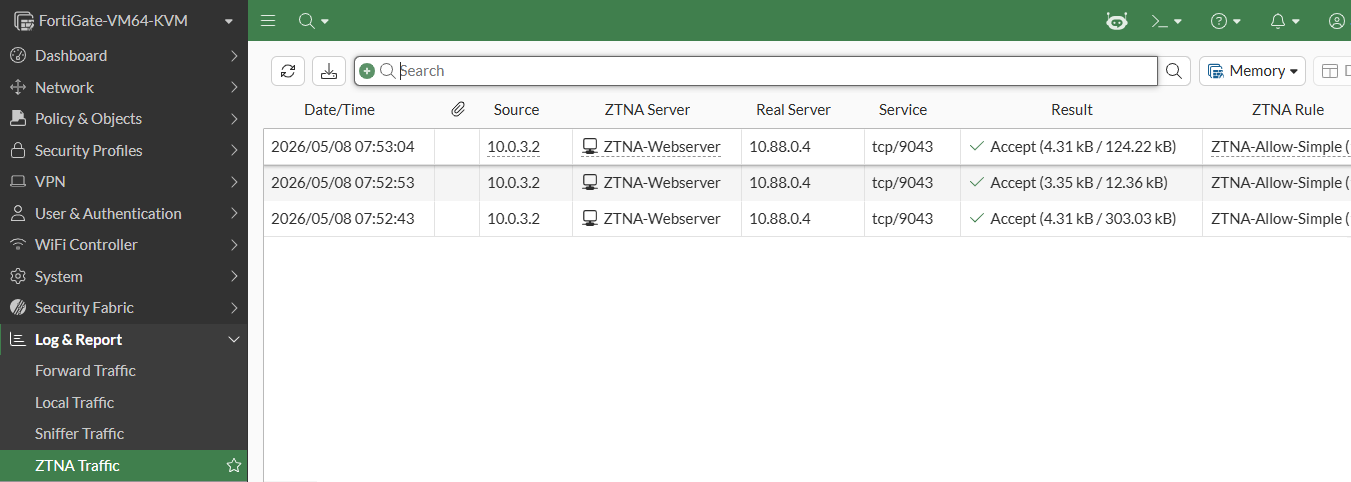
-
If not for the health-check removing the server from load-balancing, users would receive an unreachable/gateway timeout error (504).
-