

SM3/SM4 cryptographic algorithms for IKEv1/ IKEv2 NEW
The ShangMi SM4 encryption algorithm and SM3 hash algorithm are supported proposals for IKEv1 and IKEv2 site-to-site VPN configurations. The SM4-SM3 pair can be selected for Phase1 IKE proposal and Phase2 ESP tunnel proposal.
These encryption algorithms are often used in regulatory requirements in China. They are incorporated into ISO/IEC standards and recognized by IETF in the Internet-Draft for Using ShangMi in the Internet Key Exchange Protocol Version 2 (IKEv2).
For IKEv2:
FortiGate supports the following transform types and names for IKEv2:
|
Transform Type |
Type |
Name |
|---|---|---|
|
1 |
Encryption Algorithm Transform |
ENCR_SM4_CBC |
|
2 |
Pseudorandom Function Transform |
PRF_HMAC_SM3 |
|
3 |
Integrity Algorithm Transform |
AUTH_HMAC_SM3 |
In IKEv2, when SM4-SM3 proposal is chosen:
-
HMAC-SM3 is used as the PRF and integrity algorithm.
-
SM4-CBC is used for IKE encryption.
-
128-bit IV length defined by SM4-CBC block size.
-
For IPsec:
-
SM4-CBC is used for payload encryption. IV length: 128 bits.
-
HMAC-SM3 is used for ESP integrity. ICV uses the full 256-bit hash output without truncation.
-
For IKEv1:
Similarly, IKEv1 uses the following transform identifiers:
-
OAKLEY_ATTR_ENC_ALG_SM4
-
OAKLEY_ATTR_HASH_ALG_SM3
-
IPSECDOI_ESP_SM4_CBC
-
IPSECDOI_ATTR_AUTH_HMAC_SM3_256
Supported FortiGate models:
-
200G series
-
400F
-
600F
-
900G
-
All high-end F-series from 1000F and above
-
7000F
-
FG-VM64
Limitations
-
Any tunnels using SM4-SM3 proposal do not support hardware acceleration.
-
It is only available to physical or FortiGate-VMs using x86_64 processors.
-
FGT using 3.2 Linux kernel are not supported
Example
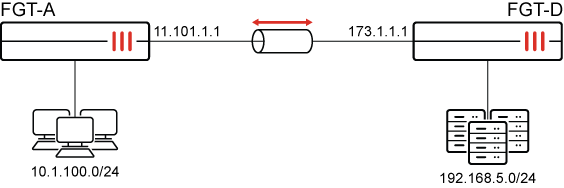
SM4-SM3 is used in the IKE proposal in IKEv2 to meet regulatory requirement for a site-to-site VPN.
To configure in the GUI:
Exact steps are not provided in detail. See CLI configuration for exact configurations.
-
On FGT-A, go to VPN > VPN Tunnels and create a new tunnel.
-
Set Remote gateway to Static IP address, and configure the Network and Authentication settings as needed.
-
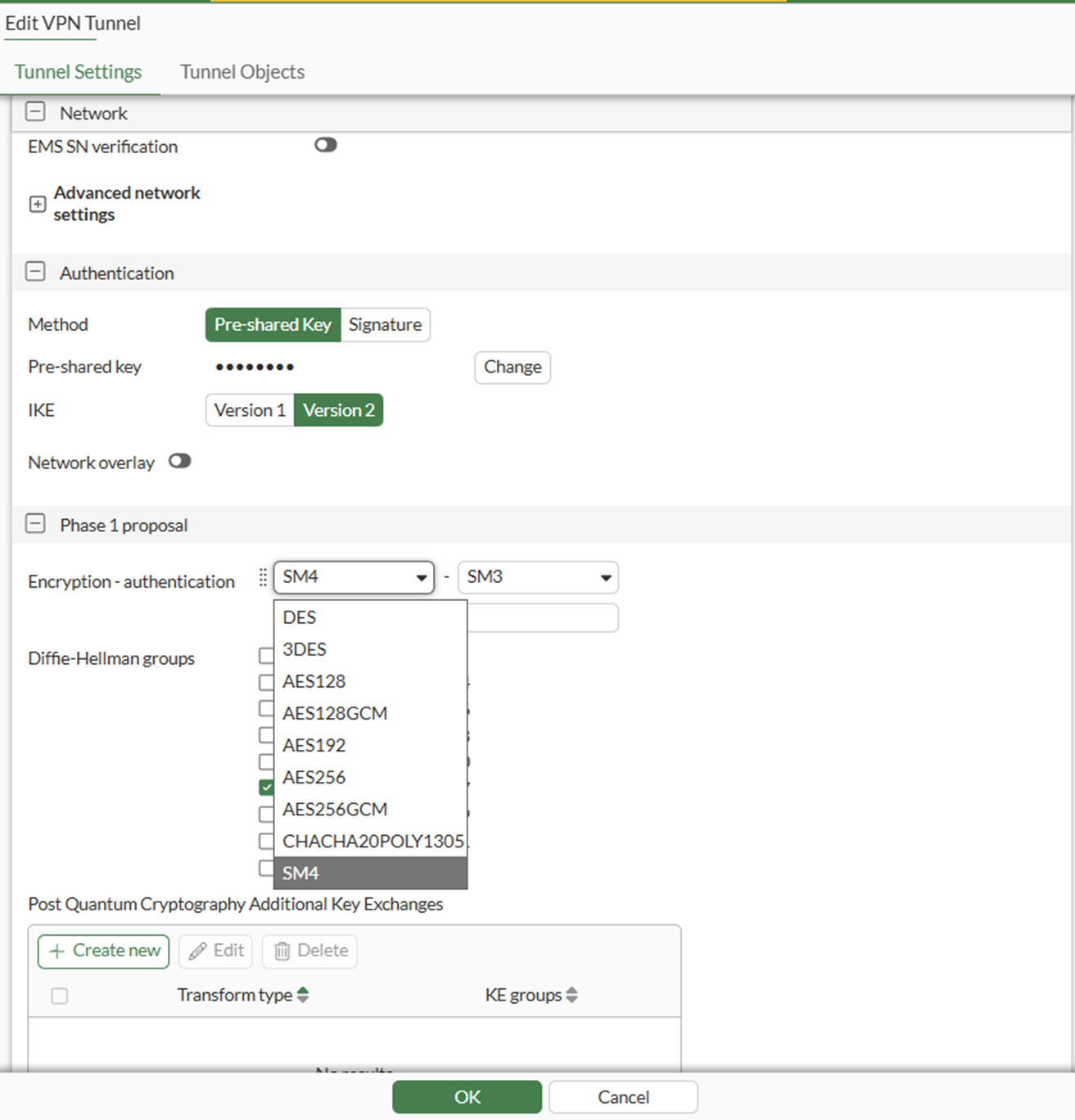
For Phase 1 proposal:
-
Remove all default proposals.
-
Select SM4 for the Encryption algorithm. SM3 will be selected automatically for the authentication algorithm.
-
-
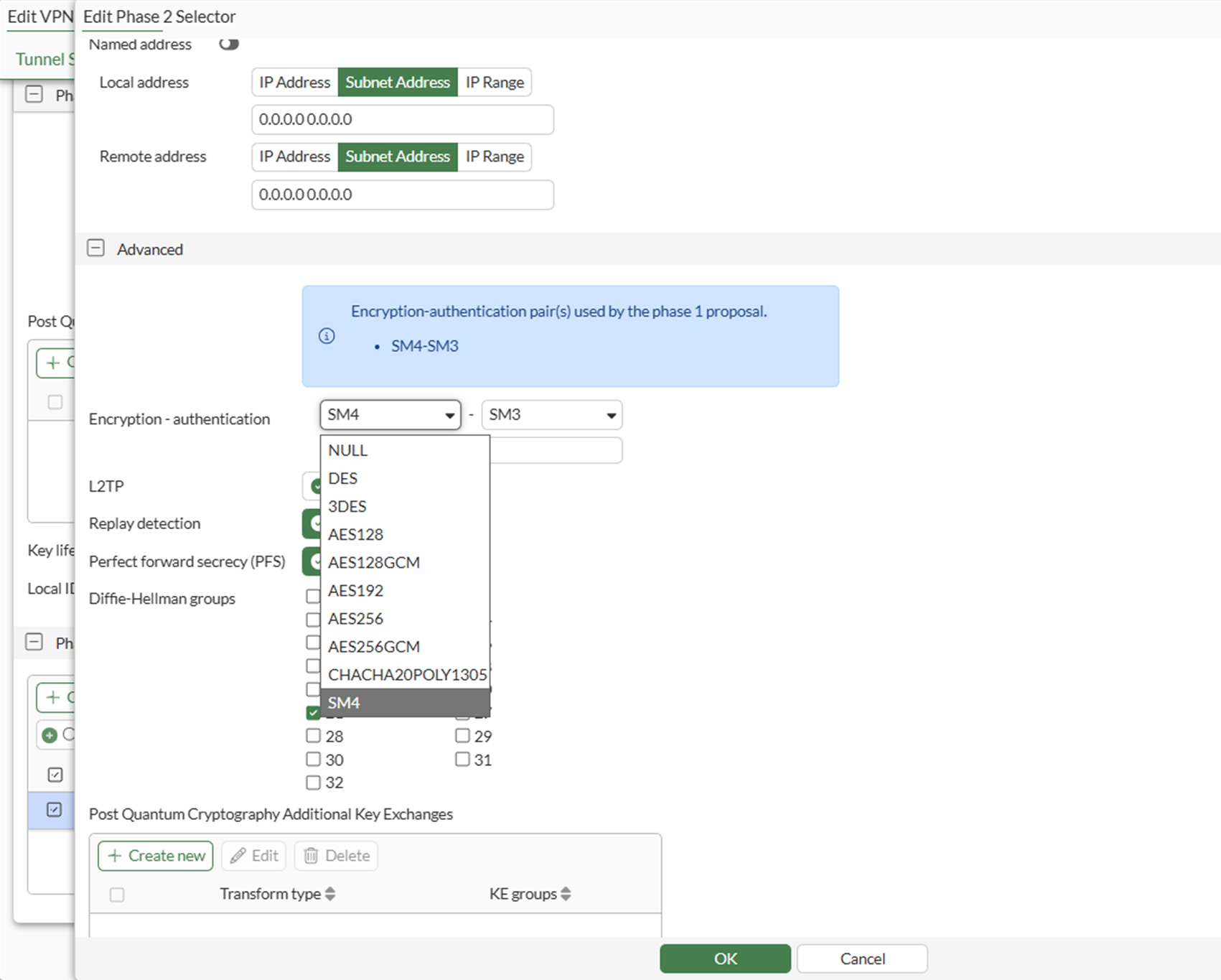
For Phase 2, create a new selector:
-
Under Advanced, remove all default proposals.
-
Select SM4 for the Encryption algorithm. SM3 will be selected automatically for the authentication algorithm.
-
Click OK.
-
-
Click OK.
-
Similarly configure SM4-SM3 proposals in the VPN configurations on your remote FortiGate FGT-D.
To configure in the CLI:
config system settings
    set ike-proposal-visibility all
end
config vpn ipsec phase1-interface
edit "HUB"
set type dynamic
set interface "port13"
set ike-version 2
set peertype any
set net-device disable
set proposal sm4-sm3
set dhgrp 20 21
set psksecret <password>
next
endconfig vpn ipsec phase2-interface
edit "HUB"
set phase1name "HUB"
set proposal sm4-sm3
set dhgrp 20 21
next
endconfig firewall policy
edit 1
set srcintf "any"
set dstintf "any"
set action accept
set srcaddr "all"
set dstaddr "all"
set srcaddr6 "all"
set dstaddr6 "all"
set schedule "always"
set service "ALL"
next
end
This policy is for example purposes only. Do not configure an any-to-any allow policy in production.
Verification
Use the following CLI commands to view the real-time debugs when establishing the VPN tunnel. Note the proposals that were offered and matched in the three transform types (ENCRYPTION, INTEGRITY, PRF) for IKE (P1) and for ESP (P2).
# diagnose debug application ike -1
# diagnose debug enable

ike V=root:0:toHUB:376: incoming proposal:
ike V=root:0:toHUB:376: proposal id = 1:
ike V=root:0:toHUB:376:   protocol = IKEv2:
ike V=root:0:toHUB:376:      encapsulation = IKEv2/none
ike V=root:0:toHUB:376:         type=ENCR, val=SM4_CBC (key_len = 128)
ike V=root:0:toHUB:376:         type=INTEGR, val=AUTH_HMAC_SM3
ike V=root:0:toHUB:376:         type=PRF, val=PRF_HMAC_SM3
ike V=root:0:toHUB:376:         type=DH_GROUP, val=ECP384.
ike V=root:0:toHUB:376: matched proposal id 1
ike V=root:0:toHUB:376: proposal id = 1:
ike V=root:0:toHUB:376:   protocol = IKEv2:
ike V=root:0:toHUB:376:      encapsulation = IKEv2/none
ike V=root:0:toHUB:376:         type=ENCR, val=SM4_CBC (key_len = 128)
ike V=root:0:toHUB:376:         type=INTEGR, val=AUTH_HMAC_SM3
ike V=root:0:toHUB:376:         type=PRF, val=PRF_HMAC_SM3
ike V=root:0:toHUB:376:         type=DH_GROUP, val=ECP384.
...
ike V=root:0:toHUB:376:toHUB:495: incoming child SA proposal:
ike V=root:0:toHUB:376:toHUB:495: proposal id = 1:
ike V=root:0:toHUB:376:toHUB:495:   protocol = ESP:
ike V=root:0:toHUB:376:toHUB:495:      encapsulation = TUNNEL
ike V=root:0:toHUB:376:toHUB:495:         type=ENCR, val=SM4_CBC (key_len = 128)
ike V=root:0:toHUB:376:toHUB:495:         type=INTEGR, val=SM3
ike V=root:0:toHUB:376:toHUB:495:         type=ESN, val=NO
ike V=root:0:toHUB:376:toHUB:495:         PFS is disabled
ike V=root:0:toHUB:376:toHUB:495: matched proposal id 1
ike V=root:0:toHUB:376:toHUB:495: proposal id = 1:
ike V=root:0:toHUB:376:toHUB:495:   protocol = ESP:
ike V=root:0:toHUB:376:toHUB:495:      encapsulation = TUNNEL
ike V=root:0:toHUB:376:toHUB:495:         type=ENCR, val=SM4_CBC (key_len = 128)
ike V=root:0:toHUB:376:toHUB:495:         type=INTEGR, val=SM3
ike V=root:0:toHUB:376:toHUB:495:         type=ESN, val=NO
ike V=root:0:toHUB:376:toHUB:495:         PFS is disabled
...
ike V=root:0:toHUB:376:toHUB:495: sending SNMP tunnel UP trap
ike V=root:0:toHUB: static tunnel up event 0.0.0.0 (dev=53)
ike V=root:0:toHUB: static tunnel up event :: (dev=53)
Use the following CLI commands to verify the tunnel is established with the SM4-SM3 proposal:
# diagnose vpn ike gateway list name <tunnel>

vd: root/0
name: toHUB
version: 2
interface: port9 15
addr: 11.101.1.1:500 -> 173.1.1.1:500
tun_id: 173.1.1.1/::173.1.1.1
remote_location: 0.0.0.0
network-id: 0
transport: UDP
created: 146s ago
peer-id: 173.1.1.1
peer-id-auth: no
pending-queue: 0
PPK: no
IKE SA: created 1/1  established 1/1  time 10/10/10 ms
IPsec SA: created 1/1  established 1/1  time 10/10/10 ms

  id/spi: 375 b276017ea711477c/e963d7bfba066129
  direction: initiator
  status: established 146-146s ago = 10ms
  proposal: sm4_128-sm3
  child: no
  SK_ei: 152ebe7d097da0e6-459a04571cc85cc0
  SK_er: 8613e0506e88b1df-2129cd5e00349db8
  SK_ai: d3a2a1a84a6581c1-1a97633532fa0d51-829a21602f0276f7-b8e79b2a888e2204
  SK_ar: fa08e32590ed6d7c-f27a4e6dc8159c12-be0f8cf0b1b56483-a955315d5caf2fa2
  PPK: no
  message-id sent/recv: 9/1
  QKD: no
  PQC-KEM (IKE): no
  PQC-KEM (all IPsec): no
  lifetime/rekey: 86400/85953
  DPD sent/recv: 00000033/00000033
  peer-id: 173.1.1.1
Similarly, use the following CLI commands to show the encryption and authentication algorithms used in the IPsec SAs.
# diagnose vpn tunnel list name <tunnel>

list all ipsec tunnel in vd 0
------------------------------------------------------
name=toHUB ver=2 serial=3 11.101.1.1:0->173.1.1.1:0 nexthop=11.101.1.2 tun_id=173.1.1.1 tun_id6=::173.1.1.1 status=up dst_mtu=1500 weight=1 country=US
bound_if=15 real_if=15 lgwy=static/1 tun=intf mode=auto/1 encap=none options[0x228]=npu frag-rfc  run_state=0 role=primary accept_traffic=1 overlay_id=0

proxyid_num=1 child_num=0 refcnt=4 ilast=15 olast=0 ad=/0
stat: rxp=0 txp=146 rxb=0 txb=12264
dpd: mode=on-demand on=1 status=ok idle=20000ms retry=3 count=0 seqno=51
natt: mode=none draft=0 interval=0 remote_port=0
fec: egress=0 ingress=0
proxyid=toHUB proto=0 sa=1 ref=3 serial=4
  src: 0:0.0.0.0-255.255.255.255:0
  dst: 0:0.0.0.0-255.255.255.255:0
  SA:  ref=3 options=10226 type=00 soft=0 mtu=1422 expire=42749/0B replaywin=2048
       seqno=93 esn=0 replaywin_lastseq=00000000 qat=0 rekey=0 hash_search_len=1
  life: type=01 bytes=0/0 timeout=42900/43200
  dec: spi=c7c6a1b5 esp=sm4 key=16 869f98b2bd18bdfd7211c0db9488e850
       ah=sm3 key=32 bfaff448ea0b23bca803420429d871a8d349ff12089bf277f89258d2567b3f3d
  enc: spi=d5e84636 esp=sm4 key=16 83ac4c93abfb1b57e6d06d3e4da595bf
       ah=sm3 key=32 832da674f1beb4fd9a8a01c3a992a55cff12792fb72e7bd38f0d21ca17cc586a
  dec:pkts/bytes=0/0, enc:pkts/bytes=146/12264
  npu_flag=20 npu_rgwy=0.0.0.0:0 npu_lgwy=0.0.0.0:0 npu_selid=6
  dec_npuid=0 enc_npuid=0 dec_engid=-1 enc_engid=-1 dec_saidx=-1 enc_saidx=-1