

Example shortcut over distinct underlay path using ADVPN 2.0
When ADVPN 2.0 was introduced, path management between spokes was enhanced to enable each spoke to learn the links from other spokes and use the information to more efficiently build shortcuts. When applied to a service rule that utilizes SLA mode with load-balancing, SD-WAN attempts to build all possible shortcuts using priority members in the service rule and overlays learned from the peer spoke. All created shortcuts use unique underlay paths. Once shortcuts are created on all distinct underlay paths, user traffic is load-balanced between in-SLA shortcuts, rather than between in-SLA shortcuts and parents.
Example
In this example with one hub and two spokes, each spoke has one underlay link, and the hub has two underlay links. For redundancy, each spoke builds two overlays to hub:
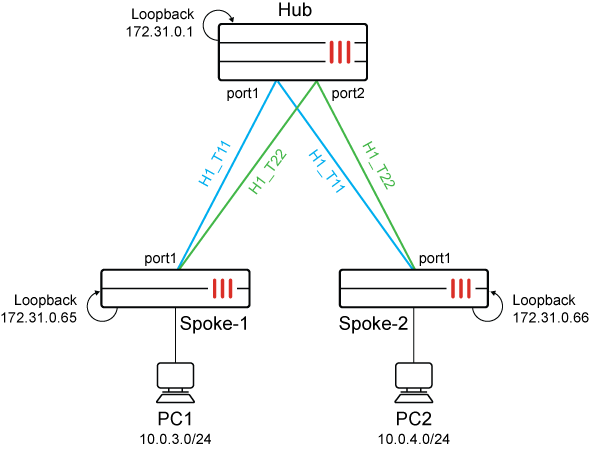
In a service rule named Corporate-H1 on Spoke-1, both H1_T11 and H1_T22 are named as priority members for this load-balancing rule. Likewise, Spoke-2 has two overlay paths to the hub. Instead of creating 2x2 shortcut paths based on the overlays, this enhancement identifies the single unique underlay path over port1 and creates a shortcut on this path.
This section reviews the following settings to demonstrate how the ADVPN 2.0 enhancement works:
Settings on spokes and hub relevant to the example
Settings on spoke-1 relevant to the example:
config vpn ipsec phase1-interface
    edit "H1_T11"
        set interface "port1"
        set ike-version 2
        set keylife 28800
        set peertype any
        set net-device enable
        set exchange-ip-addr4 172.31.0.65
        set proposal aes256gcm-prfsha384
        set add-route disable
        set dpd on-idle
        set idle-timeout enable
        set idle-timeoutinterval 5
        set auto-discovery-receiver enable
        set encapsulation vpn-id-ipip
        set network-overlay enable
        set network-id 11
        set transport udp
        set remote-gw 172.31.1.1
        set psksecret ENC YLI/3/nBszUUeTcFXvYlc18L1y2gjuWXSyBIKXOpQxnRulw+XW8/4P8DD1mMLf5K5jxhk0z05F2mdgrHtiEdH6rzZxRd62Sq6nxPyWT3zf6+KR4yHrej9nn9HjVPNuDPjb2Q0fqInBVyPf8SbcN2adxvaslKYEEIt3wKqz0ZJ4oM3qd5/EuNyCaeZ5mXMEBY9T91cFlmMjY3dkVA
        set dpd-retryinterval 5
    next
    edit "H1_T22"
        set interface "port1"
        set ike-version 2
        set keylife 28800
        set peertype any
        set net-device enable
        set exchange-ip-addr4 172.31.0.65
        set proposal aes256gcm-prfsha384
        set add-route disable
        set dpd on-idle
        set idle-timeout enable
        set idle-timeoutinterval 5
        set auto-discovery-receiver enable
        set encapsulation vpn-id-ipip
        set network-overlay enable
        set network-id 12
        set transport udp
        set remote-gw 172.31.1.5
        set psksecret ENC x86NW9dT0mEpkJZIKAA819lxkqzcnDngeWHS3hivsfAiQcFpaUm5Bvwo4zsmXeX0n5UWH5CHhn5yxcdw2vtAeuuIwXQH7lOTekIBklCD6aHt8zResI1B3bVSq7+eabMQL3RNnw8PI7IBImXpO2xJs5dt4oyxomfkfA8tCOU7w5kiegUk7lgUU5BwKJmbKtmE1plDIFlmMjY3dkVA
        set dpd-retryinterval 5
    next

config system sdwan
    set status enable
    config zone
        edit "virtual-wan-link"
        next
        edit "overlay"
            set advpn-select enable
            set advpn-health-check "HUB"
        next
        edit "underlay"
        next
    end
    config members
      ...
        edit 4
            set interface "H1_T11"
            set zone "overlay"
            set source 172.31.0.65
            set priority 10
            set transport-group 1
        next
        edit 5
            set interface "H1_T22"
            set zone "overlay"
            set source 172.31.0.65
            set priority 10
            set transport-group 1
        next
      ...
    end
    config health-check
        edit "HUB"
            set server "172.31.100.100"
            set embed-measured-health enable
            set sla-fail-log-period 10
            set sla-pass-log-period 10
            set members 4 5
            config sla
                edit 1
                    set link-cost-factor latency
                    set latency-threshold 100
                next
            end
        next
    end
    config service
        edit 1
            set name "Corporate-H1"
            set load-balance enable
            set mode sla
            set dst "CORP_LAN"
            set src "CORP_LAN"
            config sla
                edit "HUB"
                    set id 1
                next
            end
            set priority-members 4 5
        next
    end
end
Settings on spoke-2 relevant to the example:
config vpn ipsec phase1-interface
    edit "H1_T11"
        set interface "port1"
        set ike-version 2
        set keylife 28800
        set peertype any
        set net-device enable
        set exchange-ip-addr4 172.31.0.66
        set proposal aes256gcm-prfsha384
        set add-route disable
        set dpd on-idle
        set idle-timeout enable
        set idle-timeoutinterval 5
        set auto-discovery-receiver enable
        set encapsulation vpn-id-ipip
        set network-overlay enable
        set network-id 11
        set transport udp
        set remote-gw 172.31.1.1
        set psksecret ENC nVKierKcpKKdMZjidGD7OsHfdasVAQyBkMKzDtXq2Go76J2ASJckRj/NOt8BwepXUjJEVu7FoYsxeilBCeoYrR/6UU3KxgF/0mZmqMOYL/nQVznStRCkICt6dCgw4I1+ks6AK8eROgpR/12xAPCXKImi/G6Y8vCiVCKCYNmbLFYjq26E3g3H9ZLm0WuXyBWyLahhPllmMjY3dkVA
        set dpd-retryinterval 5
    next
    edit "H1_T22"
        set interface "port1"
        set ike-version 2
        set keylife 28800
        set peertype any
        set net-device enable
        set exchange-ip-addr4 172.31.0.66
        set proposal aes256gcm-prfsha384
        set add-route disable
        set dpd on-idle
        set idle-timeout enable
        set idle-timeoutinterval 5
        set auto-discovery-receiver enable
        set encapsulation vpn-id-ipip
        set network-overlay enable
        set network-id 12
        set transport udp
        set remote-gw 172.31.1.5
        set psksecret ENC nurNrgSmyldnHa9ngJb66s+cXQlWq43We2qVnJ8rT1Dkpga8ITA6bDC4qnOi/8guo3RGEvG0jfasRBHvuQtXLWf2Fzid3QsNP9UPel+PO2/vJAHhvjPEPgEeJH33vAiFZ9bzr3FqKM0UhbDICtuNrAcAve3v9mnjr19XePrN85yHZt4uggeh3xXNv2hVjEFG7v6n2VlmMjY3dkVA
        set dpd-retryinterval 5
    next

config system sdwan
    set status enable
    config zone
        edit "virtual-wan-link"
        next
        edit "overlay"
            set advpn-select enable
            set advpn-health-check "HUB"
        next
        edit "underlay"
        next
    end
    config members
    ...
        edit 4
            set interface "H1_T11"
            set zone "overlay"
            set source 172.31.0.66
            set priority 10
            set transport-group 1
        next
        edit 5
            set interface "H1_T22"
            set zone "overlay"
            set source 172.31.0.66
            set priority 10
            set transport-group 1
        next
     ...
    end
    config health-check
        edit "HUB"
            set server "172.31.100.100"
            set embed-measured-health enable
            set sla-fail-log-period 10
            set sla-pass-log-period 10
            set members 4 5
            config sla
                edit 1
                    set link-cost-factor latency
                    set latency-threshold 100
                next
            end
        next
    end
end
Settings on the hub relevant to the example:
config vpn ipsec phase1-interface
    edit "EDGE_T1"
        set type dynamic
        set interface "port1"
        set ike-version 2
        set peertype any
        set net-device disable
        set exchange-ip-addr4 172.31.0.1
        set proposal aes256gcm-prfsha384
        set add-route disable
        set dpd on-idle
        set auto-discovery-sender enable
        set encapsulation vpn-id-ipip
        set network-overlay enable
        set network-id 11
        set transport udp
        set psksecret ENC nveTNKiRH+Vw2v0kFCz6VOdGKhrVgPs67H+k1HA322+ICHSW/mPKqMWSduvctoU1Ag1UvTTNUpIYQJ3V8U3U2+O1YNYrSa76Ut8EnYEJfXTgRtq8jXbUMJzRoMl29Z4fLjBddLqT1OJCVGMM+5YkbWzICCz9o4Y1VNOAy+XtNPTsRcGaJzezotNlh87fOQEsjdXI/FlmMjY3dkVA
        set dpd-retryinterval 5
    next
    edit "EDGE_T2"
        set type dynamic
        set interface "port2"
        set ike-version 2
        set peertype any
        set net-device disable
        set exchange-ip-addr4 172.31.0.1
        set proposal aes256gcm-prfsha384
        set add-route disable
        set dpd on-idle
        set auto-discovery-sender enable
        set encapsulation vpn-id-ipip
        set network-overlay enable
        set network-id 12
        set transport udp
        set psksecret ENC UHZf3N8MSmzKQRsjmawCen60WiB3It4OByiA2cbTYtLv1785gzmlXRgLvn1mzCM96sW8kC7MCKpCNo/LA2z8MnvV5BDzrqrKyYZTC++NKg80kW9xn1Rf+P2gVs1yoghHF9dTK8lSaU4XTNN0/jxKilFz8vqLFi3nEAXNRIk1XMPTdMQcdUUVHXoL6pU1QIzR1Rf/21lmMjY3dkVA
        set dpd-retryinterval 5
    next
Routing and SD-WAN status on spokes
To view the routing and SD-WAN status on spokes:
-
Check the routing and SD-WAN status on the spokes before the shortcut is initiated.
-
On spoke-1, the service rule has two equal, viable paths over the parent overlay tunnels to reach the 10.0.4.0/24 network on Spoke-2:
# diagnose sys sdwan health-check Health Check(HUB): Seq(4 H1_T11): state(alive), packet-loss(0.000%), latency(0.288), jitter(0.034), mos(4.404), custom_profile(0.000), bandwidth-up(999999), bandwidth-dw(999998), bandwidth-bi(1999997), sla_map=0x1 Seq(5 H1_T22): state(alive), packet-loss(0.000%), latency(0.215), jitter(0.017), mos(4.404), custom_profile(0.000), bandwidth-up(999999), bandwidth-dw(999998), bandwidth-bi(1999997), sla_map=0x1 Branch1_A_FGT (root) (Interim)# diagnose sys sdwan service4 Service(1): Address Mode(IPV4) flags=0x24200 use-shortcut-sla use-shortcut Tie break: cfg Shortcut priority: 3 Gen(5), TOS(0x0/0x0), Protocol(0): src(1->65535):dst(1->65535), Mode(sla hash-mode=round-robin) Members(2): 1: Seq_num(4 H1_T11 overlay), alive, sla(0x1), gid(2), num of pass(1), selected 2: Seq_num(5 H1_T22 overlay), alive, sla(0x1), gid(2), num of pass(1), selected Src address(1): 10.0.0.0-10.255.255.255 Dst address(1): 10.0.0.0-10.255.255.255 Branch1_A_FGT (root) (Interim)# get router info routing-table details 10.0.4.0/24 Routing table for VRF=0 Routing entry for 10.0.4.0/24 Known via "bgp", distance 200, metric 0, best Last update 00:18:24 ago * vrf 0 172.31.0.66, tag 1 priority 1 (recursive via H1_T11 tunnel 172.31.1.1), tag-match (recursive via H1_T22 tunnel 172.31.1.5), tag-match -
On spoke-2:
# diagnose sys sdwan  health-check
Health Check(HUB):
Seq(4 H1_T11): state(alive), packet-loss(0.000%), latency(0.256), jitter(0.019), mos(4.404), custom_profile(0.000), bandwidth-up(999999), bandwidth-dw(999997), bandwidth-bi(1999996), sla_map=0x1
Seq(5 H1_T22): state(alive), packet-loss(0.000%), latency(0.208), jitter(0.007), mos(4.404), custom_profile(0.000), bandwidth-up(999999), bandwidth-dw(999997), bandwidth-bi(1999996), sla_map=0x1

Branch2_FGT (root) (Interim)# get router info routing-table details 10.0.3.0/24

Routing table for VRF=0
Routing entry for 10.0.3.0/24
  Known via "bgp", distance 200, metric 0, best
  Last update 00:20:22 ago
  * vrf 0 172.31.0.65, tag 1 priority 1 (recursive via H1_T11 tunnel 172.31.1.1), tag-match
                                                         (recursive via H1_T22 tunnel 172.31.1.5), tag-match
-
-
Initiate a ping from PC1 to PC2 to match SLA load-balance service 1 on Spoke-1. This initiates the shortcut path negotiations.
Instead of triggering all four possible shortcuts on all four overlay paths:
-
local H1_T11 -- remote H1_T11
-
local H1_T11 -- remote H1_T22
-
local H1_T22 -- remote H1_T11
-
local H1_T22 -- remote H1_T22
Only one shortcut is triggered on the distinct underlay path between two spokes:
-
local port1 -- remote port1
On spoke-1:
A bigger gid value (
33554434) is assigned to the shortcut, resulting in this path being the preferred for service rule 1.Branch1_A_FGT (root) (Interim)# diagnose sys sdwan service4 Service(1): Address Mode(IPV4) flags=0x24200 use-shortcut-sla use-shortcut Tie break: cfg Shortcut priority: 3 Gen(7), TOS(0x0/0x0), Protocol(0): src(1->65535):dst(1->65535), Mode(sla hash-mode=round-robin) Member sub interface(3): 3: seq_num(4), interface(H1_T11): 1: H1_T11_0(56) Members(3): 1: Seq_num(4 H1_T11_0 overlay), alive, sla(0x1), gid(33554434), num of pass(1), selected 2: Seq_num(5 H1_T22 overlay), alive, sla(0x1), gid(2), num of pass(1), selected 3: Seq_num(4 H1_T11 overlay), alive, sla(0x1), gid(2), num of pass(1), selected Src address(1): 10.0.0.0-10.255.255.255 Dst address(1): 10.0.0.0-10.255.255.255This diagnostic command shows that only one path is calculated to avoid multiple duplicate paths.
Branch1_A_FGT (root) (Interim)# diagnose sys sdwan advpn-session
Session head(Branch2_FGT-0-overlay:1)
(1) Service ID(1), last access(233927), remote health check info(2)
Selected path: local(H1_T11, port1) gw: 172.31.3.1  remote IP: 172.31.3.101(172.31.0.66) remote gw-name: H1_T11, status: up
Remote information:
1: latency: 0.261667 jitter: 0.023933 pktloss: 0.000000 mos: 4.404241 sla: 0x1 cost: 0 remote gw: H1_T11 transport_group: 1 bandwidth up: 999999 down: 999997 bidirection: 1999996
ipv4: 172.31.3.101(172.31.0.66) ipv6 ::(42:cfc:ec43:9cb8:90a3:82e0:7f00:0)
2: latency: 0.210367 jitter: 0.012100 pktloss: 0.000000 mos: 4.404278 sla: 0x1 cost: 0 remote gw: H1_T22 transport_group: 1 bandwidth up: 999999 down: 999997 bidirection: 1999996
ipv4: 172.31.3.101(172.31.0.66) ipv6 ::(7f00:0:78a5:82e0:7f00:0:78a5:82e0)
Finally, health check on the new shortcut indicates the health is good.
Branch1_A_FGT (root) (Interim)# diagnose sys sdwan  health-check
Health Check(HUB):
Seq(4 H1_T11): state(alive), packet-loss(0.000%), latency(0.236), jitter(0.012), mos(4.404), custom_profile(0.000), bandwidth-up(999999), bandwidth-dw(999997), bandwidth-bi(1999996), sla_map=0x1
Seq(4 H1_T11_0): state(alive), packet-loss(0.000%), latency(0.268), jitter(0.010), mos(4.404), custom_profile(0.000), bandwidth-up(999999), bandwidth-dw(999998), bandwidth-bi(1999997), sla_map=0x1
Seq(5 H1_T22): state(alive), packet-loss(0.000%), latency(0.206), jitter(0.007), mos(4.404), custom_profile(0.000), bandwidth-up(999999), bandwidth-dw(999997), bandwidth-bi(1999996), sla_map=0x1
The following sniffer trace shows the switch from parent to shortcut.
Branch1_A_FGT (root) (Interim)# diagnose sniffer packet any 'host 10.0.4.2' 4
interfaces=[any]
filters=[host 10.0.4.2]
2.436550 port4 in 10.0.3.2 -> 10.0.4.2: icmp: echo request
2.436993 H1_T11 out 10.0.3.2 -> 10.0.4.2: icmp: echo request
2.438112 H1_T11 in 10.0.4.2 -> 10.0.3.2: icmp: echo reply
2.438276 port4 out 10.0.4.2 -> 10.0.3.2: icmp: echo reply
3.438446 port4 in 10.0.3.2 -> 10.0.4.2: icmp: echo request
3.438529 H1_T11_0 out 10.0.3.2 -> 10.0.4.2: icmp: echo request
3.439346 H1_T11_0 in 10.0.4.2 -> 10.0.3.2: icmp: echo reply
3.439393 port4 out 10.0.4.2 -> 10.0.3.2: icmp: echo reply
4.439533 port4 in 10.0.3.2 -> 10.0.4.2: icmp: echo request
4.439745 H1_T11_0 out 10.0.3.2 -> 10.0.4.2: icmp: echo request
The following debug-flow trace shows the change from matching the H1_T11 tunnel initially to matching the H1_T11_0 shortcut tunnel once the shortcut was established.
Branch1_A_FGT (root) (Interim)#

id=65308 trace_id=1 func=print_pkt_detail line=6143 msg="vd-root:0 received a packet(proto=1, 10.0.3.2:7609->10.0.4.2:2048) tun_id=0.0.0.0 from port4. type=8, code=0, id=7609, seq=1."
id=65308 trace_id=1 func=init_ip_session_common line=6354 msg="allocate a new session-00000336"
id=65308 trace_id=1 func=rpdb_srv_match_input line=1182 msg="Match policy routing id=2130706433: to 10.0.4.2 via ifindex-44"
id=65308 trace_id=1 func=vf_ip_route_input_common line=2615 msg="find a route: flag=04000000 gw-172.31.1.1 via H1_T11"
id=65308 trace_id=1 func=__iprope_tree_check line=528 msg="gnum-100004, use int hash, slot=28, len=4"
id=65308 trace_id=1 func=fw_forward_handler line=1003 msg="Allowed by Policy-1:"
id=65308 trace_id=1 func=ip_session_confirm_final line=3209 msg="npu_state=0x1041000, hook=4"
id=65308 trace_id=1 func=ids_receive line=464 msg="send to ips"
id=65308 trace_id=1 func=ipsecdev_hard_start_xmit line=669 msg="enter IPSec interface H1_T11, tun_id=0.0.0.0"
id=65308 trace_id=1 func=_do_ipsecdev_hard_start_xmit line=229 msg="output to IPSec tunnel H1_T11, tun_id=172.31.1.1, vrf 0"
id=65308 trace_id=1 func=esp_output4 line=870 msg="IPsec encrypt/auth"
id=65308 trace_id=1 func=ipsec_output_finish line=667 msg="send to 172.31.3.2 via intf-port1"
id=65308 trace_id=2 func=print_pkt_detail line=6143 msg="vd-root:0 received a packet(proto=1, 10.0.3.2:7609->10.0.4.2:2048) tun_id=0.0.0.0 from port4. type=8, code=0, id=7609, seq=2."
id=65308 trace_id=2 func=resolve_ip_tuple_fast line=6251 msg="Find an existing session, id-00000336, original direction"
id=65308 trace_id=2 func=rpdb_srv_match_input line=1182 msg="Match policy routing id=2130706433: to 10.0.4.2 via ifindex-61"
id=65308 trace_id=2 func=vf_ip_route_input_common line=2615 msg="find a route: flag=04000000 gw-172.31.3.101 via H1_T11_0"
id=65308 trace_id=2 func=__iprope_tree_check line=528 msg="gnum-100004, use int hash, slot=28, len=4"
id=65308 trace_id=2 func=ip_session_core_in line=6853 msg="dir-0, tun_id=172.31.1.1"
id=65308 trace_id=2 func=ipsecdev_hard_start_xmit line=669 msg="enter IPSec interface H1_T11_0, tun_id=172.31.1.1"
id=65308 trace_id=2 func=_do_ipsecdev_hard_start_xmit line=229 msg="output to IPSec tunnel H1_T11_0, tun_id=172.31.3.101, vrf 0"
id=65308 trace_id=2 func=esp_output4 line=870 msg="IPsec encrypt/auth"
id=65308 trace_id=2 func=ipsec_output_finish line=667 msg="send to 172.31.3.2 via intf-port1"
-