

Hub and spoke speed tests
In an SD-WAN hub and spoke topology, connections between sites are typically made through VPN overlays. The hub usually acts as the VPN gateway with spokes connecting as dial-up VPN clients. In order to estimate the speed of the connection to each spoke, speed tests can be performed between the hub and each spoke. The results of the speed test can be used for egress traffic shaping on the VPN overlay tunnel. Hub and spoke speed test can only be used when ADVPN is enabled.
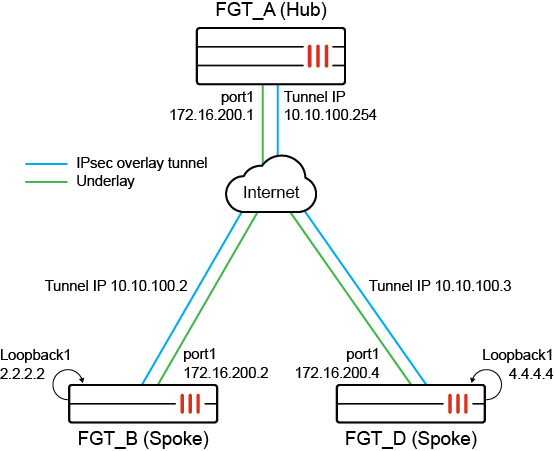
A speed test server can be enabled on the hub or spoke with custom speed-test listening ports. The test measures the speeds of the link to each spoke so that QoS can be applied on the hub to the egress traffic shaping profile assigned to the IPsec overlay tunnel interface and the respective tunnel. An egress-shaping profile can be applied to local, remote, or both local and remote IPsec tunnels or no IPsec tunnels. Tests can be in upload or download direction and support both TCP and UDP protocols.
Speed test results are cached for future use. When speed tests are initiated from the hub, the results are cached on the hub. When speed tests are initiated from the spoke, the results are cached on the spoke, but sent to the hub.
When a speed-test server is enabled on a hub or spoke, two speed test daemons are started and listen on different ports for different purposes:
-
The controller speed test daemon listens on the IPsec overlay interfaces to assign an access token to each incoming speed test for authentication.
-
The speed test daemon listens on the IPsec underlay interfaces to handle the speed tests.
Each incoming speed test request must present the obtained access token to prevent random, unauthorized requests. Otherwise, the connection is closed immediately. As such, speed test access must be enabled on both the underlay and the IPsec overlay tunnel interfaces.
config system interface
    edit <interface>
        set allowaccess speed-test [other access] ...
    next
end
If the IPsec tunnel has a configured exchange-ip, speed test access must also be configured on the associated interface, such as the loopback interface.
The speed test client can be a hub or a spoke and must have system speed-test-schedule configured and the dynamic-server setting enabled. The speed-test schedule initiates the test.
On the speed test client, specify whether and how to apply the test results in a shaping profile. The shaping profile must be configured in the phase1 interface before it can be used with a speed test.
Example
In this example, a business opens at 8am and needs the speed test to complete shortly before opening to ensure that they have the most up to date values. The results of the speed tests are applied to the traffic shaping on the spoke dial-up tunnel.
To configure the hub:
-
Enable speed-test access on the underlay and overlay interfaces:
config system interface edit "port1" set vdom "root" set ip 172.16.200.1 255.255.255.0 set allowaccess ping speed-test next edit "hub-phase1" set vdom "root" set ip 10.10.100.254 255.255.255.255 set allowaccess ping speed-test set type tunnel set egress-shaping-profile "profile_1" set outbandwidth-source measured set remote-ip 10.10.100.2 255.255.255.0 set interface "port1" next end -
Define the speed-test schedule, including the settings to update the interface with the speed-test results:
config system speed-test-schedule
    edit "hub-phase1"
        set mode TCP
        set schedules "1"
        set dynamic-server enable
        set update-bandwidth-limit-unit value
        set update-inbandwidth-maximum 1000000
        set update-inbandwidth-minimum 500000
        set update-outbandwidth-maximum 1000000
        set update-outbandwidth-minimum 500000
    next
end
Command
Description
dynamic-server
Enables IPsec speed-test.
update-bandwidth-limit-unit
Select value or percentage as units for updates
update-inbandwidth-maximum
Define the maximum download bandwidth value to be used in interface shaping.
update-inbandwidth-minimum
Define the minimum download bandwidth value to be used in interface shaping.
update-outbandwidth-maximum
Define the maximum upload bandwidth value to be used in interface shaping.
update-outbandwidth-minimum
Define the minimum upload bandwidth value to be used in interface shaping.
-
Configure when the speed-test runs:
config firewall schedule recurring
    edit "1"
        set start 07:43
        set day sunday monday tuesday wednesday thursday friday saturday
    next
end
To configure the spokes:
-
Enable the speed-test server:
config system global set speedtest-server enable end -
Enable the speed-test protocol on the overlay and underlay:
config system interface
    edit "spoke11-p1"
        set vdom "root"
        set allowaccess ping speed-test
        set type tunnel
        set interface "port1"
    next
    edit "port1"
        set vdom "root"
        set ip 172.16.200.2 255.255.255.0
        set allowaccess ping speed-test
    next
end
To test the results:
The speed-test output can be seen by running the following debug command prior to the start of the scheduled test:
Hub # diagnose debug application speedtestd -1
Firewall schedule recurring “1” begins:
Hub # fcron_speedtest_arm_sched()-405: Speed test (0x5561afd510) for hub-phase1 will run in 48 s
fcron_speedtest_arm_sched()-405: Speed test (0x5561afd510) for hub-phase1 will run in 86400 s
fcron_speedtest_ipsec_send_request()-574: root: hub-phase1(hub-phase1_0) try=0 token request=0.0.0.0:0 -> 10.10.15.1:5200, test= 172.16.200.1:0 -> 172.16.200.2:5201
fcron_sptest_ipsec_on_start()-528: root: (00790005) hub-phase1(hub-phase1_0) server notify start token=42c4abc4-1292-51f1-07b1-9054c39ee49f
__fork_run_ipsec_test()-987: [15270] Run test 00790005 for 'hub-phase1'(port1) to server 172.16.200.2:5201 (tunnel:hub-phase1_0)
[speedtest(15270)] start uploading test.
[speedtest(15270)] Connecting to host 172.16.200.2, port 5201
[speedtest(15270)] [ 28] local 172.16.200.1 port 14251 connected to 172.16.200.2 port 5201
[speedtest(15270)] [ ID] Interval           Transfer     Bitrate         Retr  Cwnd
[speedtest(15270)] [ 28]   0.00-1.01   sec  83.0 MBytes   686 Mbits/sec    0    134 KBytes
…
[speedtest(15270)] client(recver): bytes_recv=425522920, bytes_sent=426768480, sender_time=5.000, recver_time=5.001
[speedtest(15270)] client(recver): down_speed:  681 Mbits/sec
[speedtest(15270)]
[speedtest(15270)] speed test Done.
fcron_speedtest_notify_func()-1570: Speed test pid=15270 done
fcron_speedtest_on_test_finish()-1530: test 0x00790005 for 'hub-phase1' succeed with up=692880, down=680722
fcron_speedtest_save_results()-1428: Write logs to disk: succ=1, fail=0
fcron_speedtest_sync_results()-1456: Sync cached results to secondary devices.
The output from the speed-test debug indicates that the speed-test completed with an upload throughput of 692880kbps. To verify that this value has been applied to the corresponding interface, review the VPN tunnel as follows:
Hub # diagnose vpn tunnel list
------------------------------------------------------
name=hub-phase1_0 ver=2 serial=9 172.16.200.1:0->172.16.200.2:0 nexthop=172.16.200.2 tun_id=10.10.15.1 tun_id6=2000:10:10:15::1 status=up dst_mtu=1500 weight=1 country=ZZ
bound_if=11 real_if=11 lgwy=static/1 tun=intf mode=dial_inst/3 encap=none options[0x22a8]=npu rgwy-chg frag-rfc  run_state=0 role=primary accept_traffic=1 overlay_id=10
...
egress traffic control:
        bandwidth=692880(kbps) lock_hit=0 default_class=2 n_active_class=3
...