
Fortinet white logo
Fortinet white logo

Hardware Acceleration

Per-session accounting for offloaded NP7 sessions (NP7 performance monitoring)

Per-session accounting for offloaded NP7 sessions (NP7 performance monitoring)

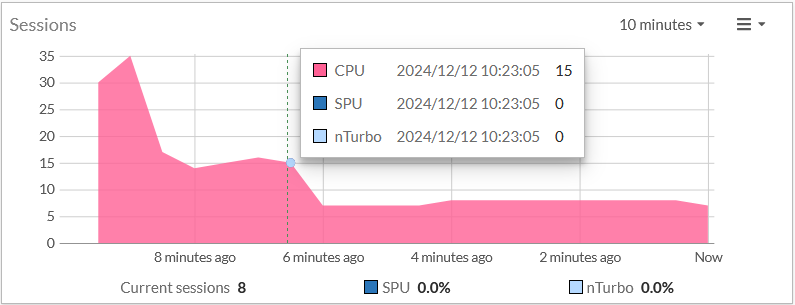
Per-session accounting is an NP7 hardware logging feature that allows the FortiGate to report the correct bytes/pkt numbers per session for sessions offloaded to an NP7 processor. This information appears in traffic log messages as well as in FortiView. The following example shows the Sessions dashboard widget tracking SPU and nTurbo sessions. Current sessions shows the total number of sessions, CPU shows the percent of sessions handled by the CPU, SPU shows the percentage of these sessions that are SPU sessions, and Nturbo shows the percentage that are nTurbo sessions.

If your FortiGate is licensed for hyperscale firewall features, the Sessions widget also includes Hyperscale, which shows the percentage of the sessions set up by NP7 processors using hardware session setup. For information about hyperscale firewall functionality, see the Hyperscale Firewall Guide.

You can also enable per-session accounting separately for TCP multicast sessions.
By default NP7 per-session accounting is enabled for all traffic accepted by firewall policies that have traffic logging enabled. You can use the following command to disable NP7 per-session accounting or enable per-session accounting for all traffic offloaded by NP7 processors.

config system npu

set per-session-accounting {disable | enable | traffic-log-only}

end

enable enables per-session accounting for all traffic offloaded by NP7 processors.

disable turns off per-session accounting.

traffic-log-only (the default) turns on NP7 per-session accounting for traffic accepted by firewall policies that have traffic logging enabled.

Enabling per-session accounting can affect NP7 offloading performance.

Per-session accounting for offloaded NP7 sessions (NP7 performance monitoring)

Per-session accounting for offloaded NP7 sessions (NP7 performance monitoring)

Per-session accounting is an NP7 hardware logging feature that allows the FortiGate to report the correct bytes/pkt numbers per session for sessions offloaded to an NP7 processor. This information appears in traffic log messages as well as in FortiView. The following example shows the Sessions dashboard widget tracking SPU and nTurbo sessions. Current sessions shows the total number of sessions, CPU shows the percent of sessions handled by the CPU, SPU shows the percentage of these sessions that are SPU sessions, and Nturbo shows the percentage that are nTurbo sessions.

If your FortiGate is licensed for hyperscale firewall features, the Sessions widget also includes Hyperscale, which shows the percentage of the sessions set up by NP7 processors using hardware session setup. For information about hyperscale firewall functionality, see the Hyperscale Firewall Guide.

You can also enable per-session accounting separately for TCP multicast sessions.

By default NP7 per-session accounting is enabled for all traffic accepted by firewall policies that have traffic logging enabled. You can use the following command to disable NP7 per-session accounting or enable per-session accounting for all traffic offloaded by NP7 processors.

config system npu

set per-session-accounting {disable | enable | traffic-log-only}

end

enable enables per-session accounting for all traffic offloaded by NP7 processors.

disable turns off per-session accounting.

traffic-log-only (the default) turns on NP7 per-session accounting for traffic accepted by firewall policies that have traffic logging enabled.

Enabling per-session accounting can affect NP7 offloading performance.