

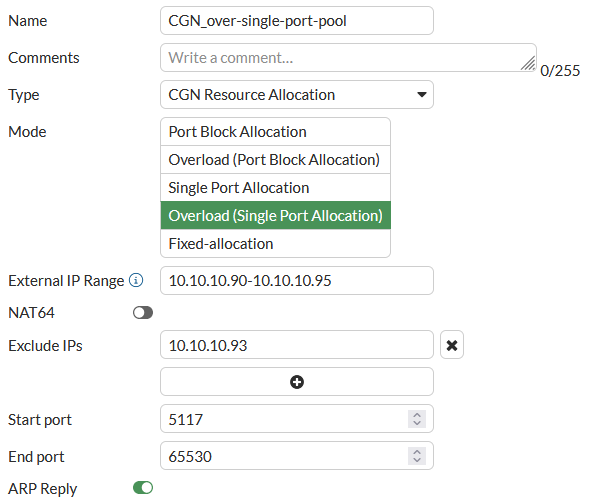
Overload with single port allocation CGN IP pool
An overload single port allocation CGN resource allocation IP pool assigns single ports instead of ranges of ports. This type of CGN IP pool conserves ports by effectively reducing the port block size to 1. Since this is an overload IP pool, ports are re-used. A client session can get any port from the range of ports added to the IP pool that are available.
Since blocks of ports are not assigned to each client and ports are re-used, there are no limits on the number of ports that a client IP address can use. Port re-use is determined by how much the pool is utilized. This IP pool type works for networks with large numbers of clients where those clients may start many individual sessions.
From the GUI
-
Go to Policy & Objects > IP Pools.
-
Select IP Pool.
-
Select Create New.
-
Give the IP pool a Name.
Type is set to CGN Resource Allocation and can't be changed.
-
Set Mode to Overload (Single Port Allocation).
-
Configure the External IP Range to specify the set of translation IP addresses available in the pool as a collection of IP prefixes with their prefix lengths. These are typically public-side addresses.
-
You can enable NAT64 to make this a NAT64 IP pool.
-
Optionally Exclude IPs from the External IP Range. You can include multiple single IP addresses.
-
Configure the Start port and End port to define the source port range for the IP pool.
-
Enable or disable ARP reply to reply to ARP requests for addresses in the external address range.
From the CLI
Use the following command to configure overload with single port allocation CGN IP pools from the CLI:
config firewall ippool
edit <name>
set type cgn-resource-allocation
set startip <ip>
set endip <ip>
set pba-interim-log <log-interval>
set arp-reply {disable | enable}
set arp-intf <interface-name>
set associated-interface <interface-name>
set cgn-spa enable
set cgn-overload enable
set cgn-client-ipv6shift <shift>
set cgn-port-start <port>
set cgn-port-end <port>
set utilization-alarm-raise <usage-threshold>
set utilization-alarm-clear <usage-threshold>
set nat64 {disable | enable}
set exclude-ip <ip>, <ip>, <ip> ...
end
You can define an overload single port allocation IP pool by configuring the following:
- External IP range (
start-ipandend-ip). Specifies the set of translation IP addresses available in the pool as a collection of IP prefixes with their prefix lengths. These are typically public-side addresses. - Exclude IPs (
exclude-ip). Specify external IP addresses that the CGN IP pool will not allocate. This is a security feature that allows you to exclude one or more IP addresses from being allocated if the IP pool could assign addresses that have been targeted by external attackers. You can only add single IP addresses. You cannot add IP address ranges. From the CLI you can use the ? to see how many IP addresses you can add. The limit depends on the FortiGate model. - Start port (
cgn-port-start). The lowest port number in the port range. The range is 1024 to 65535. The default value is 5117. - End port (
cgn-port-end). The highest possible port number in the port range. The default value is 65530 -
NAT64 (
nat64). Enable to make this a NAT64 IP pool. - ARP reply (
arp-reply). Enable to reply to ARP requests for addresses in the external address range.
CLI-only options:
- Optionally enable interim logging (pba-
interim-log) by setting a<log-interval>; which is the time between sending interim log messages while a session is active. Normally hyperscale hardware logging only sends log messages at the start or end of a session or both, depending on the logging mode. The default<log-interval>of 0 disables interim logging. For more information, see Interim logging for CGN sessions. - Optionally specify the interface (
arp-intf) that replies to ARP requests. -
Optionally specify the interface associated with this IP pool (
associated-interface). -
Generate an SNMP trap when the usage of the resources defined by an IP pool exceeds a threshold (
utilization-alarm-raise). The range is 50 to 100 per cent. -
Generate an SNMP trap when the usage of the resources defined by an IP pool falls below a threshold (
utilization-alarm-clear). The range is 40 to 100 per cent. -
When NAT64 is enabled , the option
add-nat-64-routeappears. This option is ignored by hyperscale firewall policies. -
When NAT64 is enabled, the option
subnet-broadcast-in-ippoolappears. This option is enabled by default. If you disable this option, the subnetwork address and broadcast IP address are removed from the NAT64 IP pool. This configuration is required by some applications. If you set this option todisableyou can't re-enable it.