ZTNA tags on 2 GB entry-level platforms in IP/MAC-based access control 7.6.3

|
This information is also available in the FortiOS 7.6 Administration Guide: |
Entry-level platforms with 2 GB memory now support ZTNA tags in IP/MAC-based access control. Once registered with the EMS server, they can synchronize posture tags and IP/MAC addresses for use in firewall policies.
The following settings can now be configured from CLI:
config firewall policy
    edit <id>
        set ztna-status {enable | disable}
        set ztna-ems-tag <tag>
        set ztna-ems-tag-secondary <tag>
        set ztna-geo-tag <tag>
        set ztna-ems-tag-negate {enable | disable}
    next
end
ZTNA options are not available in the GUI until the CLI has been configured. Once ZTNA has been enabled and the tags configured for the policy in the CLI, the ZTNA Security posture tags are available in the GUI.
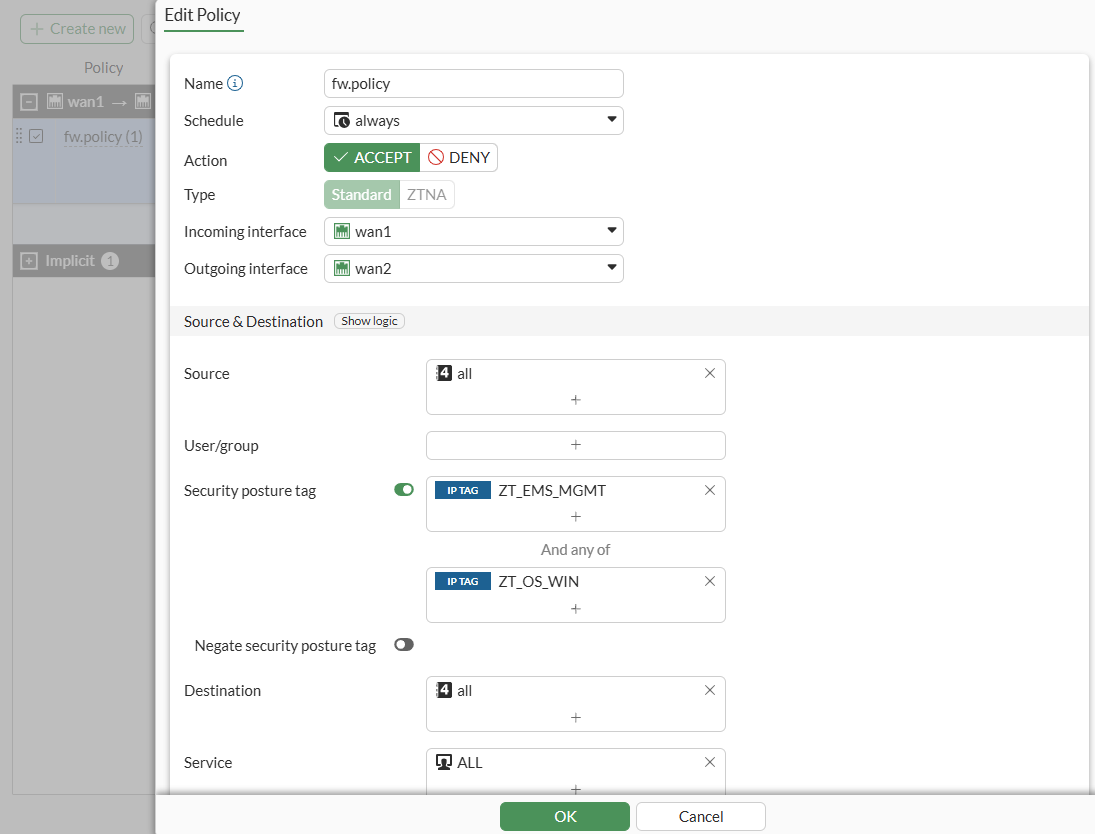
Likewise, client access will be filtered by the IP/MAC address resolved from the ZTNA EMS tag.