Handling SSL offloaded traffic from an external decryption device
In scenarios where the FortiGate is sandwiched between load-balancers and SSL processing is offloaded on the external load-balancers, the FortiGate can perform scanning on the unencrypted traffic by specifying the ssl-offloaded option in firewall profile-protocol-options. This option is supported in proxy and flow mode (previous versions only supported proxy mode).
If the FortiGate receives an AUTH TLS, PBSZ, or PROT command before receiving plain text traffic from a decrypted device, by default, it will expect encrypted traffic, determine that the traffic belongs to an abnormal protocol, and bypass the traffic.
When the ssl-offloaded command is enabled, the AUTH TLS command is ignored, and the traffic is treated as plain text rather than encrypted data. SSL decryption and encryption are performed by the external device.
Sample topology
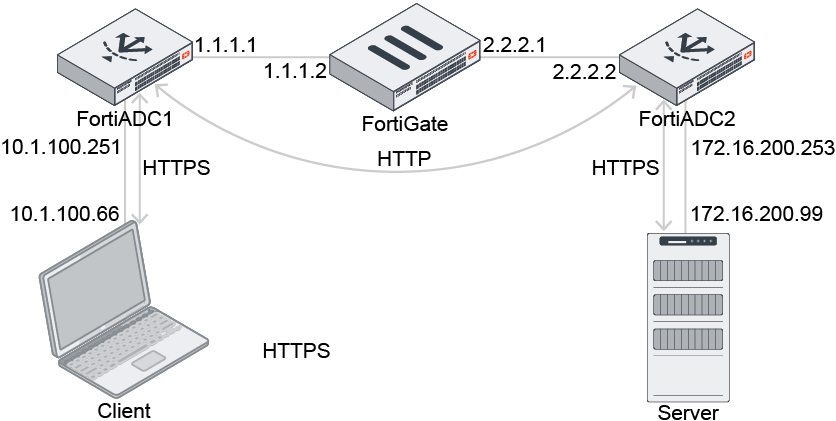
In this example, the FortiGate is between two FortiADCs and in SSL offload sandwich mode. The FortiGate receives plain text from ADC1 and forwards plain text to ADC2. There is no encrypted traffic passing through the FortiGate.
The client sends HTTPS traffic to ADC1, which then decrypts the traffic and sends HTTP to the FortiGate. The FortiGate forwards HTTP to ADC2, and the ADC2 re-encrypts the traffic to HTTPS.
To configure SSL offloading:
config firewall profile-protocol-options
    edit "default-clone"
        config http
            set ports 80
            unset options
            unset post-lang
            set ssl-offloaded yes
        end
        config ftp
            set ports 21
            set options splice
            set ssl-offloaded yes
        end
        config imap
            set ports 143
            set options fragmail
            set ssl-offloaded yes
        end
        config pop3
            set ports 110
            set options fragmail
            set ssl-offloaded yes
        end
        config smtp
            set ports 25
            set options fragmail splice
            set ssl-offloaded yes
        end
    next
end
Verifying the packet captures
The ADC1 incoming port capture shows that ADC1 receives HTTPS traffic:

The ADC1 outgoing port capture shows that ADC1 decrypts traffic and forwards HTTP traffic to the FortiGate:

The FortiGate's incoming and outgoing port captures show that HTTP traffic passes through the FortiGate:


The ADC2 incoming port capture shows that the ADC2 receives HTTP traffic:

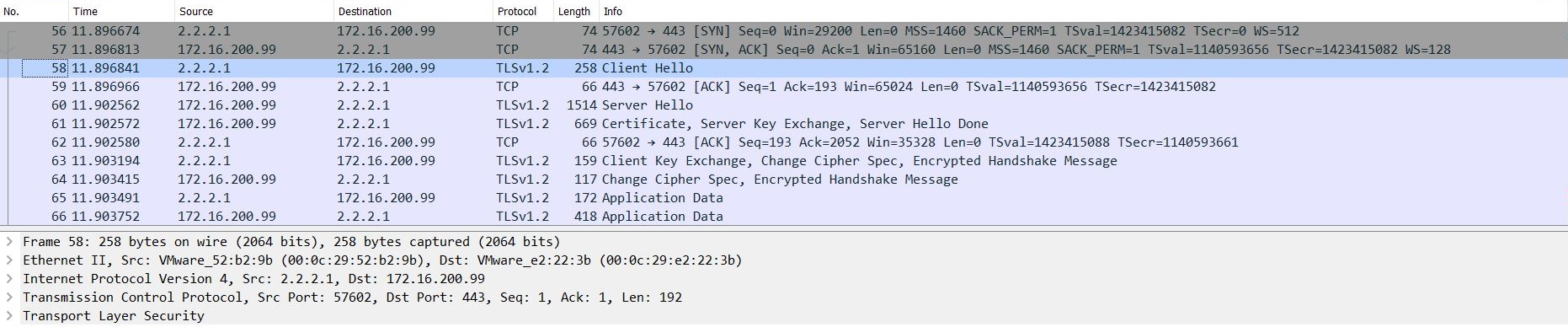
The ADC2 outgoing port capture shows that ADC2 forwards HTTPS traffic to the server: