

FortiGuard category-based DNS domain filtering
You can use the FortiGuard category-based DNS domain filter to inspect DNS traffic. This makes use of FortiGuard's continuously updated domain rating database for more reliable protection.
A DNS filter profile can be applied in a policy to scan DNS traffic traversing the FortiGate (see Configuring a DNS filter profile), or applied on the DNS server interface (see Applying DNS filter to FortiGate DNS server).

|
The FortiGate must have a FortiGuard Web Filter license to use the FortiGuard category-based filter. |
To configure FortiGuard category-based DNS domain filtering in the GUI:
- Go to Security Profiles > DNS Filter and click Create New, or edit an existing profile.
- Enable FortiGuard Category Based Filter.
- Select the category and then select Allow, Monitor, or Redirect to Block Portal for that category.
- In the Options section, select a setting for Redirect Portal IP. Select either Use FortiGuard Default (208.91.112.55) or click Specify and enter another portal IP. The FortiGate will use the portal IP to replace the resolved IP in the DNS response packet.
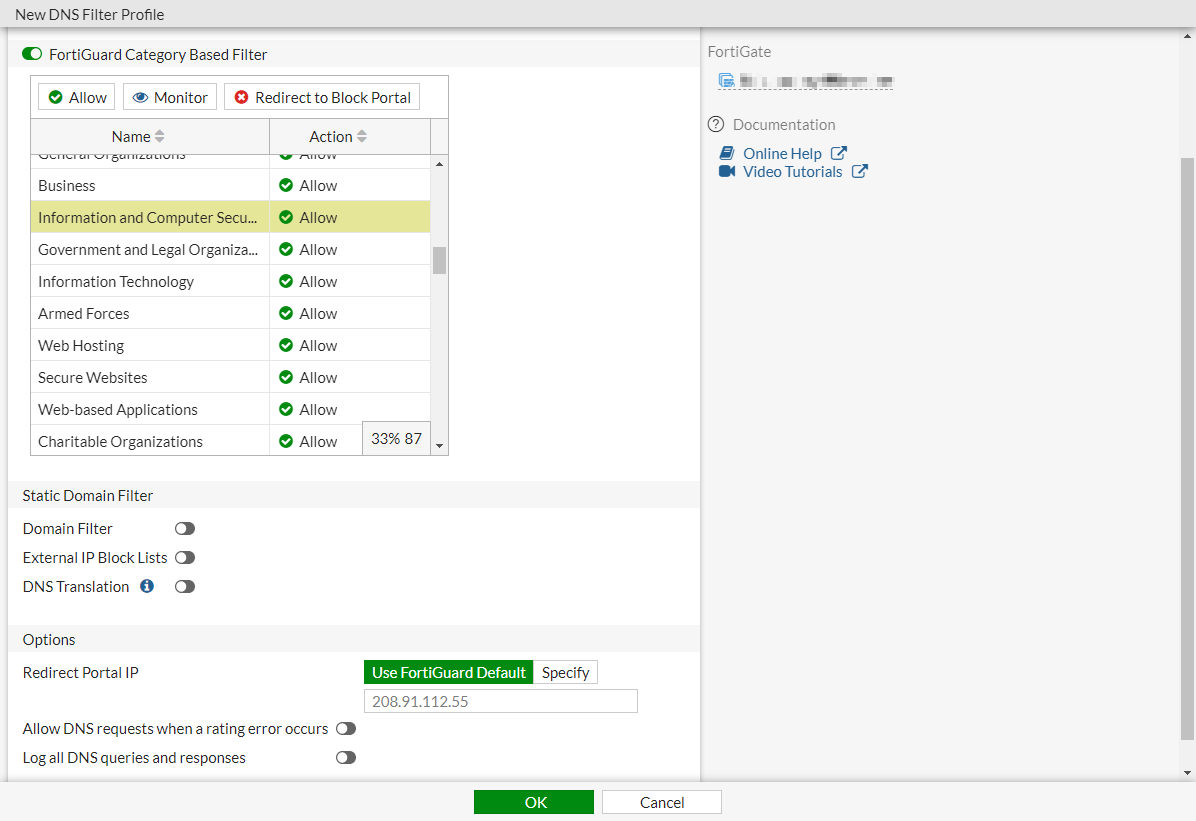
- Click OK.
To configure FortiGuard category-based DNS domain filtering in the CLI:
config dnsfilter profile
   edit "demo"
      set comment ''
      config domain-filter
         unset domain-filter-table
      end
      config ftgd-dns
         set options error-allow
         config filters
             edit 2
                 set category 2
                 set action monitor
             next
             edit 7
                 set category 7
                 set action monitor
             next
            ...
             edit 22
                 set category 0
                 set action monitor
             next
         end
      end
      set log-all-domain enable
      set sdns-ftgd-err-log enable
      set sdns-domain-log enable
      set block-action {redirect | block}
      set block-botnet enable
      set safe-search enable
      set redirect-portal 93.184.216.34
      set youtube-restrict strict
   next
end
|
|
You can use the |
Verifying the logs
From your internal network PC, use a command line tool, such as dig or nslookup, to do a DNS query for some domains. For example:
#dig www.example.com
;; ->>HEADER<<- opcode: QUERY; status: NOERROR; id: 61252
;; Flags: qr rd ra; QUERY: 1; ANSWER: 1; AUTHORITY: 13; ADDITIONAL: 11

;; QUESTION SECTION:
;; www.example.com.             IN      A

;; ANSWER SECTION:
www.example.com.        17164   IN      A       93.184.216.34

;; AUTHORITY SECTION:
com.                    20027   IN      NS      h.gtld-servers.net.
com.                    20027   IN      NS      i.gtld-servers.net.
com.                    20027   IN      NS      f.gtld-servers.net.
com.                    20027   IN      NS      d.gtld-servers.net.
com.                    20027   IN      NS      j.gtld-servers.net.
com.                    20027   IN      NS      l.gtld-servers.net.
com.                    20027   IN      NS      e.gtld-servers.net.
com.                    20027   IN      NS      a.gtld-servers.net.
com.                    20027   IN      NS      k.gtld-servers.net.
com.                    20027   IN      NS      g.gtld-servers.net.
com.                    20027   IN      NS      m.gtld-servers.net.
com.                    20027   IN      NS      c.gtld-servers.net.
com.                    20027   IN      NS      b.gtld-servers.net.

;; ADDITIONAL SECTION:
a.gtld-servers.net.     21999   IN      A       192.5.6.30
a.gtld-servers.net.     21999   IN      AAAA    2001:503:a83e::2:30
b.gtld-servers.net.     21997   IN      A       192.33.14.30
b.gtld-servers.net.     21997   IN      AAAA    2001:503:231d::2:30
c.gtld-servers.net.     21987   IN      A       192.26.92.30
c.gtld-servers.net.     20929   IN      AAAA    2001:503:83eb::30
d.gtld-servers.net.     3340    IN      A       192.31.80.30
d.gtld-servers.net.     3340    IN      AAAA    2001:500:856e::30
e.gtld-servers.net.     19334   IN      A       192.12.94.30
e.gtld-servers.net.     19334   IN      AAAA    2001:502:1ca1::30
f.gtld-servers.net.     3340    IN      A       192.35.51.30

;; Received 509 B
;; Time 2019-04-05 09:39:33 PDT
;; From 172.16.95.16@53(UDP) in 3.8 ms
To check the DNS filter log in the GUI:
- Go to Log & Report > Security Events.
- Click the DNS Query card name. There are logs for the DNS traffic that just passed through the FortiGate with the FortiGuard rating for the domain name.

To check the DNS filter log in the CLI:
# execute log filter category utm-dns

# execute log display
2 logs found.
2 logs returned.

1: date=2019-04-05 time=09:39:34 logid="1501054802" type="utm" subtype="dns" eventtype="dns-response" level="notice" vd="vdom1" eventtime=1554482373 policyid=1 sessionid=50868 srcip=10.1.100.18 srcport=34308 srcintf="port10" srcintfrole="undefined" dstip=172.16.95.16 dstport=53 dstintf="port9" dstintfrole="undefined" proto=17 profile="demo" xid=17647 qname="www.example.com" qtype="A" qtypeval=1 qclass="IN" ipaddr="93.184.216.34" msg="Domain is monitored" action="pass" cat=52 catdesc="Information Technology"

2: date=2019-04-05 time=09:39:34 logid="1500054000" type="utm" subtype="dns" eventtype="dns-query" level="information" vd="vdom1" eventtime=1554482373 policyid=1 sessionid=50868 srcip=10.1.100.18 srcport=34308 srcintf="port10" srcintfrole="undefined" dstip=172.16.95.16 dstport=53 dstintf="port9" dstintfrole="undefined" proto=17 profile="demo" xid=17647 qname="www.example.com" qtype="A" qtypeval=1 qclass="IN"