
Fortinet white logo
Fortinet white logo

Hardware Acceleration

FortiGate 4200F and 4201F fast path architecture

FortiGate 4200F and 4201F fast path architecture

The FortiGate 4200F and 4201F each include four NP7 processors. All front panel data interfaces and the NP7 processors connect to the integrated switch fabric (ISF). All data traffic passes from the data interfaces through the ISF to the NP7 processors. Because of the ISF, all supported traffic passing between any two data interfaces can be offloaded by the NP7 processors. Data traffic processed by the CPU takes a dedicated data path through the ISF and an NP7 processor to the CPU.

The FortiGate 4200F and 4201F models feature the following front panel interfaces:

  • Two 1 GigE RJ45 (MGMT1 and MGMT2, not connected to the NP7 processors).
  • Twenty 25/10/1 GigE SFP28 (HA1, HA2 , AUX1, AUX2, 1 to 16) HA1, HA2 , AUX1, AUX2 not connected to the NP7 processors. Interface groups: HA1, HA2, AUX1, and AUX2, 1 - 4, 5 - 8, 9 - 12, and 13 - 16. Every time you change the speed of one of these interfaces from 25Gbps to 10Gbps or 1Gbps or from 10Gbps or 1Gbps to 25Gbps the speeds of the other interfaces in the group also change to that speed. When you enter the end command, the CLI confirms the range of interfaces affected by the change.
  • Eight 100/40 GigE QSFP28 (17 to 24). Each of these interfaces can be split into four 25/10/1 GigE SFP28 interfaces.
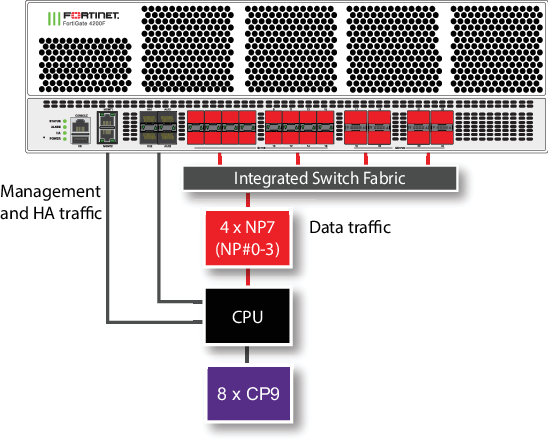
The MGMT interfaces are not connected to the NP7 processors. Management traffic passes to the CPU over a dedicated management path that is separate from the data path. You can also dedicate separate CPU resources for management traffic to further isolate management processing from data processing (see Improving GUI and CLI responsiveness (dedicated management CPU)).

The HA interfaces are also not connected to the NP7 processors. To help provide better HA stability and resiliency, HA traffic uses a dedicated physical control path that provides HA control traffic separation from data traffic processing.

The AUX interfaces are also not connected to the NP7 processors. Fortinet recommends using these interfaces for HA session synchronization.

The separation of management and HA traffic from data traffic keeps management and HA traffic from affecting the stability and performance of data traffic processing.

Note

You can use the port-path-option option of the config system npu command to connect or disconnect the HA and AUX interfaces to the NP7 processors. See config port-path-option.

You can use the following command to display the FortiGate 4200F and 4201F NP7 configuration. The command output shows a that all four NP7s are connected to all interfaces.

diagnose npu np7 port-list
Front Panel Port:
Name   Max_speed(Mbps) Dflt_speed(Mbps) NP_group        Switch_id SW_port_id SW_port_name 
------ --------------- ---------------  --------------- --------- ---------- ------------ 
port1  25000           10000            NP#0-3          0         37         xe10         
port2  25000           10000            NP#0-3          0         38         xe11         
port3  25000           10000            NP#0-3          0         39         xe12         
port4  25000           10000            NP#0-3          0         40         xe13         
port5  25000           10000            NP#0-3          0         41         xe14         
port6  25000           10000            NP#0-3          0         42         xe15         
port7  25000           10000            NP#0-3          0         43         xe16         
port8  25000           10000            NP#0-3          0         44         xe17         
port9  25000           10000            NP#0-3          0         45         xe18         
port10 25000           10000            NP#0-3          0         46         xe19         
port11 25000           10000            NP#0-3          0         47         xe20         
port12 25000           10000            NP#0-3          0         48         xe21         
port13 25000           10000            NP#0-3          0         49         xe22         
port14 25000           10000            NP#0-3          0         50         xe23         
port15 25000           10000            NP#0-3          0         51         xe24         
port16 25000           10000            NP#0-3          0         52         xe25         
port17 100000          100000           NP#0-3          0         57         ce5          
port18 100000          100000           NP#0-3          0         53         ce4          
port19 100000          100000           NP#0-3          0         67         ce7          
port20 100000          100000           NP#0-3          0         61         ce6          
port21 100000          100000           NP#0-3          0         75         ce9          
port22 100000          100000           NP#0-3          0         71         ce8          
port23 100000          100000           NP#0-3          0         83         ce11         
port24 100000          100000           NP#0-3          0         79         ce10         
------ --------------- ---------------  --------------- --------- ---------- ------------ 
 
NP Port:
Name   Switch_id SW_port_id SW_port_name 
------ --------- ---------- ------------ 
np0_0  0         5          ce0          
np0_1  0         9          ce1          
np1_0  0         13         ce2          
np1_1  0         17         ce3          
np2_0  0         115        ce13         
np2_1  0         111        ce12         
np3_0  0         123        ce15         
np3_1  0         119        ce14         
------ --------- ---------- ------------ 
* Max_speed: Maximum speed, Dflt_speed: Default speed
* SW_port_id: Switch port ID, SW_port_name: Switch port name

The command output also shows the maximum and default speeds of each interface.

The integrated switch fabric distributes sessions from the data interfaces to the NP7 processors. The four NP7 processors have a bandwidth capacity of 200Gigabit x 4 = 800 Gigabit. If all interfaces were operating at their maximum bandwidth, the NP7 processors would not be able to offload all the traffic. You can use NPU port mapping to control how sessions are distributed to NP7 processors.

You can add LAGs to improve performance. For details, see Increasing NP7 offloading capacity using link aggregation groups (LAGs).

The FortiGate-4200F and 4201F can be licensed for hyperscale firewall support, see the Hyperscale Firewall Guide.

Splitting the port17 to port24 interfaces

You can use the following command to split each FortiGate 4200F or 4201F 17 to 24 (port17 to port24) 40/100 GigE QSFP28 interface into four 25/10/1 GigE SFP28 interfaces. For example, to split interfaces 19 and 23 (port19 and port23), enter the following command:

config system global

set split-port port19 port23

end

The FortiGate 4200F or 4201F restarts and when it starts up:

  • The port19 interface has been replaced by four SFP28 interfaces named port19/1 to port19/4.

  • The port23 interface has been replaced by four SFP28 interfaces named port23/1 to port23/4.

Note

A configuration change that causes a FortiGate to restart can disrupt the operation of an FGCP cluster. If possible, you should make this configuration change to the individual FortiGates before setting up the cluster. If the cluster is already operating, you should temporarily remove the secondary FortiGate(s) from the cluster, change the configuration of the individual FortiGates and then re-form the cluster. You can remove FortiGate(s) from a cluster using the Remove Device from HA cluster button on the System > HA GUI page. For more information, see Disconnecting a FortiGate.

By default, the speed of each split interface is set to 10000full (10GigE). These interfaces can operate as 25GigE, 10GigE, or 1GigE interfaces depending on the transceivers and breakout cables. You can use the config system interface command to change the speeds of the split interfaces.

If you set the speed of one of the split interfaces to 25000full (25GigE), all of the interfaces are changed to operate at this speed (no restart required). If the split interfaces are set to 25000full and you change the speed of one of them to 10000full (10GigE) they are all changed to 10000full (no restart required). When the interfaces are operating at 10000full, you can change the speeds of individual interfaces to operate at 1000full (1GigE).

Configuring FortiGate-4200F and 4201F NPU port mapping

The default FortiGate-4200F and 4201F port mapping configuration results in sessions passing from front panel data interfaces to the integrated switch fabric. The integrated switch fabric distributes these sessions among the NP7 processors. Each NP7 processor is connected to the switch fabric with a LAG that consists of two 100-Gigabit interfaces. The integrated switch fabric distributes sessions to the LAGs and each LAG distributes sessions between the two interfaces connected to the NP7 processor.

You can use NPU port mapping to override how data network interface sessions are distributed to NP7 processors. For example, you can set up NPU port mapping to send all traffic from a front panel data interface or LAG to a specific NP7 processor or group of NP7 processors, or a single NP7 link.

Use the following command to configure FortiGate-4200F and 4201F NPU port mapping:

config system npu-post

config port-npu-map

edit <interface-name>

set npu-group {All-NP | NP0 | NP1 | NP2 | NP3 | NP0-to-NP1 | NP2-to-NP3 | NP0-to-NP2 | NP0-link0 | NP0-link1 | NP1-link0 | NP1-link1 | NP2-link0 | NP2-link1 | NP3-link0 | NP3-link1} ...

end

end

end

<interface-name> can be a physical interface or a LAG.

All-NP, (the default) distribute sessions among all four NP7 LAGs.

NP0, distribute sessions to the LAG connected to NP0.

NP1, distribute sessions to the LAG connected to NP1.

NP2, distribute sessions to the LAG connected to NP2.

NP3, distribute sessions to the LAG connected to NP3.

NP0-to-NP1, distribute sessions between the LAG connected to NP0 and the LAG connected to NP1.

NP2-to-NP3, distribute sessions between the LAG connected to NP2 and the LAG connected to NP3.

NP0-to-NP2, distribute sessions between the LAG connected to NP0, the LAG connected to NP1, and the LAG connected to NP2.

NP0-link0, send sessions to NP0 link 0.

NP0-link1, send sessions to NP0 link 1.

NP1-link0, send sessions to NP1 link 0.

NP1-link1, send sessions to NP1 link 1.

NP2-link0, send sessions to NP2 link 0.

NP2-link1, send sessions to NP2 link 1.

NP3-link0, send sessions to NP3 link 0.

NP3-link1, send sessions to NP3 link 1.

For example, use the following syntax to assign the FortiGate-4200F port21 and port22 interfaces to NP0 and NP1 and port23 and port24 interfaces to NP0, NP2, and NP3:

config system npu

config port-npu-map

edit port21

set npu-group NP0-to-NP1

next

edit port22

set npu-group NP0-to-NP1

next

edit port23

set npu-group NP0 NP2-to-NP3

next

edit port24

set npu-group NP0 NP2-to-NP3

end

end

While the FortiGate-4200F or 4201F is processing traffic, you can use the diagnose npu np7 cgmac-stats <npu-id> command to show how traffic is distributed to the NP7 links.

FortiGate 4200F and 4201F fast path architecture

FortiGate 4200F and 4201F fast path architecture

The FortiGate 4200F and 4201F each include four NP7 processors. All front panel data interfaces and the NP7 processors connect to the integrated switch fabric (ISF). All data traffic passes from the data interfaces through the ISF to the NP7 processors. Because of the ISF, all supported traffic passing between any two data interfaces can be offloaded by the NP7 processors. Data traffic processed by the CPU takes a dedicated data path through the ISF and an NP7 processor to the CPU.

The FortiGate 4200F and 4201F models feature the following front panel interfaces:

  • Two 1 GigE RJ45 (MGMT1 and MGMT2, not connected to the NP7 processors).
  • Twenty 25/10/1 GigE SFP28 (HA1, HA2 , AUX1, AUX2, 1 to 16) HA1, HA2 , AUX1, AUX2 not connected to the NP7 processors. Interface groups: HA1, HA2, AUX1, and AUX2, 1 - 4, 5 - 8, 9 - 12, and 13 - 16. Every time you change the speed of one of these interfaces from 25Gbps to 10Gbps or 1Gbps or from 10Gbps or 1Gbps to 25Gbps the speeds of the other interfaces in the group also change to that speed. When you enter the end command, the CLI confirms the range of interfaces affected by the change.
  • Eight 100/40 GigE QSFP28 (17 to 24). Each of these interfaces can be split into four 25/10/1 GigE SFP28 interfaces.

The MGMT interfaces are not connected to the NP7 processors. Management traffic passes to the CPU over a dedicated management path that is separate from the data path. You can also dedicate separate CPU resources for management traffic to further isolate management processing from data processing (see Improving GUI and CLI responsiveness (dedicated management CPU)).

The HA interfaces are also not connected to the NP7 processors. To help provide better HA stability and resiliency, HA traffic uses a dedicated physical control path that provides HA control traffic separation from data traffic processing.

The AUX interfaces are also not connected to the NP7 processors. Fortinet recommends using these interfaces for HA session synchronization.

The separation of management and HA traffic from data traffic keeps management and HA traffic from affecting the stability and performance of data traffic processing.

Note

You can use the port-path-option option of the config system npu command to connect or disconnect the HA and AUX interfaces to the NP7 processors. See config port-path-option.

You can use the following command to display the FortiGate 4200F and 4201F NP7 configuration. The command output shows a that all four NP7s are connected to all interfaces.

diagnose npu np7 port-list
Front Panel Port:
Name   Max_speed(Mbps) Dflt_speed(Mbps) NP_group        Switch_id SW_port_id SW_port_name 
------ --------------- ---------------  --------------- --------- ---------- ------------ 
port1  25000           10000            NP#0-3          0         37         xe10         
port2  25000           10000            NP#0-3          0         38         xe11         
port3  25000           10000            NP#0-3          0         39         xe12         
port4  25000           10000            NP#0-3          0         40         xe13         
port5  25000           10000            NP#0-3          0         41         xe14         
port6  25000           10000            NP#0-3          0         42         xe15         
port7  25000           10000            NP#0-3          0         43         xe16         
port8  25000           10000            NP#0-3          0         44         xe17         
port9  25000           10000            NP#0-3          0         45         xe18         
port10 25000           10000            NP#0-3          0         46         xe19         
port11 25000           10000            NP#0-3          0         47         xe20         
port12 25000           10000            NP#0-3          0         48         xe21         
port13 25000           10000            NP#0-3          0         49         xe22         
port14 25000           10000            NP#0-3          0         50         xe23         
port15 25000           10000            NP#0-3          0         51         xe24         
port16 25000           10000            NP#0-3          0         52         xe25         
port17 100000          100000           NP#0-3          0         57         ce5          
port18 100000          100000           NP#0-3          0         53         ce4          
port19 100000          100000           NP#0-3          0         67         ce7          
port20 100000          100000           NP#0-3          0         61         ce6          
port21 100000          100000           NP#0-3          0         75         ce9          
port22 100000          100000           NP#0-3          0         71         ce8          
port23 100000          100000           NP#0-3          0         83         ce11         
port24 100000          100000           NP#0-3          0         79         ce10         
------ --------------- ---------------  --------------- --------- ---------- ------------ 
 
NP Port:
Name   Switch_id SW_port_id SW_port_name 
------ --------- ---------- ------------ 
np0_0  0         5          ce0          
np0_1  0         9          ce1          
np1_0  0         13         ce2          
np1_1  0         17         ce3          
np2_0  0         115        ce13         
np2_1  0         111        ce12         
np3_0  0         123        ce15         
np3_1  0         119        ce14         
------ --------- ---------- ------------ 
* Max_speed: Maximum speed, Dflt_speed: Default speed
* SW_port_id: Switch port ID, SW_port_name: Switch port name

The command output also shows the maximum and default speeds of each interface.

The integrated switch fabric distributes sessions from the data interfaces to the NP7 processors. The four NP7 processors have a bandwidth capacity of 200Gigabit x 4 = 800 Gigabit. If all interfaces were operating at their maximum bandwidth, the NP7 processors would not be able to offload all the traffic. You can use NPU port mapping to control how sessions are distributed to NP7 processors.

You can add LAGs to improve performance. For details, see Increasing NP7 offloading capacity using link aggregation groups (LAGs).

The FortiGate-4200F and 4201F can be licensed for hyperscale firewall support, see the Hyperscale Firewall Guide.

Splitting the port17 to port24 interfaces

You can use the following command to split each FortiGate 4200F or 4201F 17 to 24 (port17 to port24) 40/100 GigE QSFP28 interface into four 25/10/1 GigE SFP28 interfaces. For example, to split interfaces 19 and 23 (port19 and port23), enter the following command:

config system global

set split-port port19 port23

end

The FortiGate 4200F or 4201F restarts and when it starts up:

  • The port19 interface has been replaced by four SFP28 interfaces named port19/1 to port19/4.

  • The port23 interface has been replaced by four SFP28 interfaces named port23/1 to port23/4.

Note

A configuration change that causes a FortiGate to restart can disrupt the operation of an FGCP cluster. If possible, you should make this configuration change to the individual FortiGates before setting up the cluster. If the cluster is already operating, you should temporarily remove the secondary FortiGate(s) from the cluster, change the configuration of the individual FortiGates and then re-form the cluster. You can remove FortiGate(s) from a cluster using the Remove Device from HA cluster button on the System > HA GUI page. For more information, see Disconnecting a FortiGate.

By default, the speed of each split interface is set to 10000full (10GigE). These interfaces can operate as 25GigE, 10GigE, or 1GigE interfaces depending on the transceivers and breakout cables. You can use the config system interface command to change the speeds of the split interfaces.

If you set the speed of one of the split interfaces to 25000full (25GigE), all of the interfaces are changed to operate at this speed (no restart required). If the split interfaces are set to 25000full and you change the speed of one of them to 10000full (10GigE) they are all changed to 10000full (no restart required). When the interfaces are operating at 10000full, you can change the speeds of individual interfaces to operate at 1000full (1GigE).

Configuring FortiGate-4200F and 4201F NPU port mapping

The default FortiGate-4200F and 4201F port mapping configuration results in sessions passing from front panel data interfaces to the integrated switch fabric. The integrated switch fabric distributes these sessions among the NP7 processors. Each NP7 processor is connected to the switch fabric with a LAG that consists of two 100-Gigabit interfaces. The integrated switch fabric distributes sessions to the LAGs and each LAG distributes sessions between the two interfaces connected to the NP7 processor.

You can use NPU port mapping to override how data network interface sessions are distributed to NP7 processors. For example, you can set up NPU port mapping to send all traffic from a front panel data interface or LAG to a specific NP7 processor or group of NP7 processors, or a single NP7 link.

Use the following command to configure FortiGate-4200F and 4201F NPU port mapping:

config system npu-post

config port-npu-map

edit <interface-name>

set npu-group {All-NP | NP0 | NP1 | NP2 | NP3 | NP0-to-NP1 | NP2-to-NP3 | NP0-to-NP2 | NP0-link0 | NP0-link1 | NP1-link0 | NP1-link1 | NP2-link0 | NP2-link1 | NP3-link0 | NP3-link1} ...

end

end

end

<interface-name> can be a physical interface or a LAG.

All-NP, (the default) distribute sessions among all four NP7 LAGs.

NP0, distribute sessions to the LAG connected to NP0.

NP1, distribute sessions to the LAG connected to NP1.

NP2, distribute sessions to the LAG connected to NP2.

NP3, distribute sessions to the LAG connected to NP3.

NP0-to-NP1, distribute sessions between the LAG connected to NP0 and the LAG connected to NP1.

NP2-to-NP3, distribute sessions between the LAG connected to NP2 and the LAG connected to NP3.

NP0-to-NP2, distribute sessions between the LAG connected to NP0, the LAG connected to NP1, and the LAG connected to NP2.

NP0-link0, send sessions to NP0 link 0.

NP0-link1, send sessions to NP0 link 1.

NP1-link0, send sessions to NP1 link 0.

NP1-link1, send sessions to NP1 link 1.

NP2-link0, send sessions to NP2 link 0.

NP2-link1, send sessions to NP2 link 1.

NP3-link0, send sessions to NP3 link 0.

NP3-link1, send sessions to NP3 link 1.

For example, use the following syntax to assign the FortiGate-4200F port21 and port22 interfaces to NP0 and NP1 and port23 and port24 interfaces to NP0, NP2, and NP3:

config system npu

config port-npu-map

edit port21

set npu-group NP0-to-NP1

next

edit port22

set npu-group NP0-to-NP1

next

edit port23

set npu-group NP0 NP2-to-NP3

next

edit port24

set npu-group NP0 NP2-to-NP3

end

end

While the FortiGate-4200F or 4201F is processing traffic, you can use the diagnose npu np7 cgmac-stats <npu-id> command to show how traffic is distributed to the NP7 links.